Stop Manual Deployments: CI/CD Pipelines for RPA
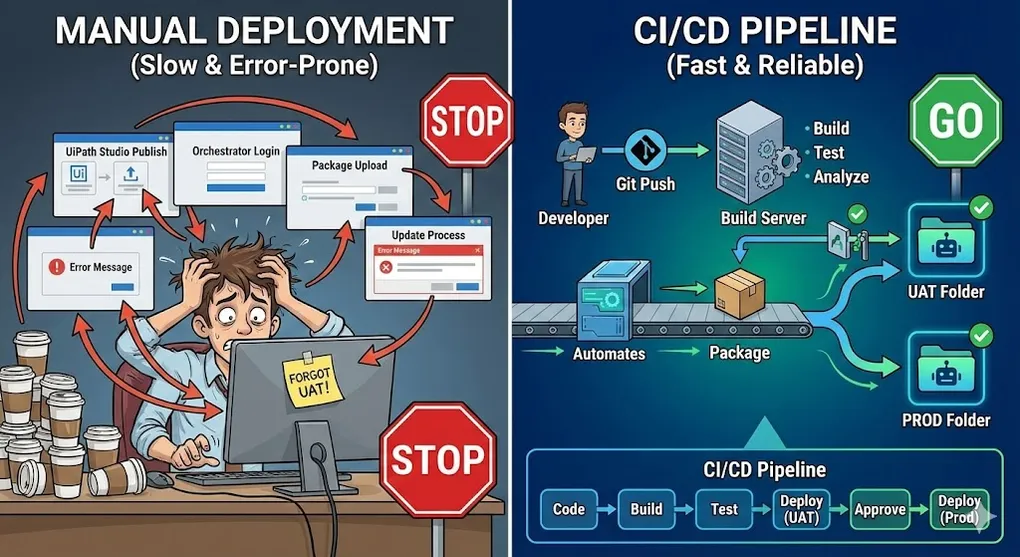
It’s release day. You’ve finished the new version of your invoice bot. Now you:
- Open UiPath Studio
- Click Publish
- Log into Orchestrator
- Navigate to Packages
- Click Upload
- Select the .nupkg file
- Update the Process
- Hope you didn’t forget anything Repeat for UAT. Repeat for Production. And again next week. This is not engineering. This is button-clicking. Real software teams automated deployments decades ago. It’s time RPA caught up.
What is CI/CD?
CI (Continuous Integration): Every code change automatically triggers:
- Build verification
- Automated tests
- Code quality analysis CD (Continuous Deployment/Delivery): Successful builds automatically deploy to target environments.
┌─────────────────────────────────────────────────────────────────┐
│                         CI/CD Pipeline                           │
├─────────────────────────────────────────────────────────────────┤
│                                                                  │
│   Developer        Build Server        Orchestrator              │
│   ─────────        ────────────        ────────────              │
│                                                                  │
│   ┌──────┐         ┌──────────┐        ┌──────────┐             │
│   │ Git  │ Push    │ Pipeline │Package │  UAT     │             │
│   │ Repo │────────▶│  Build   │───────▶│  Folder  │             │
│   └──────┘         │  Test    │        └────┬─────┘             │
│                    │  Analyze │             │                    │
│                    └──────────┘             │ Approval           │
│                                             ▼                    │
│                                        ┌──────────┐             │
│                                        │   Prod   │             │
│                                        │  Folder  │             │
│                                        └──────────┘             │
│                                                                  │
└─────────────────────────────────────────────────────────────────┘
Why CI/CD for RPA?
| Manual Deployment | CI/CD Pipeline |
|---|---|
| Human error risk | Consistent every time |
| ”It worked on my machine” | Same build everywhere |
| No audit trail | Full deployment history |
| Can’t enforce quality gates | Automated code analysis |
| Slow, error-prone | Fast, reliable |
| One person’s knowledge | Team-documented process |
The Role of Automation Ops
🔧 Automation Ops (2024+) is UiPath’s dedicated product suite for managing the CI/CD and governance of automation projects at scale.
┌─────────────────────────────────────────────────────────────────┐
│                    Automation Ops Ecosystem                      │
├─────────────────────────────────────────────────────────────────┤
│                                                                  │
│   ┌──────────────────┐    ┌──────────────────┐                  │
│   │  UiPath Studio   │───▶│  Git Repository  │                  │
│   │  (Development)   │    │  (Source Control)│                  │
│   └──────────────────┘    └────────┬─────────┘                  │
│                                    │                             │
│                             ┌──────▼──────┐                     │
│                             │  Automation │                     │
│                             │    Ops      │                     │
│                             └──────┬──────┘                     │
│                    ┌───────────────┼───────────────┐            │
│              ┌─────▼────┐   ┌──────▼─────┐  ┌─────▼────┐       │
│              │ UiPath   │   │   Test     │  │ Workflow │       │
│              │   CLI    │   │  Manager   │  │ Analyzer │       │
│              │(Pipeline)│   │(Reporting) │  │(Quality) │       │
│              └─────┬────┘   └──────┬─────┘  └─────┬────┘       │
│                    └───────────────┼───────────────┘            │
│                             ┌──────▼──────┐                     │
│                             │ Orchestrator│                     │
│                             │ (Execution) │                     │
│                             └─────────────┘                     │
│                                                                  │
└─────────────────────────────────────────────────────────────────┘
What Automation Ops Provides
| Component | Purpose |
|---|---|
| UiPath CLI | Command-line packaging, deployment, and testing |
| Workflow Analyzer | Code quality and standards enforcement |
| Test Manager | Centralized test results, coverage tracking |
| Pipeline Integrations | Native Azure DevOps, Jenkins, GitHub Actions support |
| Governance Policies | Organization-wide settings and constraints |
💡 Key Point: While you can build CI/CD from scratch using the CLI, Automation Ops provides a managed experience with dashboards, audit trails, and enterprise governance out of the box.
The UiPath CLI: Command-Line Power
The UiPath.CLI (also called uipcli) is the backbone of Automation Ops and what makes pipeline automation possible.
Installation
# Download from UiPath (or install via chocolatey)
choco install uipath-cli
# Or direct download
# https://docs.uipath.com/automation-ops/docs/uipath-command-line-interface
Key Commands
| Command | Purpose |
|---|---|
uipcli package pack | Build .nupkg from project |
uipcli package deploy | Upload to Orchestrator |
uipcli package analyze | Run Workflow Analyzer |
uipcli job run | Trigger job execution |
uipcli asset | Manage Orchestrator assets |
Pack Command
uipcli package pack `
    "C:\Projects\InvoiceBot\project.json" `
    --output "C:\Build\Output" `
    --version "1.2.3"
Output: InvoiceBot.1.2.3.nupkg
Deploy Command
uipcli package deploy `
    "C:\Build\Output\InvoiceBot.1.2.3.nupkg" `
    "https://cloud.uipath.com/org/tenant/orchestrator_" `
    --organizationUnit "Production" `
    --token $UIPATH_ACCESS_TOKEN
Analyze Command
uipcli package analyze `
    "C:\Projects\InvoiceBot\project.json" `
    --stopOnRuleViolation
# Exit code 0 = passed, non-zero = violations found
Azure DevOps Pipeline
The most common enterprise choice for UiPath CI/CD.
Pipeline Structure
# azure-pipelines.yml
trigger:
  branches:
    include:
      - main
      - develop
  paths:
    include:
      - src/*
pool:
  vmImage: 'windows-latest'
variables:
  projectPath: '$(Build.SourcesDirectory)/src/InvoiceBot/project.json'
  outputPath: '$(Build.ArtifactStagingDirectory)'
  packageVersion: '$(Build.BuildNumber)'
stages:
  - stage: Build
    jobs:
      - job: BuildPackage
        steps:
          - task: UiPathInstallPlatform@3
            displayName: 'Install UiPath CLI'

          - task: UiPathPack@3
            displayName: 'Build Package'
            inputs:
              versionType: 'ManualVersion'
              version: '$(packageVersion)'
              projectJsonPath: '$(projectPath)'
              outputPath: '$(outputPath)'
              outputType: 'Process'

          - task: PublishBuildArtifacts@1
            displayName: 'Publish Artifact'
            inputs:
              PathtoPublish: '$(outputPath)'
              ArtifactName: 'package'
  - stage: Analyze
    dependsOn: Build
    jobs:
      - job: CodeAnalysis
        steps:
          - task: UiPathInstallPlatform@3
            displayName: 'Install UiPath CLI'

          - task: UiPathAnalyze@3
            displayName: 'Run Workflow Analyzer'
            inputs:
              projectPath: '$(projectPath)'
              analyzerTraceLevel: 'Warning'
              failOnAnalyzerError: true
  - stage: DeployUAT
    dependsOn: Analyze
    condition: and(succeeded(), eq(variables['Build.SourceBranch'], 'refs/heads/develop'))
    jobs:
      - deployment: DeployToUAT
        environment: 'UAT'
        strategy:
          runOnce:
            deploy:
              steps:
                - task: UiPathDeploy@3
                  displayName: 'Deploy to UAT Orchestrator'
                  inputs:
                    orchestratorConnection: 'UiPath-UAT'
                    packagesPath: '$(Pipeline.Workspace)/package'
                    folderName: 'UAT_InvoiceProcessing'
  - stage: DeployProd
    dependsOn: DeployUAT
    condition: and(succeeded(), eq(variables['Build.SourceBranch'], 'refs/heads/main'))
    jobs:
      - deployment: DeployToProd
        environment: 'Production'
        strategy:
          runOnce:
            deploy:
              steps:
                - task: UiPathDeploy@3
                  displayName: 'Deploy to Production'
                  inputs:
                    orchestratorConnection: 'UiPath-Prod'
                    packagesPath: '$(Pipeline.Workspace)/package'
                    folderName: 'Prod_InvoiceProcessing'
Service Connection Setup
- Go to Project Settings → Service Connections
- Create “UiPath Orchestrator” connection
- Enter Orchestrator URL and credentials
- Save and reference in pipeline as
orchestratorConnection
GitHub Actions Alternative
For teams using GitHub:
# .github/workflows/uipath-cicd.yml
name: UiPath CI/CD
on:
  push:
    branches: [main, develop]
  pull_request:
    branches: [main]
jobs:
  build:
    runs-on: windows-latest

    steps:
      - uses: actions/checkout@v3

      - name: Install UiPath CLI
        run: |
          Invoke-WebRequest -Uri "https://uipath.com/cli/download" -OutFile "uipath-cli.zip"
          Expand-Archive -Path "uipath-cli.zip" -DestinationPath "C:\uipath-cli"
          echo "C:\uipath-cli" | Out-File -FilePath $env:GITHUB_PATH -Append

      - name: Build Package
        run: |
          uipcli package pack `
            ".\src\InvoiceBot\project.json" `
            --output ".\output" `
            --version "${{ github.run_number }}"

      - name: Run Analyzer
        run: |
          uipcli package analyze `
            ".\src\InvoiceBot\project.json" `
            --stopOnRuleViolation

      - name: Upload Artifact
        uses: actions/upload-artifact@v3
        with:
          name: package
          path: ./output/*.nupkg
  deploy-uat:
    needs: build
    runs-on: windows-latest
    if: github.ref == 'refs/heads/develop'
    environment: UAT

    steps:
      - uses: actions/download-artifact@v3
        with:
          name: package
          path: ./package

      - name: Deploy to UAT
        run: |
          uipcli package deploy `
            ".\package\*.nupkg" `
            "${{ secrets.ORCHESTRATOR_URL }}" `
            --token "${{ secrets.ORCHESTRATOR_TOKEN }}" `
            --organizationUnit "UAT"
  deploy-prod:
    needs: deploy-uat
    runs-on: windows-latest
    if: github.ref == 'refs/heads/main'
    environment: Production

    steps:
      - uses: actions/download-artifact@v3
        with:
          name: package
          path: ./package

      - name: Deploy to Production
        run: |
          uipcli package deploy `
            ".\package\*.nupkg" `
            "${{ secrets.ORCHESTRATOR_URL }}" `
            --token "${{ secrets.ORCHESTRATOR_TOKEN }}" `
            --organizationUnit "Production"
Jenkins Pipeline
For on-premise CI/CD:
Self-Hosted Runners: When Cloud Can’t Reach Your Orchestrator
[!WARNING] Enterprise Reality: Cloud-hosted pipeline agents (Azure DevOps Hosted, GitHub Actions runners) often cannot connect to internal Orchestrator instances behind corporate firewalls. Solution: Self-Hosted Agents
┌─────────────────────────────────────────────────────────────────┐
│             Self-Hosted Agent Architecture                       │
├─────────────────────────────────────────────────────────────────┤
│                                                                  │
│   CLOUD                           CORPORATE NETWORK              │
│   ─────                           ─────────────────              │
│   ┌─────────────┐                 ┌─────────────┐               │
│   │ Azure DevOps│                 │ Self-Hosted │               │
│   │   / GitHub  │ ◀─── Poll ────  │   Agent     │               │
│   │   Server    │                 │  (Windows)  │               │
│   └─────────────┘                 └──────┬──────┘               │
│                                          │                       │
│       ════════════ FIREWALL ════════════│═══════════════        │
│                                          │                       │
│                                          ▼                       │
│                                   ┌─────────────┐               │
│                                   │ Orchestrator│               │
│                                   │ (Internal)  │               │
│                                   └─────────────┘               │
│                                                                  │
│   Key: Agent PULLS jobs from cloud, then executes internally    │
└─────────────────────────────────────────────────────────────────┘
Setup Steps:
| Platform | Configuration |
|---|---|
| Azure DevOps | Project Settings → Agent Pools → Add Pool → Self-hosted |
| GitHub Actions | Settings → Actions → Runners → New self-hosted runner |
| Jenkins | Already on-premise; just configure Windows agent |
| Pipeline YAML (Azure DevOps): |
pool:
  name: 'Self-Hosted-Windows'  # Your internal agent pool
  demands:
    - Agent.OS -equals Windows_NT
    - UiPath.CLI  # Ensure CLI is installed
[!TIP] Security Best Practice: The self-hosted agent should have outbound-only access to the cloud. Orchestrator credentials stay inside the network, and the agent only reports results back.
// Jenkinsfile
pipeline {
    agent {
        label 'windows'
    }

    environment {
        UIPATH_CLI = 'C:\\UiPath\\CLI\\uipcli.exe'
        PROJECT_PATH = "${WORKSPACE}\\src\\InvoiceBot\\project.json"
        OUTPUT_PATH = "${WORKSPACE}\\output"
    }

    stages {
        stage('Checkout') {
            steps {
                checkout scm
            }
        }

        stage('Build') {
            steps {
                bat """
                    "${UIPATH_CLI}" package pack ^
                        "${PROJECT_PATH}" ^
                        --output "${OUTPUT_PATH}" ^
                        --version "${BUILD_NUMBER}"
                """
            }
        }

        stage('Analyze') {
            steps {
                bat """
                    "${UIPATH_CLI}" package analyze ^
                        "${PROJECT_PATH}" ^
                        --stopOnRuleViolation
                """
            }
        }

        stage('Deploy to UAT') {
            when {
                branch 'develop'
            }
            steps {
                withCredentials([string(credentialsId: 'uipath-token', variable: 'TOKEN')]) {
                    bat """
                        "${UIPATH_CLI}" package deploy ^
                            "${OUTPUT_PATH}\\*.nupkg" ^
                            "${ORCHESTRATOR_URL}" ^
                            --token "${TOKEN}" ^
                            --organizationUnit "UAT"
                    """
                }
            }
        }

        stage('Approve Production') {
            when {
                branch 'main'
            }
            steps {
                input message: 'Deploy to Production?', ok: 'Deploy'
            }
        }

        stage('Deploy to Production') {
            when {
                branch 'main'
            }
            steps {
                withCredentials([string(credentialsId: 'uipath-token', variable: 'TOKEN')]) {
                    bat """
                        "${UIPATH_CLI}" package deploy ^
                            "${OUTPUT_PATH}\\*.nupkg" ^
                            "${ORCHESTRATOR_URL}" ^
                            --token "${TOKEN}" ^
                            --organizationUnit "Production"
                    """
                }
            }
        }
    }

    post {
        always {
            archiveArtifacts artifacts: 'output/*.nupkg', fingerprint: true
        }
        failure {
            emailext (
                subject: "Pipeline Failed: ${currentBuild.fullDisplayName}",
                body: "Check console output at ${BUILD_URL}",
                recipientProviders: [culprits(), requestor()]
            )
        }
    }
}
Automated Testing
UiPath Test Suite
UiPath provides test automation capabilities:
# Add to your pipeline
- stage: Test
  dependsOn: Build
  jobs:
    - job: RunTests
      steps:
        - task: UiPathTest@3
          displayName: 'Run Test Sets'
          inputs:
            orchestratorConnection: 'UiPath-UAT'
            testTarget: 'TestSet'
            testSet: 'InvoiceBot_Regression'
            folderName: 'UAT_InvoiceProcessing'
            timeout: 3600
            traceLevel: 'Information'
            testReportDestination: '$(Build.ArtifactStagingDirectory)/testResults'
Test Categories
| Test Type | What It Validates |
|---|---|
| Unit Tests | Individual workflow components |
| Integration Tests | End-to-end process flow |
| Regression Tests | Nothing broke from changes |
| Performance Tests | Processing time within SLA |
UiPath Test Manager: Centralized Reporting
📊 Test Manager is your single pane of glass for all test results across your RPA projects.
┌─────────────────────────────────────────────────────────────────┐
│                    Test Manager Dashboard                        │
├─────────────────────────────────────────────────────────────────┤
│                                                                  │
│  Test Execution Results (Last 30 Days)                          │
│  ═══════════════════════════════════════                        │
│                                                                  │
│  InvoiceBot_Regression      ████████████░░░ 85% Pass            │
│  VendorOnboarding_Smoke     █████████████████ 100% Pass         │
│  PaymentProcessing_E2E      ████████████░░░░ 80% Pass           │
│                                                                  │
│  ┌─────────────────────────────────────────────────────────┐    │
│  │ Failed Tests Detail:                                     │    │
│  │ • InvoiceBot\ValidateAmount - Assertion failed          │    │
│  │ • InvoiceBot\HandleException - Timeout after 60s        │    │
│  │ • PaymentProcessing\VerifyBalance - Element not found   │    │
│  └─────────────────────────────────────────────────────────┘    │
│                                                                  │
│  Coverage: 78% of production workflows | Trend: ↑ 5%            │
│                                                                  │
└─────────────────────────────────────────────────────────────────┘
Publishing Results to Test Manager:
# Pipeline publishes results automatically
- task: UiPathTest@3
  inputs:
    # ... test configuration ...
    publishTestResults: true  # ← This sends results to Test Manager
    attachRobotLogs: true     # ← Include detailed execution logs
Why Use Test Manager?
| Capability | Manual Tracking | Test Manager |
|---|---|---|
| Historical trends | Spreadsheet hell | Automatic dashboards |
| Failure root cause | Dig through logs | One-click drill-down |
| Coverage metrics | Guesswork | Accurate percentages |
| Stakeholder reporting | Manual slides | Shareable links |
| CI/CD integration | Copy-paste | Automatic sync |
| Requirements Traceability (TDD in Practice): |
┌─────────────────────────────────────────────────────────────────┐
│           Test Manager: Requirements ↔ Execution Link           │
├─────────────────────────────────────────────────────────────────┤
│                                                                  │
│   BUSINESS REQUIREMENT          LINKED TEST CASES                │
│   ─────────────────────          ─────────────────                │
│   REQ-001: Invoice must be       ┌─ TC-001: Valid Amount ✅      │
│   processed within 5 seconds     ├─ TC-002: Performance SLA ✅   │
│                                   └─ TC-003: Timeout Handling ❌  │
│                                                                  │
│   REQ-002: Duplicate invoices    ┌─ TC-004: Same Invoice ID ✅   │
│   must be rejected               └─ TC-005: Same Content ✅      │
│                                                                  │
│   REQ-003: Failed invoices       ┌─ TC-006: Retry Logic ✅       │
│   must retry 3 times             ├─ TC-007: Max Retry Exit ✅    │
│                                   └─ TC-008: Notification ⏳     │
│                                                                  │
│   Coverage: 8/9 tests pass (89%) | Requirement Coverage: 100%   │
└─────────────────────────────────────────────────────────────────┘
[!TIP] TDD Workflow: Link test cases to requirements in Test Manager. When any test fails, you immediately know which business requirement is at risk.
Test Data Management
# Prepare test data before running tests
- script: |
    # Reset test queue
    uipcli queue items delete --all `
        --queue "Test_InvoiceQueue" `
        --orchestratorConnection "UiPath-UAT"

    # Load test transactions
    uipcli queue items add `
        --queue "Test_InvoiceQueue" `
        --dataFile "testdata/invoices.json" `
        --orchestratorConnection "UiPath-UAT"
  displayName: 'Prepare Test Data'
Code Quality Gates
Workflow Analyzer Rules
The Workflow Analyzer checks for:
| Category | Example Rules |
|---|---|
| Naming | Workflow names should be descriptive |
| Variables | No unused variables |
| Arguments | Arguments should have annotations |
| Activities | No empty sequences |
| Error Handling | Catch blocks should log exceptions |
| Performance | Avoid nested ForEach loops |
[!IMPORTANT] Don’t Let “Garbage Code” Into Production
Enforcing Workflow Analyzer in your pipeline is the only way to maintain code consistency at scale.Error Level (Block Deployment):
- Hardcoded credentials or secrets
- Empty Catch blocks (swallowed exceptions)
- Deprecated activities
Warning Level (Flag for Review):
- Variable naming violations
- Excessive nesting depth (> 5 levels)
- Missing activity annotations
If analysis fails, the pipeline should exit 1 immediately—this is more effective than post-hoc code reviews.
Custom Rule Sets
Create RuleSet.json for your organization:
{
  "name": "CompanyStandard",
  "rules": {
    "ST-NMG-001": "Error",
    "ST-NMG-002": "Warning",
    "ST-USG-010": "Error",
    "ST-USG-020": "Info",
    "ST-SEC-001": "Error"
  }
}
Apply in pipeline:
uipcli package analyze `
    "$PROJECT_PATH" `
    --analyzerRulesPath "RuleSet.json" `
    --stopOnRuleViolation
Quality Gate Example
- stage: QualityGate
  jobs:
    - job: EnforceStandards
      steps:
        - script: |
            # Run analyzer
            uipcli package analyze "$(projectPath)" --output "analysis.json"

            # Count violations
            $analysis = Get-Content "analysis.json" | ConvertFrom-Json
            $errors = ($analysis.RuleViolations | Where-Object { $_.Severity -eq "Error" }).Count

            if ($errors -gt 0) {
                Write-Error "$errors critical violations found!"
                exit 1
            }
          displayName: 'Enforce Quality Standards'
Environment Management
Environment-Specific Configuration
Use separate asset sets per environment:
- stage: DeployUAT
  steps:
    - task: UiPathAssetUpdate@1
      inputs:
        orchestratorConnection: 'UiPath-UAT'
        folderName: 'UAT_InvoiceProcessing'
        assetName: 'EmailRecipient'
        assetValue: 'uat-alerts@company.com'

    - task: UiPathDeploy@3
      inputs:
        # ... deploy package ...
Secrets Management
Never commit secrets! Use:
- Azure DevOps: Variable Groups (with secrets)
- GitHub: Repository Secrets
- Jenkins: Credentials Plugin
# Azure DevOps - Reference variable group
variables:
  - group: UiPath-Secrets
steps:
  - script: |
      uipcli package deploy ... --token "$(ORCHESTRATOR_TOKEN)"
Branching Strategy for RPA
GitFlow for RPA
main (production)
├── hotfix/critical-fix     → Deploy directly to prod
│
develop (integration)
├── feature/add-new-vendor  → Merge to develop when done
├── feature/improve-retry   → Merge to develop when done
└── bugfix/selector-fix     → Merge to develop when done
│
release/1.2.0               → Final testing before main
Branch-Environment Mapping
| Branch | Deploys To | Automatic? |
|---|---|---|
feature/* | — | No deployment |
develop | UAT | Yes (on merge) |
release/* | Staging | Yes (on create) |
main | Production | Yes (after approval) |
hotfix/* | Production | Yes (after approval) |
Rollback Strategy
Things go wrong. Plan for it.
Semantic Versioning
1.2.3
│ │ └── Patch: Bug fixes
│ └──── Minor: New features, backward compatible
└────── Major: Breaking changes
Automated Versioning: Stop Manual Input
[!IMPORTANT] In 2026, nobody should type version numbers manually. Use Git and CI/CD to generate them automatically. The Formula: This ensures every
.nupkgis unique and traceable. Method 1: Build ID Suffix (Simple)
# Azure DevOps
variables:
  packageVersion: '1.2.$(Build.BuildId)'  # e.g., 1.2.1847
# GitHub Actions
env:
  VERSION: "1.2.${{ github.run_number }}"  # e.g., 1.2.523
Method 2: Git Tag (Semantic)
# In pipeline, extract version from Git tag
$tag = git describe --tags --abbrev=0  # e.g., v1.3.0
$version = $tag -replace 'v', ''       # → 1.3.0
$buildId = $env:BUILD_BUILDID          # → 2847
$fullVersion = "$version.$buildId"     # → 1.3.0.2847
uipcli package pack --version $fullVersion
Method 3: GitVersion (Advanced)
# Install GitVersion for automatic semantic versioning
- task: gitversion/execute@0
  displayName: 'Determine Version'
- task: UiPathPack@3
  inputs:
    version: '$(GitVersion.SemVer)'
    # e.g., 1.3.0-beta.1+5 (includes branch info)
Keep Previous Versions
- script: |
    # Deploy new version
    uipcli package deploy "InvoiceBot.1.3.0.nupkg" ...

    # Don't delete old version automatically
    # Keep last 3 versions in Orchestrator
    uipcli package list --folderName "Production" `
        | Select-Object -Skip 3 `
        | ForEach-Object { uipcli package delete $_.Id }
Rollback Procedure
# Rollback pipeline (triggered manually)
parameters:
  - name: rollbackVersion
    displayName: 'Version to rollback to'
    type: string
steps:
  - script: |
      uipcli process update `
          --processName "InvoiceBot" `
          --packageVersion "$(rollbackVersion)" `
          --folderName "Production" `
          --orchestratorConnection "UiPath-Prod"
    displayName: 'Rollback to previous version'
Monitoring Deployments
Post-Deployment Verification
- stage: Verify
  dependsOn: DeployProd
  jobs:
    - job: HealthCheck
      steps:
        - script: |
            # Run a test transaction
            $jobId = uipcli job run `
                --processName "InvoiceBot" `
                --folderName "Production" `
                --inputArguments '{"isTestRun": true}'

            # Wait for completion
            $status = uipcli job status --jobId $jobId --wait

            if ($status -ne "Successful") {
                Write-Error "Health check failed!"
                exit 1
            }
          displayName: 'Post-Deployment Health Check'
Key Takeaways
- CI/CD is not optional for serious RPA programs.
- Automate everything: Build, test, analyze, deploy.
- Quality gates prevent bad code from reaching production.
- Environment separation keeps development safe from production.
- Rollback plans save the day when things go wrong.
- The UiPath CLI is your automation toolkit. If you’re still manually clicking “Publish”… it’s time to stop.
Advanced Testing Strategies
Beyond basic test execution, production RPA needs sophisticated testing patterns.
Data-Driven Testing
Instead of writing separate tests for each scenario, define test data externally.
┌─────────────────────────────────────────────────────────────────┐
│                    Data-Driven Test Architecture                 │
├─────────────────────────────────────────────────────────────────┤
│                                                                  │
│   TestData.xlsx                    Test Workflow                 │
│   ─────────────                    ─────────────                 │
│   ┌──────────────────────────┐     ┌──────────────────────────┐ │
│   │ Input_Amount | Expected  │     │ For Each row In TestData │ │
│   │ ───────────────────────  │     │   Run single test case   │ │
│   │ 100.00       | Success   │ ──▶ │   Compare actual vs exp  │ │
│   │ -50.00       | Rejected  │     │   Log Pass/Fail          │ │
│   │ 0.00         | Minimum   │     │ Next                     │ │
│   │ 99999.99     | Max limit │     └──────────────────────────┘ │
│   └──────────────────────────┘                                   │
│                                                                  │
│   Benefits:                                                      │
│   • Add new test cases without coding                           │
│   • Business users can define scenarios                         │
│   • Test boundary conditions systematically                     │
│                                                                  │
└─────────────────────────────────────────────────────────────────┘
Implementation Pattern:
' Load test data
testDataTable = ReadRange("TestData.xlsx", "TestCases")

For Each testCase In testDataTable.AsEnumerable()
    ' Arrange
    inputAmount = testCase.Field(Of Decimal)("Input_Amount")
    expectedResult = testCase.Field(Of String)("Expected_Result")

    ' Act
    actualResult = ProcessAmount(inputAmount)

    ' Assert
    If actualResult = expectedResult Then
        Log.Info($"PASS: Amount {inputAmount} → {actualResult}")
        passCount += 1
    Else
        Log.Error($"FAIL: Amount {inputAmount} → Expected {expectedResult}, Got {actualResult}")
        failCount += 1
    End If
Next

Log.Info($"Test Summary: {passCount} passed, {failCount} failed")
Given-When-Then Pattern
Structure your test cases clearly:
┌─────────────────────────────────────────────────────────────────┐
│                    Given-When-Then Pattern                       │
├─────────────────────────────────────────────────────────────────┤
│                                                                  │
│   GIVEN: The preconditions (setup)                              │
│   ─────────────────────────────────                             │
│   • User is logged into SAP                                     │
│   • Invoice INV-001 exists in queue                             │
│   • Vendor V12345 is active                                     │
│                                                                  │
│   WHEN: The action being tested                                 │
│   ────────────────────────────                                  │
│   • Process Invoice workflow is executed                        │
│                                                                  │
│   THEN: The expected outcome                                    │
│   ───────────────────────────                                   │
│   • Invoice status = "Posted"                                   │
│   • SAP document number is generated                            │
│   • Queue item marked as "Successful"                           │
│                                                                  │
└─────────────────────────────────────────────────────────────────┘
Mocking External Systems
When SAP, email servers, or APIs are unavailable, use mock responses.
Strategy 1: Mock Flag in Config
' In Config.xlsx: UseMockData = True (for testing)

If Config("UseMockData") = "True" Then
    ' Return mock response
    vendorData = GetMockVendorData(vendorId)
Else
    ' Call real SAP
    vendorData = SAPLookupVendor(vendorId)
End If
Strategy 2: Mock Service Layer
┌─────────────────────────────────────────────────────────────────┐
│                    Mock Service Architecture                     │
├─────────────────────────────────────────────────────────────────┤
│                                                                  │
│   Production:                                                    │
│   ProcessInvoice.xaml → SAPService.xaml → Real SAP              │
│                                                                  │
│   Testing:                                                       │
│   ProcessInvoice.xaml → SAPServiceMock.xaml → Mock Data         │
│                         (Returns predefined responses)           │
│                                                                  │
│   Implementation:                                                │
│   • Create interface workflow (ISAPService.xaml)                │
│   • Real implementation (SAPService.xaml)                       │
│   • Mock implementation (SAPServiceMock.xaml)                   │
│   • Config determines which to use                              │
│                                                                  │
└─────────────────────────────────────────────────────────────────┘
Strategy 3: Record and Replay
' During development: Record real responses
Dim response = CallRealAPI(request)
File.WriteAllText($"Mocks/{requestHash}.json", response.ToJson())

' During testing: Replay recorded responses
If File.Exists($"Mocks/{requestHash}.json") Then
    Return JsonConvert.DeserializeObject(File.ReadAllText($"Mocks/{requestHash}.json"))
End If
Test Coverage Metrics
Track what percentage of your automation is tested:
| Metric | Target | How to Measure |
|---|---|---|
| Workflow Coverage | 80%+ | Workflows with at least one test |
| Path Coverage | 60%+ | Decision branches tested |
| Exception Coverage | 100% | All exception handlers tested |
| Boundary Testing | High | Edge cases (min, max, null) tested |
Regression Testing in Pipeline
# Run regression tests on every PR
- stage: RegressionTest
  jobs:
    - job: RunTestSuite
      steps:
        - task: UiPathTest@3
          inputs:
            testTarget: 'TestSet'
            testSet: 'Regression_Suite'
            timeout: 7200  # 2 hours max

        - script: |
            $results = Get-Content "testResults.json" | ConvertFrom-Json
            if ($results.FailedCount -gt 0) {
                Write-Error "$($results.FailedCount) tests failed!"
                exit 1
            }
          displayName: 'Fail Pipeline on Test Failures'