Skip the Clicks: Why API Integration Beats UI Automation Every Time
Here’s a dirty secret of RPA: the best automation doesn’t click anything.
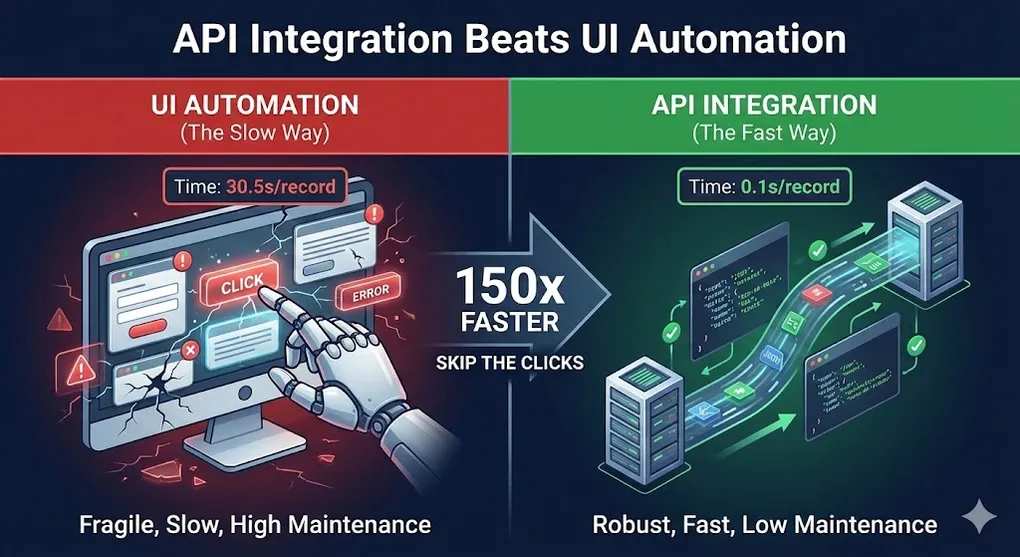
While beginners spend hours perfecting selectors and handling popup windows, experts are calling APIs and finishing in milliseconds. The difference isn’t marginal —it’s orders of magnitude.
In this article, we’ll explore when and how to bypass the UI entirely.
The Case Against UI Automation
Let’s be honest about what UI automation actually is: a workaround.
We click buttons because the system doesn’t give us a better option. But clicking is:
| UI Automation | API Integration |
|---|---|
| 30+ seconds per form | 0.1 seconds per request |
| Breaks on any UI change | Immune to visual changes |
| Requires screen resolution | Runs headless, anywhere |
| One action at a time | Parallel requests possible |
| Visible on screen | Invisible background process |
| Complex selectors | Clean JSON payloads |
If a system offers an API, use it.
When to Use Each Approach
Use API When:
- System has documented REST/SOAP endpoints
- You’re extracting or inserting structured data
- High volume processing (hundreds/thousands of transactions)
- Process runs unattended in background
- You need maximum speed and reliability
Use UI When:
- No API exists (legacy mainframes, terminal apps)
- API lacks specific functionality you need
- One-time or low-volume process
- Vendor won’t provide API access
- Human-in-the-loop approval steps
Hybrid Approach
Many enterprise solutions combine both:
Data Flow in Hybrid Architecture:
[!TIP] Design Principle: Always start with API paths. Only fall back to UI when API is unavailable or missing specific functionality. This maximizes speed while maintaining coverage.
REST API Fundamentals
Most modern systems use REST APIs. Here’s what you need to know:
HTTP Methods
| Method | Purpose | Example |
|---|---|---|
GET | Retrieve data | Get invoice details |
POST | Create new record | Create new customer |
PUT | Replace entire record | Update customer profile |
PATCH | Update partial record | Change customer email only |
DELETE | Remove record | Delete draft invoice |
HTTP Status Codes
| Code | Meaning | Action |
|---|---|---|
200 OK | Success | Continue processing |
201 Created | Resource created | Capture new ID from response |
400 Bad Request | Invalid input | Check your payload format |
401 Unauthorized | Auth failed | Refresh token or check credentials |
403 Forbidden | No permission | Contact admin for access |
404 Not Found | Resource doesn’t exist | Handle gracefully |
429 Too Many Requests | Rate limited | Implement backoff and retry |
500 Server Error | Their problem | Retry later |
Request Components
POST https://api.example.com/v1/invoices
Headers:
  Authorization: Bearer eyJhbGciOiJIUzI1NiIs...
  Content-Type: application/json
  X-Request-ID: uuid-12345

Body:
{
  "vendor_id": "V001",
  "amount": 1234.56,
  "currency": "USD",
  "due_date": "2024-02-15"
}
Finding APIs: Swagger and OpenAPI
Before you can integrate, you need to discover what the API offers.
What is Swagger/OpenAPI?
Simple Analogy: Swagger is like an “API menu” or “API instruction manual”. Just like a restaurant menu tells you what dishes are available, how much they cost, and what ingredients they contain, Swagger tells you what API functions you can call, what parameters are needed, and what data will be returned.
OpenAPI (formerly Swagger) is the industry standard for API documentation. Think of it as:
| Real World Analogy | Swagger/OpenAPI Equivalent |
|---|---|
| Restaurant Menu | API Endpoint List |
| Dish Name | Function Name (GET /users, POST /orders) |
| Ingredient List | Required Parameters |
| Price | Response Format |
| How to Order | Authentication Method |
Most modern APIs provide an OpenAPI spec that tells you:
- Available endpoints
- Required parameters
- Request/response formats
- Authentication methods
Why does this matter for RPA developers?
Without Swagger, you would need to:
- Ask the development team for documentation (often outdated)
- Guess the correct parameter names and formats
- Trial-and-error until something works
With Swagger, you can:
- Browse all available functions in a web interface
- Test the API directly in your browser before writing any code
- Copy exact request formats into your UiPath workflow
Finding API Documentation
| System | Where to Find API Docs |
|---|---|
| Salesforce | Settings → API → API Documentation or developer.salesforce.com |
| SAP | SAP API Business Hub |
| ServiceNow | System Web Services → REST API Explorer |
| Microsoft 365 | Microsoft Graph Explorer |
| Custom Systems | Ask IT: “Do you have a Swagger/OpenAPI spec?” or try /swagger, /api-docs |
Pro Tip: When asking IT for API access, use the magic phrase: “Do you have a Swagger doc?” This shows you understand API integration and makes the conversation much more productive.
API Discovery: When IT Says “We Don’t Have an API”
[!IMPORTANT] Hidden APIs Are Everywhere
Many web applications are Single Page Apps (SPAs) that communicate with REST APIs behind the scenes. Even if there’s no public documentation, the API exists — you just need to find it.
How to Discover Hidden APIs with Chrome DevTools:
1. Open the web application in Chrome
2. Press F12 → Network tab
3. Filter by "Fetch/XHR" (API calls only)
4. Perform the action manually (e.g., click "Submit")
5. Watch the Network tab for API calls
What to Look For:
| Column | What It Tells You |
|---|---|
| Name | The endpoint URL (e.g., /api/v1/invoices) |
| Method | GET, POST, PUT, etc. |
| Status | 200 = success, 401 = need auth |
| Headers | Authentication method used |
| Payload | Request body (JSON format) |
| Response | What data comes back |
Example Discovery:
You click "Submit Invoice" in browser
  ↓
DevTools shows: POST https://internal.company.com/api/invoices
  ↓
Payload: {"vendor_id": "V001", "amount": 1234.56}
  ↓
Response: {"invoice_id": "INV-789", "status": "created"}
  ↓
✓ You just found an undocumented API!
[!CAUTION] Ethics and Permission: Always get IT approval before using discovered APIs. Undocumented APIs may change without notice and lack support agreements.
Swagger UI: Try Before You Code
Many APIs expose an interactive Swagger UI at /swagger or /api-docs:
https://api.yourcompany.com/swagger
https://api.yourcompany.com/api-docs
This lets you:
- Browse all available endpoints
- Test requests directly in browser (no code needed!)
- See exact request/response formats
- Generate code samples
UiPath HTTP Request Activity
UiPath’s HTTP Request activity is your gateway to APIs.
Basic GET Request
Activity: HTTP Request
├── End Point: https://api.example.com/v1/customers/C001
├── Method: GET
├── Headers:
│   └── Authorization: Bearer {{accessToken}}
└── Output: responseBody (String)
POST with JSON Body
Activity: HTTP Request
├── End Point: https://api.example.com/v1/invoices
├── Method: POST
├── Headers:
│   ├── Authorization: Bearer {{accessToken}}
│   └── Content-Type: application/json
├── Body: {"vendor_id":"V001","amount":1234.56}
├── Body Format: application/json
└── Output: responseBody, statusCode
Handling the Response
' Check if successful
If statusCode = 200 Or statusCode = 201 Then
    ' Parse JSON response
    jsonResponse = JObject.Parse(responseBody)
    newInvoiceId = jsonResponse("id").ToString()
    Log.Info($"Created invoice: {newInvoiceId}")
Else
    ' Handle error
    Log.Error($"API Error {statusCode}: {responseBody}")
    Throw New BusinessRuleException($"API returned {statusCode}")
End If
JSON Parsing in UiPath
API responses are typically JSON. Here’s how to work with them:
Simple Value Extraction
{
  "id": "INV-001",
  "amount": 1234.56,
  "vendor": {
    "name": "Acme Corp",
    "country": "USA"
  }
}
' Parse the JSON
json = JObject.Parse(responseBody)
' Get simple values
invoiceId = json("id").ToString() ' "INV-001"
amount = json("amount").Value(Of Decimal)() ' 1234.56
' Get nested values
vendorName = json("vendor")("name").ToString() ' "Acme Corp"Array Processing
{
  "invoices": [
    {"id": "INV-001", "amount": 100},
    {"id": "INV-002", "amount": 200},
    {"id": "INV-003", "amount": 300}
  ]
}
json = JObject.Parse(responseBody)
invoices = json("invoices").ToObject(Of JArray)()
' Loop through array
For Each invoice As JObject In invoices
id = invoice("id").ToString()
amount = invoice("amount").Value(Of Decimal)()
Log.Info($"Invoice {id}: ${amount}")
Next
' LINQ on JSON array
totalAmount = invoices.Sum(Function(i) i("amount").Value(Of Decimal)())
highValue = invoices.Where(Function(i) i("amount").Value(Of Decimal)() > 150).ToList()Dynamic JSON Construction
' Build request body dynamically
requestBody = New JObject()
requestBody("vendor_id") = vendorId
requestBody("amount") = amount
requestBody("line_items") = New JArray()

For Each item In lineItems
    lineItem = New JObject()
    lineItem("description") = item("Description")
    lineItem("quantity") = item("Qty")
    lineItem("unit_price") = item("Price")
    requestBody("line_items").Add(lineItem)
Next

jsonString = requestBody.ToString()
The Professional Way: Deserialize to Class
Parsing JSON with JObject is fine for simple cases. But for production code, deserializing to strongly-typed classes is superior.
Why Deserialize to Class?
| Approach | JObject.Parse() | Deserialize to Class |
|---|---|---|
| Type Safety | ? Runtime errors | ? Compile-time checking |
| IntelliSense | ? No autocomplete | ? Full autocomplete |
| Refactoring | ? String-based, brittle | ? IDE-supported renames |
| Null Handling | ? Manual checks everywhere | ? Class properties handle |
| Performance | ? Slower dictionary lookups | ? Faster direct access |
Step 1: Define Your Classes
' In Invoke Code or custom library
Public Class InvoiceResponse
    Public Property id As String
    Public Property amount As Decimal
    Public Property vendor As Vendor
    Public Property line_items As List(Of LineItem)
End Class

Public Class Vendor
    Public Property name As String
    Public Property country As String
End Class

Public Class LineItem
    Public Property description As String
    Public Property quantity As Integer
    Public Property unit_price As Decimal
End Class
Step 2: Deserialize
' Deserialize JSON to strongly-typed object
invoice = JsonConvert.DeserializeObject(Of InvoiceResponse)(responseBody)

' Now you have IntelliSense and type safety!
vendorName = invoice.vendor.name          ' No more json("vendor")("name").ToString()
totalAmount = invoice.amount              ' Already a Decimal, no casting
firstItem = invoice.line_items.First()    ' Full LINQ support
Step 3: Handle Nullable Fields
Public Class ApiResponse
    Public Property data As List(Of Record)
    Public Property errors As List(Of String)  ' May be null
    Public Property next_page As String         ' May be null
End Class

' Safe access
If apiResponse.errors IsNot Nothing AndAlso apiResponse.errors.Any() Then
    HandleErrors(apiResponse.errors)
End If

hasNextPage = Not String.IsNullOrEmpty(apiResponse.next_page)
Pro Tip: Use online tools like json2csharp.com or jsonformatter.org to auto-generate classes from sample JSON.
[!NOTE] Required NuGet Packages for Serialization
UiPath.WebAPI.Activities— HTTP Request activityNewtonsoft.Json— JSON parsing (JObject, JsonConvert)How to Generate Classes Faster:
- Copy sample JSON response
- Use QuickType.io → Select VB.NET or C#
- Paste into your UiPath project as an Invoke Code or Library
This avoids typos and handles edge cases (nullable fields, arrays) automatically.
JSON to Class Mapping Visualization:
Authentication Patterns
Pattern 1: API Key
Simplest approach —a static key in the header:
Headers:
  X-API-Key: your-secret-key-here
Store in Orchestrator Asset (Text type, encrypted).
[!CAUTION] Asset Type Matters for Security
Secret Type Correct Asset Type Why API Key Text (encrypted) Single value, no username Username + Password Credential Stores pair, password never logged Client Secret (OAuth) Text (encrypted) or Credential Treat as password Never store passwords as regular Text Assets —use Credential type so the password is encrypted and never appears in logs or exports.
[!WARNING] Secret Lifecycle Management
- Rotate secrets regularly: Client Secrets should expire every 90-180 days
- Never hardcode in comments:
' TODO: secret is abc123is a security breach waiting to happen- Use different secrets per environment: Dev/UAT/Prod should have separate API keys
Pattern 2: Basic Auth
Username and password, Base64 encoded:
credentials = Convert.ToBase64String(
    Encoding.UTF8.GetBytes($"{username}:{password}")
)

' Header
Authorization: Basic {credentials}
Pattern 3: OAuth 2.0 (Bearer Token)
Most enterprise APIs use OAuth 2.0. Understanding the flow is critical.
OAuth Grant Types
| Grant Type | Use Case | RPA Suitability |
|---|---|---|
| Client Credentials | Server-to-server (no user) | ✓ Best for unattended bots |
| Authorization Code | User login required | ~ Requires browser interaction |
| Password (ROPC) | Legacy, deprecated | ✗ Avoid, security risk |
| Refresh Token | Extend session | ✓ Use when provided |
Token Management Workflow
' Token caching pattern
Private Shared accessToken As String
Private Shared tokenExpiry As DateTime

Public Function GetValidToken() As String
    ' Check if token is still valid (with 60s buffer)
    If accessToken Is Nothing OrElse tokenExpiry < DateTime.Now.AddSeconds(60) Then
        ' Get new token
        tokenResponse = CallTokenEndpoint(clientId, clientSecret)
        accessToken = tokenResponse("access_token").ToString()
        tokenExpiry = DateTime.Now.AddSeconds(
            tokenResponse("expires_in").Value(Of Integer)()
        )
        Log.Info($"New token acquired, expires at {tokenExpiry}")
    End If

    Return accessToken
End Function
Pattern 4: Certificate-Based Auth
For maximum security (banking, government):
Activity: HTTP Request
├── Client Certificate Path: C:\Certs\client.pfx
├── Client Certificate Password: {{certPassword}}
└── ...
Rate Limiting and Retry
APIs limit request frequency. Handle it gracefully:
Detecting Rate Limits
If statusCode = 429 Then
    ' Check Retry-After header
    retryAfter = responseHeaders("Retry-After")
    If retryAfter IsNot Nothing Then
        waitSeconds = Integer.Parse(retryAfter)
    Else
        waitSeconds = 60  ' Default wait
    End If

    Log.Warn($"Rate limited. Waiting {waitSeconds} seconds.")
    Delay(waitSeconds * 1000)
    ' Retry
End If
Exponential Backoff Pattern
maxRetries = 5
For attempt = 1 To maxRetries
    Try
        response = CallAPI(endpoint)
        Exit For  ' Success, exit loop
    Catch ex As Exception
        If attempt = maxRetries Then Throw

        waitTime = Math.Pow(2, attempt) * 1000  ' 2s, 4s, 8s, 16s, 32s
        Log.Warn($"Attempt {attempt} failed. Waiting {waitTime/1000}s")
        Delay(waitTime)
    End Try
Next
Circuit Breaker Pattern: Fail Fast
For high-volume API calls, simple retry can make things worse. If the API is down, hammering it with retries may:
- Get your account rate-limited or blocked
- Overload an already struggling server
- Waste processing time on guaranteed failures
The Circuit Breaker Concept:
Simple Implementation:
' Shared state (in Init or Invoke Code)
Private Shared consecutiveFailures As Integer = 0
Private Shared circuitOpenUntil As DateTime = DateTime.MinValue

Public Function CallAPIWithCircuitBreaker(endpoint As String) As String
    ' Check if circuit is open
    If DateTime.Now < circuitOpenUntil Then
        Throw New ApplicationException("Circuit breaker OPEN - skipping API call")
    End If

    Try
        response = CallAPI(endpoint)
        consecutiveFailures = 0  ' Reset on success
        Return response

    Catch ex As Exception
        consecutiveFailures += 1
        If consecutiveFailures >= 5 Then
            ' Open the circuit for 60 seconds
            circuitOpenUntil = DateTime.Now.AddSeconds(60)
            Log.Error("Circuit breaker OPENED - too many failures")
        End If
        Throw
    End Try
End Function
[!TIP] When to Use Circuit Breaker: High-volume batch processing (100+ API calls), external third-party APIs with unreliable uptime, or any scenario where continued retrying causes more harm than failing fast.
Common API Integrations in RPA
Salesforce
' Query records with SOQL
endpoint = "https://yourinstance.salesforce.com/services/data/v55.0/query"
query = "SELECT Id, Name, Amount FROM Opportunity WHERE StageName = 'Closed Won'"
url = $"{endpoint}?q={HttpUtility.UrlEncode(query)}"

response = GET(url, bearerToken)
opportunities = JObject.Parse(response)("records")
SAP (OData)
' Get sales orders via OData
endpoint = "https://sap.company.com/sap/opu/odata/sap/API_SALES_ORDER_SRV/A_SalesOrder"
params = "$filter=SalesOrderType eq 'OR'&$top=100"

response = GET($"{endpoint}?{params}", basicAuthHeader)
orders = JObject.Parse(response)("d")("results")
Microsoft Graph (Office 365)
' Get emails from shared mailbox
endpoint = "https://graph.microsoft.com/v1.0/users/shared@company.com/messages"
params = "$filter=isRead eq false&$top=50"

response = GET($"{endpoint}?{params}", bearerToken)
emails = JObject.Parse(response)("value")
ServiceNow
' Create incident ticket
endpoint = "https://company.service-now.com/api/now/table/incident"
body = New JObject()
body("short_description") = "RPA: Invoice processing failure"
body("description") = errorDetails
body("urgency") = "2"
body("category") = "software"

response = POST(endpoint, body.ToString(), basicAuth)
ticketNumber = JObject.Parse(response)("result")("number").ToString()
Testing APIs with Postman
Before coding in UiPath, test in Postman:
Workflow
- Get documentation: Find the API reference
- Set up collection: Organize related endpoints
- Configure auth: Add credentials to collection
- Test endpoints: Verify responses
- Export for reference: Save successful requests
Postman to UiPath Translation
| Postman | UiPath HTTP Request |
|---|---|
| URL | End Point |
| Method dropdown | Method property |
| Headers tab | Headers dictionary |
| Body > raw > JSON | Body + BodyFormat |
| Response body | Output variable |
Error Handling for APIs
The Defensive Pattern
Try
    ' Make API call
    response = HTTP_Request(endpoint, method, body, headers)

    ' Validate response
    If statusCode < 200 Or statusCode >= 300 Then
        Throw New ApplicationException($"API Error: {statusCode}")
    End If

    ' Parse response
    json = JObject.Parse(response)

    ' Validate expected fields
    If json("id") Is Nothing Then
        Throw New BusinessRuleException("Response missing required 'id' field")
    End If

    ' Extract data
    resultId = json("id").ToString()

Catch jsonEx As JsonReaderException
    ' Malformed response
    Log.Error($"Invalid JSON response: {response}")
    Throw New SystemException("API returned invalid JSON", jsonEx)

Catch httpEx As HttpRequestException
    ' Network/connection issue
    Log.Error($"Network error calling API: {httpEx.Message}")
    Throw New SystemException("Cannot connect to API", httpEx)

Catch ex As Exception
    ' Unexpected error
    Log.Error($"Unexpected API error: {ex.Message}")
    Throw
End Try
Performance Comparison
Real numbers from a production invoice processing system:
| Metric | UI Automation | API Integration | Improvement |
|---|---|---|---|
| Time per invoice | 45 seconds | 0.3 seconds | 150x faster |
| Daily capacity | 640 invoices | 96,000 invoices | 150x more |
| Failure rate | 3.2% | 0.1% | 32x more stable |
| Maintenance hours/month | 8 hours | 0.5 hours | 16x less work |
The math is clear: APIs win on every metric.
Key Takeaways
- API first: Always check if an API exists before automating UI.
- Find Swagger/OpenAPI docs: Most modern systems have them.
- Deserialize to classes: Don’t parse JSON with string keys in production.
- Master OAuth 2.0: Client Credentials flow is your bread and butter.
- Speed difference is massive: 100x-1000x faster is normal.
- Postman is essential: Test before you code.
- Handle failures gracefully: Rate limits, timeouts, and errors happen.
The best RPA developers aren’t the fastest button clickers —they’re the ones who avoid clicking altogether.