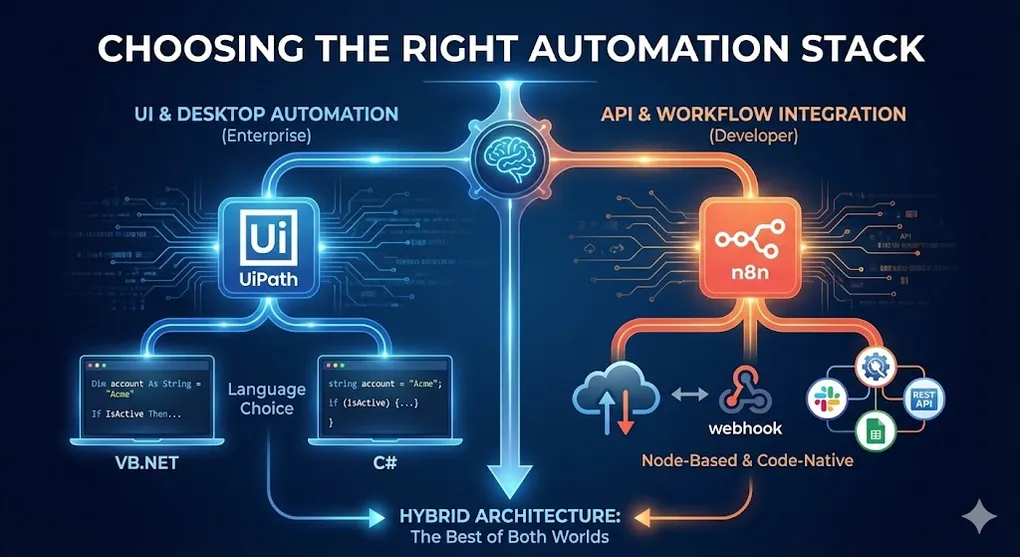
UiPath vs n8n, VB vs C#: Choosing the Right Automation Stack
You’re about to start an automation project. Before writing a single activity or workflow, you face two critical decisions:
- Which platform? UiPath, n8n, Power Automate, or something else?
- Which language? If UiPath, should you use VB.NET or C#?
Get these wrong, and you’ll spend months fighting your tools instead of solving problems.
Part 1: UiPath vs n8n - Two Different Worlds
At first glance, UiPath and n8n seem to solve the same problem: automation. But they’re designed for fundamentally different use cases.
The Core Difference
+---------------------------------------------------------------------+
|                   Automation Platform Spectrum                      |
+---------------------------------------------------------------------+
|                                                                     |
|  API/Integration-First              UI/Desktop-First                |
|  <=================================================>                |
|                                                                     |
|  n8n          Zapier         Power Automate         UiPath          |
|  Make         Workato        Automation Anywhere                    |
|                                                                     |
|  +----------------------+             +----------------------+      |
|  | Connect APIs         |             | Control Desktop UI   |      |
|  | Webhook triggers     |             | Scrape websites      |      |
|  | Data transformation  |             | Automate legacy apps |      |
|  | Cloud-native         |             | Handle PDFs, Excel   |      |
|  | Self-hostable        |             | OCR, AI integration  |      |
|  +----------------------+             +----------------------+      |
|                                                                     |
|  Best for:                            Best for:                     |
|  SaaS integration                     Desktop automation            |
|  Developers                           Business process              |
|  Startups                             Enterprise                    |
|                                                                     |
+---------------------------------------------------------------------+
n8n: The Developer’s Workflow Engine
What it is: An open-source, self-hostable workflow automation tool that connects APIs and services.
Strengths:
| Feature | Benefit |
|---|---|
| Open Source | Free self-hosting, no vendor lock-in |
| API-first | Native HTTP, webhooks, REST integrations |
| Code nodes | Write JavaScript/Python inline |
| Self-hosted | Full data control, on-premise deployment |
| Fair pricing | Pay for executions, not seats - ideal for startups with limited budget |
| Modern UI | Clean, developer-friendly interface |
| AI-Native | Built-in LangChain, OpenAI, Vector DB nodes for rapid AI agent development |
Ideal Use Cases:
- Syncing data between SaaS apps (Slack → Notion → Google Sheets)
- Webhook-triggered workflows (GitHub push → Deploy → Notify)
- API orchestration and data transformation
- Startups and dev teams who prefer code over UI
Limitations:
- ✗ No native desktop UI automation
- ✗ Limited screen scraping capabilities
- ✗ Can’t control legacy Windows/SAP applications
- ✗ No built-in OCR or document processing
UiPath: The Enterprise RPA Platform
What it is: A full-stack RPA platform designed for automating business processes, especially those involving desktop UI and legacy systems.
Strengths:
| Feature | Benefit |
|---|---|
| UI Automation | Control any desktop application |
| Recorder | Click-to-automate for non-developers |
| Document Understanding | AI-powered OCR and extraction |
| Orchestrator | Enterprise-grade scheduling and monitoring |
| REFramework | Production-ready architecture template |
| SAP/Citrix | Native connectors for enterprise apps |
Ideal Use Cases:
- Invoice processing with OCR
- SAP data entry automation
- Legacy system integration (no API available)
- High-volume, rule-based business processes
- Enterprises with compliance requirements
Limitations:
- ✗ Expensive licensing (enterprise pricing)
- ✗ Heavier learning curve
- ✗ Overkill for simple API integrations
- ✗ Requires Windows for most robots
Head-to-Head Comparison
| Dimension | n8n | UiPath |
|---|---|---|
| Primary use | API/webhook automation | Desktop/UI automation |
| Deployment | Self-hosted or cloud | Cloud or on-premise |
| Pricing model | Free (self-hosted) / Execution-based | Per-robot licensing |
| Target user | Developers | Business users + developers |
| Learning curve | Medium | Medium-High |
| UI automation | ✗ No | ✓ Excellent |
| API integration | ✓ Excellent | ✓ Good (HTTP Request) |
| OCR/AI | ✗ Limited | ✓ Built-in |
| Enterprise features | Limited | Full (audit, governance) |
| Open source | ✓ Yes | ✗ No |
| Debugging | JSON data flow inspection | Full IDE: breakpoints, variable watch, slow step |
Decision Framework
+---------------------------------------------------------------------+
|             Which Platform Should You Choose?                       |
+---------------------------------------------------------------------+
|                                                                     |
|  START                                                              |
|    |                                                                |
|    v                                                                |
|  Does the target system have an API?                                |
|    |                                                                |
|    +-- YES ------------------+                                      |
|    |                         |                                      |
|    |                   Is it SaaS-to-SaaS?                          |
|    |                         |                                      |
|    |            +--- YES ----+---- NO ---+                          |
|    |            |                        |                          |
|    |       n8n / Zapier            Consider both                    |
|    |       Make                                                     |
|    |                                                                |
|    +-- NO -------------------+                                      |
|                              |                                      |
|                    Is it desktop/legacy UI?                         |
|                              |                                      |
|                 +--- YES ----+---- NO ----+                         |
|                 |                         |                         |
|             UiPath                   What is it?                    |
|             Automation Anywhere      (clarify)                      |
|             Power Automate Desktop                                  |
|                                                                     |
|  HYBRID SCENARIO: Use n8n for API orchestration +                   |
|                   UiPath for UI steps (via Orchestrator API)        |
|                                                                     |
+---------------------------------------------------------------------+
Real-World Scenario Comparison
Scenario 1: Sync Salesforce leads to Slack and Notion
| Platform | Approach | Complexity |
|---|---|---|
| n8n | 3 nodes: Salesforce Trigger → Slack → Notion | Easy |
| UiPath | HTTP Request activities, JSON parsing | Overengineered |
Winner: n8n - This is pure API work. UiPath adds unnecessary complexity.
Scenario 2: Extract data from 500 PDFs and enter into SAP
| Platform | Approach | Complexity |
|---|---|---|
| n8n | Can’t do this natively | ✗ Not possible |
| UiPath | Document Understanding + SAP GUI automation | Built for this |
Winner: UiPath - n8n can’t control SAP GUI or read complex PDFs.
Scenario 3: Pull data from API, transform it, and send via email
| Platform | Approach | Complexity |
|---|---|---|
| n8n | HTTP Request → Transform → Email node | Easy |
| UiPath | HTTP Request → Deserialize JSON → Send Mail | Doable but heavier |
Winner: n8n - Both can do it, but n8n is lighter for pure API work.
Scenario 4: Log into a legacy banking portal, download statements, reconcile
| Platform | Approach | Complexity |
|---|---|---|
| n8n | If no API, can’t automate the login | ✗ Not possible |
| UiPath | Browser automation + Excel manipulation | Standard RPA |
Winner: UiPath - This is classic RPA territory.
Part 2: VB.NET vs C# in UiPath
If you’ve chosen UiPath, you now face another decision: which language?
UiPath supports both VB.NET and C# for expressions and Invoke Code activities. Here’s how to choose.
Historical Context
| Era | Default Language | Reason |
|---|---|---|
| UiPath < 2020 | VB.NET only | Inherited from Windows Workflow Foundation |
| UiPath 2021+ | VB.NET or C# | C# support added for developer familiarity |
| UiPath 2023+ | C# gaining momentum | Studio now prompts for language choice |
Syntax Comparison
Variable Declaration:
' VB.NET
Dim customerName As String = "Acme Corp"
Dim totalAmount As Decimal = 1234.56
Dim isActive As Boolean = True
// C#
string customerName = "Acme Corp";
decimal totalAmount = 1234.56m;
bool isActive = true;Conditionals:
' VB.NET
If amount > 1000 AndAlso status = "Active" Then
    ProcessHighValue()
ElseIf amount > 500 OrElse isPriority Then
    ProcessMedium()
Else
    ProcessStandard()
End If
// C#
if (amount > 1000 && status == "Active")
{
ProcessHighValue();
}
else if (amount > 500 || isPriority)
{
ProcessMedium();
}
else
{
ProcessStandard();
}LINQ Queries:
' VB.NET
result = dt.AsEnumerable() _
    .Where(Function(r) r.Field(Of String)("Status") = "Active") _
    .OrderBy(Function(r) r.Field(Of DateTime)("Date")) _
    .CopyToDataTable()
// C#
result = dt.AsEnumerable()
.Where(r => r.Field<string>("Status") == "Active")
.OrderBy(r => r.Field<DateTime>("Date"))
.CopyToDataTable();Null Handling:
' VB.NET
customerName = If(row.Field(Of String)("Name"), "Unknown")
// C#
customerName = row.Field<string>("Name") ?? "Unknown";Feature Comparison
| Feature | VB.NET | C# |
|---|---|---|
| UiPath legacy support | ✓ Full (all versions) | Partial (2021+ only) |
| Community resources | ✓ Most examples in VB | Growing |
| UiPath Academy | ✓ VB-focused | Mixed |
| IntelliSense | ✓ Full | ✓ Full |
| Case sensitivity | ✗ No | ✓ Yes |
| Ternary operator | Uses If() function | ✓ Uses ?: |
| String interpolation | ✓ $“Hello {name}” | ✓ $“Hello {name}“ |
| Null coalescing | If(value, default) | ✓ value ?? default |
| Async/await | ✓ Supported | ✓ Supported |
| Developer familiarity | Legacy devs | ✓ Modern devs |
When to Use VB.NET
| Scenario | Reason |
|---|---|
| Existing VB.NET codebase | Consistency matters |
| Team with VB.NET experience | Lower learning curve |
| Using older UiPath versions | C# not available pre-2021 |
| Following UiPath Academy | Most courses use VB |
| Maintaining legacy bots | Don’t rewrite what works |
When to Use C#
| Scenario | Reason |
|---|---|
| Team with C#/Java/.NET Core background | Familiar syntax |
| New greenfield project | Start with modern standard |
| Heavy Invoke Code usage | Cleaner syntax for complex logic |
| Integrating with C# libraries | Avoid mental context switching |
| Personal preference | Developer happiness matters |
The Honest Answer
For most RPA work, it doesn’t matter.
The differences are syntactic, not functional. Both compile to the same IL (Intermediate Language). Both have full access to .NET libraries. Both work identically in activities.
Choose based on:
- Team familiarity - What does your team already know?
- Existing codebase - What language are existing bots in?
- Company standard - Does your org mandate one?
If none of the above apply and you’re starting fresh:
- Learning RPA first time? → VB.NET (more UiPath resources)
- Experienced developer? → C# (cleaner syntax, modern conventions)
[!NOTE] C# Practical Considerations:
- Stricter Validation: C# projects in UiPath Studio have more aggressive compile-time checking. This catches errors earlier but may show more warnings during development.
- Library Compatibility: Most NuGet packages work with both languages. However, some legacy UiPath Custom Activities were built for VB.NET, and C# users may occasionally need type conversions when referencing them.
Mixing Languages
✗ Don’t do this:
- VB.NET project with C# Invoke Code
- C# project with VB.NET expressions
✓ Do this:
- Consistent language across entire project
- Consistent language across team’s projects
- Document your standard in coding guidelines
Part 3: The Hybrid Approach
The most powerful automation architectures often combine tools:
+---------------------------------------------------------------------+
|              Hybrid Automation Architecture                         |
+---------------------------------------------------------------------+
|                                                                     |
|                    +------------------+                             |
|                    |       n8n        |                             |
|                    |  (Orchestrator)  |                             |
|                    +--------+---------+                             |
|                             |                                       |
|             Webhook trigger | API calls                             |
|                             |                                       |
|        +--------------------+--------------------+                  |
|        |                    |                    |                  |
|  +------------+       +------------+       +------------+           |
|  | Salesforce |       |   UiPath   |       |   Slack    |           |
|  |    API     |       |   Robot    |       |    API     |           |
|  +------------+       |            |       +------------+           |
|                       | (Desktop   |                                |
|                       |  tasks)    |                                |
|                       +------------+                                |
|                                                                     |
|  Pattern:                                                           |
|  1. n8n receives webhook from Salesforce                            |
|  2. n8n calls UiPath Orchestrator API to start job                  |
|  3. UiPath robot processes legacy desktop app                       |
|  4. UiPath updates queue status                                     |
|  5. n8n polls for completion, sends Slack notification              |
|                                                                     |
+---------------------------------------------------------------------+
When Hybrid Makes Sense
| Scenario | Configuration |
|---|---|
| API + Desktop steps | n8n for API, UiPath for UI |
| Event-driven + batch | n8n webhooks trigger UiPath jobs |
| Multi-platform | n8n orchestrates, UiPath handles Windows |
| Cost optimization | n8n (free) + UiPath (licensed only for UI) |
Integration Points
n8n → UiPath Orchestrator API:
// n8n HTTP Request node
{
  "method": "POST",
  "url": "https://cloud.uipath.com/org/tenant/orchestrator_/odata/Jobs/UiPath.Server.Configuration.OData.StartJobs",
  "headers": {
    "Authorization": "Bearer {{$credentials.uipath.accessToken}}",
    "Content-Type": "application/json"
  },
  "body": {
    "startInfo": {
      "ReleaseKey": "{{releaseKey}}",
      "Strategy": "Specific",
      "RobotIds": [{{robotId}}],
      "InputArguments": "{\"invoiceId\": \"{{invoiceId}}\"}"
    }
  }
}
Key Takeaways
Platform Choice
| If you need to… | Choose |
|---|---|
| Connect SaaS APIs | n8n, Zapier, Make |
| Automate desktop UI | UiPath, Power Automate Desktop |
| Process documents with AI | UiPath, Automation Anywhere |
| Self-host everything | n8n + open-source tools |
| Enterprise compliance | UiPath, Automation Anywhere |
Language Choice (UiPath)
| If you are… | Choose |
|---|---|
| New to RPA, following courses | VB.NET |
| Experienced C# developer | C# |
| Maintaining existing VB bots | VB.NET |
| Starting fresh with modern team | C# |
The Meta-Lesson
The best automation isn’t about picking the “best” tool. It’s about picking the right tool for each job and knowing how to combine them.
A 10-minute n8n workflow that connects APIs is better than a 2-day UiPath project that does the same thing. And a 2-day UiPath project that automates SAP is infinitely better than “it’s impossible because there’s no API.”
Know your tools. Know their strengths. Use both when needed.