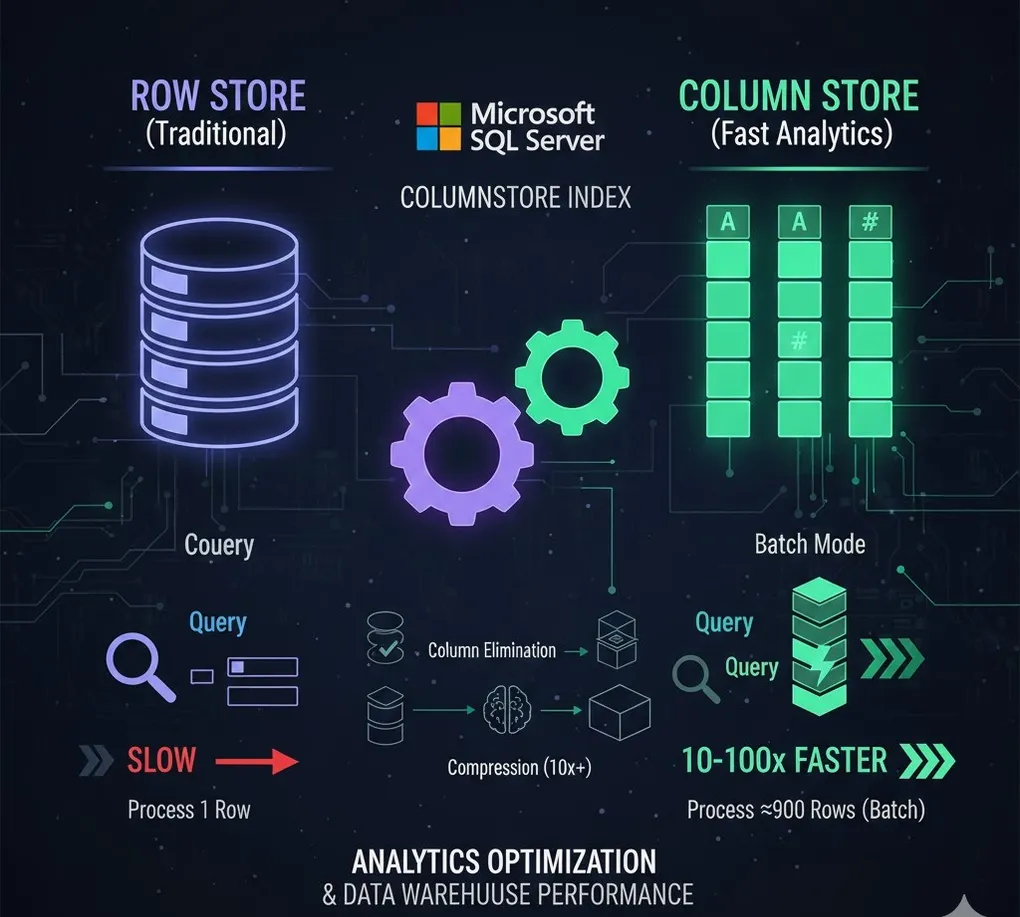
Columnstore Index: Analytics Optimization & Data Warehouse Performance
Prerequisites: Understanding of B-Tree indexes. See DB 03 B-Tree Index.
Columnstore indexes can improve analytics queries by 10-100x through columnar storage and batch processing.
Part A: Columnstore Basics
1. Row Store vs Column Store
graph LR
    subgraph "Row Store (Traditional)"
        R1["Row 1: ID, Name, Sales, Region"]
        R2["Row 2: ID, Name, Sales, Region"]
        R3["Row 3: ID, Name, Sales, Region"]
    end

    subgraph "Column Store"
        C1["ID Column: 1, 2, 3"]
        C2["Name Column: Alice, Bob, Carol"]
        C3["Sales Column: 100, 200, 300"]
        C4["Region Column: NW, SW, NE"]
    end

    style R1 fill:#e74c3c,color:#fff
style C3 fill:#27ae60,color:#fff| Query | Row Store | Column Store |
|---|---|---|
| SELECT * WHERE ID = 5 | ✓ Fast (read 1 row) | ✗ Must reconstruct row |
| SUM(Sales) for 1M rows | ✗ Read all columns | ✓ Read only Sales column |
| AVG(Sales) GROUP BY Region | ✗ Full table scan | ✓ Read 2 columns only |
2. When to Use Columnstore
| Good Fit | Not a Fit |
|---|---|
| Aggregate queries (SUM, AVG, COUNT) | Point lookups (WHERE ID = 5) |
| Large fact tables | Frequent single-row updates |
| Data warehouse / OLAP | OLTP workloads |
| Reporting / Analytics | Small tables (< 1M rows) |
| Historical data | Real-time updates |
[!NOTE] 1 Million Row Threshold: Each Row Group holds up to 1,048,576 rows (2^20). If your table has fewer rows (e.g., 100K), data stays in the Delta Store (B-Tree format) and won’t benefit from compression or Batch Mode. Only use Columnstore on tables with 1 million+ rows.
3. How Columnstore Achieves Performance
- Column Elimination → Only read needed columns
- Compression → Same data type compresses well (10x compression)
- Batch Mode → Process 900 rows at once instead of 1
- Segment Elimination → Skip irrelevant row groups
Part B: Types of Columnstore Indexes
4. Clustered vs Nonclustered Columnstore
graph TD
    subgraph "Clustered Columnstore Index (CCI)"
        CCI1[Entire table stored in columnar format]
        CCI2[No rowstore heap]
        CCI3[Best for data warehouse]
    end

    subgraph "Nonclustered Columnstore Index (NCCI)"
        NCCI1[Regular rowstore table]
        NCCI2[Additional columnstore index]
        NCCI3[HTAP: Both OLTP and analytics]
    end

    style CCI1 fill:#27ae60,color:#fff
style NCCI1 fill:#3498db,color:#fff| Type | Storage | Best For |
|---|---|---|
| Clustered (CCI) | Table IS the columnstore | Data warehouse facts |
| Nonclustered (NCCI) | Secondary index | HTAP (hybrid) workloads |
5. Creating Columnstore Indexes
Clustered Columnstore (Pure Analytics)
-- Entire table in columnar format
CREATE CLUSTERED COLUMNSTORE INDEX CCI_Sales
ON dbo.SalesHistory;
Nonclustered Columnstore (Hybrid)
-- Keep rowstore, add columnstore for analytics
CREATE NONCLUSTERED COLUMNSTORE INDEX NCCI_Orders
ON dbo.Orders (OrderDate, ProductID, Quantity, Amount);
With Filtered Index
-- Only index historical data
CREATE NONCLUSTERED COLUMNSTORE INDEX NCCI_Orders_Archive
ON dbo.Orders (OrderDate, Amount)
WHERE OrderDate < '2024-01-01';
Part C: Columnstore Architecture
6. Row Groups & Segments
graph TD
    subgraph "Columnstore Structure"
        TABLE[Table: 5 Million Rows]
        TABLE --> RG1[Row Group 1: 1M rows]
        TABLE --> RG2[Row Group 2: 1M rows]
        TABLE --> RG3[Row Group 3: 1M rows]
        TABLE --> RG4[Row Group 4: 1M rows]
        TABLE --> RG5[Row Group 5: 1M rows]

        RG1 --> SEG1[Segment: Col1]
        RG1 --> SEG2[Segment: Col2]
        RG1 --> SEG3[Segment: Col3]
    end

    style RG1 fill:#3498db,color:#fff
style SEG1 fill:#27ae60,color:#fff| Component | Description |
|---|---|
| Row Group | ~1 million rows, unit of compression |
| Segment | One column’s data for one row group |
| Delta Store | Temporary rowstore for new inserts |
| Deleted Bitmap | Tracks deleted rows (soft delete) |
7. Compression Engine
Columnstore uses advanced compression:
| Technique | Description |
|---|---|
| Dictionary Encoding | Store unique values once |
| Run-Length Encoding | Repeated values stored as count |
| Bit Packing | Use minimal bits for value range |
-- Check compression ratio
SELECT
    OBJECT_NAME(object_id) AS table_name,
    SUM(on_disk_size) / 1024 / 1024 AS compressed_mb,
    SUM(size_in_bytes) / 1024 / 1024 AS logical_mb,
    SUM(size_in_bytes) * 1.0 / NULLIF(SUM(on_disk_size), 0) AS compression_ratio
FROM sys.column_store_segments
GROUP BY object_id;
Part D: Best Practices
8. Loading Data
Bulk Load (Best Performance)
-- Bulk insert directly into compressed row groups
INSERT INTO dbo.SalesHistory WITH (TABLOCK)
SELECT * FROM dbo.StagingTable;
-- (Tablock enables minimal logging)
Partition Switching (ETL Pattern)
-- 1. Load into staging table (clustered columnstore)
-- 2. Switch partition into main table
ALTER TABLE dbo.SalesHistory_Staging
SWITCH PARTITION 1 TO dbo.SalesHistory PARTITION 5;
Pre-Sorting for Segment Elimination
[!TIP] Pro Technique: Columnstore itself is unordered, but if data is physically sorted during load, Row Groups will have excellent Min/Max ranges for Segment Elimination.
-- Step 1: Create a staging table with B-Tree clustered index on date
CREATE TABLE dbo.Staging_Sorted (
    SaleDate DATE,
    -- other columns...
    INDEX CIX_Date CLUSTERED (SaleDate)  -- Forces sorted order
);

-- Step 2: Insert data (now physically sorted)
INSERT INTO dbo.Staging_Sorted SELECT * FROM dbo.RawData ORDER BY SaleDate;

-- Step 3: Create CCI on sorted table (or bulk insert into final CCI table)
CREATE CLUSTERED COLUMNSTORE INDEX CCI_Sales ON dbo.Staging_Sorted;Result: Each Row Group now has a tight date range (e.g., Jan 1-15 in Group 1, Jan 16-31 in Group 2). Queries filtering by date can skip entire Row Groups.
9. Maintenance
Rebuild for Better Compression
-- Rebuild entire index (offline)
ALTER INDEX CCI_Sales ON dbo.SalesHistory REBUILD;

-- Reorganize specific row groups (online)
ALTER INDEX CCI_Sales ON dbo.SalesHistory
REORGANIZE WITH (COMPRESS_ALL_ROW_GROUPS = ON);
Check Row Group Quality
SELECT
    OBJECT_NAME(object_id) AS table_name,
    index_id,
    state_desc,
    total_rows,
    deleted_rows,
    size_in_bytes / 1024 / 1024 AS size_mb
FROM sys.dm_db_column_store_row_group_physical_stats
WHERE object_id = OBJECT_ID('dbo.SalesHistory');| state_desc | Meaning | Action |
|---|---|---|
| OPEN | Delta store, not compressed | Wait or force tuple mover |
| CLOSED | Ready for compression | Tuple mover will compress |
| COMPRESSED | Optimal | None needed |
| TOMBSTONE | Marked for cleanup | Background cleanup |
10. Handling Updates & Deletes
Columnstore is optimized for append, not updates:
| Operation | How It Works |
|---|---|
| INSERT | Goes to delta store, then compressed |
| DELETE | Marks row in deleted bitmap |
| UPDATE | Delete + Insert |
-- For heavy update patterns, consider:
-- 1. Partition by time, update only recent partition
-- 2. Use filtered NCCI on historical data
-- 3. Archive and rebuild periodically
Part E: Query Optimization
11. Batch Mode Execution
graph LR
    subgraph "Row Mode"
        RM[Process 1 row at a time]
    end

    subgraph "Batch Mode"
        BM[Process 900 rows at a time]
    end

    RM -->|Slow| RESULT1[Result]
    BM -->|Fast| RESULT2[Result]

    style RM fill:#e74c3c,color:#fff
    style BM fill:#27ae60,color:#fff
-- Check if query uses batch mode
SET STATISTICS XML ON;
SELECT Region, SUM(Amount) FROM dbo.SalesHistory GROUP BY Region;
SET STATISTICS XML OFF;
-- Look for "EstimatedExecutionMode" = "Batch" in plan[!NOTE] Batch Mode on Rowstore (SQL Server 2019+): In earlier versions, Batch Mode only worked with Columnstore indexes. Starting from SQL Server 2019, the optimizer can use Batch Mode on Rowstore tables for eligible queries (large aggregations, hash joins). This means some analytics queries on rowstore tables can also benefit from batch processing.
12. Segment Elimination
-- Each segment stores min/max values
-- Query only reads relevant segments

-- This query may skip most segments:
SELECT SUM(Amount)
FROM dbo.SalesHistory
WHERE SaleDate > '2024-01-01';
-- Only reads row groups where max(SaleDate) > '2024-01-01'
13. Query Patterns
Great Performance
-- Aggregations
SELECT Region, YEAR(SaleDate), SUM(Amount)
FROM dbo.SalesHistory
GROUP BY Region, YEAR(SaleDate);

-- Filtered aggregations
SELECT ProductCategory, COUNT(*)
FROM dbo.SalesHistory
WHERE SaleDate >= '2024-01-01'
GROUP BY ProductCategory;
Avoid or Redesign
-- Point lookups (use rowstore index)
SELECT * FROM dbo.SalesHistory WHERE SaleID = 12345;

-- Frequent updates on recent data
UPDATE dbo.SalesHistory SET Status = 'Shipped' WHERE SaleID = 12345;
Part F: HTAP (Hybrid Transactional/Analytical)
14. Real-Time Analytics
Use Nonclustered Columnstore for operational analytics:
-- OLTP table with rowstore
CREATE TABLE dbo.Orders (
    OrderID INT PRIMARY KEY,
    CustomerID INT,
    OrderDate DATE,
    Amount DECIMAL(10,2),
    Status VARCHAR(20),
    INDEX IX_Customer (CustomerID)  -- For OLTP
);

-- Add columnstore for analytics
CREATE NONCLUSTERED COLUMNSTORE INDEX NCCI_Orders
ON dbo.Orders (OrderDate, CustomerID, Amount);
Now the table supports both:
- OLTP: Fast point lookups using rowstore
- Analytics: Fast aggregations using columnstore
15. Memory-Optimized Columnstore
Combine In-Memory OLTP with Columnstore:
-- Memory-optimized table with columnstore
CREATE TABLE dbo.SensorData
(
    SensorID INT NOT NULL,
    ReadingTime DATETIME2 NOT NULL,
    Value DECIMAL(18,4),

    INDEX IX_Sensor NONCLUSTERED (SensorID),
    INDEX CCS CLUSTERED COLUMNSTORE
)
WITH (MEMORY_OPTIMIZED = ON);
Summary
Columnstore vs Rowstore
| Aspect | Rowstore (B-Tree) | Columnstore |
|---|---|---|
| Best for | OLTP, point lookups | OLAP, analytics |
| Query type | SELECT * WHERE ID = 5 | SUM, AVG, COUNT, GROUP BY |
| Compression | Low | 10x or more |
| Updates | Fast | Slow (use delta store) |
| Storage | Row by row | Column by column |
| Processing | Row mode | Batch mode |
When to Use What
| Workload | Recommendation |
|---|---|
| Data warehouse fact tables | Clustered Columnstore |
| OLTP with some analytics | Nonclustered Columnstore |
| Pure OLTP | Rowstore indexes |
| Archive tables | Clustered Columnstore + partitioning |
| Real-time analytics | HTAP with NCCI |
Performance Tips
- Load data in bulk → Minimize delta store usage
- Order data by segment elimination column → Often date
- Maintain row groups → Reorganize periodically
- Use appropriate data types → Smaller = better compression
- Partition large tables → Easier maintenance and elimination
Practice Questions
Conceptual
-
Explain the difference between row store and column store. When is each better?
-
What is a Row Group and why does columnstore organize data this way?
-
Compare Clustered Columnstore Index (CCI) vs Nonclustered Columnstore Index (NCCI).
Hands-on
-- You have a 100 million row SalesHistory table with columns:
-- SaleID, SaleDate, CustomerID, ProductID, Quantity, Amount, Region
--
-- Design the optimal columnstore strategy for:
-- 1. Daily sales summaries by region
-- 2. Monthly sales trends
-- 3. Top products by revenue
View Answer
-- Use Clustered Columnstore for pure analytics table
CREATE CLUSTERED COLUMNSTORE INDEX CCI_SalesHistory
ON dbo.SalesHistory;

-- Optional: Partition by SaleDate for easier management
-- (Create partition function/scheme first)

-- For the queries mentioned, columnstore will:
-- 1. Daily by region: Read only SaleDate, Region, Amount columns
-- 2. Monthly trends: Aggregate with segment elimination on date
-- 3. Top products: Read ProductID, Amount, aggregate efficiently

-- All three queries should see 10-100x improvement over rowstore
Scenario
- Design Decision: A 2TB fact table is updated with 1 million new rows daily but also gets 10,000 individual row updates to recent data. How would you design the columnstore strategy?