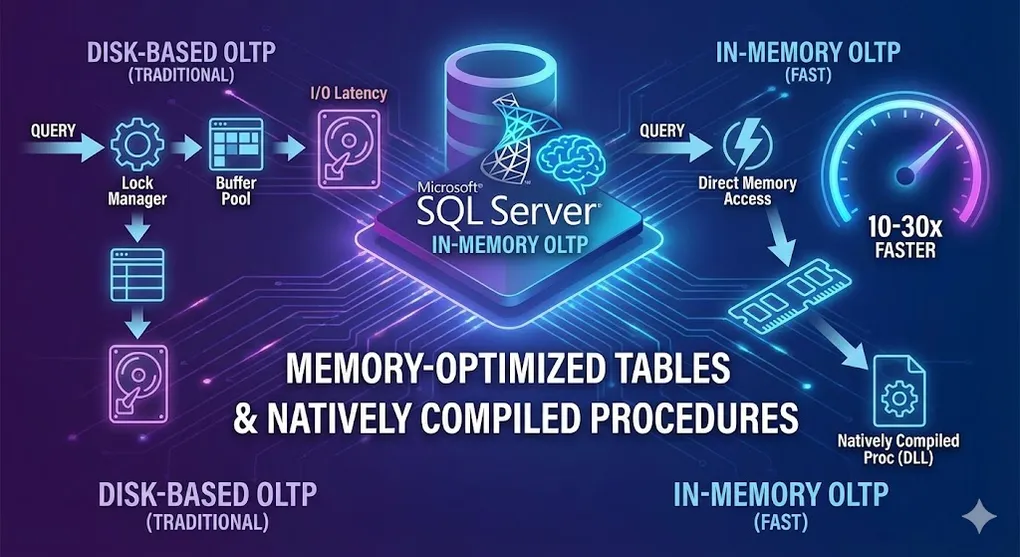
In-Memory OLTP: Memory-Optimized Tables & Natively Compiled Procedures
Prerequisites: Strong SQL Server fundamentals. See DB 03 B-Tree Index for index concepts.
In-Memory OLTP can speed up OLTP workloads by 10-30x by eliminating disk I/O and lock contention.
Part A: In-Memory OLTP Basics
1. What is In-Memory OLTP?
graph LR
    subgraph "Traditional (Disk-Based)"
        T1[Query] --> T2[Lock Manager]
        T2 --> T3[Buffer Pool]
        T3 --> T4[Disk I/O]
    end

    subgraph "In-Memory OLTP"
        M1[Query] --> M2[Direct Memory Access]
        M2 --> M3[No Locks!]
    end

    style T4 fill:#e74c3c,color:#fff
style M3 fill:#27ae60,color:#fff| Aspect | Disk-Based | In-Memory OLTP |
|---|---|---|
| Storage | On disk, cached in memory | Entirely in memory |
| Locking | Pessimistic (locks) | Optimistic (no locks/latches) |
| Durability | Transaction log + checkpoints | Log stream + checkpoint files |
| Speed | Good | 10-30x faster |
[!NOTE] How “No Locks” Works — MVCC: In-Memory OLTP uses Multi-Version Concurrency Control (MVCC). Each row has
Begin TimestampandEnd Timestamp. Updates create a new version instead of overwriting, marking the old row’sEnd Timestamp. This is why:
- Reads never block writes (readers see the old version)
- Garbage Collection is needed (to clean up old versions)
2. Key Components
| Component | Description |
|---|---|
| Memory-Optimized Tables | Tables stored entirely in memory |
| Hash Index | O(1) lookup for equality searches |
| Range Index | Bw-Tree for range scans |
| Natively Compiled Procs | Stored procedures compiled to native code |
| Memory-Optimized Filegroup | Required storage container |
3. When to Use In-Memory OLTP
| Good Fit | Not a Fit |
|---|---|
| High-volume OLTP | Large data warehouse |
| Session state | Complex analytics |
| Shopping carts | Full-text search |
| Gaming leaderboards | LOB data (large objects) |
| IoT data ingestion | Infrequently accessed data |
Part B: Implementation
4. Prerequisites
-- Check if database has memory-optimized filegroup
SELECT * FROM sys.filegroups WHERE type = 'FX';

-- Add memory-optimized filegroup (if not exists)
ALTER DATABASE MyDB
ADD FILEGROUP MyDB_InMemory CONTAINS MEMORY_OPTIMIZED_DATA;

-- Add container
ALTER DATABASE MyDB
ADD FILE (
    NAME = 'MyDB_InMemory_Data',
    FILENAME = 'C:\Data\MyDB_InMemory_Data'
)
TO FILEGROUP MyDB_InMemory;
5. Creating Memory-Optimized Tables
CREATE TABLE dbo.ShoppingCart
(
    CartID INT NOT NULL,
    SessionID UNIQUEIDENTIFIER NOT NULL,
    ProductID INT NOT NULL,
    Quantity INT NOT NULL,
    AddedAt DATETIME2 NOT NULL,

    -- Primary key with HASH index (for point lookups)
    CONSTRAINT PK_ShoppingCart PRIMARY KEY NONCLUSTERED HASH (CartID)
        WITH (BUCKET_COUNT = 1000000),

    -- Additional index for filtering
    INDEX IX_SessionID HASH (SessionID)
        WITH (BUCKET_COUNT = 100000)
)
WITH (MEMORY_OPTIMIZED = ON, DURABILITY = SCHEMA_AND_DATA);
6. Durability Options
| Option | Description | Use Case |
|---|---|---|
SCHEMA_AND_DATA | Full durability | Production data |
SCHEMA_ONLY | Data lost on restart | Temp tables, caches |
-- Schema-only (non-durable) - perfect for session state
CREATE TABLE dbo.TempCache
(
    CacheKey NVARCHAR(100) NOT NULL PRIMARY KEY NONCLUSTERED HASH
        WITH (BUCKET_COUNT = 10000),
    CacheValue NVARCHAR(MAX) NOT NULL,
    ExpiresAt DATETIME2 NOT NULL
)
WITH (MEMORY_OPTIMIZED = ON, DURABILITY = SCHEMA_ONLY);
7. Index Types
Hash Index (Equality lookups)
-- Best for: WHERE SessionID = @id
INDEX IX_Session HASH (SessionID)
    WITH (BUCKET_COUNT = 1000000)  -- ~2x expected unique values
Range Index (Range queries, ORDER BY)
-- Best for: WHERE CreatedAt > @date ORDER BY CreatedAt
INDEX IX_CreatedAt NONCLUSTERED (CreatedAt)
[!WARNING] Common Mistake: Many developers use Hash Index for everything because it’s “fast.” But Hash Index only supports
=operator. For>,<,>=,<=, orORDER BY, Hash Index requires a full table scan! Always use Range Index (Nonclustered) for range queries.
Part C: Natively Compiled Stored Procedures
8. What are Natively Compiled Procedures?
Regular stored procedures are interpreted at runtime. Natively compiled procedures are compiled to machine code for maximum speed.
graph LR
    subgraph "Interpreted Procedure"
        I1[SQL Text] --> I2[Parse]
        I2 --> I3[Optimize]
        I3 --> I4[Execute]
    end

    subgraph "Natively Compiled"
        N1[SQL Text] --> N2[Compile to DLL]
        N2 --> N3[Direct Execution]
    end

    style I4 fill:#f39c12,color:#fff
    style N3 fill:#27ae60,color:#fff
9. Creating Natively Compiled Procedures
CREATE PROCEDURE dbo.AddToCart
    @SessionID UNIQUEIDENTIFIER,
    @ProductID INT,
    @Quantity INT
WITH NATIVE_COMPILATION, SCHEMABINDING
AS
BEGIN ATOMIC WITH
(
    TRANSACTION ISOLATION LEVEL = SNAPSHOT,
    LANGUAGE = N'English'
)
    DECLARE @CartID INT = NEXT VALUE FOR dbo.CartSequence;

    INSERT INTO dbo.ShoppingCart (CartID, SessionID, ProductID, Quantity, AddedAt)
    VALUES (@CartID, @SessionID, @ProductID, @Quantity, SYSUTCDATETIME());
END;
10. Natively Compiled Requirements
| Requirement | Notes |
|---|---|
SCHEMABINDING | Required |
BEGIN ATOMIC | Required (defines transaction) |
| All tables | Must be memory-optimized |
| T-SQL | Subset of features supported |
Unsupported in Natively Compiled
- Dynamic SQL
- CURSOR
- Subqueries (some limitations)
- CTEs (some versions)
- CASE in some contexts
[!WARNING] Recompilation Trap: Natively Compiled Stored Procedures do NOT automatically recompile when statistics update. If data distribution changes significantly, the old execution plan may become extremely slow. You must manually run
sp_recompileor restart the database to force recompilation.
Part D: Best Practices
11. Sizing Hash Buckets
-- Rule of thumb: BUCKET_COUNT = 2x unique values
-- Too few: Long chains (slow)
-- Too many: Wasted memory

-- Check bucket usage
SELECT
    OBJECT_NAME(hs.object_id) AS table_name,
    i.name AS index_name,
    hs.total_bucket_count,
    hs.empty_bucket_count,
    hs.avg_chain_length,
    hs.max_chain_length
FROM sys.dm_db_xtp_hash_index_stats hs
JOIN sys.indexes i ON hs.object_id = i.object_id AND hs.index_id = i.index_id;| avg_chain_length | Status |
|---|---|
| < 1.5 | ✓ Good |
| 1.5 - 3 | ~ Acceptable |
| > 3 | ✗ Increase bucket count |
12. Memory Management
-- Check memory usage
SELECT
    OBJECT_NAME(object_id) AS table_name,
    memory_allocated_for_table_kb / 1024.0 AS table_mb,
    memory_allocated_for_indexes_kb / 1024.0 AS index_mb
FROM sys.dm_db_xtp_table_memory_stats
WHERE object_id > 0;

-- Server-wide In-Memory OLTP memory
SELECT
    type,
    memory_node_id,
    pages_kb / 1024.0 AS memory_mb
FROM sys.dm_os_memory_clerks
WHERE type = 'MEMORYCLERK_XTP';
13. Migration Strategy
[!TIP] AMR Tool: SQL Server provides a built-in Analysis, Migration, and Reporting (AMR) tool. It analyzes which tables and procedures would benefit most from In-Memory OLTP based on actual transaction patterns. Access it via: SSMS → Right-click database → Reports → Transaction Performance Analysis Overview.
graph TD
    START[Identify Hot Tables] --> ANALYZE[Analyze Access Patterns]
    ANALYZE --> SELECT[Select Candidates]
    SELECT --> TEST[Test in Dev/QA]
    TEST --> MIGRATE[Migrate to In-Memory]
    MIGRATE --> MONITOR[Monitor Performance]
Migration Script Pattern
-- 1. Create memory-optimized version
CREATE TABLE dbo.Orders_InMemory (...) WITH (MEMORY_OPTIMIZED = ON);

-- 2. Copy data
INSERT INTO dbo.Orders_InMemory SELECT * FROM dbo.Orders;

-- 3. Rename tables
EXEC sp_rename 'Orders', 'Orders_Old';
EXEC sp_rename 'Orders_InMemory', 'Orders';

-- 4. Recreate stored procedures as natively compiled (optional)
Part E: Monitoring & Troubleshooting
14. Key DMVs
| DMV | Purpose |
|---|---|
sys.dm_db_xtp_table_memory_stats | Table memory usage |
sys.dm_db_xtp_hash_index_stats | Hash index efficiency |
sys.dm_db_xtp_transactions | Active transactions |
sys.dm_xtp_system_memory_consumers | System memory usage |
15. Common Issues
| Issue | Symptom | Solution |
|---|---|---|
| Write conflicts | Error 41302 | Review transaction design |
| Memory exhaustion | Out of memory errors | Increase memory limit |
| Poor hash performance | High avg_chain_length | Resize bucket count |
| Checkpoint I/O | High log wait times | Multiple checkpoint files |
Summary
In-Memory OLTP Quick Guide
| Feature | Use When |
|---|---|
| Memory-Optimized Tables | High-volume OLTP |
| Schema-Only Durability | Session state, temp data |
| Hash Index | Point lookups (WHERE x = y) |
| Range Index | Range queries, ORDER BY |
| Natively Compiled Procs | Hot code paths |
Performance Comparison
| Scenario | Disk-Based | In-Memory |
|---|---|---|
| Simple INSERT | ~1,000/sec | ~100,000/sec |
| Point lookup | ~10,000/sec | ~500,000/sec |
| Lock contention | High | None |
Key Takeaways
- Not for everything → Best for high-volume OLTP hot spots
- Memory cost → Data must fit in memory
- Hash vs Range → Choose based on query patterns
- Native compilation → Maximum speed for critical procedures
- Test thoroughly → SQL subset, different behavior
Practice Questions
Conceptual
-
What is the main difference between disk-based tables and memory-optimized tables?
-
Explain the difference between SCHEMA_AND_DATA and SCHEMA_ONLY durability.
-
When should you use a Hash index vs a Range index in In-Memory OLTP?
Scenario
-
Design Decision: Your e-commerce site has a shopping cart table that handles 10,000 transactions per second. Cart data is temporary (expires after 30 minutes). Would you use In-Memory OLTP? If yes, what durability would you choose?
-
Troubleshooting: A memory-optimized table’s hash index has
avg_chain_lengthof 15. What does this mean and how would you fix it?