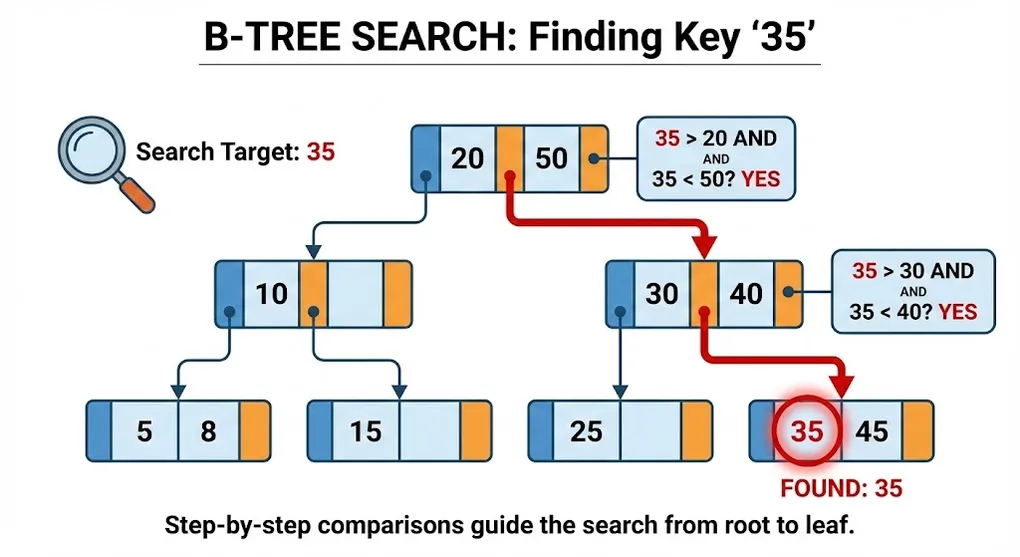
B-Tree Index: How SQL Server Finds Your Data
Prerequisites: Basic understanding of SQL Server and database tables. See SQL Server & Networking Fundamentals for background.
The Problem: Finding Data Without Indexes
Imagine a library with 1 million books but no catalog system. To find a specific book, you’d have to scan every shelf—one by one.
┌─────────────────────────────────────────────────────────────────┐
│              Without Index: Full Table Scan                     │
├─────────────────────────────────────────────────────────────────┤
│                                                                 │
│   Query: SELECT * FROM Customers WHERE CustomerID = 999999      │
│                                                                 │
│   ┌───┬───┬───┬───┬───┬───┬───┬───┬───┬───┬───┬───┬───┐         │
│   │ 1 │ 2 │ 3 │ 4 │ 5 │ 6 │ 7 │...│...│...│999999│...│ 1M│      │
│   └───┴───┴───┴───┴───┴───┴───┴───┴───┴───┴───────┴───┴───┘     │
│     ↑   ↑   ↑   ↑   ↑   ↑   ↑   ↑   ↑   ↑     ↑                 │
│   Scan every single row until found!                            │
│                                                                 │
│   Time: O(n) = Check all 1,000,000 rows                         │
│                                                                 │
└─────────────────────────────────────────────────────────────────┘
This is a Table Scan — the slowest way to find data.
The Solution: B-Tree Index
A B-Tree (Balanced Tree) is a sorted, hierarchical data structure that allows SQL Server to find any row in O(log n) time instead of O(n).
┌─────────────────────────────────────────────────────────────────┐
│              With B-Tree Index: Logarithmic Search              │
├─────────────────────────────────────────────────────────────────┤
│                                                                 │
│   Query: SELECT * FROM Customers WHERE CustomerID = 750000      │
│                                                                 │
│                         ┌───────────┐                           │
│                         │  Root     │                           │
│                         │ 1-500K    │                           │
│                         │ 500K-1M   │                           │
│                         └─────┬─────┘                           │
│                               │ "750000 is in 500K-1M range"    │
│                    ┌──────────┴──────────┐                      │
│                    ▼                      ▼                     │
│              ┌──────────┐          ┌──────────┐                 │
│              │ 500-750K │          │ 750K-1M  │ ← Go here       │
│              └──────────┘          └─────┬────┘                 │
│                                          │                      │
│                               ┌──────────┴──────────┐           │
│                               ▼                      ▼          │
│                        ┌──────────┐          ┌──────────┐       │
│                        │ 750-800K │ ← Found! │ 800-850K │       │
│                        └──────────┘          └──────────┘       │
│                                                                 │
│   Time: O(log n) = Only 3-4 levels to traverse for 1M rows      │
│                                                                 │
└─────────────────────────────────────────────────────────────────┘| Rows | Full Scan (O(n)) | B-Tree (O(log n)) | Improvement |
|---|---|---|---|
| 1,000 | 1,000 reads | ~10 reads | 100x |
| 1,000,000 | 1,000,000 reads | ~20 reads | 50,000x |
| 1,000,000,000 | 1,000,000,000 reads | ~30 reads | 33,000,000x |
Part A: B-Tree Structure
1. Anatomy of a B-Tree
┌─────────────────────────────────────────────────────────────────┐
│              B-Tree Anatomy                                     │
├─────────────────────────────────────────────────────────────────┤
│                                                                 │
│   Level 0 (Root)        ┌────────────────────────┐              │
│                         │   500  │  1000  │  1500 │             │
│                         └──┬─────┴────┬───┴────┬──┘             │
│                            │          │        │                │
│   Level 1 (Intermediate)   ▼          ▼        ▼                │
│                     ┌──────────┐ ┌──────────┐ ┌──────────┐      │
│                     │100│200│..│ │600│700│..│ │1100│1200│       │
│                     └────┬─────┘ └──────────┘ └──────────┘      │
│                          │                                      │
│   Level 2 (Leaf)         ▼                                      │
│                     ┌──────────────────────────────────┐        │
│                     │ Actual data or pointers to data  │        │
│                     │ (Row 100, Row 101, Row 102...)   │        │
│                     └──────────────────────────────────┘        │
│                                                                 │
│   Key Properties:                                               │
│   • All leaves at same depth (balanced)                         │
│   • Nodes sorted left to right                                  │
│   • Each node = one 8KB page on disk                            │
│                                                                 │
└─────────────────────────────────────────────────────────────────┘
2. Pages: The Building Blocks
SQL Server stores data in 8KB pages. Each B-Tree node = one page.
| Page Type | Contents |
|---|---|
| Root Page | Entry point; pointers to intermediate pages |
| Intermediate Pages | Navigation pages with key ranges |
| Leaf Pages | Actual data OR pointers to data (depends on index type) |
┌─────────────────────────────────────────────────────────────────┐
│              8KB Page Structure                                 │
├─────────────────────────────────────────────────────────────────┤
│                                                                 │
│   ┌─────────────────────────────────────────────────────────┐   │
│   │ Page Header (96 bytes)                                  │   │
│   │ - Page number, Object ID, Index ID                      │   │
│   │ - Free space info, Previous/Next page pointers          │   │
│   ├─────────────────────────────────────────────────────────┤   │
│   │                                                         │   │
│   │ Row 1: [Key: 100] [Data or Pointer]                     │   │
│   │ Row 2: [Key: 101] [Data or Pointer]                     │   │
│   │ Row 3: [Key: 102] [Data or Pointer]                     │   │
│   │ ...                                                     │   │
│   │ Row N: [Key: 199] [Data or Pointer]                     │   │
│   │                                                         │   │
│   ├─────────────────────────────────────────────────────────┤   │
│   │ Row Offset Array (from bottom up)                       │   │
│   └─────────────────────────────────────────────────────────┘   │
│                                                                 │
│   Typical capacity: 100-500 rows per page (depends on row size) │
│                                                                 │
└─────────────────────────────────────────────────────────────────┘
Part B: Clustered vs Non-Clustered Index
This is the most important distinction in SQL Server indexing.
3. Clustered Index: The Table IS the Index
A Clustered Index physically reorders the data on disk to match the index order.
┌─────────────────────────────────────────────────────────────────┐
│              Clustered Index = Physical Sort Order              │
├─────────────────────────────────────────────────────────────────┤
│                                                                 │
│   CREATE CLUSTERED INDEX IX_Customers_ID ON Customers(ID)       │
│                                                                 │
│   Before (Heap):              After (Clustered):                │
│   ┌─────────────────┐         ┌─────────────────┐               │
│   │ ID=5, Name=Eve  │         │ ID=1, Name=Alice│ ← Physically  │
│   │ ID=1, Name=Alice│         │ ID=2, Name=Bob  │   sorted!     │
│   │ ID=3, Name=Carol│   →     │ ID=3, Name=Carol│               │
│   │ ID=2, Name=Bob  │         │ ID=4, Name=Dave │               │
│   │ ID=4, Name=Dave │         │ ID=5, Name=Eve  │               │
│   └─────────────────┘         └─────────────────┘               │
│                                                                 │
│   Leaf pages contain ACTUAL ROWS (all columns)                  │
│                                                                 │
└─────────────────────────────────────────────────────────────────┘
Key Facts:
- Only ONE clustered index per table (because data can only be sorted one way)
- Primary Key = Clustered Index by default
- Leaf level = the actual table data
What Is a Heap? (No Clustered Index)
A table without a clustered index is called a Heap — data is stored in no particular order.
┌─────────────────────────────────────────────────────────────────┐
│              Heap vs Clustered Table                            │
├─────────────────────────────────────────────────────────────────┤
│                                                                 │
│   HEAP (No CI):                    CLUSTERED TABLE:             │
│   ┌─────────────────┐              ┌─────────────────┐          │
│   │ ID=5, Name=Eve  │              │ ID=1, Name=Alice│          │
│   │ ID=1, Name=Alice│  (random)    │ ID=2, Name=Bob  │ (sorted) │
│   │ ID=3, Name=Carol│              │ ID=3, Name=Carol│          │
│   └─────────────────┘              └─────────────────┘          │
│                                                                 │
│   NC Index points to: RID          NC Index points to:          │
│   (FileID:PageID:SlotID)           Clustered Key (ID)           │
│                                                                 │
└─────────────────────────────────────────────────────────────────┘| Aspect | Heap | Clustered Table |
|---|---|---|
| Data order | Random (insertion order) | Sorted by clustered key |
| NC Index pointer | RID (physical location) | Clustered key value |
| Range scans | Full table scan | Fast (sequential read) |
| Point lookups | Via RID (fast if known) | Via B-Tree (fast) |
When Heaps Are Useful:
- ⚡ Staging tables: Bulk-load data quickly, process later, then drop
- ⚡ High-velocity inserts: No page splits, no key ordering overhead
- ⚡ Bulk export/import: ETL intermediate tables
Rule of Thumb: Most production tables should have a clustered index. Use heaps only for temporary/staging scenarios where write speed matters more than read performance.
4. Non-Clustered Index: The Separate Index
A Non-Clustered Index is a separate structure with pointers to the actual data.
┌─────────────────────────────────────────────────────────────────┐
│              Non-Clustered Index = Separate Lookup              │
├─────────────────────────────────────────────────────────────────┤
│                                                                 │
│   CREATE NONCLUSTERED INDEX IX_Customers_Name ON Customers(Name)│
│                                                                 │
│   ┌────────────────────┐         ┌─────────────────────────┐    │
│   │  NC Index          │         │  Table (Clustered)      │    │
│   │  (sorted by Name)  │         │  (sorted by ID)         │    │
│   ├────────────────────┤         ├─────────────────────────┤    │
│   │ Alice → ID=1 ──────┼────────►│ ID=1, Alice, 555-1234   │    │
│   │ Bob → ID=2 ────────┼────────►│ ID=2, Bob, 555-5678     │    │
│   │ Carol → ID=3 ──────┼────────►│ ID=3, Carol, 555-9999   │    │
│   │ Dave → ID=4 ───────┼────────►│ ID=4, Dave, 555-0000    │    │
│   │ Eve → ID=5 ────────┼────────►│ ID=5, Eve, 555-1111     │    │
│   └────────────────────┘         └─────────────────────────┘    │
│                                                                 │
│   Leaf pages contain: Index key + Row Locator (Clustered Key    │
│   or RID if heap)                                               │
│                                                                 │
└─────────────────────────────────────────────────────────────────┘
Key Facts:
- Up to 999 non-clustered indexes per table
- Leaf level contains key + pointer (not full row)
- May require a “Key Lookup” to get non-indexed columns
5. Comparison Table
| Feature | Clustered Index | Non-Clustered Index |
|---|---|---|
| Max per table | 1 | 999 |
| Leaf level contains | All row data | Key + Row locator |
| Data physically sorted | Yes | No |
| Speed for range queries | Excellent (sequential read) | Good (may need lookups) |
| Speed for point lookups | Excellent | Excellent |
| Storage overhead | None (IS the table) | Additional storage needed |
Part C: Index Operations
6. Key Lookup and Covering Indexes
When a non-clustered index doesn’t contain all columns needed:
┌─────────────────────────────────────────────────────────────────┐
│              Key Lookup Problem                                 │
├─────────────────────────────────────────────────────────────────┤
│                                                                 │
│   Query: SELECT Name, Phone FROM Customers WHERE Name='Alice'   │
│   Index: CREATE NONCLUSTERED INDEX IX_Name ON Customers(Name)   │
│                                                                 │
│   Step 1: Find 'Alice' in NC Index                              │
│   ┌────────────────────┐                                        │
│   │ Name    │ ID       │                                        │
│   │ Alice   │ 1  ──────┼───┐                                    │
│   └────────────────────┘   │                                    │
│                             │ Key Lookup (expensive!)           │
│   Step 2: Go to table       ▼                                   │
│   ┌──────────────────────────────────┐                          │
│   │ ID=1, Name=Alice, Phone=555-1234 │ ← Get Phone column       │
│   └──────────────────────────────────┘                          │
│                                                                 │
│   SOLUTION: Covering Index                                      │
│   CREATE NONCLUSTERED INDEX IX_Name_Phone                       │
│   ON Customers(Name) INCLUDE(Phone)                             │
│                                                                 │
│   Now leaf level contains: Name + Phone                         │
│   ┌─────────────────────────────────┐                           │
│   │ Name    │ Phone      │ (No lookup needed!)                  │
│   │ Alice   │ 555-1234   │                                      │
│   └─────────────────────────────────┘                           │
│                                                                 │
└─────────────────────────────────────────────────────────────────┘
7. Page Splits: The Hidden Performance Killer
When inserting into a full page, SQL Server must split it:
┌─────────────────────────────────────────────────────────────────┐
│              Page Split                                         │
├─────────────────────────────────────────────────────────────────┤
│                                                                 │
│   Before: Page is full, need to insert ID=150                   │
│   ┌─────────────────────────────────────────────────────────┐   │
│   │ Page 100: [100][101][102][103][104][199] ← Full!        │   │
│   └─────────────────────────────────────────────────────────┘   │
│                                                                 │
│   After: Page split!                                            │
│   ┌───────────────────────────┐ ┌───────────────────────────┐   │
│   │ Page 100: [100][101][102] │ │ Page 200: [103][104][150] │   │
│   │ (half the data)           │ │ [199] (other half + new)  │   │
│   └───────────────────────────┘ └───────────────────────────┘   │
│                                                                 │
│   Problems:                                                     │
│   1. Extra I/O to allocate new page                             │
│   2. Updates to parent page pointers                            │
│   3. Fragmentation (pages no longer contiguous)                 │
│   4. Transaction log bloat                                      │
│                                                                 │
└─────────────────────────────────────────────────────────────────┘
When do splits happen?
- Random inserts (non-sequential keys like GUIDs)
- Inserts in the middle of an ordered sequence
8. Fill Factor: Leaving Room for Growth
Fill Factor defines how full pages should be when index is built/rebuilt.
┌─────────────────────────────────────────────────────────────────┐
│              Fill Factor                                        │
├─────────────────────────────────────────────────────────────────┤
│                                                                 │
│   Fill Factor = 100% (default)                                  │
│   ┌─────────────────────────────────────────────────────────┐   │
│   │ [100][101][102][103][104][105][106][107][108][109] FULL │   │
│   └─────────────────────────────────────────────────────────┘   │
│   → ANY insert causes page split!                               │
│                                                                 │
│   Fill Factor = 80%                                             │
│   ┌─────────────────────────────────────────────────────────┐   │
│   │ [100][101][102][103][104][105][106][107]    SPACE       │   │
│   └─────────────────────────────────────────────────────────┘   │
│   → Room for 2 more inserts before split                        │
│                                                                 │
│   Trade-off:                                                    │
│   Lower Fill Factor = Fewer splits, More disk space             │
│   Higher Fill Factor = More splits, Less disk space             │
│                                                                 │
└─────────────────────────────────────────────────────────────────┘| Fill Factor | Use Case |
|---|---|
| 100% | Read-only tables, append-only (sequential keys) |
| 80-90% | Normal OLTP with updates |
| 50-70% | Heavy random inserts (GUID keys) |
Part D: Index Fragmentation
9. Types of Fragmentation
| Type | Description | Impact |
|---|---|---|
| Internal | Pages not fully utilized (empty space) | Wastes disk space |
| External (Logical) | Pages out of physical order | Slows sequential reads |
┌─────────────────────────────────────────────────────────────────┐
│              External Fragmentation                             │
├─────────────────────────────────────────────────────────────────┤
│                                                                 │
│   Ideal (0% fragmentation):                                     │
│   ┌────────┐┌────────┐┌────────┐┌────────┐                      │
│   │ Page 1 ││ Page 2 ││ Page 3 ││ Page 4 │ (contiguous)         │
│   └────────┘└────────┘└────────┘└────────┘                      │
│                                                                 │
│   Fragmented (after many splits):                               │
│   ┌────────┐         ┌────────┐                                 │
│   │ Page 1 │         │ Page 3 │                                 │
│   └────────┘         └────────┘                                 │
│         ┌────────┐         ┌────────┐                           │
│         │ Page 2 │         │ Page 4 │ (scattered on disk)       │
│         └────────┘         └────────┘                           │
│                                                                 │
│   Impact: Disk head has to jump around → slower reads           │
│                                                                 │
└─────────────────────────────────────────────────────────────────┘
10. Checking and Fixing Fragmentation
Check fragmentation:
SELECT
    index_type_desc,
    avg_fragmentation_in_percent,
    page_count
FROM sys.dm_db_index_physical_stats(
    DB_ID(),
    OBJECT_ID('Customers'),
    NULL,
    NULL,
    'LIMITED'
);
Fix fragmentation:
| Fragmentation | Action | Command |
|---|---|---|
| < 5% | Do nothing | - |
| 5-30% | Reorganize | ALTER INDEX IX_Name REORGANIZE |
| > 30% | Rebuild | ALTER INDEX IX_Name REBUILD |
| Operation | Online? | Log Usage | Time |
|---|---|---|---|
| REORGANIZE | Yes | Minimal | Slower |
| REBUILD | Enterprise only | Full | Faster |
Part E: Index Design Best Practices
11. What Columns to Index?
| Good Candidates | Bad Candidates |
|---|---|
| ✅ Columns in WHERE clauses | ❌ Low selectivity (gender, yes/no) |
| ✅ Columns in JOIN conditions | ❌ Frequently updated columns |
| ✅ Columns in ORDER BY | ❌ Wide columns (text, nvarchar(max)) |
| ✅ High selectivity columns | ❌ Tables with heavy INSERT load |
Selectivity, Cardinality, and Statistics
Why does SQL Server sometimes ignore your index? The answer lies in Statistics.
| Term | Definition | Example |
|---|---|---|
| Cardinality | Number of unique values in a column | Gender has cardinality 2; CustomerID has cardinality 1,000,000 |
| Selectivity | % of rows returned by a filter | WHERE Gender='M' returns 50% (low selectivity); WHERE CustomerID=123 returns 0.0001% (high selectivity) |
| Statistics | SQL Server’s histogram of value distribution | Updated automatically or via UPDATE STATISTICS |
┌─────────────────────────────────────────────────────────────────┐
│         Why SQL Server Ignores Your Index                       │
├─────────────────────────────────────────────────────────────────┤
│                                                                 │
│   Query: SELECT * FROM Orders WHERE Status = 'Completed'        │
│   Index exists on: Status                                       │
│                                                                 │
│   Query Optimizer checks Statistics:                            │
│   ┌─────────────────────────────────────────────────────────┐   │
│   │ Status      │ Rows      │ % of Table                    │   │
│   │ Pending     │ 50,000    │ 5%  → Use Index ✅            │   │
│   │ Completed   │ 800,000   │ 80% → Table Scan faster! ❌   │   │
│   │ Cancelled   │ 150,000   │ 15% → Maybe use index ⚠️      │   │
│   └─────────────────────────────────────────────────────────┘   │
│                                                                 │
│   Rule: If query returns >15-20% of table, full scan is faster  │
│   than thousands of random I/O lookups.                         │
│                                                                 │
└─────────────────────────────────────────────────────────────────┘
Key Takeaways:
- ❌ Low selectivity (returns many rows) → Index hurts more than helps
- ✅ High selectivity (returns few rows) → Index is valuable
- 🔄 Outdated statistics → Wrong decisions. Run
UPDATE STATISTICSafter large data changes
-- Check statistics age
DBCC SHOW_STATISTICS ('Customers', 'IX_Status');

-- Force statistics update
UPDATE STATISTICS Customers WITH FULLSCAN;
12. Composite Index: Column Order Matters!
CREATE NONCLUSTERED INDEX IX_Name_City ON Customers(LastName, City);┌─────────────────────────────────────────────────────────────────┐
│ Composite Index: Leftmost Prefix Rule │
├─────────────────────────────────────────────────────────────────┤
│ │
│ Index on (LastName, City) │
│ │
│ ✅ Can use index for: │
│ WHERE LastName = 'Smith' │
│ WHERE LastName = 'Smith' AND City = 'NYC' │
│ │
│ ❌ Cannot use index for: │
│ WHERE City = 'NYC' (first column not used!) │
│ │
│ Think of it like a phone book: │
│ Sorted by LastName first, then by City within same LastName │
│ │
│ Smith, NYC │
│ Smith, LA │
│ Smith, Tokyo ← Easy to find all Smiths │
│ Jones, NYC │
│ Jones, LA ← But finding "all NYC" requires full scan │
│ │
└─────────────────────────────────────────────────────────────────┘Key Columns vs INCLUDE Columns
Critical distinction often missed by developers:
-- Composite Key Index (both columns sorted)
CREATE INDEX IX_Key ON Orders(CustomerID, OrderDate);

-- Covering Index with INCLUDE (only CustomerID sorted)
CREATE INDEX IX_Cover ON Orders(CustomerID) INCLUDE(OrderDate);| Aspect | Key Columns | INCLUDE Columns |
|---|---|---|
| Stored in | All B-Tree levels | Leaf level only |
| Sorted | ✅ Yes, used for seeking | ❌ No, just stored alongside |
| Can be used for | WHERE, ORDER BY, JOIN | SELECT list only |
| Index size | Larger (in every node) | Smaller (leaf only) |
┌─────────────────────────────────────────────────────────────────┐
│         Key Column vs INCLUDE Column Structure                   │
├─────────────────────────────────────────────────────────────────┤
│                                                                 │
│   CREATE INDEX IX_Cover ON Orders(CustomerID) INCLUDE(OrderDate)│
│                                                                 │
│                     ┌───────────────┐                           │
│   Root/Intermediate │ CustomerID    │ ← Only key columns        │
│                     │ (sorted)      │   at upper levels         │
│                     └───────────────┘                           │
│                            │                                    │
│                            ▼                                    │
│   Leaf Level         ┌───────────────────────────────┐          │
│                      │ CustomerID │ OrderDate        │          │
│                      │ (sorted)   │ (just stored)    │          │
│                      └───────────────────────────────┘          │
│                                                                 │
│   Query: WHERE CustomerID = 123 → Seeks using CustomerID        │
│   Query: WHERE OrderDate = '2024-01-01' → Cannot seek! ❌       │
│                                                                 │
└─────────────────────────────────────────────────────────────────┘
When to use INCLUDE:
- ✅ Column needed in SELECT but not in WHERE/ORDER BY
- ✅ Want to avoid Key Lookups without bloating the index
- ✅ Column has low cardinality (not useful for seeking anyway)
13. Choosing the Right Clustered Index Key
| Criteria | Why |
|---|---|
| Narrow | Used in all non-clustered indexes as pointer |
| Unique | No need for “uniqueifier” |
| Static | Changing clustered key = move entire row |
| Ever-increasing | Prevents page splits (new rows at end) |
Best choice: Auto-increment INT (IDENTITY) or sequential GUID (NEWSEQUENTIALID)
Worst choice: Random GUID (NEWID) — causes massive page splits!
Part F: Monitoring and Tuning
14. Finding Missing Indexes
SQL Server tracks queries that would benefit from indexes:
SELECT
    migs.avg_user_impact,
    mid.statement AS table_name,
    mid.equality_columns,
    mid.inequality_columns,
    mid.included_columns
FROM sys.dm_db_missing_index_groups mig
JOIN sys.dm_db_missing_index_group_stats migs ON mig.index_group_handle = migs.group_handle
JOIN sys.dm_db_missing_index_details mid ON mig.index_handle = mid.index_handle
ORDER BY migs.avg_user_impact DESC;
15. Finding Unused Indexes
Indexes that waste space and slow down writes:
SELECT
    OBJECT_NAME(i.object_id) AS table_name,
    i.name AS index_name,
    ius.user_seeks,
    ius.user_scans,
    ius.user_lookups,
    ius.user_updates
FROM sys.indexes i
JOIN sys.dm_db_index_usage_stats ius ON i.object_id = ius.object_id AND i.index_id = ius.index_id
WHERE ius.user_seeks = 0 AND ius.user_scans = 0 AND ius.user_lookups = 0
ORDER BY ius.user_updates DESC;
If user_updates is high but seeks/scans/lookups are zero → consider dropping the index.
Part G: What Is an Algorithm?
Before we go deeper, let’s understand the concept that makes all of this work.
16. Algorithm = Recipe (SOP)
An algorithm is simply: “A standard procedure for solving a problem.”
| Step | Description |
|---|---|
| Input | Raw, messy data |
| Algorithm | Step-by-step processing logic |
| Output | The desired result |
┌─────────────────────────────────────────────────────────────────┐
│              Algorithm = Recipe                                 │
├─────────────────────────────────────────────────────────────────┤
│                                                                 │
│   Input: Flour, Eggs, Sugar                                     │
│                                                                 │
│   Algorithm (Recipe):                                           │
│   1. Mix ingredients                                            │
│   2. Let rise for 30 minutes                                    │
│   3. Bake at 180°C for 20 minutes                               │
│                                                                 │
│   Output: Delicious cake! 🎂                                    │
│                                                                 │
└─────────────────────────────────────────────────────────────────┘
17. Algorithms We’ve Already Learned
| System | Problem | Bad Algorithm | Good Algorithm | Result |
|---|---|---|---|---|
| SQL Query | Find one row in 1M rows | Full Table Scan (O(n)) | B-Tree Seek (O(log n)) | 10 min → 0.1 sec |
| Navigation (OSPF) | Find fastest route | Random walk | Dijkstra’s algorithm | Lost → Arrive on time |
| TCP | Packet lost | Resend everything | Resend only lost packet | Crash → Smooth |
| Hard Disk | Multiple read requests | Jump randomly | Elevator algorithm (sequential) | Overheated → Efficient |
Part H: Index ≠ B-Tree (Other Index Types)
Index is the goal (find data fast). B-Tree is the most common implementation—but not the only one!
┌─────────────────────────────────────────────────────────────────┐
│              Index vs Implementation                            │
├─────────────────────────────────────────────────────────────────┤
│                                                                 │
│   Index (Goal)     =     Engine (Purpose: Make car move)        │
│   B-Tree (Method)  =     V8 Engine (One specific design)        │
│                                                                 │
│   Other engines: Electric motor, Rotary engine...               │
│   Other indexes: Hash, Columnstore, Spatial...                  │
│                                                                 │
└─────────────────────────────────────────────────────────────────┘
18. Hash Index
Analogy: Library call number calculated by formula.
How it works: A math function calculates the exact storage location.
Hash("Alice") = 42 → Go directly to slot 42!| Advantage | Disadvantage |
|---|---|
| ✅ Point lookup in O(1) | ❌ Cannot do range queries |
| ✅ Faster than B-Tree for single-row lookup | ❌ WHERE Age > 20 doesn’t work |
Use Case: Redis, SQL Server Memory-Optimized Tables
19. Columnstore Index
Analogy: Store data “vertically” instead of “horizontally.”
┌─────────────────────────────────────────────────────────────────┐
│              Rowstore vs Columnstore                            │
├─────────────────────────────────────────────────────────────────┤
│                                                                 │
│   ROWSTORE (Traditional):          COLUMNSTORE:                 │
│   ┌────────────────────────────┐   ┌──────┬──────┬──────┐       │
│   │ ID │ Name  │ Salary        │   │ ID   │ Name │Salary│       │
│   │ 1  │ Alice │ 50000         │   │ 1    │ Alice│ 50000│       │
│   │ 2  │ Bob   │ 60000         │   │ 2    │ Bob  │ 60000│       │
│   │ 3  │ Carol │ 55000         │   │ 3    │ Carol│ 55000│       │
│   └────────────────────────────┘   └──────┴──────┴──────┘       │
│   (Rows stored together)           (Columns stored together)    │
│                                                                 │
│   Query: SELECT AVG(Salary) FROM Employees                      │
│                                                                 │
│   Rowstore: Must read entire rows (wasted I/O)                  │
│   Columnstore: Only reads Salary column (10x faster for BI!)    │
│                                                                 │
└─────────────────────────────────────────────────────────────────┘
Use Case: Data warehouses, Business Intelligence, Big Data analytics
20. Spatial Index (R-Tree)
Problem: “Find all gas stations within 5km of my location.” B-Tree can’t handle 2D coordinates!
Solution: R-Tree (Rectangle Tree) uses geometric regions.
┌─────────────────────────────────────────────────────────────────┐
│              R-Tree: Geographic Indexing                         │
├─────────────────────────────────────────────────────────────────┤
│                                                                  │
│   ┌──────────────────────────────────────┐                       │
│   │    ┌─────────┐     ┌─────────┐       │                       │
│   │    │ Region A│     │ Region B│       │                       │
│   │    │ ⛽ ⛽    │     │   ⛽     │       │                        │
│   │    └─────────┘     └─────────┘       │                       │
│   │         📍 You are here              │                        │
│   │    ┌─────────┐                       │                       │
│   │    │ Region C│                       │                       │
│   │    │   ⛽     │                       │                       │
│   │    └─────────┘                       │                       │
│   └──────────────────────────────────────┘                       │
│                                                                  │
│   Query: "What's near me?"                                       │
│   R-Tree: Only check Region A (overlaps with search area)        │
│   Skip B, C → Massive performance improvement for maps           │
│                                                                  │
└─────────────────────────────────────────────────────────────────┘
Use Case: Google Maps, Uber, any location-based service
21. Index Type Comparison
| Index Type | Best For | Range Queries? | Point Lookup |
|---|---|---|---|
| B-Tree | General purpose OLTP | ✅ Yes | ⚡ Fast |
| Hash | Key-value stores | ❌ No | ⚡⚡ Fastest |
| Columnstore | Analytics/BI | ✅ Yes (aggregate) | ❌ Slow |
| Spatial (R-Tree) | Geographic data | ✅ Yes (2D) | ⚡ Fast |
Part I: Query Optimizer (SQL Server’s Brain)
22. What Happens When You Execute a Query?
When you write SELECT * FROM Customers, SQL Server doesn’t just run it blindly. A built-in AI called the Query Optimizer makes intelligent decisions.
┌─────────────────────────────────────────────────────────────────┐
│              Query Optimizer Decision Process                    │
├─────────────────────────────────────────────────────────────────┤
│                                                                  │
│   Your Query: SELECT * FROM Customers WHERE Name = 'Alice'       │
│                                                                  │
│   Query Optimizer thinks (in 0.01 seconds):                      │
│                                                                  │
│   ┌─────────────────────────────────────────────────────────┐    │
│   │ 1. Is there an index on Name?                           │    │
│   │ 2. How many rows will match? (statistics)               │    │
│   │ 3. Is it cheaper to scan the whole table or use index?  │    │
│   │ 4. Generate multiple possible plans                     │    │
│   │ 5. Calculate cost of each plan                          │    │
│   │ 6. Choose the CHEAPEST plan                             │    │
│   └─────────────────────────────────────────────────────────┘    │
│                                                                  │
│   Output: Execution Plan (Index Seek, Hash Join, etc.)           │
│                                                                  │
└─────────────────────────────────────────────────────────────────┘
23. Index Seek vs Index Scan
| Operation | Description | Performance |
|---|---|---|
| Index Seek | Use index to jump directly to matching rows | ⚡ Fast |
| Index Scan | Read entire index from start to end | 🐌 Slow |
| Table Scan | Read entire table (no index used) | 🐌🐌 Very slow |
SELECT * FROM Customers WHERE CustomerID = 100
→ Index Seek (good!)

SELECT * FROM Customers WHERE YEAR(BirthDate) = 1990
→ Index Scan or Table Scan (bad! function on column)
Part J: Index Anti-Patterns (When Indexes Fail)
Even with indexes, SQL Server may refuse to use them. These are the 禁忌 (taboos) to avoid:
24. Common Index Killers
❌ Anti-Pattern 1: Function on Column
-- BAD: Index on BirthDate is IGNORED
SELECT * FROM Customers WHERE YEAR(BirthDate) = 1990;

-- GOOD: Rewrite to avoid function
SELECT * FROM Customers
WHERE BirthDate >= '1990-01-01' AND BirthDate < '1991-01-01';
Why? The index stores BirthDate values, not YEAR(BirthDate) values.
❌ Anti-Pattern 2: Implicit Type Conversion
-- BAD: CustomerCode is VARCHAR, but you pass INT
-- Index on CustomerCode is IGNORED
SELECT * FROM Customers WHERE CustomerCode = 12345;

-- GOOD: Match the data type
SELECT * FROM Customers WHERE CustomerCode = '12345';
❌ Anti-Pattern 3: Leading Wildcard
-- BAD: Cannot use index (starts with wildcard)
SELECT * FROM Customers WHERE Name LIKE '%Smith';

-- GOOD: Can use index (wildcard at end)
SELECT * FROM Customers WHERE Name LIKE 'Smith%';
❌ Anti-Pattern 4: OR Condition with Non-Indexed Column
-- BAD: If only one column is indexed
SELECT * FROM Customers WHERE Name = 'Alice' OR Phone = '555-1234';

-- GOOD: Use UNION instead
SELECT * FROM Customers WHERE Name = 'Alice'
UNION
SELECT * FROM Customers WHERE Phone = '555-1234';
❌ Anti-Pattern 5: SELECT * (Forcing Key Lookup)
-- BAD: Forces lookup even with covering index
SELECT * FROM Customers WHERE Name = 'Alice';

-- GOOD: Select only needed columns
SELECT Name, Email FROM Customers WHERE Name = 'Alice';
25. How to Check If Index Is Used
Use Execution Plan (Ctrl+M in SSMS):
SET STATISTICS IO ON;
SELECT * FROM Customers WHERE CustomerID = 100;
Look for:
- ✅ Index Seek = Good
- ⚠️ Index Scan = Might be OK for small tables
- ❌ Table Scan = No index used, full table read
Summary: Quick Reference
Clustered vs Non-Clustered
| Clustered | Non-Clustered | |
|---|---|---|
| Data location | Leaf = actual rows | Leaf = key + pointer |
| Per table | 1 | 999 |
| Best for | Range scans, PK | Secondary lookups |
Index Types
| Type | Use Case | Range Query? |
|---|---|---|
| B-Tree | General OLTP | ✅ |
| Hash | Key lookup | ❌ |
| Columnstore | BI/Analytics | ✅ (aggregate) |
| Spatial | Geographic | ✅ (2D) |
Maintenance Thresholds
| Fragmentation | Action |
|---|---|
| < 5% | None |
| 5-30% | REORGANIZE |
| > 30% | REBUILD |
Index Killers to Avoid
| Anti-Pattern | Example |
|---|---|
| Function on column | WHERE YEAR(Date) = 2020 |
| Type mismatch | WHERE VarcharCol = 123 |
| Leading wildcard | WHERE Name LIKE '%Smith' |
| SELECT * | Forces key lookup |
Key Design Rules
- Clustered key: Narrow, unique, static, ever-increasing
- Non-clustered: Put most selective column first
- Include columns: Avoid key lookups
- Monitor: Check missing indexes, unused indexes
💡 Practice Questions
Conceptual
-
Explain the difference between a clustered index and a non-clustered index. Can a table have multiple of each?
-
What is a covering index? Why does it improve query performance?
-
Describe what happens during a page split. How can you minimize page splits?
-
What is index fragmentation and when should you rebuild vs reorganize an index?
Hands-on
-- Create the optimal index for this query:
SELECT CustomerName, OrderDate, TotalAmount
FROM Orders
WHERE Status = 'Active' AND Region = 'APAC'
ORDER BY OrderDate DESC;

-- Analyze this execution plan and identify the problem:
-- Table Scan (Cost: 95%) -> suggests what action?
💡 View Answer
-- Optimal covering index (includes all columns needed):
CREATE NONCLUSTERED INDEX IX_Orders_StatusRegion
ON Orders (Status, Region, OrderDate DESC)
INCLUDE (CustomerName, TotalAmount);

-- Why this works:
-- 1. Status, Region: Equality predicates (first columns)
-- 2. OrderDate DESC: Sort order matches ORDER BY
-- 3. INCLUDE: CustomerName, TotalAmount avoids key lookup
Table Scan Analysis:
- A Table Scan at 95% cost means NO USEFUL INDEX exists
- Action: Create an index on the filtered columns (Status, Region)
- The index should cover all SELECT columns to avoid lookups
Scenario
-
Performance Issue: A query that used to run in 2 seconds now takes 30 seconds. The table grew from 100K to 10M rows. No indexes were added. What happened and how would you fix it?
-
Index Design: A table has a GUID as primary key and clustered index. Insert performance is terrible. Explain why and propose a solution.
-
Trade-off Decision: A developer wants to add 15 indexes to a table to speed up various reports. What questions would you ask, and what are the potential downsides?