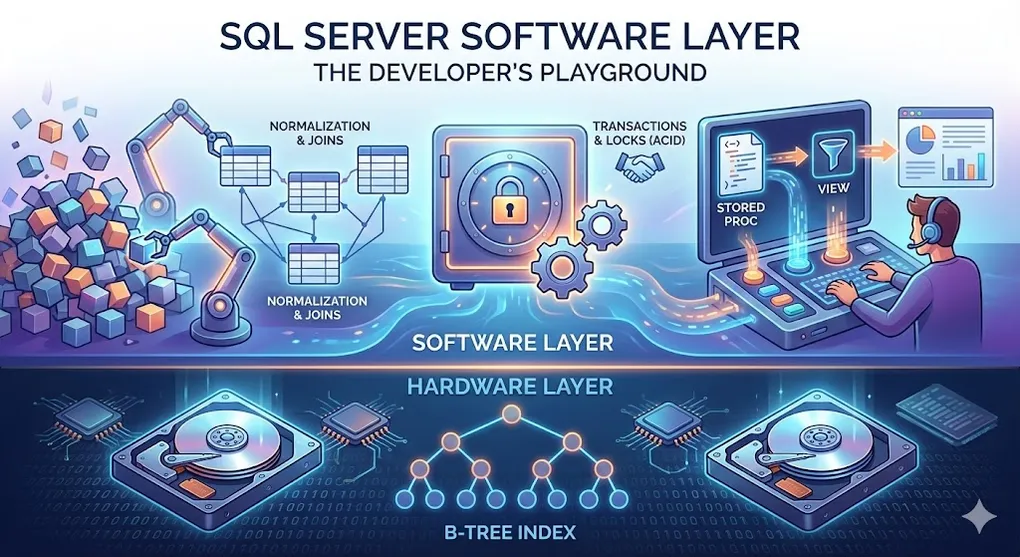
SQL Server Software Layer: The Developer's Playground
Prerequisites: Understand SQL Server architecture and indexing. See DB 01 Networking Fundamentals and DB 03 B-Tree Index.
We’ve covered the hardware layer (disk, memory) and the search engine (B-Tree). Now let’s explore the software logic layer — the magic developers work with every day.
graph LR
    subgraph "Hardware Layer"
        DISK[Hard Disk]
        RAM[Memory]
    end

    subgraph "Search Engine"
        BTREE[B-Tree Index]
    end

    subgraph "Software Layer"
        NORM[Normalization]
        JOIN[Joins]
        ACID[Transactions]
        LOCK[Locks]
        SP[Stored Procedures]
        VIEW[Views]
    end

    DISK --> BTREE
    RAM --> BTREE
    BTREE --> NORM
    NORM --> JOIN
    JOIN --> ACID
    ACID --> LOCK

    style NORM fill:#3498db,color:#fff
    style JOIN fill:#3498db,color:#fff
    style ACID fill:#e74c3c,color:#fff
    style LOCK fill:#e74c3c,color:#fff
    style SP fill:#27ae60,color:#fff
    style VIEW fill:#27ae60,color:#fff
Part A: Normalization & Joins — The Art of Organization
This is the essence of Relational in Relational Database.
1. The Problem: The Giant Messy Spreadsheet
Imagine storing all your data in ONE giant Excel sheet:
| OrderID | CustomerName | CustomerPhone | CustomerAddress | ProductName | ProductPrice | Quantity |
|---|---|---|---|---|---|---|
| 1001 | Alice | 555-1234 | 123 Main St | Laptop | 1000 | 1 |
| 1002 | Alice | 555-1234 | 123 Main St | Mouse | 25 | 2 |
| 1003 | Alice | 555-1234 | 123 Main St | Keyboard | 75 | 1 |
| 1004 | Bob | 555-5678 | 456 Oak Ave | Laptop | 1000 | 1 |
Problems:
- ❌ Redundancy: Alice’s phone appears 3 times
- ❌ Update Anomaly: If Alice changes phone, must update 3 rows
- ❌ Delete Anomaly: If we delete all Alice’s orders, we lose her contact info
- ❌ Insert Anomaly: Can’t add a customer without an order
2. Normalization: Don’t Put All Eggs in One Basket
Normalization = Split data into separate, focused tables.
graph TD
    subgraph "Before: One Giant Table"
        BIG[Orders + Customers + Products All Mixed]
    end

    subgraph "After: Normalized Tables"
        CUST[Customers Table]
        PROD[Products Table]
        ORD[Orders Table]
    end

    BIG -->|Split| CUST
    BIG -->|Split| PROD
    BIG -->|Split| ORD

    CUST -.->|CustomerID| ORD
    PROD -.->|ProductID| ORD

    style BIG fill:#e74c3c,color:#fff
    style CUST fill:#27ae60,color:#fff
    style PROD fill:#27ae60,color:#fff
    style ORD fill:#27ae60,color:#fff
Normal Forms (1NF → 2NF → 3NF)
| Normal Form | Rule | Example |
|---|---|---|
| 1NF | No repeating groups, atomic values | Phone: “555-1234” not “555-1234, 555-9999” |
| 2NF | 1NF + No partial dependencies | CustomerName depends only on CustomerID, not OrderID |
| 3NF | 2NF + No transitive dependencies | CustomerCity not stored with CustomerID if it depends on ZipCode |
Why 3NF Matters: The Update Anomaly
Transitive Dependency is the trickiest concept. Here’s a concrete example:
┌─────────────────────────────────────────────────────────────────┐
│              3NF Violation: Update Anomaly                       │
├─────────────────────────────────────────────────────────────────┤
│                                                                 │
│   BAD: Customer table with City stored directly                 │
│   ┌──────────────────────────────────────────────────────┐      │
│   │ CustomerID │ Name  │ ZipCode │ City                  │      │
│   │ 1          │ Alice │ 90210   │ Beverly Hills         │      │
│   │ 2          │ Bob   │ 90210   │ Beverly Hills         │      │
│   │ 3          │ Carol │ 90210   │ Beverly Hills         │      │
│   │ 4          │ Dave  │ 90210   │ Beverly Hills         │      │
│   │ 5          │ Eve   │ 90210   │ Beverly Hills         │      │
│   └──────────────────────────────────────────────────────┘      │
│                                                                 │
│   Problem: City depends on ZipCode, not CustomerID!             │
│   (CustomerID → ZipCode → City = Transitive Dependency)         │
│                                                                 │
│   Scenario: Post office renames "Beverly Hills" to "Los Angeles"│
│   ❌ Must update 5 rows (error-prone, slow)                     │
│                                                                 │
└─────────────────────────────────────────────────────────────────┘
3NF Solution: Separate ZipCode table
-- ZipCodes table
CREATE TABLE ZipCodes (
    ZipCode CHAR(5) PRIMARY KEY,
    City NVARCHAR(100)
);

-- Customers only stores ZipCode (FK)
CREATE TABLE Customers (
    CustomerID INT PRIMARY KEY,
    Name NVARCHAR(100),
    ZipCode CHAR(5) REFERENCES ZipCodes(ZipCode)
);| Before (2NF) | After (3NF) |
|---|---|
| Update 5 rows | Update 1 row in ZipCodes table |
| Risk of inconsistency | Single source of truth |
| ”Beverly Hills” appears 5 times | ”Beverly Hills” appears once |
After Normalization (3 Tables)
Customers Table:
| CustomerID | Name | Phone | Address |
|---|---|---|---|
| 1 | Alice | 555-1234 | 123 Main St |
| 2 | Bob | 555-5678 | 456 Oak Ave |
Products Table:
| ProductID | Name | Price |
|---|---|---|
| 101 | Laptop | 1000 |
| 102 | Mouse | 25 |
| 103 | Keyboard | 75 |
Orders Table:
| OrderID | CustomerID | ProductID | Quantity |
|---|---|---|---|
| 1001 | 1 | 101 | 1 |
| 1002 | 1 | 102 | 2 |
| 1003 | 1 | 103 | 1 |
| 1004 | 2 | 101 | 1 |
Benefits:
- ✅ Alice’s phone stored ONCE
- ✅ Update one place, done everywhere
- ✅ No data anomalies
3. Joins: Gluing the Tables Back Together
Since data is split, we need JOIN to combine them for reports.
Types of Joins
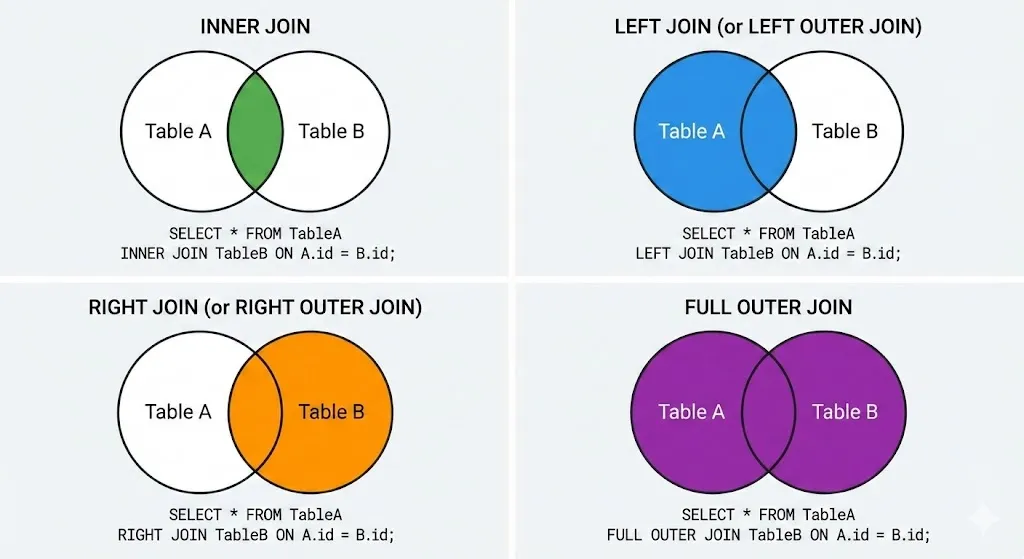
INNER JOIN: Both Sides Must Match
SELECT Orders.OrderID, Customers.Name, Products.Name, Orders.Quantity
FROM Orders
INNER JOIN Customers ON Orders.CustomerID = Customers.CustomerID
INNER JOIN Products ON Orders.ProductID = Products.ProductID;
Result: Only rows where CustomerID and ProductID exist in both tables.
LEFT JOIN: Left Table Always Included
SELECT Customers.Name, Orders.OrderID
FROM Customers
LEFT JOIN Orders ON Customers.CustomerID = Orders.CustomerID;
Result: ALL customers, even those with no orders (OrderID = NULL).
| Join Type | When to Use |
|---|---|
| INNER JOIN | Only want matching records |
| LEFT JOIN | Want all from left table, match if possible |
| RIGHT JOIN | Want all from right table (rarely used) |
| FULL JOIN | Want everything from both sides |
Part B: Transactions & ACID — Life or Death Together
This is database’s greatest invention — why banks trust SQL Server.
4. The Problem: Bank Transfer Gone Wrong
Scenario: Alice transfers $100 to Bob.
Step 1: Deduct $100 from Alice's account
Step 2: Add $100 to Bob's account
What if power fails after Step 1?
- Alice: -$100 ✓
- Bob: +$0 ✗
- $100 vanished into thin air!
5. Solution: Transaction
Wrap both steps into ONE transaction:
BEGIN TRANSACTION;

UPDATE Accounts SET Balance = Balance - 100 WHERE AccountID = 'Alice';
UPDATE Accounts SET Balance = Balance + 100 WHERE AccountID = 'Bob';

-- If both succeed:
COMMIT;

-- If anything fails:
-- ROLLBACK; (automatically reverts everything)
sequenceDiagram
participant App as Application
participant DB as SQL Server
App->>DB: BEGIN TRANSACTION
App->>DB: UPDATE Alice -100
DB-->>DB: Tentatively done (not permanent)
App->>DB: UPDATE Bob +100
DB-->>DB: Tentatively done
alt Both Succeed
App->>DB: COMMIT
DB-->>App: ✅ Permanent!
else Any Failure
App->>DB: ROLLBACK
DB-->>App: ❌ Reverted everything
end6. ACID Properties
| Property | Meaning | Bank Example |
|---|---|---|
| Atomicity | All or nothing | Both transfers succeed or both fail |
| Consistency | Valid state → Valid state | Total money in system stays same |
| Isolation | Transactions don’t interfere | Bob can’t see partial transfer |
| Durability | Once committed, permanent | After COMMIT, survives power failure |
Atomicity in Action
┌─────────────────────────────────────────────────────────────────┐
│              Transaction Atomicity                              │
├─────────────────────────────────────────────────────────────────┤
│                                                                 │
│   BEGIN TRANSACTION                                             │
│   ┌───────────────────────────────────────────────────────┐     │
│   │  Step 1: Alice -100  ✓                                │     │
│   │  Step 2: Bob +100    ✓                                │     │
│   │  Step 3: Log entry   ✗ (disk error!)                  │     │
│   └───────────────────────────────────────────────────────┘     │
│                                                                 │
│   Result: ROLLBACK (all 3 steps undone)                         │
│   Alice still has original balance                              │
│   Bob still has original balance                                │
│   As if nothing happened                                        │
│                                                                 │
└─────────────────────────────────────────────────────────────────┘
Part C: Locks & Concurrency — The Queue System
What happens when 1000 people try to buy the last train ticket?
7. The Problem: Race Condition
Time 1: User A reads TicketsRemaining = 1
Time 2: User B reads TicketsRemaining = 1
Time 3: User A updates TicketsRemaining = 0 (bought it!)
Time 4: User B updates TicketsRemaining = 0 (also bought it!)
Result: 2 tickets sold, but only 1 existed! 💀
8. Solution: Locks
When User A modifies data, SQL Server puts a Lock on it.
sequenceDiagram
    participant A as User A
    participant DB as SQL Server
    participant B as User B

    A->>DB: SELECT Tickets (gets Shared Lock)
    B->>DB: SELECT Tickets (gets Shared Lock)
    A->>DB: UPDATE Tickets (requires Exclusive Lock)
    DB-->>A: ✅ Granted (converts to Exclusive)
    B->>DB: UPDATE Tickets (requires Exclusive Lock)
    DB-->>B: ⏳ WAIT (blocked by A's lock)
    A->>DB: COMMIT (releases lock)
    DB-->>B: ✅ Now you can proceed
    B->>DB: UPDATE... but Tickets = 0!
    DB-->>B: ❌ No tickets left
Lock Types
| Lock Type | Abbr | Allows | Use Case |
|---|---|---|---|
| Shared (S) | Read lock | Others can read | SELECT queries |
| Exclusive (X) | Write lock | No one else can access | UPDATE, DELETE |
| Update (U) | Intent to write | Prevents deadlock | SELECT with intent to UPDATE |
9. Deadlock: The Standoff
graph LR
    A[User A] -->|Holds Lock on| TableX[Table X]
    A -->|Waiting for| TableY[Table Y]
    B[User B] -->|Holds Lock on| TableY
    B -->|Waiting for| TableX

    style A fill:#e74c3c,color:#fff
    style B fill:#e74c3c,color:#fff
Deadlock:
- User A holds Table X, waiting for Table Y
- User B holds Table Y, waiting for Table X
- Neither can proceed — stuck forever!
SQL Server’s Solution: Detect deadlock, pick a victim, kill their transaction, let the other proceed.
-- Error 1205: Transaction was deadlocked and has been chosen as the victim.Avoiding Deadlocks
| Strategy | Description |
|---|---|
| Access tables in same order | Always lock Table A before Table B |
| Keep transactions short | Less time holding locks |
| Use appropriate isolation level | Don’t over-lock |
Isolation Levels: Controlling Lock Behavior
Developers control locking through Isolation Levels. This is the “dial” between speed and safety:
| Isolation Level | Dirty Read | Non-Repeatable Read | Phantom Read | Performance |
|---|---|---|---|---|
| READ UNCOMMITTED | ⚠️ Yes | ⚠️ Yes | ⚠️ Yes | ⚡ Fastest (dangerous) |
| READ COMMITTED | ✅ No | ⚠️ Yes | ⚠️ Yes | 🔵 SQL Server Default |
| REPEATABLE READ | ✅ No | ✅ No | ⚠️ Yes | 🟡 Stricter |
| SERIALIZABLE | ✅ No | ✅ No | ✅ No | 🔴 Slowest (safest) |
-- Set isolation level for current session
SET TRANSACTION ISOLATION LEVEL READ COMMITTED;

-- Or for a specific transaction
BEGIN TRANSACTION;
SET TRANSACTION ISOLATION LEVEL SERIALIZABLE;
-- Your queries here (maximum locking)
COMMIT;| Problem | Description |
|---|---|
| Dirty Read | Reading uncommitted data that might be rolled back |
| Non-Repeatable Read | Same SELECT returns different values within one transaction |
| Phantom Read | New rows appear between two identical SELECTs |
Practical Rule: Stick with
READ COMMITTED(default) unless you have a specific reason to change it.SERIALIZABLEguarantees consistency but can cause severe blocking.
Part D: Stored Procedures — The Menu Button
Instead of writing complex SQL every time, pre-save it on the server.
10. The Problem: Sending Long SQL Across Network
-- Client sends this 500-character query every time:
SELECT o.OrderID, c.Name, c.Phone, p.ProductName, p.Price, o.Quantity,
       (p.Price * o.Quantity) AS Total
FROM Orders o
INNER JOIN Customers c ON o.CustomerID = c.CustomerID
INNER JOIN Products p ON o.ProductID = p.ProductID
WHERE o.OrderDate > '2024-01-01'
AND c.Country = 'Taiwan'
ORDER BY o.OrderDate DESC;
Problems:
- ❌ Network traffic: 500 bytes every call
- ❌ Security risk: Exposes table structure
- ❌ Performance: SQL must be parsed/compiled each time
11. Solution: Stored Procedure
-- Create once, store on server:
CREATE PROCEDURE GetRecentOrders
    @Country NVARCHAR(50),
    @StartDate DATE
AS
BEGIN
    SELECT o.OrderID, c.Name, c.Phone, p.ProductName, p.Price, o.Quantity,
           (p.Price * o.Quantity) AS Total
    FROM Orders o
    INNER JOIN Customers c ON o.CustomerID = c.CustomerID
    INNER JOIN Products p ON o.ProductID = p.ProductID
    WHERE o.OrderDate > @StartDate
    AND c.Country = @Country
    ORDER BY o.OrderDate DESC;
END
-- Client only sends this:
EXEC GetRecentOrders @Country = 'Taiwan', @StartDate = '2024-01-01';sequenceDiagram
participant C as Client
participant S as SQL Server
Note over C,S: Without Stored Procedure
C->>S: SELECT o.OrderID, c.Name... (500 bytes)
S-->>S: Parse → Compile → Execute
S-->>C: Results
Note over C,S: With Stored Procedure
C->>S: EXEC GetRecentOrders (30 bytes)
S-->>S: Already compiled! Just execute
S-->>C: ResultsBenefits Summary
| Benefit | Explanation |
|---|---|
| ⚡ Performance | Pre-compiled execution plan cached |
| 🔐 Security | Client doesn’t know table structure |
| 📉 Network Traffic | Only procedure name + parameters sent |
| 🔧 Maintainability | Change SQL in one place, all clients benefit |
| 🛡️ SQL Injection Prevention | Parameters are strongly typed |
Modern Perspective: While SPs remain powerful, modern ORMs (Entity Framework, Dapper, Hibernate) often generate SQL dynamically at the application layer. Today, SPs are primarily used for:
- 📊 Complex reporting with many JOINs and aggregations
- ⏰ Batch jobs running overnight (ETL, data cleanup)
- 🏦 High-security systems (banking) where direct table access is forbidden
- ⚡ Performance-critical hot paths where every millisecond counts
Part E: Views — The Filter / Virtual Table
A View is a fake table that shows only what you want to show.
12. The Problem: Sensitive Data Exposure
Employees Table:
| EmployeeID | Name | Department | Phone | Salary | SSN |
|---|---|---|---|---|---|
| 1 | Alice | Engineering | 555-1234 | 150000 | 123-45-6789 |
| 2 | Bob | Sales | 555-5678 | 80000 | 987-65-4321 |
Problem: Intern needs to look up employee phone numbers, but shouldn’t see salaries or SSN.
13. Solution: View
-- Create a View that hides sensitive columns:
CREATE VIEW EmployeeDirectory AS
SELECT EmployeeID, Name, Department, Phone
FROM Employees;
-- Intern queries the View:
SELECT * FROM EmployeeDirectory;What intern sees:
| EmployeeID | Name | Department | Phone |
|---|---|---|---|
| 1 | Alice | Engineering | 555-1234 |
| 2 | Bob | Sales | 555-5678 |
Salary and SSN? Never existed! 🕶️
graph LR
    subgraph "Real Table (Hidden)"
        RT[Employees: ID, Name, Dept, Phone, Salary, SSN]
    end

    subgraph "View (Visible to Intern)"
        VW[EmployeeDirectory: ID, Name, Dept, Phone]
    end

    RT -->|Filter| VW

    style RT fill:#e74c3c,color:#fff
    style VW fill:#27ae60,color:#fff
14. Types of Views
| View Type | Description | Use Case |
|---|---|---|
| Simple View | SELECT from one table | Security filtering |
| Complex View | JOINs multiple tables | Simplified reporting |
| Indexed View | Materialized, stored physically | Performance optimization |
Complex View Example
-- Instead of writing complex JOIN every time:
CREATE VIEW SalesReport AS
SELECT
    c.Name AS CustomerName,
    p.ProductName,
    o.Quantity,
    (p.Price * o.Quantity) AS TotalAmount,
    o.OrderDate
FROM Orders o
INNER JOIN Customers c ON o.CustomerID = c.CustomerID
INNER JOIN Products p ON o.ProductID = p.ProductID;
-- Now anyone can query easily:
SELECT * FROM SalesReport WHERE OrderDate > '2024-01-01';Summary: Quick Reference
The 5 Core Concepts
| Concept | Purpose | Analogy |
|---|---|---|
| Normalization | Split data to avoid redundancy | Library classification |
| Joins | Combine split tables for reports | Gluing pieces back together |
| Transaction | Group operations: all or nothing | Bank transfer |
| Locks | Prevent race conditions | Queue system |
| Stored Procedure | Pre-saved SQL on server | Restaurant menu button |
| View | Virtual table hiding data | Sunglasses filter |
When to Use What
| Scenario | Solution |
|---|---|
| Data redundancy issues | Normalize to 3NF |
| Need data from multiple tables | JOIN them |
| Multiple updates must succeed together | Wrap in TRANSACTION |
| Concurrent users modifying same row | SQL Server handles LOCKS |
| Complex SQL used repeatedly | Create STORED PROCEDURE |
| Need to hide sensitive columns | Create VIEW |
Common Mistakes
| Mistake | Consequence | Fix |
|---|---|---|
| No transactions for multi-step updates | Data inconsistency | Use BEGIN/COMMIT |
| Long-running transactions | Lock contention | Keep transactions short |
| SELECT * everywhere | Exposes all data | Use Views for security |
| Duplicating SQL in every app | Maintenance nightmare | Use Stored Procedures |
💡 Practice Questions
Conceptual
-
Explain the difference between 1NF, 2NF, and 3NF. What problems does each normalization level solve?
-
What is an ACID transaction? Describe each property with a real-world banking example.
-
Compare INNER JOIN vs LEFT JOIN. When would you use each?
-
What is the difference between a View and a Stored Procedure?
Hands-on
-- Given this denormalized table, normalize it to 3NF:
-- Orders(OrderID, CustomerName, CustomerPhone, ProductName, ProductPrice, Quantity)
--
-- HINT: Consider that one order may contain MULTIPLE products.
-- You'll need a junction table to handle the many-to-many relationship.

-- Write a transaction that transfers $100 from Account A to Account B
-- Include proper error handling with ROLLBACK
💡 View Answer
Normalization to 3NF:
-- Customers table (eliminates customer data redundancy)
CREATE TABLE Customers (
    CustomerID INT PRIMARY KEY,
    CustomerName NVARCHAR(100),
    CustomerPhone NVARCHAR(20)
);

-- Products table (eliminates product data redundancy)
CREATE TABLE Products (
    ProductID INT PRIMARY KEY,
    ProductName NVARCHAR(100),
    ProductPrice DECIMAL(10,2)
);

-- Orders table (references Customers)
CREATE TABLE Orders (
    OrderID INT PRIMARY KEY,
    CustomerID INT FOREIGN KEY REFERENCES Customers(CustomerID)
);

-- OrderItems table (junction for Order-Product relationship)
CREATE TABLE OrderItems (
    OrderID INT FOREIGN KEY REFERENCES Orders(OrderID),
    ProductID INT FOREIGN KEY REFERENCES Products(ProductID),
    Quantity INT,
    PRIMARY KEY (OrderID, ProductID)
);
Transfer Transaction:
BEGIN TRY
    BEGIN TRANSACTION;

    UPDATE Accounts SET Balance = Balance - 100 WHERE AccountID = 'A';
    UPDATE Accounts SET Balance = Balance + 100 WHERE AccountID = 'B';

    COMMIT TRANSACTION;
END TRY
BEGIN CATCH
    ROLLBACK TRANSACTION;
    THROW;
END CATCH
Scenario
-
Design Decision: A junior developer wants to store customer orders as a comma-separated list in a single column (e.g., “Laptop,Mouse,Keyboard”). Explain why this violates 1NF and what problems it will cause.
-
Debugging: A user reports that their UPDATE statement changed more rows than expected. The table has no primary key. What happened and how would you prevent this?