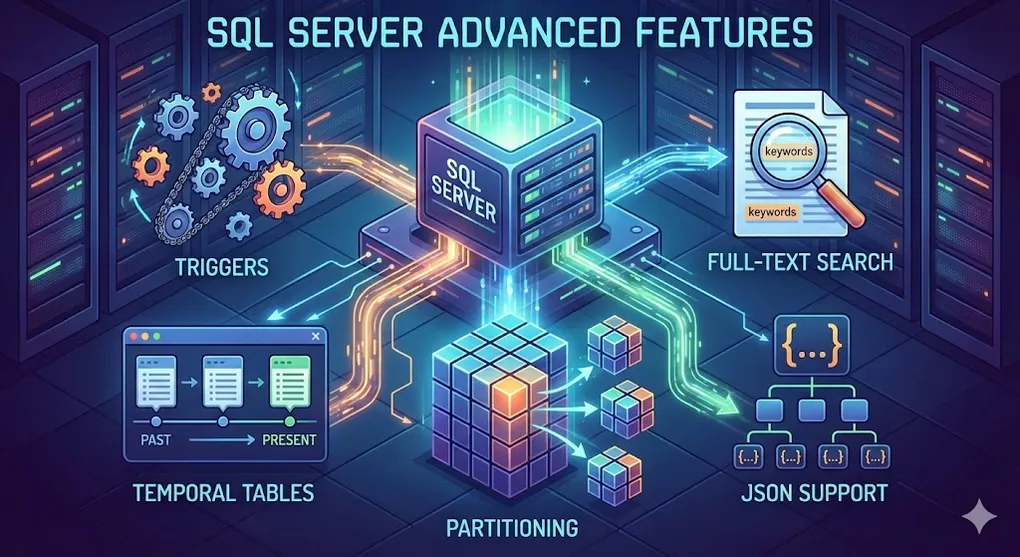
SQL Server Advanced Features: Triggers, Temporal Tables & More
Prerequisites: Solid understanding of SQL fundamentals. See previous articles in this series.
These are specialized features — you may not use them daily, but when you need them, they’re invaluable.
Part A: Triggers — Automatic Actions
1. What is a Trigger?
A Trigger is code that runs automatically when data changes.
graph LR
    U[User: INSERT/UPDATE/DELETE] --> T[Trigger Fires]
    T --> A[Automatic Action]
    T --> L[Log to Audit Table]
    T --> V[Validate Data]

    style T fill:#e74c3c,color:#fff
2. Types of Triggers
| Type | When it Fires | Use Case |
|---|---|---|
| AFTER | After INSERT/UPDATE/DELETE completes | Audit logging |
| INSTEAD OF | Replaces the original action | Custom validation |
| DDL Trigger | On CREATE/ALTER/DROP | Schema change tracking |
3. Creating an Audit Trigger
-- Create audit table:
CREATE TABLE EmployeeAudit (
    AuditID INT IDENTITY PRIMARY KEY,
    EmployeeID INT,
    Action NVARCHAR(10),
    OldSalary DECIMAL(10,2),
    NewSalary DECIMAL(10,2),
    ChangedBy NVARCHAR(100),
    ChangedAt DATETIME DEFAULT GETDATE()
);

-- Create trigger:
CREATE TRIGGER trg_Employee_Audit
ON Employees
AFTER UPDATE
AS
BEGIN
    INSERT INTO EmployeeAudit (EmployeeID, Action, OldSalary, NewSalary, ChangedBy)
    SELECT
        i.EmployeeID,
        'UPDATE',
        d.Salary,  -- deleted = old values
        i.Salary,  -- inserted = new values
        SYSTEM_USER
    FROM inserted i
    INNER JOIN deleted d ON i.EmployeeID = d.EmployeeID
    WHERE i.Salary <> d.Salary;  -- Only log if salary changed
END;
4. INSTEAD OF Trigger (Custom Logic)
-- Prevent deletes, soft-delete instead:
CREATE TRIGGER trg_SoftDelete
ON Employees
INSTEAD OF DELETE
AS
BEGIN
    UPDATE Employees
    SET IsDeleted = 1, DeletedAt = GETDATE()
    WHERE EmployeeID IN (SELECT EmployeeID FROM deleted);

    PRINT 'Rows soft-deleted instead of hard-deleted.';
END;
5. Trigger Best Practices
| Do | Don’t |
|---|---|
| ✅ Keep triggers short | ❌ Complex business logic in triggers |
| ✅ Use for audit/logging | ❌ Send emails from triggers |
| ✅ Handle multi-row operations | ❌ Assume single-row INSERT |
| ✅ Document trigger existence | ❌ Forget triggers exist (hidden logic!) |
Part B: Temporal Tables — Time Travel
6. What is a Temporal Table?
A Temporal Table automatically tracks historical versions of every row.
┌─────────────────────────────────────────────────────────────────┐
│                     Temporal Table                              │
├─────────────────────────────────────────────────────────────────┤
│                                                                 │
│   Main Table (Current Data):                                    │
│   │ ID │ Name  │ Salary │ ValidFrom         │ ValidTo          │
│   │ 1  │ Alice │ 80000  │ 2024-03-01 10:00  │ 9999-12-31       │
│                                                                 │
│   History Table (Past Versions):                                │
│   │ ID │ Name  │ Salary │ ValidFrom         │ ValidTo          │
│   │ 1  │ Alice │ 70000  │ 2024-01-01 10:00  │ 2024-03-01 10:00 │
│   │ 1  │ Alice │ 60000  │ 2023-01-01 10:00  │ 2024-01-01 10:00 │
│                                                                 │
└─────────────────────────────────────────────────────────────────┘
7. Creating a Temporal Table
CREATE TABLE Employees (
    EmployeeID INT PRIMARY KEY,
    Name NVARCHAR(100),
    Salary DECIMAL(10,2),

    -- System-time columns:
    ValidFrom DATETIME2 GENERATED ALWAYS AS ROW START,
    ValidTo DATETIME2 GENERATED ALWAYS AS ROW END,
    PERIOD FOR SYSTEM_TIME (ValidFrom, ValidTo)
)
WITH (SYSTEM_VERSIONING = ON (HISTORY_TABLE = dbo.EmployeesHistory));
8. Querying Historical Data
-- Current data:
SELECT * FROM Employees;

-- Data as of specific time:
SELECT * FROM Employees
FOR SYSTEM_TIME AS OF '2024-01-15 12:00:00';

-- All versions between dates:
SELECT * FROM Employees
FOR SYSTEM_TIME BETWEEN '2024-01-01' AND '2024-03-01';

-- Complete history:
SELECT * FROM Employees
FOR SYSTEM_TIME ALL;
9. Use Cases for Temporal Tables
| Scenario | Benefit |
|---|---|
| Audit compliance | Automatic, tamper-proof history |
| Bug investigation | ”What was the data at this time?” |
| Slowly changing dimensions | BI reporting over time |
| Undo mistakes | Find previous values |
⚠️ Temporal Table Gotchas
- Schema changes (adding columns) propagate to the history table automatically — no action needed.
- Dropping the table requires turning off
SYSTEM_VERSIONINGfirst:ALTER TABLE Employees SET (SYSTEM_VERSIONING = OFF); DROP TABLE Employees; DROP TABLE EmployeesHistory;- Truncating is not allowed — use
DELETEinstead (which logs to history).
Part C: Table Partitioning — Divide and Conquer
10. What is Partitioning?
Split a large table into smaller, more manageable partitions.
graph TD
    subgraph "Before: One Giant Table"
        BIG[Orders: 100 million rows]
    end

    subgraph "After: Partitioned Table"
        P1[2022 Orders: 30M]
        P2[2023 Orders: 35M]
        P3[2024 Orders: 35M]
    end

    BIG --> P1
    BIG --> P2
    BIG --> P3

    style BIG fill:#e74c3c,color:#fff
    style P1 fill:#27ae60,color:#fff
    style P2 fill:#27ae60,color:#fff
    style P3 fill:#27ae60,color:#fff
11. Creating a Partitioned Table
-- Step 1: Create partition function (how to split):
CREATE PARTITION FUNCTION pf_OrderDate (DATE)
AS RANGE RIGHT FOR VALUES ('2023-01-01', '2024-01-01', '2025-01-01');

-- Step 2: Create partition scheme (where to store):
CREATE PARTITION SCHEME ps_OrderDate
AS PARTITION pf_OrderDate
TO (fg_2022, fg_2023, fg_2024, fg_2025);

-- Step 3: Create table on partition scheme:
CREATE TABLE Orders (
    OrderID INT,
    OrderDate DATE,
    Amount DECIMAL(10,2)
) ON ps_OrderDate(OrderDate);
12. Partition Benefits
| Benefit | Explanation |
|---|---|
| Faster queries | Only scan relevant partitions |
| Easy archival | Switch old partitions to archive |
| Parallel operations | Each partition can be maintained separately |
| Faster loading | Bulk load into staging, then switch in |
💡 Pro Tip: Index Alignment
For partition elimination to work, your indexes must be aligned (partitioned on the same column):
-- Aligned Index (Recommended)
CREATE INDEX IX_OrderDate ON Orders (OrderDate, CustomerID)
ON ps_OrderDate(OrderDate);  -- Same partition scheme!

-- Non-Aligned Index (Loses benefit!)
CREATE INDEX IX_CustomerID ON Orders (CustomerID);
-- SQL Server must scan ALL partitions for CustomerID queries
Part D: Full-Text Search
13. What is Full-Text Search?
Search inside text columns efficiently — like having Google for your database.
-- Regular LIKE (SLOW for large text):
SELECT * FROM Articles WHERE Content LIKE '%database%';

-- Full-Text Search (FAST):
SELECT * FROM Articles WHERE CONTAINS(Content, 'database');
14. Setting Up Full-Text Search
-- Create full-text catalog:
CREATE FULLTEXT CATALOG ftCatalog AS DEFAULT;

-- Create full-text index on table:
CREATE FULLTEXT INDEX ON Articles(Title, Content)
KEY INDEX PK_Articles
ON ftCatalog;
15. Full-Text Query Examples
-- Search for word:
SELECT * FROM Articles WHERE CONTAINS(Content, 'database');

-- Search for phrase:
SELECT * FROM Articles WHERE CONTAINS(Content, '"SQL Server"');

-- Search for any of multiple words:
SELECT * FROM Articles WHERE CONTAINS(Content, 'database OR server');

-- Search with wildcards:
SELECT * FROM Articles WHERE CONTAINS(Content, 'data*');

-- Fuzzy search (similar words):
SELECT * FROM Articles WHERE CONTAINS(Content, 'FORMSOF(INFLECTIONAL, run)');
-- Matches: run, runs, running, ran

-- Ranked results:
SELECT *, KEY_TBL.RANK
FROM Articles
INNER JOIN CONTAINSTABLE(Articles, Content, 'database') AS KEY_TBL
ON Articles.ArticleID = KEY_TBL.[KEY]
ORDER BY KEY_TBL.RANK DESC;
Part E: JSON Support
16. Why JSON in SQL Server?
Modern applications use JSON for APIs. SQL Server can store and query JSON directly.
17. Querying JSON
-- Sample data:
DECLARE @json NVARCHAR(MAX) = '{
    "name": "John",
    "age": 30,
    "address": {
        "city": "Taipei",
        "zip": "100"
    },
    "orders": [
        {"id": 1, "product": "Laptop"},
        {"id": 2, "product": "Mouse"}
    ]
}';

-- Extract scalar value:
SELECT JSON_VALUE(@json, '$.name');  -- Returns: John

-- Extract object:
SELECT JSON_QUERY(@json, '$.address');  -- Returns: {"city":"Taipei","zip":"100"}

-- Extract from array:
SELECT JSON_VALUE(@json, '$.orders[0].product');  -- Returns: Laptop
18. Converting JSON to Table
-- Parse JSON array to rows:
SELECT *
FROM OPENJSON(@json, '$.orders')
WITH (
    OrderID INT '$.id',
    ProductName NVARCHAR(100) '$.product'
);
Result:
| OrderID | ProductName |
|---|---|
| 1 | Laptop |
| 2 | Mouse |
19. Storing JSON in Tables
CREATE TABLE Products (
    ProductID INT PRIMARY KEY,
    ProductName NVARCHAR(100),
    Attributes NVARCHAR(MAX)  -- Store JSON here
);

INSERT INTO Products VALUES
(1, 'Laptop', '{"color":"silver","weight":"1.5kg","ports":["USB","HDMI"]}');

-- Query JSON column:
SELECT
    ProductName,
    JSON_VALUE(Attributes, '$.color') AS Color
FROM Products;
🚀 Performance Pro Tip: Indexing JSON Properties
Querying JSON with
JSON_VALUE()scans the entire column. For faster lookups, create a computed column and index it:-- Add computed column for frequently queried property ALTER TABLE Products ADD Color AS JSON_VALUE(Attributes, '$.color'); -- Now index it like any regular column! CREATE INDEX IX_Products_Color ON Products (Color); -- This query is now fast (Index Seek): SELECT * FROM Products WHERE Color = 'silver';This bridges the gap between relational speed and JSON flexibility.
Summary: When to Use What
| Feature | Use When |
|---|---|
| Triggers | Audit logging, cascading updates |
| Temporal Tables | Need historical data/time travel |
| Partitioning | Tables > 100 million rows |
| Full-Text Search | Searching inside large text/documents |
| JSON | Flexible schema, API integration |
Feature Comparison
| Feature | Complexity | Performance Impact | Maintenance |
|---|---|---|---|
| Triggers | Medium | Can slow DML | Hidden logic |
| Temporal | Low | Doubles storage | Automatic |
| Partitioning | High | Improves at scale | Complex |
| Full-Text | Medium | Large index | Catalog management |
| JSON | Low | Queries slower than columns | Simple |
💡 Practice Questions
Conceptual
-
What is the difference between an AFTER trigger and an INSTEAD OF trigger? When would you use each?
-
Explain what a Temporal Table is and name two use cases for it.
-
When should you consider table partitioning? What problem does it solve?
-
Compare LIKE ‘%keyword%’ vs Full-Text Search. Why is one faster than the other?
Hands-on
-- Create an audit trigger that logs all DELETE operations on the Customers table
-- Include: CustomerID, DeletedBy (SYSTEM_USER), DeletedAt (GETDATE())
💡 View Answer
CREATE TABLE CustomerAudit (
    AuditID INT IDENTITY PRIMARY KEY,
    CustomerID INT,
    DeletedBy NVARCHAR(100),
    DeletedAt DATETIME
);

CREATE TRIGGER trg_Customer_Delete_Audit
ON Customers
AFTER DELETE
AS
BEGIN
    INSERT INTO CustomerAudit (CustomerID, DeletedBy, DeletedAt)
    SELECT CustomerID, SYSTEM_USER, GETDATE()
    FROM deleted;
END;
Scenario
-
Compliance Requirement: Legal requires you to keep 7 years of employee salary history and be able to answer “What was John’s salary on March 15, 2022?” Which feature would you use?
-
Performance: A 500GB Orders table is getting slow. Most queries only need the last 3 months of data. What feature would help and how would you implement it?