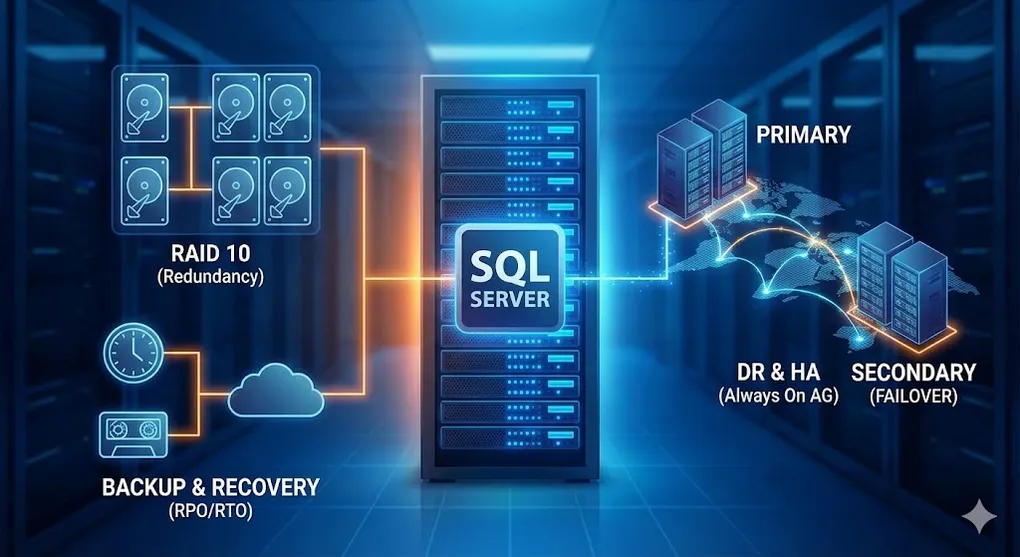
SQL Server Infrastructure & High Availability: RAID, Backup & DR
Prerequisites: Understanding of SQL Server basics. This article focuses on DBA/Operations topics.
When your database serves millions of users, you need reliability, redundancy, and recovery. This is the infrastructure layer.
Part A: RAID — Protecting Against Disk Failure
1. What is RAID?
RAID (Redundant Array of Independent Disks) = Multiple disks working together for speed and/or safety.
graph LR
    subgraph "Single Disk"
        D1[1 Disk = 1 Point of Failure]
    end

    subgraph "RAID Array"
        R1[Disk 1]
        R2[Disk 2]
        R3[Disk 3]
        R4[Disk 4]
    end

    style D1 fill:#e74c3c,color:#fff
    style R1 fill:#27ae60,color:#fff
    style R2 fill:#27ae60,color:#fff
    style R3 fill:#27ae60,color:#fff
    style R4 fill:#27ae60,color:#fff
2. RAID Levels Comparison
| RAID | How it Works | Min Disks | Capacity | Speed | Fault Tolerance | Use Case |
|---|---|---|---|---|---|---|
| RAID 0 | Striping only | 2 | 100% | ⚡⚡⚡ Fast | ❌ None | Temp/scratch |
| RAID 1 | Mirroring | 2 | 50% | ⚡ Normal | ✅ 1 disk | OS drive |
| RAID 5 | Striping + parity | 3 | n-1 disks | ⚡⚡ Good | ✅ 1 disk | General use |
| RAID 6 | Striping + double parity | 4 | n-2 disks | ⚡ Medium | ✅ 2 disks | Critical data, NAS |
| RAID 10 | Mirror + Stripe | 4 | 50% | ⚡⚡⚡ Fast | ✅ 1 per mirror | SQL Server |
| RAID 50 | RAID 5 + Striping | 6 | Varies | ⚡⚡ Good | ✅ 1 per RAID 5 | Large storage arrays |
| RAID 60 | RAID 6 + Striping | 8 | Varies | ⚡ Medium | ✅ 2 per RAID 6 | Enterprise storage |
3. RAID Visual Explanation
RAID 0 (Striping) — Speed, No Safety
graph LR
    DATA["Data: A B C D E F G H"]

    subgraph "Disk 1"
        D1[A, C, E, G]
    end

    subgraph "Disk 2"
        D2[B, D, F, H]
    end

    DATA --> D1
    DATA --> D2

    style D1 fill:#e74c3c,color:#fff
style D2 fill:#e74c3c,color:#fff- ✅ Read/Write speed: 2x (parallel access)
- ❌ Any disk fails = ALL DATA LOST
RAID 1 (Mirroring) — Safety, Less Space
graph LR
    DATA["Data: A B C D"]

    subgraph "Mirror"
        D1["Disk 1: A B C D"]
        D2["Disk 2: A B C D<br/>(Exact Copy)"]
    end

    DATA --> D1
    DATA --> D2
    D1 <-.->|Same Data| D2

    style D1 fill:#27ae60,color:#fff
style D2 fill:#27ae60,color:#fff- ✅ One disk fails? The other has everything
- ❌ Lose 50% capacity
RAID 5 (Striping + Parity) — Balanced
graph TD
    subgraph "RAID 5 Array"
        D1["Disk 1<br/>A1, B2, Cp"]
        D2["Disk 2<br/>A2, Bp, C1"]
        D3["Disk 3<br/>Ap, B1, C2"]
    end

    P["p = Parity<br/>(Can rebuild)"]

    D1 --- D2 --- D3

    style D1 fill:#f39c12,color:#fff
    style D2 fill:#f39c12,color:#fff
style D3 fill:#f39c12,color:#fff- ✅ Any ONE disk can fail, data survives
- ⚠️ Rebuild is slow and stresses remaining disks
- ⚠️ Write Penalty: Slower writes due to parity calculation. Not recommended for write-heavy OLTP systems.
RAID 6 (Double Parity) — Extra Protection
graph TD
    subgraph "RAID 6 Array (4+ disks)"
        D1["Disk 1<br/>A1, B2, Cp, Dq"]
        D2["Disk 2<br/>A2, Bp, Cq, D1"]
        D3["Disk 3<br/>Ap, Bq, C1, D2"]
        D4["Disk 4<br/>Aq, B1, C2, Dp"]
    end

    NOTE["p, q = Two Parity Blocks<br/>(Different algorithms)"]

    D1 --- D2 --- D3 --- D4

    style D1 fill:#9b59b6,color:#fff
    style D2 fill:#9b59b6,color:#fff
    style D3 fill:#9b59b6,color:#fff
style D4 fill:#9b59b6,color:#fff- ✅ Any TWO disks can fail simultaneously, data survives
- ⚠️ Write performance lower than RAID 5 (double parity calculation)
- 📦 Popular for NAS and backup storage
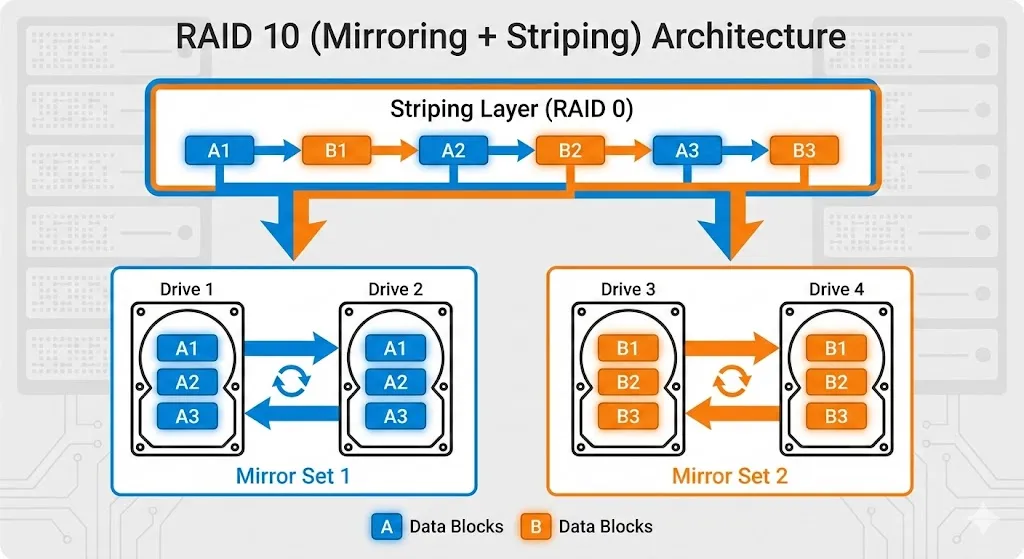
RAID 10 (Mirror + Stripe) — Best for SQL Server
graph TD
    subgraph "Mirror Set 1"
        D1[Disk 1<br/>A, C]
        D2[Disk 2<br/>A, C]
    end

    subgraph "Mirror Set 2"
        D3[Disk 3<br/>B, D]
        D4[Disk 4<br/>B, D]
    end

    D1 <-->|Mirror| D2
    D3 <-->|Mirror| D4

    STRIPE[Striped Data]
    D1 --> STRIPE
    D3 --> STRIPE

    style D1 fill:#27ae60,color:#fff
    style D2 fill:#27ae60,color:#fff
    style D3 fill:#3498db,color:#fff
    style D4 fill:#3498db,color:#fff
    style STRIPE fill:#9b59b6,color:#fff
RAID 10 Advantages:
- ✅ Fast reads AND writes
- ✅ Can lose 1 disk per mirror
- ❌ Need minimum 4 disks, 50% capacity
Microsoft recommends RAID 10 for SQL Server data files
4. SQL Server & RAID Best Practices
| File Type | Recommended RAID | Reason |
|---|---|---|
| Data files (.mdf) | RAID 10 | Heavy random I/O |
| Log files (.ldf) | RAID 1 or RAID 10 | Sequential writes, critical |
| TempDB | RAID 10 or RAID 0* | High I/O, can recreate |
| Backups | RAID 5 or RAID 6 | Large sequential reads |
*RAID 0 only if tempdb can be recreated on restart
☁️ Cloud Context: In cloud environments (AWS EBS, Azure Managed Disk), RAID is typically handled at the infrastructure layer. You focus on selecting IOPS and Throughput tiers instead of managing disk arrays directly.
Part B: Backup Strategies
5. Why Backup?
RAID protects against disk failure, but NOT against:
- ❌ Accidental DELETE
- ❌ Ransomware encryption
- ❌ Application bugs corrupting data
- ❌ Natural disasters
Backup = Your last line of defense
6. Backup Types
graph LR
    subgraph "Backup Types"
        FULL[Full Backup]
        DIFF[Differential]
        LOG[Transaction Log]
    end

    FULL -->|Daily| DIFF
    DIFF -->|Hourly| LOG
    LOG -->|Every 15 min| LOG

    style FULL fill:#e74c3c,color:#fff
    style DIFF fill:#f39c12,color:#fff
style LOG fill:#27ae60,color:#fff| Type | Contains | Size | Restore Need |
|---|---|---|---|
| Full | Entire database | Large | Just this backup |
| Differential | Changes since last Full | Medium | Full + this Diff |
| Transaction Log | Changes since last Log | Small | Full + all Logs |
7. Backup Commands
-- 0. Integrity Check (Critical!)
-- Check for corruption BEFORE backing up
DBCC CHECKDB(MyDB) WITH NO_INFOMSGS;

-- 1. Full backup:
BACKUP DATABASE MyDB
TO DISK = 'D:\Backups\MyDB_Full.bak'
WITH COMPRESSION, INIT, CHECKSUM;
-- CHECKSUM ensures page integrity during backup

-- 2. Differential backup:
BACKUP DATABASE MyDB
TO DISK = 'D:\Backups\MyDB_Diff.bak'
WITH DIFFERENTIAL, COMPRESSION, CHECKSUM;

-- 3. Transaction log backup:
-- IMPORTANT: This truncates the log, allowing space reuse
BACKUP LOG MyDB
TO DISK = 'D:\Backups\MyDB_Log.trn'
WITH COMPRESSION;
⚠️ Why DBCC CHECKDB First?
If you backup a corrupted database, your backup is also corrupted. Run
DBCC CHECKDBregularly (weekly minimum) to catch corruption early.
📋 Log Truncation Explained
In Full Recovery Model, the transaction log grows forever until you back it up.
BACKUP LOGmarks old log records as reusable (“truncates” the log). This is why Full Recovery requires regular log backups — or your disk fills up!
8. Common Backup Strategies
Simple Strategy (Small DBs)
Sunday: Full
Monday-Saturday: Full (daily)
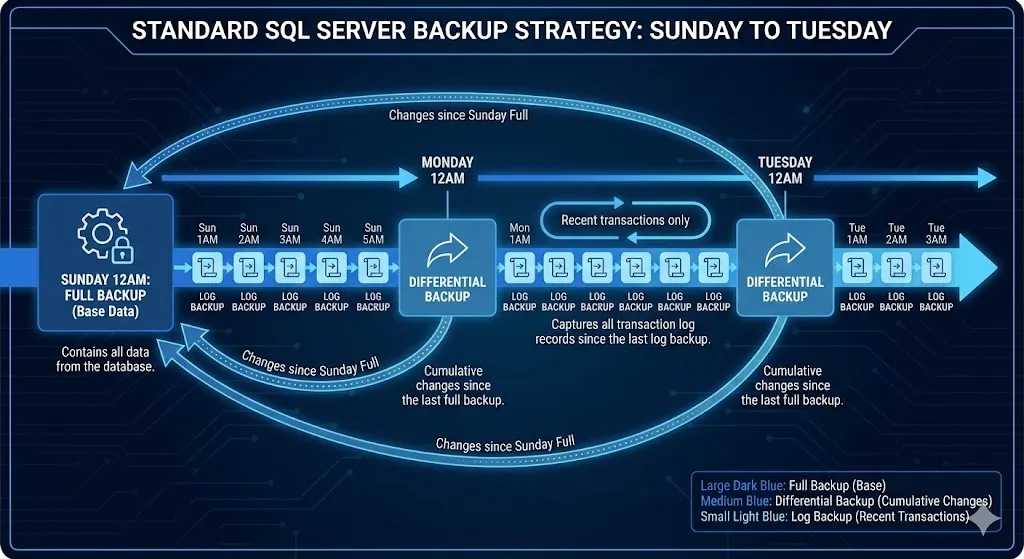
Standard Strategy (Most DBs)
Sunday 12AM: Full
Mon-Sat 12AM: Differential
Every hour: Transaction Log
Enterprise Strategy (Mission-Critical)
Sunday 12AM: Full
Daily 12AM: Differential
Every 15 minutes: Transaction Log
Copy to offsite storage: Daily
9. Recovery Models
| Model | Log Backup Possible? | Point-in-Time Restore? | Use Case |
|---|---|---|---|
| Simple | ❌ No | ❌ No | Dev/Test |
| Full | ✅ Yes | ✅ Yes | Production |
| Bulk-Logged | ✅ Yes | ⚠️ Limited | ETL periods |
-- Check recovery model:
SELECT name, recovery_model_desc FROM sys.databases;

-- Change recovery model:
ALTER DATABASE MyDB SET RECOVERY FULL;
10. Point-in-Time Recovery
-- Restore to specific time (requires FULL recovery model):
RESTORE DATABASE MyDB FROM DISK = 'MyDB_Full.bak' WITH NORECOVERY;
RESTORE LOG MyDB FROM DISK = 'MyDB_Log1.trn' WITH NORECOVERY;
RESTORE LOG MyDB FROM DISK = 'MyDB_Log2.trn'
WITH STOPAT = '2024-03-15 14:30:00', RECOVERY;
Part C: Replication — Keeping Copies in Sync
11. Types of Replication
graph LR
    subgraph "Replication Types"
        SNAP[Snapshot]
        TRANS[Transactional]
        MERGE[Merge]
    end

    PUB[Publisher] --> SNAP --> SUB1[Subscriber]
    PUB --> TRANS --> SUB2[Subscriber]
PUB --> MERGE --> SUB3[Subscriber]| Type | How it Works | Latency | Use Case |
|---|---|---|---|
| Snapshot | Periodic full copy | High (minutes-hours) | Reporting, rarely changed |
| Transactional | Stream changes in near-real-time | Low (seconds) | Read replicas |
| Merge | Bi-directional sync | Medium | Mobile/disconnected |
12. Transactional Replication Flow
sequenceDiagram
    participant P as Publisher<br/>(Main DB)
    participant D as Distributor<br/>(Queue)
    participant S as Subscriber<br/>(Copy)

    P->>D: 1. Log Reader reads transaction log
    D-->>D: 2. Store in distribution DB
    D->>S: 3. Distribution Agent pushes changes
    S-->>S: Apply changes
Part D: Always On Availability Groups — Enterprise HA
13. What is Always On AG?
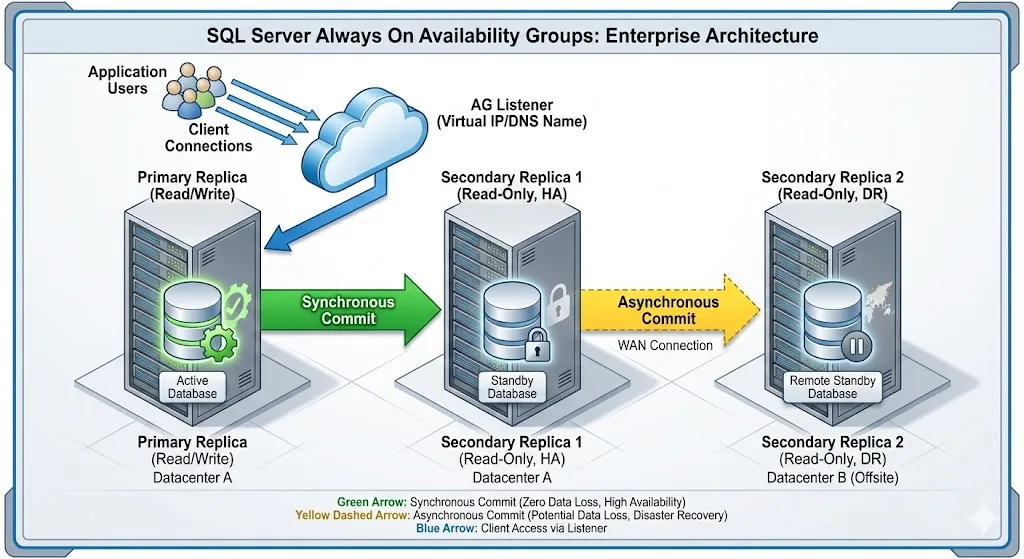
Always On Availability Groups = Multiple database replicas with automatic failover.
graph TD
    subgraph "Primary Replica"
        P[SQL Server 1<br/>Read/Write]
    end

    subgraph "Secondary Replicas"
        S1[SQL Server 2<br/>Read-Only]
        S2[SQL Server 3<br/>Read-Only]
    end

    P -->|Synchronous| S1
    P -->|Asynchronous| S2

    L[Listener: ag-listener.company.com]
    L --> P

    style P fill:#27ae60,color:#fff
    style S1 fill:#3498db,color:#fff
    style S2 fill:#3498db,color:#fff
14. Sync vs Async Mode
| Mode | Commit Behavior | Data Loss on Failover | Latency | Use Case |
|---|---|---|---|---|
| Synchronous | Wait for secondary to confirm | ❌ None (zero data loss) | Higher | Same datacenter |
| Asynchronous | Don’t wait | ⚠️ Possible | Lower | DR site (different city) |
15. Failover Types
| Type | Trigger | Downtime |
|---|---|---|
| Automatic | Primary failure detected | Seconds (30-60s typical) |
| Manual Planned | DBA initiates | Seconds |
| Forced | Primary unreachable | Potential data loss |
15.1 Always On AG vs Failover Cluster Instance (FCI)
| Feature | Always On AG | Failover Cluster Instance |
|---|---|---|
| Architecture | Shared-Nothing | Shared-Storage |
| Data Storage | Each node has own copy | Single shared disk |
| Storage Cost | Higher (N copies) | Lower (1 copy) |
| Failover Scope | Per-database | Entire instance |
| Read from Secondary | ✅ Yes | ❌ No |
| Requires SAN | ❌ No | ✅ Yes |
When to choose?
- AG: Modern choice. Better for DR across datacenters, readable secondaries, per-database control.
- FCI: Legacy or when shared storage (SAN) already exists. Simpler but less flexible.
Part E: Disaster Recovery (DR)
16. Key Metrics: RTO and RPO
| Metric | Meaning | Question |
|---|---|---|
| RTO | Recovery Time Objective | How fast must we recover? |
| RPO | Recovery Point Objective | How much data can we lose? |
| Scenario | RTO | RPO | Solution |
|---|---|---|---|
| E-commerce | 1 hour | 5 min | Always On + Log shipping |
| Banking | 0 | 0 | Synchronous Always On |
| Archive system | 24 hours | 1 day | Daily backup to cloud |
17. DR Strategy Tiers
graph TD
    subgraph "Tier 1: Backup Only"
        T1["Backup to tape/cloud<br/>RTO: Hours-Days | RPO: Last backup"]
    end

    subgraph "Tier 2: Warm Standby"
        T2["Log shipping to secondary<br/>RTO: 1-4 hours | RPO: 15 min"]
    end

    subgraph "Tier 3: Hot Standby"
        T3["Always On AG (async)<br/>RTO: Minutes | RPO: Near-zero"]
    end

    subgraph "Tier 4: Active-Active"
        T4["Distributed AG<br/>RTO: Seconds | RPO: Zero"]
    end

    T1 --> T2 --> T3 --> T4

    style T1 fill:#e74c3c,color:#fff
    style T2 fill:#f39c12,color:#fff
    style T3 fill:#3498db,color:#fff
    style T4 fill:#27ae60,color:#fff
18. Log Shipping — Simple DR
-- On Primary:
BACKUP LOG MyDB TO DISK = '\\FileShare\Logs\MyDB_Log.trn';

-- Copy job runs every 15 minutes to secondary

-- On Secondary:
RESTORE LOG MyDB FROM DISK = '\\FileShare\Logs\MyDB_Log.trn'
WITH STANDBY = 'MyDB_Undo.ldf';
Summary: When to Use What
Technology Selection
| Requirement | Solution |
|---|---|
| Protect against disk failure | RAID 10 |
| Recover from accidental DELETE | Backup + Point-in-time restore |
| Read replicas for reporting | Transactional replication or AG |
| Automatic failover (same DC) | Always On AG (synchronous) |
| DR site in another city | Always On AG (async) or Log Shipping |
| Zero data loss requirement | Synchronous Always On + SAN replication |
Cost vs Protection
| Level | Components | Cost |
|---|---|---|
| Basic | RAID + Daily backup | $ |
| Standard | + Differential + Log backups | $$ |
| Professional | + Replication or Log Shipping | $$$ |
| Enterprise | + Always On AG + DR site | $$$$ |
| Mission Critical | + Active-Active + SAN replication | $$$$$ |
Quick Reference: Backup Strategy
Small DB (< 10 GB):
  └── Full backup daily

Medium DB (10-100 GB):
  └── Full weekly + Diff daily + Log hourly

Large DB (100 GB+):
  └── Full weekly + Diff daily + Log every 15 min

Critical DB:
  └── Full weekly + Diff daily + Log every 5 min + Offsite copy
💡 Practice Questions
Conceptual
-
Compare RAID 5, RAID 6, and RAID 10. Which would you use for SQL Server data files and why?
-
Explain the difference between Full, Differential, and Transaction Log backups. How do they work together?
-
What is the difference between Replication and Always On Availability Groups?
-
Define RPO and RTO. How do they influence your backup/DR strategy?
Hands-on
-- Design a backup strategy for a 50GB database with RPO of 15 minutes and RTO of 1 hour.
-- List: backup types, frequencies, and retention period.
💡 View Answer
Backup Strategy:
- Full backup: Weekly (Sunday night)
- Differential backup: Daily (every night)
- Transaction log backup: Every 15 minutes
Retention:
- Keep 4 weeks of full backups
- Keep 7 days of differential backups
- Keep 24 hours of log backups
Recovery scenario (RTO < 1 hour):
- Restore latest full backup (~20 min for 50GB)
- Restore latest differential (~10 min)
- Restore transaction logs up to failure point (~10 min)
- Total: ~40 minutes ✅
Scenario
-
Disaster Planning: Your company’s main datacenter loses power. You have an Always On Availability Group with a secondary in another city. Walk through the failover process.
-
Capacity Planning: A database is growing 10GB per month. Current RAID 10 array is 80% full. What would you recommend?