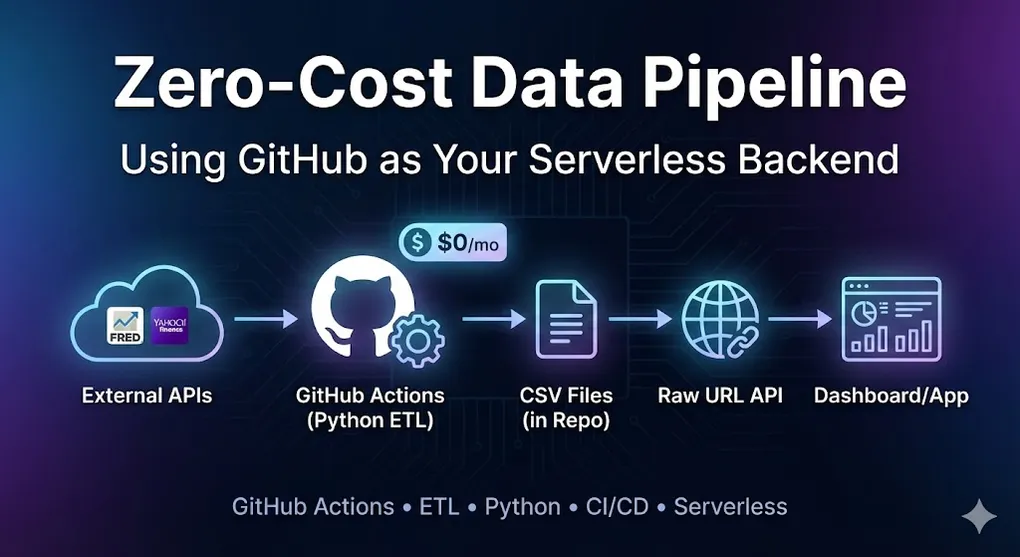
Zero-Cost Data Pipeline: Using GitHub as Your Serverless Backend
The Idea: GitHub Is More Than Code Storage
What if I told you that GitHub can be:
- ⏰ A cron job scheduler (GitHub Actions)
- 🗄️ A database (CSV files in your repo)
- 🌐 A REST API (Raw file URLs)
- 🔐 A secrets vault (GitHub Secrets)
All for $0/month.
This is the architecture I used for my Global Macro Dashboard — a system that fetches economic data daily, processes it with Python, and serves it to a Power BI dashboard without any traditional backend.
The Architecture
┌─────────────────────────────────────────────────────────────────┐
│                 Serverless Data Pipeline                         │
├─────────────────────────────────────────────────────────────────┤
│                                                                  │
│  ┌─────────────┐   ┌─────────────┐   ┌─────────────┐            │
│  │  External   │──▶│   GitHub    │──▶│  Processed  │            │
│  │    APIs     │   │   Actions   │   │    CSVs     │            │
│  │(FRED/Yahoo) │   │  (Python)   │   │  (in Repo)  │            │
│  └─────────────┘   └─────────────┘   └─────────────┘            │
│                                              │                   │
│                                              ▼                   │
│                                      ┌─────────────┐            │
│                                      │  Raw URL    │            │
│                                      │  (Public    │            │
│                                      │   API)      │            │
│                                      └─────────────┘            │
│                                              │                   │
│                              ┌───────────────┴───────────────┐  │
│                              ▼                               ▼  │
│                       ┌─────────────┐                ┌─────────┐│
│                       │  Power BI   │                │ Web App ││
│                       └─────────────┘                └─────────┘│
│                                                                  │
└─────────────────────────────────────────────────────────────────┘
Part 1: GitHub Actions as Your Scheduler
The Workflow File
Create .github/workflows/daily_update.yml:
name: Daily Data Update

# Trigger: Run every day at 00:00 UTC
on:
  schedule:
    - cron: '0 0 * * *'  # Minute Hour Day Month Weekday

  # Also allow manual trigger
  workflow_dispatch:

jobs:
  update-data:
    runs-on: ubuntu-latest

    steps:
      # 1. Checkout repository
      - name: Checkout
        uses: actions/checkout@v4

      # 2. Setup Python
      - name: Setup Python
        uses: actions/setup-python@v5
        with:
          python-version: '3.11'

      # 3. Install dependencies
      - name: Install dependencies
        run: pip install -r requirements.txt

      # 4. Run ETL script (with secrets)
      - name: Run ETL
        env:
          FRED_API_KEY: ${{ secrets.FRED_API_KEY }}
        run: python src/etl_script.py

      # 5. Commit and push updated data
      - name: Commit changes
        run: |
          git config --local user.email "action@github.com"
          git config --local user.name "GitHub Action"
          git add data/
          git diff --quiet && git diff --staged --quiet || git commit -m "📊 Auto-update: $(date +'%Y-%m-%d')"
          git push
[!WARNING] Fix Permission Denied (403) Errors
By default, GitHub Actions might not have permission to push changes.Setup Steps:
- Go to Repository Settings
- Navigate to Actions → General
- Scroll to Workflow permissions
- Select Read and write permissions
- Click Save
Without this, the
git pushstep will fail with a 403 error!
Key Concepts Explained
Cron Syntax
┌───────────── minute (0-59)
│ ┌───────────── hour (0-23)
│ │ ┌───────────── day of month (1-31)
│ │ │ ┌───────────── month (1-12)
│ │ │ │ ┌───────────── day of week (0-6, Sun=0)
│ │ │ │ │
0 0 * * *   = Every day at midnight UTC
0 */6 * * * = Every 6 hours
0 9 * * 1   = Every Monday at 9am UTC
GitHub Secrets (Never Hardcode API Keys!)
# In your repository:
# Settings → Secrets and variables → Actions → New repository secret

# Name: FRED_API_KEY
# Value: your_api_key_here

# Access in workflow via ${{ secrets.FRED_API_KEY }}
# Access in Python via os.environ['FRED_API_KEY']
Security Note: Secrets are encrypted and never exposed in logs. Even if your repo is public, secrets remain private.
Part 2: The Python ETL Script
Project Structure
my-data-pipeline/
├── .github/workflows/
│   └── daily_update.yml
├── data/
│   ├── market_data.csv      # Output: Updated daily
│   └── macro_data.csv       # Output: Updated daily
├── src/
│   └── etl_script.py        # Main ETL logic
├── requirements.txt
└── README.md
The ETL Script
# src/etl_script.py
import os
import pandas as pd
from fredapi import Fred
import yfinance as yf
from datetime import datetime

# ============ CONFIG ============
FRED_API_KEY = os.environ.get('FRED_API_KEY')
OUTPUT_PATH = 'data/'

# ============ EXTRACT ============
def fetch_fred_data(series_ids: list) -> pd.DataFrame:
    """Fetch economic data from FRED API."""
    fred = Fred(api_key=FRED_API_KEY)

    data = {}
    for sid in series_ids:
        try:
            data[sid] = fred.get_series(sid)
            print(f"✅ Fetched {sid}")
        except Exception as e:
            print(f"❌ Failed {sid}: {e}")

    return pd.DataFrame(data)

def fetch_market_data(tickers: list, period: str = '5y') -> pd.DataFrame:
    """Fetch market data from Yahoo Finance."""
    import time

    # Rate limiting: avoid triggering API blocks
    results = []
    for ticker in tickers:
        try:
            df = yf.download(ticker, period=period, auto_adjust=True)['Close']
            results.append(df)
            time.sleep(0.5)  # 500ms delay between requests
        except Exception as e:
            print(f"❌ Failed {ticker}: {e}")

    return pd.concat(results, axis=1) if results else pd.DataFrame()

# ============ TRANSFORM ============
def calculate_metrics(macro_df: pd.DataFrame) -> pd.DataFrame:
    """Calculate derived metrics."""

    # Taylor Rule: r = π + r* + 0.5(π - π*) + 0.5(y - y*)
    # Simplified: r = inflation + 2 + 0.5*(inflation - 2) + 0.5*output_gap
    if 'PCEPILFE' in macro_df.columns:
        inflation = macro_df['PCEPILFE'].pct_change(12) * 100
        macro_df['Taylor_Rule'] = inflation + 2 + 0.5 * (inflation - 2)

    # Yield Curve (10Y - 2Y)
    if 'DGS10' in macro_df.columns and 'DGS2' in macro_df.columns:
        macro_df['Yield_Curve'] = macro_df['DGS10'] - macro_df['DGS2']

    return macro_df

# ============ LOAD ============
def save_to_csv(df: pd.DataFrame, filename: str) -> None:
    """Save DataFrame to CSV."""
    filepath = os.path.join(OUTPUT_PATH, filename)
    df.to_csv(filepath)
    print(f"💾 Saved {filepath} ({len(df)} rows)")

# ============ MAIN ============
def main():
    print(f"🚀 ETL started at {datetime.now()}")

    # 1. EXTRACT
    macro_df = fetch_fred_data([
        'CPIAUCSL',   # CPI
        'PCEPILFE',   # Core PCE
        'UNRATE',     # Unemployment
        'DGS10',      # 10Y Treasury
        'DGS2',       # 2Y Treasury
        'FEDFUNDS',   # Fed Funds Rate
    ])

    market_df = fetch_market_data([
        'SPY',        # S&P 500
        'GLD',        # Gold
        'USO',        # Oil
    ])

    # 2. TRANSFORM
    macro_df = calculate_metrics(macro_df)

    # 3. LOAD
    save_to_csv(macro_df, 'macro_data.csv')
    save_to_csv(market_df, 'market_data.csv')

    print("✅ ETL complete!")

if __name__ == '__main__':
    main()
Part 3: GitHub as a Database (Raw URLs)
The Magic of Raw URLs
Once your workflow commits the CSV files, they’re accessible via public URLs:
https://raw.githubusercontent.com/{user}/{repo}/{branch}/data/market_data.csvExample:
https://raw.githubusercontent.com/yourname/macro-dashboard/main/data/macro_data.csvThis URL:
- ✅ Updates automatically when your workflow runs
- ✅ Can be consumed by Power BI, Excel, Python, JavaScript…
- ✅ Has GitHub’s CDN and availability
- ✅ Costs $0
Private Repository Access
[!CAUTION] Private Repos Need Authentication
Raw URLs for private repositories will return 404 without proper authentication.
Options for Private Repos:
| Approach | Pros | Cons |
|---|---|---|
| Personal Access Token (PAT) | Easy setup | Token in URL is risky |
| GitHub Pages | Public access to specific folder | Exposes data publicly |
| GitHub API + OAuth | Proper auth flow | More complex setup |
PAT Approach (for internal tools only):
# In Power BI or Python
import requests

token = os.environ.get('GITHUB_PAT')
url = 'https://raw.githubusercontent.com/user/private-repo/main/data/file.csv'
headers = {'Authorization': f'token {token}'}

response = requests.get(url, headers=headers)
⚠️ Never embed PAT in client-side code. Use server-side proxy for web apps.
Connecting Power BI
# In Power BI → Get Data → Web

# URL:
https://raw.githubusercontent.com/yourname/macro-dashboard/main/data/macro_data.csv
Or in Power Query (M language):
let
    Source = Csv.Document(
        Web.Contents("https://raw.githubusercontent.com/yourname/macro-dashboard/main/data/macro_data.csv"),
        [Delimiter=",", Encoding=65001, QuoteStyle=QuoteStyle.None]
    ),
    PromotedHeaders = Table.PromoteHeaders(Source, [PromoteAllScalars=true])
in
    PromotedHeaders
For Web Applications
// In JavaScript / React / Vue
fetch('https://raw.githubusercontent.com/yourname/macro-dashboard/main/data/market_data.csv')
  .then(res => res.text())
  .then(csv => {
    // Parse CSV and render chart
  });
Part 4: Best Practices
1. Error Notifications
Add Slack/Email alerts when the workflow fails:
# In your workflow, add at the end:
- name: Notify on Failure
  if: failure()
  uses: 8398a7/action-slack@v3
  with:
    status: ${{ job.status }}
    fields: repo,message,commit,author
  env:
    SLACK_WEBHOOK_URL: ${{ secrets.SLACK_WEBHOOK }}
2. Data Validation
Prevent bad data from being committed:
def validate_data(df: pd.DataFrame) -> bool:
    """Validate before saving."""

    # Check for minimum rows
    if len(df) < 100:
        raise ValueError(f"Too few rows: {len(df)}")

    # Check for too many nulls
    null_pct = df.isnull().sum().max() / len(df)
    if null_pct > 0.2:
        raise ValueError(f"Too many nulls: {null_pct:.1%}")

    return True
3. Version History
Every commit creates a history. You can “time travel”:
# See data from last week
git show HEAD~7:data/macro_data.csv

# Restore old version
git checkout abc123 -- data/macro_data.csv
Generating Changelog in Commits
Make your git history informative with data diff summaries:
def generate_changelog(old_df: pd.DataFrame, new_df: pd.DataFrame) -> str:
    """Generate a changelog summary for commit message."""

    # Count changes
    old_rows = len(old_df) if old_df is not None else 0
    new_rows = len(new_df)
    rows_added = max(0, new_rows - old_rows)

    # Detect value changes (if same index)
    if old_df is not None and len(old_df) > 0:
        common_idx = old_df.index.intersection(new_df.index)
        changes = (old_df.loc[common_idx] != new_df.loc[common_idx]).sum().sum()
    else:
        changes = 0

    return f"Updated: +{rows_added} rows, {changes} values changed"
In your workflow:
# Generate descriptive commit message
- name: Commit with changelog
  run: |
    CHANGES=$(python -c "from src.etl_script import get_changelog; print(get_changelog())")
    git commit -m "📊 Auto-update: $(date +'%Y-%m-%d') | $CHANGES"
Result in git log:
📊 Auto-update: 2024-01-15 | Updated: +5 rows, 12 values changed
📊 Auto-update: 2024-01-14 | Updated: +3 rows, 8 values changed
4. Cache Dependencies
Speed up workflow runs:
- name: Cache pip packages
  uses: actions/cache@v3
  with:
    path: ~/.cache/pip
    key: ${{ runner.os }}-pip-${{ hashFiles('requirements.txt') }}
    restore-keys: |
      ${{ runner.os }}-pip-
Cost Comparison
| Component | Traditional | GitHub Approach |
|---|---|---|
| Scheduler | AWS EventBridge ($1+/mo) | GitHub Actions (Free) |
| Compute | Lambda/EC2 ($5-50/mo) | GitHub Runners (Free 2000 min/mo) |
| Storage | S3 ($5+/mo) | Git repo (Free) |
| API Server | API Gateway ($3.50/million) | Raw URLs (Free) |
| Secrets | AWS Secrets Manager ($0.40/secret) | GitHub Secrets (Free) |
| TOTAL | $15-100/month | $0 |
Limitations
| Limitation | Workaround |
|---|---|
| File Size | Max 100MB per file (use Git LFS for larger) |
| Private Repos | Raw URLs require auth token |
| Rate Limits | GitHub API has limits (5000 req/hr authenticated) |
| Workflow Minutes | 2000 min/month free (public repos unlimited) |
| Real-time | Minimum cron is 5 minutes |
Handling Large Files (> 50MB)
[!TIP] gzip Compression is Your Friend
Instead of Git LFS (which has bandwidth limits), use gzip compression for CSV files.
# Save compressed CSV (pandas supports this natively!)
df.to_csv('data/large_dataset.csv.gz', compression='gzip')

# Read compressed CSV (also automatic)
df = pd.read_csv('data/large_dataset.csv.gz')
Compression Results:
| File Type | Uncompressed | Gzipped | Savings |
|---|---|---|---|
| CSV (10M rows) | 85 MB | 12 MB | 86% |
| JSON (API response) | 50 MB | 8 MB | 84% |
GitHub Actions decompresses gzip almost instantly, so there’s no performance penalty.
When NOT to Use This
❌ Real-time data (need sub-minute updates) ❌ Large datasets (> 100MB per file) ❌ High-frequency reads (> 5000 requests/hour) ❌ Write operations from external services (Git is the only writer)
✅ Perfect for:
- Daily/hourly data refreshes
- Small-to-medium datasets (< 50MB)
- Personal projects, dashboards, portfolios
- Proof-of-concepts before scaling to cloud
Key Takeaways
- GitHub Actions = Free Cron — Schedule any Python script
- GitHub Secrets = Free Vault — Secure API key storage
- Raw URLs = Free API — Serve data globally
- Git History = Free Versioning — Time travel your data
- $0/month — Perfect for MVPs and personal projects
The best infrastructure is the one you don’t have to manage. GitHub gives you serverless data pipelines without the AWS bill.