ETL/ELT Core Concepts: A Complete Guide to Modern Data Engineering
1. Architecture Overview: ETL vs ELT
The fundamental question: How do we move data from Source to Target?
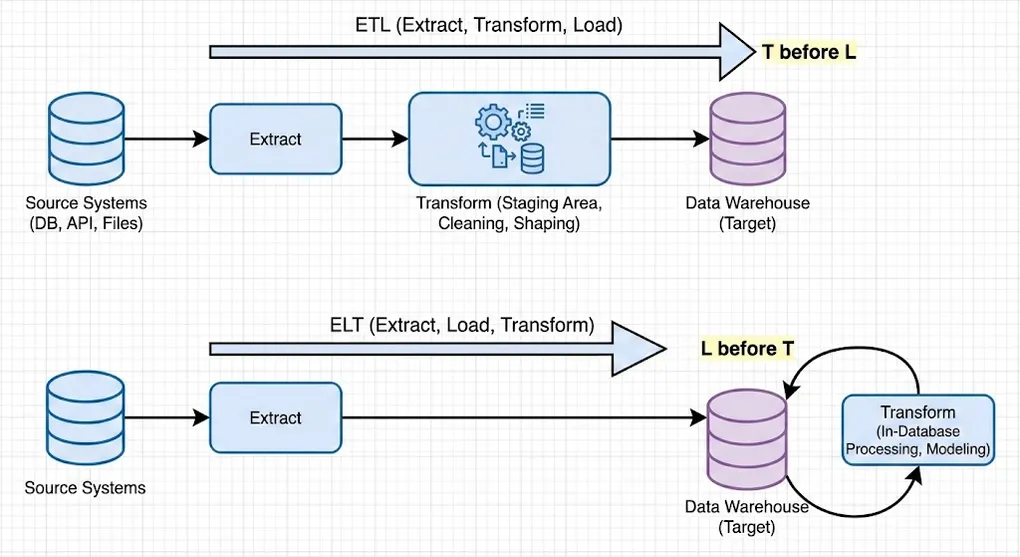
ETL (Extract-Transform-Load)
┌─────────┐    ┌─────────────┐    ┌─────────┐
│ Source  │───▶│  Transform  │───▶│  Target │
└─────────┘    │  (External) │    │ (Clean) │
└─────────────┘ └─────────┘- Flow: Extract → External Transform → Load
- Result: Clean, production-ready data lands in target
- Best For: On-premise systems, strict data privacy/security, limited target compute
ELT (Extract-Load-Transform)
┌─────────┐    ┌─────────┐    ┌─────────────┐
│ Source  │───▶│  Target │───▶│  Transform  │
└─────────┘    │  (Raw)  │    │ (In-Database)│
└─────────┘ └─────────────┘- Flow: Extract → Raw Load → In-Database Transform (SQL/dbt)
- Result: Raw data lands first, transformed using target’s compute power
- Best For: Cloud platforms (Snowflake/BigQuery/Databricks), rapid iteration, modern analytics
Quick Comparison
| Aspect | ETL | ELT |
|---|---|---|
| Transform Location | External (Spark/Python) | In-Database (SQL/dbt) |
| Data in Target | Clean/Processed | Raw + Processed |
| Flexibility | Lower | Higher |
| Compute Cost | External servers | Target database |
| Primary Use Case | Heavy compute, compliance, unstructured data | Cloud-native analytics |
ETL is Not Dead: While ELT dominates cloud data warehouses, ETL remains essential for:
- PII Masking/Compliance: Anonymize sensitive data before it enters the lake
- Heavy Transformations: Complex processing (ML preprocessing, image/video) using PySpark
- Unstructured Data: Parse and structure complex JSON, logs, or binary files externally
- Hybrid Architectures: Combine ETL for ingestion prep with ELT for analytics
2. E: Extraction (Data Sourcing)
Solving: How do we get the data? How much data do we pull?
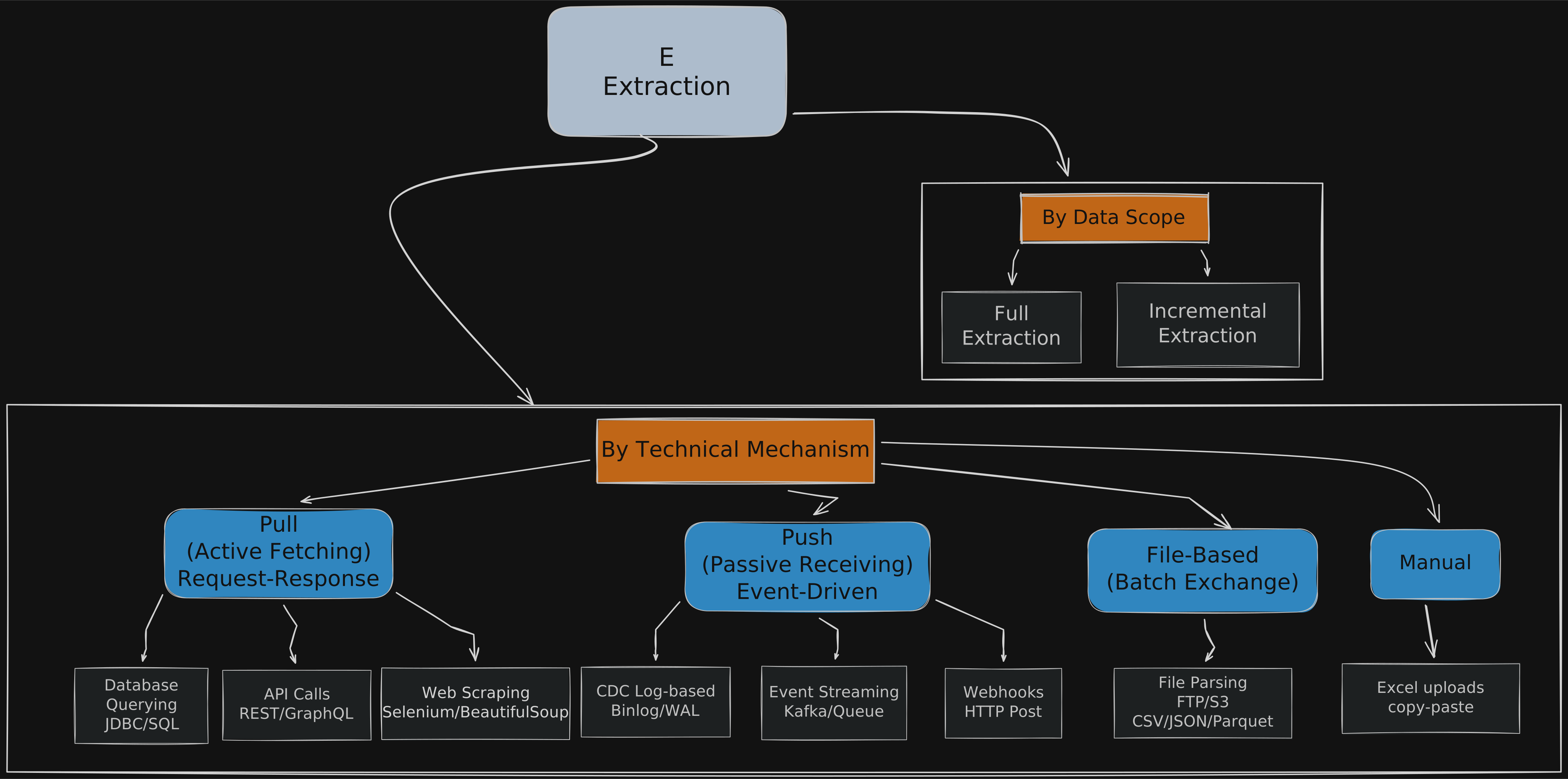
By Data Scope
| Strategy | Description | Use Case |
|---|---|---|
| Full Extraction | SELECT * every time, replace entire dataset | Dimension tables, small reference data |
| Incremental Extraction | Filter by updated_at or ID, pull only changes | Large fact tables, event logs |
By Technical Mechanism
Pull / Request-Response (Active Fetching)
| Method | Description | Considerations |
|---|---|---|
| Database Querying | Direct SQL via JDBC/ODBC | Connection pooling, query optimization |
| API Calls | REST/GraphQL endpoints | Pagination, Rate Limiting, Authentication |
| Web Scraping | Selenium/BeautifulSoup | Legal concerns, fragile to UI changes |
Push / Event-Driven (Passive Receiving)
| Method | Description | Tools |
|---|---|---|
| CDC (Log-based) | Read database transaction logs (Binlog/WAL) | Debezium, AWS DMS, Fivetran |
| Event Streaming | Subscribe to message queues | Kafka, RabbitMQ, AWS Kinesis |
| Webhooks | SaaS sends HTTP POST on events | Stripe, GitHub, Shopify |
CDC Deep Dive: Change Data Capture has two main approaches:
- Query-based CDC: Poll database with timestamp columns. Simple but can miss deletes.
- Log-based CDC: Read transaction logs directly. Complete but requires DB permissions.
File-Based (Batch Exchange)
| Method | Description | Formats |
|---|---|---|
| File Parsing | Read files from FTP/S3/ADLS | CSV, JSON, Parquet, Avro |
Manual
- Excel uploads, copy-paste operations (avoid in production!)
3. L: Loading (Write Strategies)
Solving: How do we write data to target? How do we handle historical changes?
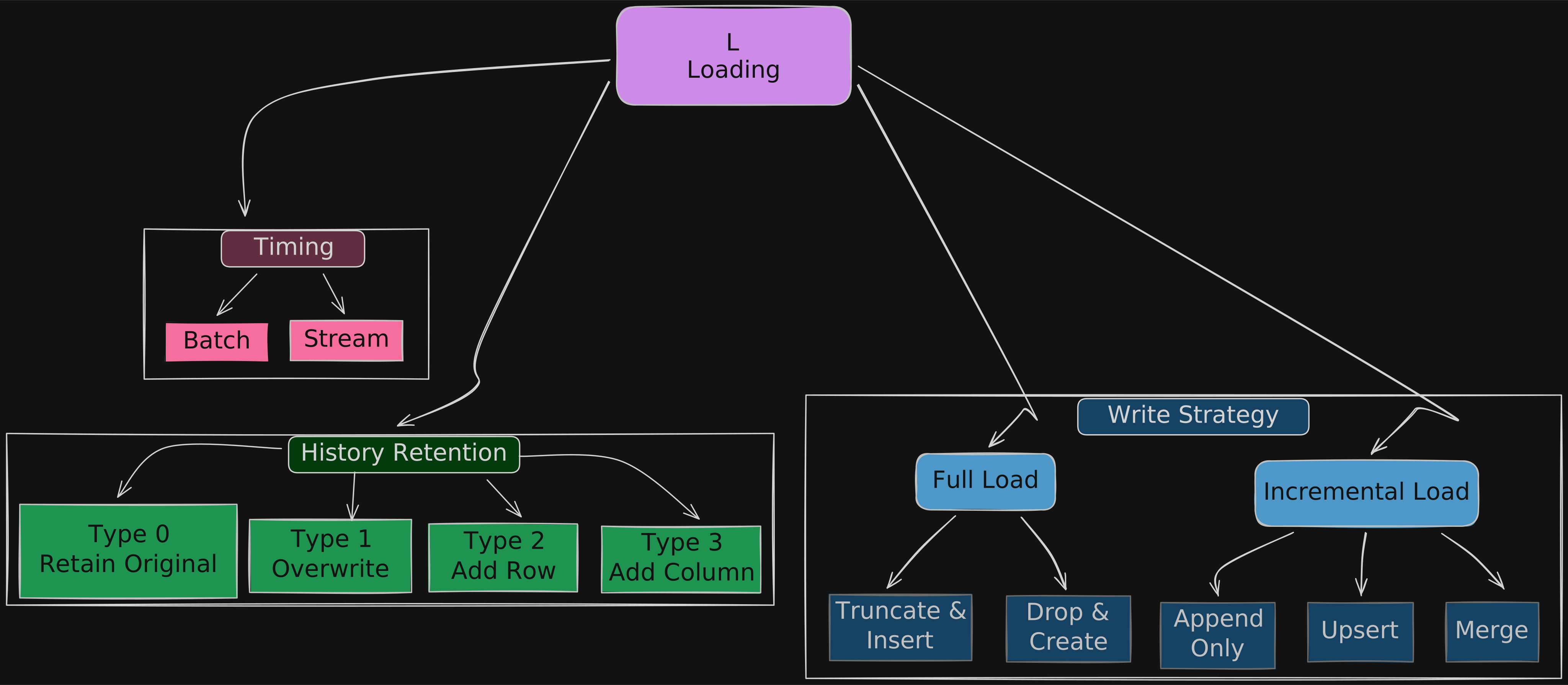
By Write Strategy
Full Load (Complete Replacement)
| Strategy | Description | Risk Level |
|---|---|---|
| Truncate & Insert | TRUNCATE TABLE → INSERT | ⚠️ High (data loss window) |
| Drop & Create | DROP TABLE → CREATE → INSERT | ⚠️ High (schema reset) |
Best for: Small dimension tables, complete refreshes, schema migrations
Incremental Load (Partial Updates)
| Strategy | Description | Use Case |
|---|---|---|
| Append Only | INSERT new records only | Event logs, time-series, immutable data |
| Upsert | UPDATE if exists, else INSERT (by Primary Key) | Master data, slowly changing records |
| Merge | SQL MERGE statement combining INSERT/UPDATE/DELETE | Complex sync operations, SCD handling |
-- Upsert Example (PostgreSQL)
INSERT INTO target_table (id, name, updated_at)
VALUES (1, 'John', NOW())
ON CONFLICT (id)
DO UPDATE SET name = EXCLUDED.name, updated_at = EXCLUDED.updated_at;

-- Merge Example (SQL Server / Snowflake)
MERGE INTO target_table t
USING source_table s ON t.id = s.id
WHEN MATCHED THEN UPDATE SET t.name = s.name
WHEN NOT MATCHED THEN INSERT (id, name) VALUES (s.id, s.name);
By History Retention (Slowly Changing Dimensions)
| SCD Type | Name | Behavior | History |
|---|---|---|---|
| Type 0 | Retain Original | Never update | ❌ No |
| Type 1 | Overwrite | Replace old value | ❌ No |
| Type 2 | Add New Row | New row with valid_from/valid_to | ✅ Full |
| Type 3 | Add New Column | current_value, previous_value columns | ⚠️ Limited |
-- SCD Type 2 Example
-- Before: id=1, name='John', valid_from='2024-01-01', valid_to='9999-12-31', is_current=true
-- After update:
UPDATE dim_customer SET valid_to = '2024-06-15', is_current = false WHERE id = 1 AND is_current = true;
INSERT INTO dim_customer (id, name, valid_from, valid_to, is_current) VALUES (1, 'Johnny', '2024-06-15', '9999-12-31', true);
Production Note: In high-concurrency or large-scale environments, the two-step approach (UPDATE + INSERT) can cause data inconsistency if not wrapped in a transaction. Modern Lakehouses (Delta Lake, Iceberg) support atomic
MERGEfor SCD Type 2:
-- SCD Type 2 with MERGE (Delta Lake / Databricks)
MERGE INTO dim_customer t
USING (
    SELECT id, name, current_timestamp() as effective_date
    FROM staging_customer
) s
ON t.id = s.id AND t.is_current = true
WHEN MATCHED AND t.name <> s.name THEN
    UPDATE SET t.valid_to = s.effective_date, t.is_current = false
WHEN NOT MATCHED THEN
    INSERT (id, name, valid_from, valid_to, is_current)
    VALUES (s.id, s.name, s.effective_date, '9999-12-31', true);

-- Then insert the new current record
INSERT INTO dim_customer
SELECT id, name, effective_date, '9999-12-31', true
FROM staging_customer s
WHERE EXISTS (SELECT 1 FROM dim_customer t WHERE t.id = s.id AND t.is_current = false);
By Timing
| Mode | Description | Latency | Throughput |
|---|---|---|---|
| Batch | Scheduled runs (hourly/daily) | High | High |
| Stream | Real-time processing | Low | Variable |
| Micro-batch | Small frequent batches (e.g., every 5 min) | Medium | Medium |
4. T: Transformation (Data Processing)
Solving: How do we clean, standardize, and create business value?
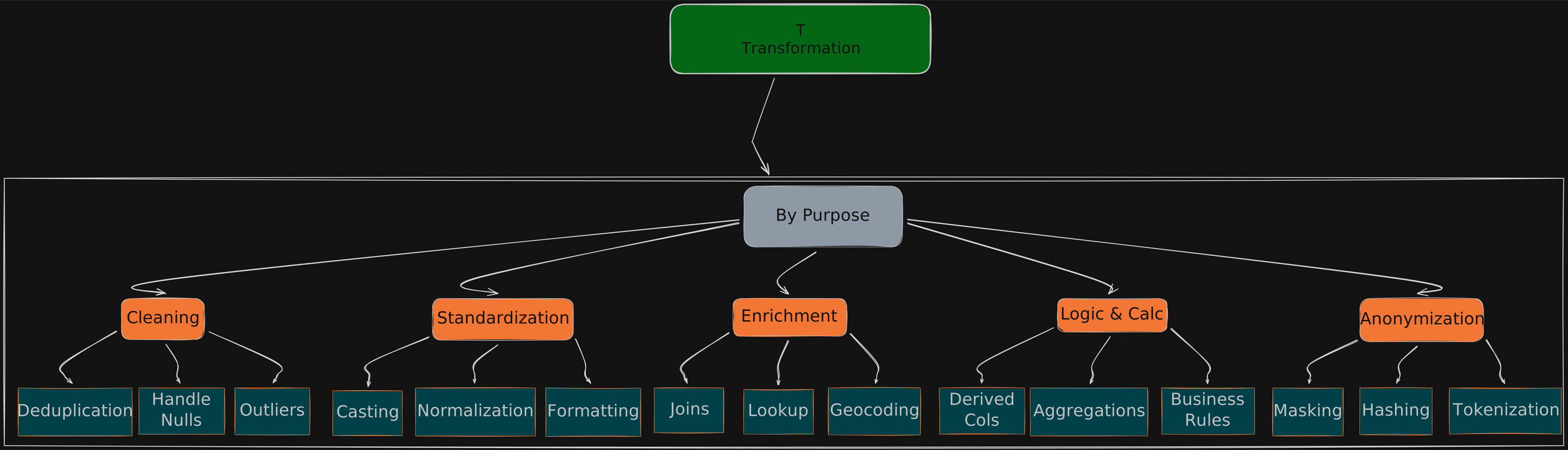
By Purpose (Functional)
Cleaning
| Operation | Description | Example |
|---|---|---|
| Remove Duplicates | Deduplication by key | ROW_NUMBER() OVER (PARTITION BY id) |
| Handle Missing Data | Impute or remove nulls | COALESCE(value, default) |
| Outlier Detection | Filter statistical anomalies | Z-score > 3 standard deviations |
| Trim Whitespace | Remove unwanted spaces | TRIM(column) |
| Filter Invalid | Remove records failing validation | WHERE email LIKE '%@%.%' |
Standardization
| Operation | Description | Example |
|---|---|---|
| Type Casting | Convert data types | CAST(date_string AS DATE) |
| Normalization | Unify units/codes | Convert all currencies to USD |
| Format Standardization | Consistent formatting | Phone: +1-555-123-4567 |
Enrichment
| Operation | Description | Example |
|---|---|---|
| Integration | Join external data | Join customer with demographics |
| Geocoding | Address to coordinates | Google Maps API |
| Lookup | Reference data enrichment | Country code → Country name |
Logic & Calculation
| Operation | Description | Example |
|---|---|---|
| Derived Columns | Calculate new fields | age = DATEDIFF(YEAR, birthdate, GETDATE()) |
| Business Rules | Apply business logic | customer_tier = CASE WHEN revenue > 1M THEN 'Enterprise'... |
| Aggregations | Summarize data | SUM(sales), COUNT(DISTINCT users) |
Anonymization
| Operation | Description | Example |
|---|---|---|
| Masking | Hide sensitive data | john.doe@email.com → j***@e***.com |
| Hashing | One-way encryption | SHA256(ssn) |
| Tokenization | Replace with tokens | SSN → Random UUID mapping |
By Location (Architectural)
| Location | When | Tools |
|---|---|---|
| Pre-Load (ETL) | Before entering database | Python, Spark, AWS Glue |
| In-Database (ELT) | After raw data lands | SQL, dbt, Stored Procedures |
5. Data Quality & Observability
Modern data engineering requires continuous monitoring and validation.
Data Quality Dimensions
| Dimension | Description | Example Check |
|---|---|---|
| Completeness | No unexpected nulls | NULL rate < 1% |
| Uniqueness | No duplicates | COUNT(*) = COUNT(DISTINCT pk) |
| Accuracy | Values are correct | price > 0 |
| Consistency | Cross-system alignment | SUM(orders) = SUM(order_items) |
| Timeliness | Data is fresh | max(updated_at) within 1 hour |
| Validity | Conforms to rules | email matches regex pattern |
Tools Ecosystem
┌─────────────────────────────────────────────────────────────────┐
│                     Data Quality & Observability                 │
├─────────────────────────────────────────────────────────────────┤
│  Testing          │  Great Expectations, dbt tests, Soda        │
│  Monitoring       │  Monte Carlo, Bigeye, Datafold              │
│  Lineage          │  OpenLineage, Atlan, DataHub                │
│  Alerting         │  PagerDuty, Slack integrations              │
└─────────────────────────────────────────────────────────────────┘
dbt Test Example
# schema.yml
models:
  - name: orders
    columns:
      - name: order_id
        tests:
          - unique
          - not_null
      - name: amount
        tests:
          - not_null
          - dbt_utils.accepted_range:
              min_value: 0
6. Tool Ecosystem
ETL/ELT Tools by Category
┌─────────────────────────────────────────────────────────────────┐
│                        Data Pipeline Ecosystem                   │
├─────────────────────────────────────────────────────────────────┤
│                                                                  │
│  ┌──────────────┐    ┌──────────────┐    ┌──────────────┐       │
│  │   Extract    │    │  Transform   │    │     Load     │       │
│  ├──────────────┤    ├──────────────┤    ├──────────────┤       │
│  │ Fivetran     │    │ dbt          │    │ Snowflake    │       │
│  │ Airbyte      │    │ Spark        │    │ BigQuery     │       │
│  │ Stitch       │    │ Python       │    │ Redshift     │       │
│  │ Debezium     │    │ Dataflow     │    │ Databricks   │       │
│  └──────────────┘    └──────────────┘    └──────────────┘       │
│                                                                  │
│  ┌──────────────────────────────────────────────────────┐       │
│  │                   Orchestration                       │       │
│  ├──────────────────────────────────────────────────────┤       │
│  │  Airflow  │  Dagster  │  Prefect  │  Mage  │  Kestra │       │
│  └──────────────────────────────────────────────────────┘       │
│                                                                  │
└─────────────────────────────────────────────────────────────────┘
Modern Data Stack (Typical Architecture)
Source Systems          Ingestion         Warehouse        Transform        BI
    │                      │                  │               │             │
    ▼                      ▼                  ▼               ▼             ▼
┌────────┐            ┌─────────┐        ┌─────────┐     ┌───────┐    ┌─────────┐
│Postgres│──┐         │         │        │         │     │       │    │         │
│ MySQL  │──┼────────▶│ Fivetran│───────▶│Snowflake│────▶│  dbt  │───▶│ Tableau │
│  APIs  │──┤         │ Airbyte │        │ BigQuery│     │       │    │Power BI │
│  Files │──┘         │         │        │         │     │       │    │         │
└────────┘            └─────────┘        └─────────┘     └───────┘    └─────────┘
Reverse ETL (Data Activation)
The Modern Data Stack isn’t complete without Reverse ETL – pushing transformed data back to operational systems.
              Traditional ETL/ELT                    Reverse ETL
                     │                                    │
                     ▼                                    ▼
┌────────────────────────────────────────┐   ┌──────────────────────────┐
│  Sources → Warehouse → BI Dashboards   │   │  Warehouse → SaaS Tools  │
└────────────────────────────────────────┘ └──────────────────────────┘| Aspect | Description |
|---|---|
| Purpose | Activate warehouse data in operational tools |
| Direction | Warehouse → SaaS (Salesforce, HubSpot, Facebook Ads) |
| Use Cases | Enrich CRM with lead scores, sync segments to ad platforms, update customer success tools |
| Tools | Hightouch, Census, Polytomic, RudderStack |
Example Flow:
Snowflake (Gold Layer)    →    Hightouch    →    Salesforce
    │                              │                  │
    ▼                              ▼                  ▼
Customer Lifetime Value    Sync daily at 6am    Update Account.LTV field
High-churn-risk flag       Map to SF fields     Trigger CS workflow
Why Reverse ETL Matters: Data teams spend effort building clean datasets. Reverse ETL closes the loop by making that data actionable in the tools sales, marketing, and support teams actually use.
7. Architecture Layers (Medallion Architecture)
Solving: How do we organize data pipelines?
🥉 Bronze Layer (Raw / Landing)
- Content: Raw data exactly as received (JSON, CSV, API responses)
- Purpose: Full traceability, debugging, replay capability
- Transformations: None (or minimal: add ingestion timestamp)
🥈 Silver Layer (Clean / Staging)
- Content: Cleaned, deduplicated, typed, standardized tables
- Purpose: Single Source of Truth for analysts
- Transformations: Cleaning, standardization, deduplication
🥇 Gold Layer (Serve / Mart)
- Content: Aggregated, business-logic-enriched reporting tables (Star Schema)
- Purpose: High-performance, BI-ready (Power BI, Tableau, Looker)
- Transformations: Aggregations, business rules, dimensional modeling
┌─────────────────────────────────────────────────────────────────┐
│                     Medallion Architecture                       │
├─────────────────────────────────────────────────────────────────┤
│                                                                  │
│   Source    ──▶    🥉 Bronze    ──▶    🥈 Silver    ──▶    🥇 Gold     │
│   Systems          (Raw)              (Clean)            (Mart)  │
│                                                                  │
│   • APIs          • JSON blobs       • Typed tables    • Star   │
│   • DBs           • CSV dumps        • Deduplicated      Schema │
│   • Files         • Full history     • Standardized    • KPIs   │
│                                                                  │
└─────────────────────────────────────────────────────────────────┘
8. Summary: The Kitchen Analogy 🍳
| Concept | Kitchen Equivalent |
|---|---|
| E (Extract) | Sourcing – Getting ingredients (whether you pick them up or suppliers deliver) |
| L (Load) | Storage/Plating – Putting ingredients in the fridge, or serving finished dishes |
| T (Transform) | Prep & Cooking – Washing, chopping, cooking |
| Architecture | Kitchen Layout – Receiving → Prep → Service areas (zone management) |
| Data Quality | Quality Control – Checking freshness, rejecting bad ingredients |
| Orchestration | Order Management – Coordinating dish preparation timing |
9. Complete Structure Overview 📋
A quick-reference outline of everything covered in this series.
-
1. Core Architecture Paradigms — How data flows and when it’s processed
- ETL (Extract-Transform-Load)
- Flow: Extract → External Transform (Python/Spark) → Load
- Characteristic: Compute-heavy, clean data lands in target
- Use Case: On-premise, GDPR/HIPAA, complex unstructured data
- ELT (Extract-Load-Transform)
- Flow: Extract → Raw Load → In-Database Transform (SQL/dbt)
- Characteristic: Storage-heavy, raw data first, leverage cloud compute (Snowflake/BigQuery)
- Use Case: Cloud-native, fast iteration, preserve raw history
- Reverse ETL
- Flow: Warehouse → SaaS Tools (Salesforce/Slack)
- Purpose: Operational Analytics — let business users see insights in their existing tools
- ETL (Extract-Transform-Load)
-
2. E: Extraction — How to acquire data from sources
- 2.1 By Technical Mechanism
- Pull / Request-Response
- Database Querying: JDBC/ODBC SQL queries (
SELECT *) - API Calls: REST/GraphQL
- Challenges: Pagination (Offset/Cursor), Rate Limiting (Exponential Backoff)
- Web Scraping: For sites without APIs
- Tools: Selenium (dynamic rendering), BeautifulSoup (static parsing)
- Database Querying: JDBC/ODBC SQL queries (
- Push / Event-Driven
- CDC (Change Data Capture): Log-based
- Principle: Listen to DB Transaction Log (Binlog/WAL)
- Advantages: Captures DELETEs, near real-time, low source DB load
- Event Streaming: Message queues (Kafka/RabbitMQ)
- Webhooks: SaaS systems push HTTP POST payload
- CDC (Change Data Capture): Log-based
- File-Based
- File Parsing: FTP/S3 files (CSV, JSON, Parquet, XML)
- Manual
- Manual Data Extraction: Excel input, copy-paste (Human-in-the-loop)
- Pull / Request-Response
- 2.2 By Data Scope
- Full Extraction: Complete dataset each run
- Incremental Extraction: Based on
updated_at(Watermark) or Auto-increment ID- Risk: Cannot detect Hard Deletes at source
- 2.1 By Technical Mechanism
-
3. L: Loading — How data enters the target and maintains state
- 3.1 Write Strategy
- **Full Load **
- Truncate & Insert: Clear table → Write (fast, but table is empty during execution)
- Drop & Create: Drop schema → Rebuild → Write (for frequent schema changes)
- **Incremental Load **
- Append Only: Add to end (logs, transactions — immutable data)
- Upsert (Merge): Update + Insert
- Logic: Match on Primary Key
- If exists → Update, if not → Insert
- Application: Sync member data, inventory status
- **Full Load **
- 3.2 SCD (Slowly Changing Dimensions) — How warehouse handles source changes (e.g., user moves address)
- Type 0 (No Historization): Ignore changes, keep original value forever
- Type 1 (Overwrite): Direct overwrite, latest state only, no history
- Type 2 (Row Versioning): Add new row (most standard approach)
- Uses:
Effective_Date,End_Date,Is_Currentcolumns - Advantage: Can query state at any point in time
- Uses:
- Type 3 (Previous Column): Add column
- Keeps
Current_ValueandPrevious_Value
- Keeps
- 3.3 Processing Timing
- Batch Processing: Accumulated processing (daily/hourly), high Throughput
- Stream Processing: Event-driven (ms/s latency), low Latency
- 3.1 Write Strategy
-
4. T: Transformation — Data cleaning, standardization, enrichment
- 4.1 Data Cleaning (Data Hygiene)
- Remove Duplicates: Delete completely duplicate rows
- Filtering: Exclude unwanted rows (test users, soft-deleted records)
- Missing Data Handling:
- Drop: Discard rows/columns
- Imputation: Fill with 0, “Unknown”, Mean, or Forward Fill
- Outlier Detection: Identify and isolate anomalies (e.g., age > 150)
- String Manipulation:
- Unwanted Spaces: Trim/Strip
- Invalid Values: Fix format errors (e.g., Email missing @)
- 4.2 Standardization
- Type Casting: String → Integer/Date
- Normalization:
- Unit conversion (cm → m, TWD → USD)
- Value scaling (0-1 normalization)
- Formatting: Date format unification (ISO 8601)
- 4.3 Integration & Enrichment
- Data Integration: Join tables from different sources
- Lookup/Enrichment: Link external reference tables
- Examples: IP → Country, Coordinates → Administrative Region
- 4.4 Logic & Aggregation
- Derived Columns: Calculate new fields (Unit Price × Quantity = Total)
- Business Rules: Apply business logic (Spend > 1000 → Mark as VIP)
- Aggregations:
- Roll-up: Day → Month
- Summarize: SUM, COUNT, AVG, MAX, MIN
- 4.1 Data Cleaning (Data Hygiene)
10. What is dbt? (The “T” in ELT)
A common question: Is dbt a database?
No. dbt (data build tool) is not a database. It doesn’t store any data.
The Kitchen Analogy
| Component | Kitchen Equivalent |
|---|---|
| Database / Data Warehouse (BigQuery, Snowflake) | The fridge & stove — stores ingredients, does the cooking |
| dbt | The recipe book & head chef — tells the stove how to cook, what order to prepare dishes |
Key Concept: dbt connects to your database, sends SQL instructions, and the results stay in your database. This is called push-down computing.
dbt’s Position in the Stack
Extract & Load (EL)    →    Transform (T)    →    Analyze
   Fivetran/Airbyte         dbt (SQL)             Tableau/PowerBI
        ↓                      ↓                       ↓
   Raw data enters       dbt transforms          BI reads
   (Bronze)              Bronze → Silver          Gold layer
                         Silver → Gold
Why Everyone Uses dbt
Before dbt, data engineers wrote:
CREATE TABLE ... AS SELECT ...statements- Stored procedures
- Pain points: No version control, no dependency management, no testing
dbt brings software engineering best practices to SQL:
| Feature | Description |
|---|---|
| Modularity | Write only SELECT; dbt wraps it in CREATE TABLE/VIEW |
| Dependency Graph | Define dependencies; dbt runs in correct order automatically |
| Version Control | All code in Git — who changed what, when |
| Testing | Write tests like “This column should not be NULL” |
| Documentation | Auto-generates docs website from your models |
One-Liner Summary
dbt is not where your data lives. dbt is the tool that transforms your data inside your warehouse.