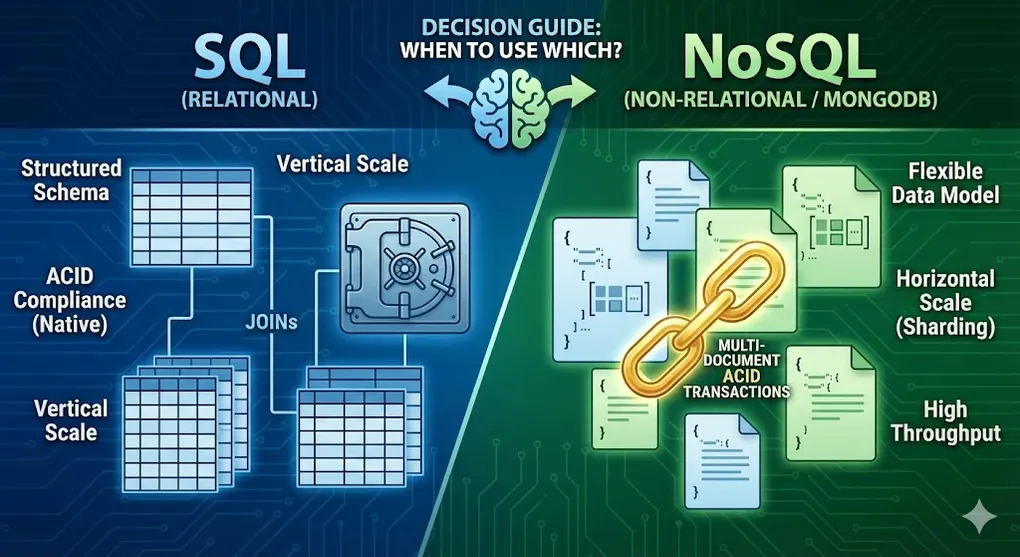
SQL vs NoSQL: When to Use Which & Multi-Document ACID
Prerequisites: Understanding of both SQL and NoSQL concepts. See DB 01 Networking Fundamentals and NOSQL 01 Introduction.
This is the ultimate decision guide for choosing between relational (SQL) and non-relational (NoSQL) databases.
Part A: Fundamental Differences
1. The Core Difference
2. Feature Comparison
| Feature | SQL (e.g., SQL Server) | NoSQL (e.g., MongoDB) |
|---|---|---|
| Data Model | Tables with fixed columns | JSON documents (flexible) |
| Schema | Rigid, predefined | Dynamic, schema-less |
| Relationships | JOINs across tables | Embedded documents or $lookup |
| Scaling | Vertical (bigger server) | Horizontal (more servers) |
| Transactions | Multi-table ACID | Per-document (multi-doc available) |
| Query Language | SQL (standardized) | Varies by database |
| Best For | Complex queries, consistency | Scale, flexibility, speed |
[!CAUTION] Common Myths Debunked:
- ❌ “NoSQL doesn’t support ACID” → MongoDB 4.0+ has multi-document transactions
- ❌ “SQL can’t scale horizontally” → SQL Server supports Read Replicas, and sharding (though more complex)
- ❌ “NoSQL is always faster” → Depends on query patterns and index design; poorly indexed MongoDB can be slower than well-tuned SQL
- ❌ “Schema-less means no planning” → You still need to design for your query patterns
3. Architecture Comparison
Part B: Decision Framework
4. The Decision Tree
5. Quick Decision Matrix
| Requirement | Choose SQL | Choose NoSQL |
|---|---|---|
| Complex relationships | ✅ | ⚠️ |
| Strict consistency | ✅ | ⚠️ |
| Ad-hoc queries | ✅ | ⚠️ |
| Flexible schema | ⚠️ | ✅ |
| Horizontal scaling | ⚠️ | ✅ |
| High write throughput | ⚠️ | ✅ |
| Rapid development | ⚠️ | ✅ |
| Geographic distribution | ⚠️ | ✅ |
[!TIP] Team Factor: Technology decisions aren’t just technical. If your team has 10 years of SQL expertise and zero MongoDB experience, switching databases means:
- 📚 Steep learning curve
- 🐛 More bugs during transition
- 💰 Training costs
Tech debt includes knowledge debt. Factor in team skills when choosing databases.
6. Use Case Guide
Choose SQL When:
| Scenario | Why SQL |
|---|---|
| Banking/Finance | ACID transactions, audit requirements |
| ERP Systems | Complex relationships between entities |
| Inventory Management | Exact stock counts, no overselling |
| Reporting/Analytics | Complex JOINs, aggregations |
| Legacy Integration | Standard SQL interface |
Choose NoSQL When:
| Scenario | Why NoSQL |
|---|---|
| Real-time Apps | Low latency, high concurrency |
| Content Management | Variable content structure |
| IoT/Sensor Data | Time-series, high write volume |
| Mobile Apps | Offline sync, flexible schema |
| Gaming | Leaderboards, user profiles |
| Product Catalogs | Variable attributes per product |
Part C: Multi-Document ACID Transactions
7. The MongoDB ACID Evolution
Early MongoDB was criticized for lacking transactions. Since version 4.0 (2018), MongoDB supports multi-document ACID transactions.
8. When to Use Transactions
| Scenario | Use Transaction? |
|---|---|
| Update single document | ❌ Already atomic |
| Update embedded array | ❌ Already atomic |
| Transfer money between accounts | ✅ Yes |
| Create order + reduce inventory | ✅ Yes |
| Multi-collection updates | ✅ Yes |
9. Transaction Syntax
// Start a session
const session = client.startSession();

try {
  session.startTransaction();

  // Operation 1: Debit from account A
  await db.accounts.updateOne(
    { _id: "accountA" },
    { $inc: { balance: -100 } },
    { session }
  );

  // Operation 2: Credit to account B
  await db.accounts.updateOne(
    { _id: "accountB" },
    { $inc: { balance: 100 } },
    { session }
  );

  // Commit the transaction
  await session.commitTransaction();
  console.log("Transfer successful");

} catch (error) {
  // Abort on any error
  await session.abortTransaction();
  console.log("Transfer failed, rolled back");

} finally {
  session.endSession();
}
10. Transaction Best Practices
| Practice | Reason |
|---|---|
| Keep transactions short | Locks held during transaction |
| Limit operations | Performance impact |
| Use retry logic | Transient errors possible |
| Prefer schema design over transactions | Embedding avoids multi-doc updates |
[!WARNING] Transaction Performance Cost: Multi-document transactions use Snapshot Isolation and create locks on involved documents. Long transactions increase lock contention and memory usage. This is why schema embedding (denormalization) should always be your first choice — use transactions only as a last resort when cross-document atomicity is absolutely required.
// With retry logic
async function runTransactionWithRetry(session, txnFunc) {
  while (true) {
    try {
      await txnFunc(session);
      break;
    } catch (error) {
      if (error.hasErrorLabel("TransientTransactionError")) {
        console.log("Transient error, retrying...");
        continue;
      }
      throw error;
    }
  }
}
Part D: Hybrid Approaches
11. Polyglot Persistence
Use multiple databases for different parts of your system:
| Component | Database | Reason |
|---|---|---|
| Orders/Payments | SQL Server | ACID, complex queries |
| Product Catalog | MongoDB | Flexible attributes |
| User Sessions | Redis | Fast, ephemeral |
| Product Search | Elasticsearch | Full-text, faceted |
[!IMPORTANT] Data Sync Challenge: With polyglot persistence, the same data may exist in multiple databases (e.g., user ID in SQL and MongoDB). Keeping them in sync is critical. Common solutions include:
- Message Queues (Kafka, RabbitMQ) — Event-driven sync
- Change Streams (MongoDB) / CDC (SQL Server) — Database-level change capture
- Eventual Consistency — Accept slight delays between systems
Without proper sync, you risk data inconsistency across your architecture.
12. Migration Strategies
SQL to NoSQL
Common Migration Patterns
| Pattern | Approach |
|---|---|
| Strangler Fig | Gradually replace endpoints |
| Event Sourcing | Sync via event stream |
| Dual Write | Write to both during transition |
| CDC | Change Data Capture for sync |
Part E: Real-World Examples
13. E-Commerce Platform
| Component | SQL | NoSQL |
|---|---|---|
| User accounts | ✅ Relationships, auth | |
| Shopping cart | ✅ Fast, session-based | |
| Product catalog | ✅ Variable attributes | |
| Orders | ✅ ACID, inventory | |
| Reviews | ✅ High volume, denormalized | |
| Analytics | ✅ Complex aggregations |
14. Social Media Platform
| Component | SQL | NoSQL |
|---|---|---|
| User profiles | ✅ Flexible fields | |
| Friend graph | ✅ Graph DB (Neo4j) | |
| Posts/Feed | ✅ High write, timeline | |
| Messages | ✅ Real-time, partitioned | |
| Ads targeting | ✅ Complex queries | |
| Billing | ✅ ACID |
15. IoT Platform
| Component | SQL | NoSQL |
|---|---|---|
| Device registry | ✅ Relationships | |
| Sensor readings | ✅ Time-series (Cassandra) | |
| Alerts | ✅ Fast writes | |
| Configuration | ✅ Consistency | |
| Analytics | ✅ Column store |
Summary
The Golden Rules
- It’s not either/or — use both when appropriate
- Start with requirements — not technology preference
- Consider future scale — but don’t over-engineer
- Schema flexibility — comes with trade-offs
- Transactions — MongoDB has them when needed
[!NOTE] Total Cost of Ownership (TCO): Technology choice is also a business decision:
- SQL Server: High licensing costs, but mature DBA talent pool is widely available
- MongoDB Atlas: Convenient managed service, but misconfigured sharding can cause cloud bills to skyrocket
- Open Source (PostgreSQL, MySQL): No license fees, but requires in-house expertise for operations
Always factor in licensing, hosting, and team expertise when making database decisions.
Decision Cheat Sheet
| Question | SQL if… | NoSQL if… |
|---|---|---|
| Schema | Well-defined | Evolving |
| Relationships | Many, complex | Few, embedded |
| Consistency | Critical | Eventual OK |
| Write volume | Moderate | Very high |
| Scale | Vertical OK | Need horizontal |
| Development | Planned, stable | Agile, rapid |
Final Comparison
| Aspect | SQL Server | MongoDB |
|---|---|---|
| Mature tech | 30+ years | 15+ years |
| Tooling | Excellent | Good |
| Talent pool | Large | Growing |
| Cloud support | Azure SQL, RDS | Atlas, DocumentDB |
| Learning curve | SQL standard | MongoDB-specific |
| Cost | License + scale | Scale-based |
💡 Practice Questions
Conceptual
-
List 3 scenarios where SQL is better than NoSQL and 3 where NoSQL is better.
-
Explain what polyglot persistence means and give an example architecture.
-
When did MongoDB add multi-document ACID transactions? When should you use them?
Scenario
-
Architecture Decision: You’re building an e-commerce platform with: user accounts, product catalog (varying attributes), shopping cart, orders, and product reviews. Which database(s) would you use for each component and why?
-
Migration: Your company has a legacy SQL Server database with 100 tables. The CEO wants to “move to the cloud and use MongoDB because it’s faster.” How would you respond and what questions would you ask?
💡 View Answer (Scenario 2)
Response Framework:
- Clarify the “Why”: What specific problem are we solving? Is it performance, cost, or scalability?
- Challenge assumptions: “Faster” depends on workload. MongoDB isn’t inherently faster for all use cases.
- Assess the current state:
- How many tables have complex JOINs?
- What’s the current pain point (slow queries, scaling issues)?
- Are there ACID-critical transactions?
- Consider alternatives:
- Can we optimize current SQL (indexes, query tuning)?
- Azure SQL (cloud) keeps SQL benefits without migration risk
- If migration is needed:
- Use Strangler Fig pattern (gradual replacement)
- Start with non-critical, schema-flexible components
- Keep ACID-critical data (payments, inventory) in SQL
Key insight: Migration should be driven by specific requirements, not technology trends.
Related Series
Looking to deepen your database knowledge? Check out:
- DB Series — SQL Server from fundamentals to troubleshooting
- DATA Series — Data engineering and analytics