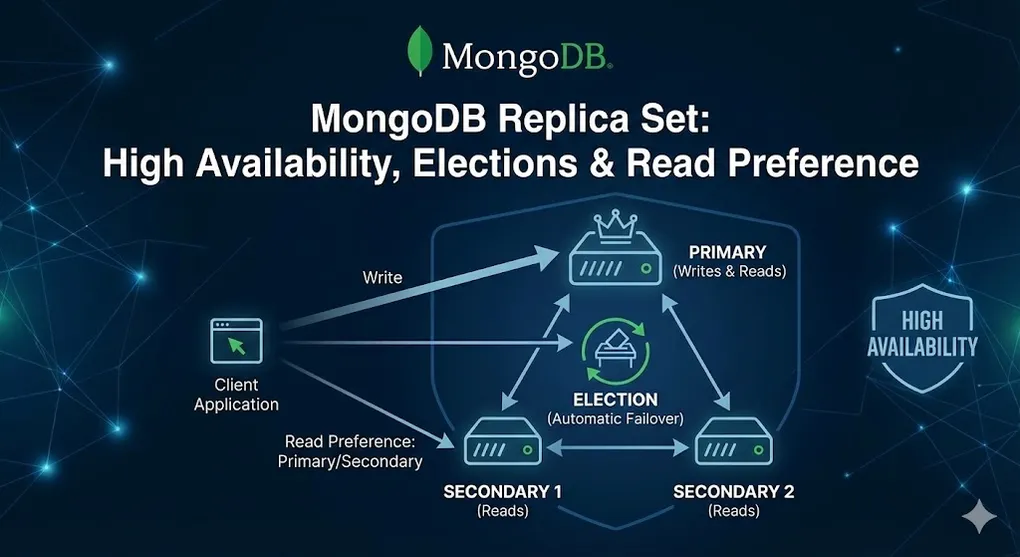
MongoDB Replica Set: High Availability, Elections & Read Preference
Prerequisites: Understanding of MongoDB basics. See NOSQL 02 MongoDB Basics.
A Replica Set is MongoDB’s built-in high availability solution — multiple copies of your data with automatic failover.
Part A: Replica Set Architecture
1. What is a Replica Set?
A group of MongoDB servers that maintain the same data set, providing:
- Redundancy (data safety)
- High Availability (automatic failover)
- Read Scaling (read from secondaries)
graph TD
    subgraph "Replica Set (3 members)"
        P[Primary<br/>Read + Write]
        S1[Secondary 1<br/>Read Only]
        S2[Secondary 2<br/>Read Only]
    end

    P -->|Replicates| S1
    P -->|Replicates| S2

    APP[Application] -->|Write| P
    APP -.->|Read| S1
    APP -.->|Read| S2

    style P fill:#27ae60,color:#fff
    style S1 fill:#3498db,color:#fff
    style S2 fill:#3498db,color:#fff
2. Member Roles
| Role | Can Vote? | Can Become Primary? | Purpose |
|---|---|---|---|
| Primary | ✅ | (current) | Handles all writes |
| Secondary | ✅ | ✅ | Maintains copy, can serve reads |
| Arbiter | ✅ | ❌ | Vote only, no data |
| Hidden | ✅ | ❌ | Backup/reporting, invisible to apps |
| Delayed | ✅ | ❌ | Time-delayed copy (recover from mistakes) |
3. Recommended Configurations
| Scenario | Configuration | Why |
|---|---|---|
| Standard | 1 Primary + 2 Secondaries | Tolerates 1 failure |
| Budget | 1 Primary + 1 Secondary + 1 Arbiter | Saves disk space |
| Disaster Recovery | P + S + S (different datacenters) | Geographic redundancy |
| Reporting | P + S + Hidden Secondary | Reports don’t affect production |
Part B: Replication Process
4. How Data Replicates
sequenceDiagram
    participant C as Client
    participant P as Primary
    participant O as Oplog
    participant S as Secondary

    C->>P: Insert document
    P->>P: Write to data files
    P->>O: Write to oplog
    O-->>S: Tail oplog (continuous)
    S->>S: Apply operation
    P-->>C: Acknowledge write
5. The Oplog (Operation Log)
The oplog is a capped collection that records all write operations.
// View oplog on primary
use local
db.oplog.rs.find().sort({ ts: -1 }).limit(5)

// Output:
{
  "ts": Timestamp(1710500000, 1),    // Timestamp
  "op": "i",                           // i=insert, u=update, d=delete
  "ns": "mydb.users",                  // Namespace
  "o": { "_id": ObjectId("..."), "name": "Alice" }  // Document
}| Field | Meaning |
|---|---|
ts | Timestamp (for ordering) |
op | Operation type (i/u/d/c/n) |
ns | Database.collection |
o | The actual document/operation |
Part C: Elections & Automatic Failover
6. What Triggers an Election?
| Trigger | Scenario |
|---|---|
| Primary failure | Server crashes, network disconnect |
| Maintenance | Admin steps down primary |
| Priority change | Higher priority member joins |
| Network partition | Primary isolated from majority |
7. Election Process
sequenceDiagram
    participant S1 as Secondary 1
    participant S2 as Secondary 2
    participant S3 as Secondary 3

    Note over S1,S3: Primary fails!

    S1->>S1: Start election timer
    S2->>S2: Start election timer
    S3->>S3: Start election timer

    Note over S1: Timer expires first

    S1->>S2: Request vote (term 2)
    S1->>S3: Request vote (term 2)

    S2-->>S1: Vote YES
    S3-->>S1: Vote YES

    Note over S1: Majority reached!

    S1->>S1: Become PRIMARY
    S1->>S2: Notify: I am Primary
    S1->>S3: Notify: I am Primary
8. Election Rules
| Rule | Explanation |
|---|---|
| Majority required | 2 of 3, 3 of 5, etc. |
| Higher priority wins | If equally up-to-date |
| Most recent data wins | Latest oplog timestamp |
| Term number | Prevents split-brain (like election seasons) |
Why Odd Numbers?
graph LR
    subgraph "3 Members (Odd)"
        A1[Server A]
        A2[Server B]
        A3[Server C]
    end

    subgraph "2 Members (Even) - BAD"
        B1[Server X]
        B2[Server Y]
    end

    A1 -.->|2 votes = majority| A2
    B1 x-.->|1 vote each = TIE| B2
Always use odd numbers to avoid tie votes!
Part D: Write Concern
9. What is Write Concern?
Write Concern specifies how many nodes must acknowledge a write before returning success.
graph LR
    subgraph "Write Concern: 1 (Fast)"
        W1[Write to Primary]
        W1 --> ACK1[Return OK]
    end

    subgraph "Write Concern: majority (Safe)"
        W2[Write to Primary]
        W2 --> REP[Replicate to Secondary]
        REP --> ACK2[Return OK]
    end

    style ACK1 fill:#f39c12,color:#fff
    style ACK2 fill:#27ae60,color:#fff
10. Write Concern Options
| Value | Meaning | Speed | Data Safety |
|---|---|---|---|
w: 0 | Fire and forget | ⚡⚡⚡ | ❌ None |
w: 1 | Primary acknowledged | ⚡⚡ | ⚠️ May lose on failure |
w: "majority" | Majority acknowledged | ⚡ | ✅ High |
w: 3 | 3 nodes acknowledged | Slow | ✅ Very high |
Code Examples
// Default: w: 1 (primary only)
db.users.insertOne({ name: "Alice" });

// Majority write concern
db.users.insertOne(
  { name: "Bob" },
  { writeConcern: { w: "majority", wtimeout: 5000 } }
);

// With journal acknowledgment
db.users.insertOne(
  { name: "Carol" },
  { writeConcern: { w: "majority", j: true } }
);
[!NOTE] Journal vs Memory:
w: "majority"ensures data exists in memory across multiple nodes. Addingj: trueensures data is written to the on-disk journal. In a datacenter-wide power outage, only journaled writes survive. Usej: truefor critical data like financial transactions.
11. Write Concern Decision Guide
| Scenario | Recommended | Reason |
|---|---|---|
| Logging/metrics | w: 1 | Speed over durability |
| User data | w: "majority" | Balanced |
| Financial transactions | w: "majority", j: true | Maximum safety |
Part E: Read Preference
12. What is Read Preference?
Read Preference specifies which members can serve read queries.
graph TD
    subgraph "Read Preference Options"
        P[primary<br/>Only Primary]
        PS[primaryPreferred<br/>Primary, fallback to Secondary]
        S[secondary<br/>Only Secondary]
        SP[secondaryPreferred<br/>Secondary, fallback to Primary]
        N[nearest<br/>Lowest latency]
    end

    style P fill:#27ae60,color:#fff
    style S fill:#3498db,color:#fff
    style N fill:#9b59b6,color:#fff
13. Read Preference Options
| Mode | Reads From | Use Case |
|---|---|---|
primary | Primary only | Default, consistent reads |
primaryPreferred | Primary, then secondary | Consistency with failover |
secondary | Secondaries only | Offload reads from primary |
secondaryPreferred | Secondary, then primary | Read scaling with fallback |
nearest | Lowest network latency | Geo-distributed apps |
14. Code Examples
// In MongoDB shell
db.users.find().readPref("secondary");

// In connection string
"mongodb://host1,host2,host3/mydb?readPreference=secondaryPreferred"

// In Node.js driver
const client = new MongoClient(uri, {
  readPreference: 'secondaryPreferred'
});
15. Read Preference Trade-offs
graph LR
    subgraph "Consistency vs Performance"
        C[Strong Consistency<br/>primary]
        P[Read Performance<br/>secondaryPreferred]
    end

    C <-->|Trade-off| P

    style C fill:#e74c3c,color:#fff
style P fill:#27ae60,color:#fff| Preference | Consistency | Read Performance | Availability |
|---|---|---|---|
primary | ✅ Strong | ⚠️ Limited | ⚠️ Single point |
secondary | ⚠️ Eventual | ✅ Scaled | ✅ High |
nearest | ⚠️ Eventual | ✅ Low latency | ✅ High |
[!WARNING] Read-Your-Own-Writes Problem: If your app does a write then immediately reads, using
secondaryRead Preference may return stale data due to replication lag. The newly written document may not have replicated yet. In this pattern, you must useprimaryfor the read, or use “read your writes” consistency with caution.
Part F: Practical Operations
16. Setting Up a Replica Set
// Connect to first server
mongosh --port 27017

// Initiate replica set
rs.initiate({
  _id: "myReplicaSet",
  members: [
    { _id: 0, host: "server1:27017", priority: 2 },  // Higher priority = preferred primary
    { _id: 1, host: "server2:27017", priority: 1 },
    { _id: 2, host: "server3:27017", priority: 1 }
  ]
})

// Check status
rs.status()
17. Common Operations
// Check replica set status
rs.status()

// Check which member is primary
rs.isMaster()

// Step down primary (trigger election)
rs.stepDown()

// Add a new member
rs.add("server4:27017")

// Remove a member
rs.remove("server4:27017")

// Add an arbiter
rs.addArb("arbiter:27017")

// Check replication lag
rs.printSecondaryReplicationInfo()
18. Monitoring Replication Lag
// Check secondary lag
db.adminCommand({ replSetGetStatus: 1 }).members.forEach(m => {
  if (m.stateStr === "SECONDARY") {
    print(`${m.name}: ${m.optimeDate}`)
  }
})

// In production, alert if lag > 10 seconds
Summary
Replica Set Checklist
□ Minimum 3 members (odd number)
□ Members in different availability zones
□ Appropriate write concern for workload
□ Read preference configured
□ Monitoring for replication lag
□ Backup strategy (even with replication!)
[!IMPORTANT] Connection String Matters: The power of Replica Set is automatic failover, but your application must connect using a connection string that includes all members or the Replica Set name. If you connect to a single node and it goes down, your app loses connectivity. Use:
mongodb://host1,host2,host3/mydb?replicaSet=myReplicaSet
Quick Reference
| Concept | Key Points |
|---|---|
| Replica Set | 1 Primary + N Secondaries |
| Oplog | Capped collection of operations |
| Election | Automatic, needs majority vote |
| Write Concern | How many ack before success |
| Read Preference | Which members serve reads |
Comparison with SQL Server Always On
| Feature | MongoDB Replica Set | SQL Server Always On AG |
|---|---|---|
| Minimum nodes | 3 | 2 (with witness) |
| Failover | Automatic (seconds) | Automatic (seconds) |
| Read replicas | Read Preference | Yes (readable secondary) |
| Write scaling | No (single primary) | No (single primary) |
| Configuration | Built-in | Requires WSFC |
💡 Practice Questions
Conceptual
-
What is a Replica Set and what are the three main benefits?
-
Explain the election process in MongoDB. Why do you need an odd number of voting members?
-
What is the difference between Write Concern
w: 1andw: "majority"? -
Describe the five Read Preference options and when to use each.
Hands-on
// You have a 3-node replica set and need to:
// 1. Check replica set status
// 2. Find which member is primary
// 3. Add a new member at server4:27017
// Write the commands.
💡 View Answer
// 1. Check replica set status
rs.status()

// 2. Find which member is primary
rs.isMaster()
// Or: rs.status().members.filter(m => m.stateStr === "PRIMARY")

// 3. Add a new member
rs.add("server4:27017")
Scenario
-
Failover: Your primary goes down. Describe what happens automatically and how long it typically takes for the application to recover.
-
Trade-off: A developer wants to use Read Preference
secondaryfor all reads. What are the benefits and risks?