AI Evals: Software Testing for the Probabilistic Age
In AI 08, we built a production financial AI system — agents that autonomously reconcile bank accounts, flag anomalies, and generate audit-ready reports. Before you deploy that system to production, a critical question needs answering: how do you know it’s actually working correctly?
Traditional software has a clear answer: run the unit tests. If assert output == expected passes, you’re good. But our financial agent doesn’t produce deterministic output. Prompt an agent to classify a transaction and you might get “TIMING_DIFFERENCE” one run and “MISSING_ENTRY” the next — both potentially valid, neither obviously wrong. The conventional test framework breaks.
This is the eval problem of the LLM era. This article is the methodology that answers it.
TL;DR
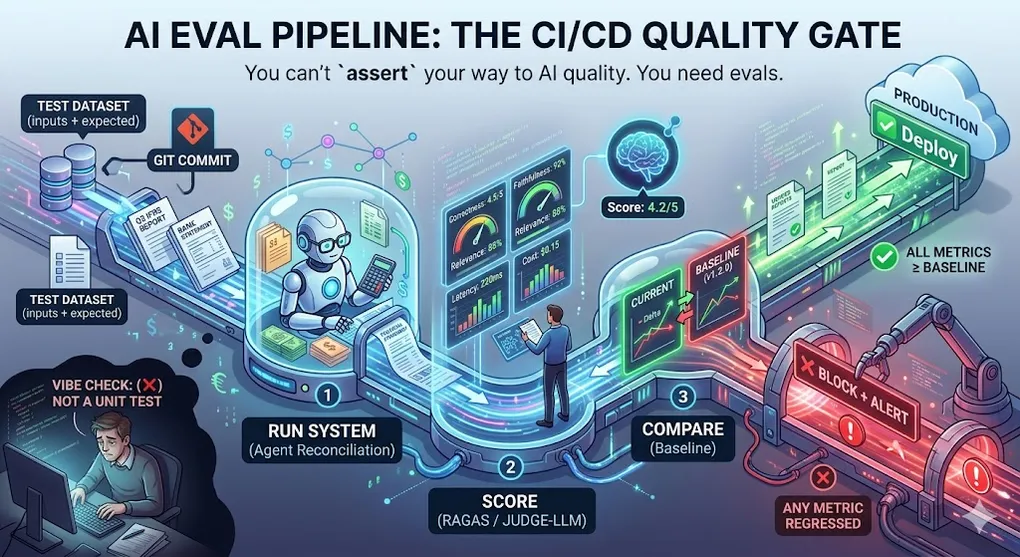
You can’t assert your way to AI quality. You need evals.
Evaluation is how you know whether your AI system is getting better or worse after changes. Without it, you’re flying blind — changing prompts and hoping for the best. With it, you have a systematic feedback loop that gates deployment, catches regressions, and gives you the confidence to keep improving.
The AI Eval Pipeline:

  ┌──────────────────────────────────────────────────────────┐
  │                    AI Eval Pipeline                       │
  │                                                          │
  │  Test Dataset   ──→  Run Your System   ──→  Score        │
  │  (inputs +                                 (automated +  │
  │   expected)                                 human spot)  │
  │       │                                        │         │
  │       └──────────── Compare ───────────────────┘         │
  │                         │                                │
  │                   Pass / Fail Gate                        │
  │                         │                                │
  │              CI/CD Pipeline Decision                      │
  │              ├── All metrics ≥ baseline → ✅ Deploy       │
  │              └── Any metric regressed  → ❌ Block + Alert │
  └──────────────────────────────────────────────────────────┘

  This pipeline runs on every prompt change, model upgrade,
  and configuration update — just like unit tests on every commit.
Article Map
I — Problem Layer (why testing is hard)
- The Testing Crisis — Deterministic → Probabilistic
- The Eval Taxonomy — 7 dimensions of AI quality
II — Technique Layer (how to evaluate) 3. Traditional NLP Metrics: BLEU & ROUGE — n-gram overlap and its limits 4. Embedding-Based Metrics: BERTScore — Semantic similarity 5. LLM-as-Judge: The Core Pattern — Automating quality at scale 6. RAG Evaluation: RAGAS Framework — 4 metrics for the full pipeline 7. Agent Evaluation: Trajectory Analysis — Eval for autonomous systems
III — Engineering Layer (production integration) 8. Building an Eval Dataset — The foundation of the system 9. CI/CD Integration — Automating quality gates 10. Production Monitoring & Drift Detection — Staying alert after deployment 11. Key Takeaways: Evaluation-Driven Development — TDD → EDD
1. The Testing Crisis: Why assert Breaks
1.1 Deterministic vs. Probabilistic Systems
Traditional software is deterministic. Given the same input, it always produces the same output:
# Traditional software testing
def add(a: int, b: int) -> int:
    return a + b

def test_add():
    assert add(2, 3) == 5      # ← Binary: exactly right or exactly wrong
    assert add(-1, 1) == 0
    assert add(0, 0) == 0

# If all pass: confident the function is correct.
# If any fail: know exactly what broke.
LLM systems are probabilistic. The “correct” output is a distribution, not a point:
# LLM system — what would testing look like?
def summarize_article(article: str) -> str:
    return llm.generate(f"Summarize this article: {article}")

def test_summarize():
    output = summarize_article(financial_report)

    # Option 1: Exact match — obviously wrong
    assert output == "Revenue grew 15% in Q3."  # ← Never matches exactly

    # Option 2: Substring check — too brittle
    assert "Q3" in output and "revenue" in output.lower()
    # → Passes even if output is factually wrong

    # Option 3: Length check — meaningless
    assert 50 < len(output) < 500
    # → Passes even if output is random text

# None of these tell you if the summary is GOOD.
1.2 The Real Problems with LLM Testing
Why Traditional Testing Fails for LLMs:

  Problem 1: Multiple Valid Answers
    Question: "What is IFRS 16?"
    Valid answer A: "IFRS 16 is the standard for lease accounting."
    Valid answer B: "A financial reporting standard requiring lessees to
                    recognize right-of-use assets for most leases."
    Valid answer C: "The IASB standard that replaced IAS 17..."
    → All three are correct. assert output == X fails all three.

  Problem 2: Quality is a Spectrum
    Score 1/5: "IFRS is a thing."         ← Technically true
    Score 3/5: "IFRS 16 covers leases."   ← Incomplete
    Score 5/5: Detailed, accurate, cites paragraph numbers
    → Binary pass/fail loses the gradient.

  Problem 3: Stochastic Outputs
    Same prompt, different temperature → different valid answers
    Same prompt, model upgraded → answers shift
    → Even a "correct" system produces variability.

  Problem 4: The "Vibe Check" Anti-Pattern
    Dev: "I tried it 5 times and it seems to work."
    → This is not evaluation. This is wishful thinking.
    → 5 samples won't surface edge cases or systematic failures.
🔧 Engineer’s Note: Not doing evals is the same as not writing tests in traditional software. You wouldn’t push a new API endpoint to production without unit tests — why would you deploy a prompt change without evals? The mental shift is: evals are the tests for probabilistic systems. They’re not optional; they’re the quality gate.
2. The Eval Taxonomy: What Are We Measuring?
AI quality is multi-dimensional. Before choosing a metric, identify which dimension you’re measuring:
| Dimension | Core Question | Example Metric | When Critical |
|---|---|---|---|
| Correctness | Is the answer factually right? | Exact Match, F1 | Financial figures, dates, code |
| Faithfulness | Does the answer stick to the context? | RAGAS Faithfulness | RAG systems (prevent hallucination) |
| Relevance | Did it answer the actual question? | RAGAS Answer Relevance | Any QA system |
| Completeness | Did it cover all key points? | ROUGE-L, Judge score | Summarization |
| Fluency | Is the language quality acceptable? | BLEU, grammar score | Customer-facing output |
| Safety | Does it avoid harmful content? | Toxicity classifier | Public-facing AI |
| Latency | Is it fast enough? | TTFT, tokens/sec | Real-time applications |
| Cost | How much does it spend? | /month | Production economics |
Choosing Your Eval Dimensions:

  Not all dimensions matter equally for every use case.

  Financial AI Agent (AI 08):
    ├── Correctness:  ★★★★★  (wrong figures = audit failure)
    ├── Faithfulness: ★★★★★  (hallucinated IFRS = compliance disaster)
    ├── Latency:      ★★★    (batch overnight is fine)
    └── Fluency:      ★★      (auditors read reports, not prose)

  Customer Support Chatbot:
    ├── Relevance:    ★★★★★  (off-topic answers = user frustration)
    ├── Safety:       ★★★★★  (harmful content = legal risk)
    ├── Latency:      ★★★★   (users expect <2s)
    └── Correctness:  ★★★★   (wrong info = churn)

  Code Generation Tool (AI 02):
    ├── Correctness:  ★★★★★  (broken code = unhappy developers)
    ├── Latency:      ★★★★   (IDE completions need <500ms)
    └── Faithfulness: ★★     (creative license is fine)
🔧 Engineer’s Note: Instrument all 8 dimensions from Day 1, but gate on only 2–3. Log everything so you can diagnose regressions. Gate on correctness + faithfulness (for RAG) or correctness + safety (for public-facing). Latency and cost are instrumented but rarely block deployment — they escalate to architectural decisions.
3. Traditional NLP Metrics: BLEU & ROUGE
These metrics predate LLMs but remain useful as fast, cheap regression alarms.
3.1 BLEU (Bilingual Evaluation Understudy)
Originally designed for machine translation in 2002. Measures n-gram overlap between generated output and reference text.
BLEU Score Calculation:

  Reference: "The revenue grew significantly in Q3 this year"
  Candidate: "Revenue increased substantially in Q3 this year"

  1-gram precision (unigrams):
    Matched: revenue, in, Q3, this, year  → 5/7 = 0.714

  2-gram precision (bigrams):
    Candidate 2-grams: (Revenue increased), (increased substantially),
                       (substantially in), (in Q3), (Q3 this), (this year)
    Matched in reference: (in Q3), (Q3 this), (this year) → 3/6 = 0.500

  3-gram precision:
    Matched: (in Q3 this), (Q3 this year) → 2/5 = 0.400

  4-gram precision:
    Matched: (in Q3 this year) → 1/4 = 0.250

  + Brevity Penalty (penalizes too-short outputs)

  BLEU-4 = BP × exp(0.25 × (log 0.714 + log 0.5 + log 0.4 + log 0.25))
         ≈ 0.44

  Perfect BLEU = 1.0. Human-quality translation ≈ 0.6-0.8.

  The semantic problem:
    Reference: "The feline rested upon the rug"
    Candidate: "The cat sat on the mat"
    → BLEU ≈ 0.0 (no n-gram overlap)
    → But semantically identical!
# Quick BLEU score in Python
from nltk.translate.bleu_score import sentence_bleu, SmoothingFunction
reference = [["revenue", "grew", "significantly", "in", "q3"]]
candidate = ["revenue", "increased", "substantially", "in", "q3"]
score = sentence_bleu(
reference,
candidate,
smoothing_function=SmoothingFunction().method1
)
print(f"BLEU-4: {score:.3f}")3.2 ROUGE (Recall-Oriented Understudy for Gisting Evaluation)
Designed for summarization evaluation. Focuses on recall (capturing key content) rather than precision:
from rouge_score import rouge_scorer

scorer = rouge_scorer.RougeScorer(
    ['rouge1', 'rouge2', 'rougeL'],
    use_stemmer=True
)

reference = "Revenue grew 15% in Q3 driven by Asia-Pacific markets"
candidate  = "Q3 revenue increased 15%, led by strong APAC performance"

scores = scorer.score(reference, candidate)
for metric, score in scores.items():
    print(f"{metric}: P={score.precision:.3f} R={score.recall:.3f} F1={score.fmeasure:.3f}")

# Output:
# rouge1:  P=0.625 R=0.556 F1=0.588
# rouge2:  P=0.286 R=0.222 F1=0.250
# rougeL:  P=0.500 R=0.444 F1=0.471
3.3 When to Use (and Not Use) These Metrics
BLEU/ROUGE Practical Guide:

  ✅ Use for regression alarming:
     ROUGE-L was 0.72 last week → 0.38 today → Something broke badly.
     Low cost to run (no LLM call). Good for CI/CD quick check.

  ✅ Use when you have golden references:
     Machine translation, summarization of known documents.

  ❌ Do NOT use as primary quality signal:
     BLEU/ROUGE low ≠ Answer bad (synonyms, paraphrase)
     BLEU/ROUGE high ≠ Answer good (copied text, ignores facts)

  ❌ Do NOT use for open-ended generation:
     "Give me advice on IFRS 16 treatment for this lease."
     → No single correct reference → metrics meaningless.
🔧 Engineer’s Note: Think of BLEU/ROUGE as the smoke detector, not the fire inspector. When it alarms suddenly (ROUGE-L drops 30%+), something serious happened. But you need a human or Judge-LLM to determine what actually went wrong and whether it matters. The metric is the alert; the judgment is the diagnosis.
4. Embedding-Based Metrics: BERTScore
BERTScore solves BLEU’s biggest flaw: it compares meaning, not just word overlap.
4.1 How BERTScore Works
BERTScore: Semantic Similarity via Embeddings (AI 03 §2)

  Reference: "The cat sat on the mat"
  Candidate: "The feline rested upon the rug"

  Step 1: Embed each token using BERT
    ref = [embed("The"), embed("cat"), embed("sat"), embed("on"), ...]
    cand= [embed("The"), embed("feline"), embed("rested"), ...]

  Step 2: Greedy matching — for each cand token,
          find the most similar ref token (cosine similarity)
    embed("feline")  ↔ embed("cat")   → similarity: 0.91
    embed("rested")  ↔ embed("sat")   → similarity: 0.87
    embed("upon")    ↔ embed("on")    → similarity: 0.93
    embed("rug")     ↔ embed("mat")   → similarity: 0.88

  Step 3: Average the matched similarities
    BERTScore F1 ≈ 0.90  ← captures synonymy that BLEU misses

  BLEU for same pair: ≈ 0.0 (no word overlap)
  BERTScore:          ≈ 0.90 (correctly identifies semantic match)
# BERTScore implementation
from bert_score import score as bert_score
references = [
"Revenue grew 15% in Q3 driven by Asia-Pacific",
"IFRS 16 requires lessees to recognize right-of-use assets",
]
candidates = [
"Q3 saw a 15% revenue increase led by the APAC region",
"Under IFRS 16, lessees must record right-of-use assets on balance sheet",
]
P, R, F1 = bert_score(
candidates, references,
lang="en",
model_type="bert-base-uncased",
verbose=True,
)
for i, (p, r, f) in enumerate(zip(P, R, F1)):
print(f"Sample {i+1}: P={p:.3f} R={r:.3f} F1={f:.3f}")
# Output:
# Sample 1: P=0.888 R=0.893 F1=0.890 ← captures "15% increase" ≈ "grew 15%"
# Sample 2: P=0.921 R=0.914 F1=0.917 ← captures synonym paraphrase4.2 BERTScore Limitations
BERTScore catches semantic similarity — but NOT factual correctness.

  Reference: "Q3 revenue was $15.2M, up 12% YoY"
  Candidate: "Q3 revenue was $18.7M, up 23% YoY"

  BERTScore F1 ≈ 0.95  ← semantically very similar (same structure)
  Actually correct?      ← NO. Numbers are completely wrong.

  The lesson: BERTScore measures HOW you say it, not if it's TRUE.
  For factual correctness in financial AI, you need:
  → LLM-as-Judge (§5) or RAGAS (§6)
🔧 Engineer’s Note: Use all three metric families together — BLEU/ROUGE for cheap regression alerts, BERTScore for semantic quality, Judge-LLM for factual correctness and nuanced quality. Each catches different failure modes. A drop in ROUGE = structure changed. High ROUGE, low Judge = structure fine, content wrong. This layered approach keeps costs down while maximizing coverage.
5. LLM-as-Judge: The Core Pattern
When human evaluation is too expensive and simple metrics are insufficient, use a superior LLM to evaluate the outputs of your system. This is the most powerful eval technique for production AI.
5.1 The Judge Architecture
LLM-as-Judge Pattern:

  ┌─────────────┐     ┌──────────────────┐     ┌─────────────┐
  │  Test Input  │────→│   Your System     │────→│  Output     │
  └─────────────┘     │  (what you're      │     └──────┬──────┘
                      │   evaluating)      │            │
                      └──────────────────┘            │
                                                       ▼
  ┌─────────────┐     ┌──────────────────┐     ┌─────────────┐
  │  Reference   │────→│   JUDGE LLM      │────→│  Score 1-5  │
  │  (if avail.) │     │  (GPT-4o or      │     │  + Reason   │
  └─────────────┘     │   Claude 3.7)     │     └─────────────┘
                      └──────────────────┘

  Three variants:
  1. Reference-based: Compare output to a known-good reference
  2. Reference-free:  Judge quality standalone (no reference)
  3. Pairwise:        Judge which of A vs B is better (most reliable)
5.2 Designing a Good Judge Prompt
The quality of your eval depends entirely on the quality of your judge prompt. Vague prompts produce inconsistent scores.
# A well-designed Judge-LLM prompt for financial AI evaluation
JUDGE_PROMPT_TEMPLATE = """You are an expert evaluator for a financial AI system.
Evaluate the AI's response to a financial question.

## Input Question
{question}

## AI Response to Evaluate
{ai_response}

## Reference Answer (Expert-Written)
{reference_answer}

## Evaluation Rubric

Score the response on each dimension (1-5):

**CORRECTNESS** (1-5): Are all financial figures, dates, and facts accurate?
  1 = Multiple factual errors
  2 = One significant error
  3 = Mostly correct, minor imprecision
  4 = Fully correct
  5 = Correct AND adds useful context

**FAITHFULNESS** (1-5): Does the response stay within the provided context?
  1 = Introduces claims not in context (hallucination)
  2 = Mostly faithful, one unsupported claim
  3 = Faithful but misses key context
  4 = Fully faithful to context
  5 = Faithful AND clearly attributes sources

**RELEVANCE** (1-5): Does the response actually answer the question asked?
  1 = Off-topic entirely
  2 = Partially addresses the question
  3 = Addresses main point, misses nuances
  4 = Fully addresses the question
  5 = Addresses question AND anticipates follow-ups

## Required Output Format (JSON only, no other text)
{{
  "correctness":   {{"score": <1-5>, "reasoning": "<one sentence>"}},
  "faithfulness":  {{"score": <1-5>, "reasoning": "<one sentence>"}},
  "relevance":     {{"score": <1-5>, "reasoning": "<one sentence>"}},
  "overall_score": <average of three>,
  "summary":       "<one sentence overall assessment>",
  "flagged_issues": ["<issue 1>", "<issue 2>"] // empty list if none
}}"""

async def judge_evaluation(
    question:         str,
    ai_response:      str,
    reference_answer: str,
    judge_model:      str = "claude-3-7-sonnet-20250219",  # Use ≥ your system's model
) -> dict:
    """Run Judge-LLM evaluation on a single response."""
    prompt = JUDGE_PROMPT_TEMPLATE.format(
        question         = question,
        ai_response      = ai_response,
        reference_answer = reference_answer,
    )

    response = await anthropic.messages.create(
        model    = judge_model,
        max_tokens = 1024,
        messages = [{"role": "user", "content": prompt}],
    )

    try:
        return json.loads(response.content[0].text)
    except json.JSONDecodeError:
        # Fallback: extract JSON from response
        return extract_json(response.content[0].text)

# Run evaluation on a test case
result = await judge_evaluation(
    question         = "What does IFRS 16 require for lease accounting?",
    ai_response      = rag_system.query("What does IFRS 16 require for lease accounting?"),
    reference_answer = "IFRS 16 requires lessees to recognize a right-of-use "
                       "asset and a lease liability for leases with terms > 12 months...",
)
print(f"Overall score: {result['overall_score']}/5")
print(f"Issues: {result['flagged_issues']}")
5.3 Pairwise Comparison (More Reliable Than Absolute Scoring)
Absolute scoring (“rate this 1-5”) is unstable — judges shift their scale. Pairwise comparison (“which is better, A or B?”) is more reliable:
PAIRWISE_PROMPT = """Which response better answers this financial question?

Question: {question}

Response A: {response_a}

Response B: {response_b}

Evaluate on: correctness, completeness, faithfulness to facts.

Return JSON:
{{
  "winner": "A" | "B" | "tie",
  "confidence": "high" | "medium" | "low",
  "reasoning": "<one paragraph>",
  "dimension_breakdown": {{
    "correctness": "A" | "B" | "tie",
    "completeness": "A" | "B" | "tie",
    "faithfulness": "A" | "B" | "tie"
  }}
}}"""

async def pairwise_eval(question: str, response_a: str, response_b: str) -> dict:
    """
    Compare two responses, alternating positions to control position bias.
    Run twice: A vs B and B vs A. Consistent winner = reliable result.
    """
    result_ab = await run_judge(PAIRWISE_PROMPT.format(
        question=question, response_a=response_a, response_b=response_b
    ))
    result_ba = await run_judge(PAIRWISE_PROMPT.format(
        question=question, response_a=response_b, response_b=response_a
    ))

    # Check consistency (swap A/B back)
    winner_ba_corrected = "A" if result_ba["winner"] == "B" else \
                          "B" if result_ba["winner"] == "A" else "tie"

    if result_ab["winner"] == winner_ba_corrected:
        return {"winner": result_ab["winner"], "consistent": True, **result_ab}
    else:
        return {"winner": "tie", "consistent": False,
                "note": "Inconsistent across position swap — low confidence"}
5.4 Judge Biases to Mitigate
Known LLM Judge Biases:

  1. Position Bias
     Judge prefers whichever answer appears FIRST or LAST.
     Mitigation: Always run A vs B AND B vs A. Only trust consistent results.

  2. Verbosity Bias
     Judge prefers longer, more elaborate answers.
     Mitigation: Include rubric criterion "conciseness" or explicitly instruct
     "length should not factor into your score."

  3. Self-Enhancement Bias
     GPT-4 tends to rate GPT-4 outputs higher.
     Claude tends to rate Claude outputs higher.
     Mitigation: Use a DIFFERENT model family as judge.
     → If your system uses GPT-4o, use Claude 3.7 as judge.
     → If your system uses Claude, use GPT-4o as judge.

  4. Anchoring Bias
     Early examples in few-shot judge prompts skew all later scores.
     Mitigation: Randomize order of few-shot examples across batches.
🔧 Engineer’s Note: The Judge model should be at least as capable as the model you’re evaluating — ideally a different family. Don’t use GPT-4o-mini to judge GPT-4o outputs. The judge needs to detect subtle errors, hallucinations, and missing context that the weaker model can’t recognize. Cross-family evaluation (Claude judging GPT, GPT judging Claude) reduces self-enhancement bias and tends to produce better-calibrated scores.
5.5 Judge Calibration: How Do You Know the Judge Is Accurate?
Mitigating biases isn’t enough. Before trusting a Judge-LLM in CI/CD, you need to verify it actually agrees with human experts on your specific domain.
# Judge Calibration Protocol
def calibrate_judge(
    golden_set_path: str,       # 50 cases hand-labeled by domain expert
    judge_fn:        callable,  # Your judge_evaluation() function
    agreement_threshold: float = 0.85,
) -> dict:
    """
    Run 50 expert-labeled cases through Judge-LLM.
    Compare judge scores to expert labels.
    If Human-AI Agreement Rate >= 85%, the judge is calibrated.
    """
    golden_cases = load_jsonl(golden_set_path)

    agreements = []
    disagreements = []

    for case in golden_cases:
        # Human expert score (ground truth)
        human_score  = case["expert_label"]       # e.g., 1 = correct, 0 = wrong
        human_rating = case["expert_rating"]       # e.g., 4.5 out of 5

        # Judge-LLM score
        judge_result = judge_fn(
            question         = case["question"],
            ai_response      = case["ai_response"],
            reference_answer = case["reference_answer"],
        )
        judge_rating = judge_result["overall_score"]

        # Check agreement (within 1 point on a 5-point scale = "agree")
        agreed = abs(human_rating - judge_rating) <= 1.0
        (agreements if agreed else disagreements).append({
            "question":     case["question"],
            "human":        human_rating,
            "judge":        judge_rating,
            "delta":        abs(human_rating - judge_rating),
        })

    agreement_rate = len(agreements) / len(golden_cases)

    result = {
        "agreement_rate":     agreement_rate,
        "calibrated":         agreement_rate >= agreement_threshold,
        "agreements":         len(agreements),
        "disagreements":      len(disagreements),
        "worst_cases":        sorted(disagreements, key=lambda x: -x["delta"])[:5],
        "recommendation":     "Ready for CI/CD" if agreement_rate >= agreement_threshold else
                              f"Not calibrated. Review top {len(disagreements)} disagreements "
                              f"and refine judge prompt before deploying.",
    }

    print(f"Human-AI Agreement Rate: {agreement_rate:.1%} "
          f"({'\u2705 CALIBRATED' if result['calibrated'] else '\u274c NOT CALIBRATED'})")

    if not result["calibrated"]:
        print("\nTop Disagreements (Judge vs. Expert):")
        for case in result["worst_cases"]:
            print(f"  Q: {case['question'][:60]}...")
            print(f"  Expert: {case['human']:.1f}/5  Judge: {case['judge']:.1f}/5  Delta: {case['delta']:.1f}")

    return result

# Calibration workflow:
# 1. Domain expert (e.g., CPA for financial AI) labels 50 Q&A pairs: 1-5 scale
# 2. Run calibrate_judge() with your judge prompt
# 3. If agreement >= 85%: Judge is calibrated → deploy to CI/CD
# 4. If agreement < 85%: Inspect disagreements → refine rubric → re-calibrate
# 5. Re-run calibration quarterly (judge models get updated too)
Calibration Results (Example Output):
Human-AI Agreement Rate: 88.0% ✅ CALIBRATED
Agreements: 44 / 50
Disagreements: 6 / 50
Top Disagreements:
Q: "How should a lease modification be classified under IFRS 16..."
Expert: 5.0/5 Judge: 3.0/5 Delta: 2.0
→ Judge was overly strict about technical depth. Refine rubric.
Recommendation: Ready for CI/CD. Re-calibrate after 3 months.🔧 Engineer’s Note: Never put a Judge-LLM into CI/CD without first running calibration. An uncalibrated judge that systematically scores financial answers 0.5 points too low will block valid PRs and frustrate developers. The 2-3 hours a domain expert spends labeling 50 cases is the most valuable investment in your eval infrastructure. Do this once per domain, and re-run calibration every quarter or whenever you change the judge model.
6. RAG Evaluation: RAGAS Framework
For RAG systems (AI 03), you need to evaluate both the retrieval step and the generation step. Generic LLM evals miss the retrieval half. RAGAS was designed specifically for this.
6.1 The Four RAGAS Metrics
RAGAS: Four Metrics for the Full RAG Pipeline

  User Question
       │
       ▼
  ┌───────────┐    ┌─────────────────────┐
  │  Retrieve  │───→│  Retrieved Context   │
  └───────────┘    └──────────┬──────────┘
       │                      │
       │           ┌──────────▼──────────┐
       └──────────→│    LLM Generation   │
                   └──────────┬──────────┘
                              │
                              ▼
                         AI Answer
                              │
                ┌─────────────┼─────────────┐
                ▼             ▼             ▼
         Context          Answer         Context
         Precision       Relevance       Recall
    (Retrieval quality) (Generation   (Retrieval
                          quality)    completeness)
                              │
                         Faithfulness
                     (Grounding to context)

  METRIC 1: Faithfulness
    Question: Does the answer claim things that aren't in the context?
    Measures: Hallucination
    Goal: As HIGH as possible (1.0 = no hallucination)

  METRIC 2: Answer Relevance
    Question: Does the answer actually address the question?
    Measures: Off-topic generation
    Goal: As HIGH as possible

  METRIC 3: Context Precision
    Question: Of what was retrieved, how much was actually useful?
    Measures: Retrieval precision (noise in retrieved chunks)
    Goal: As HIGH as possible (1.0 = all retrieved chunks were used)

  METRIC 4: Context Recall
    Question: Did retrieval get all important information?
    Measures: Retrieval completeness (missed relevant chunks)
    Goal: As HIGH as possible (requires a reference answer)
6.2 RAGAS in Practice
# Running RAGAS evaluation on your RAG pipeline
from ragas import evaluate
from ragas.metrics import (
    faithfulness,
    answer_relevancy,
    context_precision,
    context_recall,
)
from datasets import Dataset

# Your RAG pipeline results
# Each item: question + retrieved context + generated answer + reference
eval_data = {
    "question": [
        "What does IFRS 16 require for lease recognition?",
        "How is goodwill tested for impairment under IAS 36?",
        "What is the ASC 606 five-step revenue recognition model?",
    ],
    "contexts": [
        # Retrieved chunks from your vector DB (lists of strings per question)
        ["IFRS 16.22 — The lease term is the non-cancellable period...",
         "IFRS 16.26 — At the commencement date, a lessee recognises..."],
        ["IAS 36.80 — An entity shall assess at the end of each reporting period..."],
        ["ASC 606-10-05-4 — The core principle is that an entity recognises revenue..."],
    ],
    "answer": [
        rag_pipeline.query("What does IFRS 16 require for lease recognition?"),
        rag_pipeline.query("How is goodwill tested for impairment under IAS 36?"),
        rag_pipeline.query("What is the ASC 606 five-step revenue recognition model?"),
    ],
    "ground_truth": [
        # Expert-written reference answers (for Context Recall metric)
        "IFRS 16 requires lessees to recognize a right-of-use asset and "
        "a corresponding lease liability at the commencement date for leases "
        "with terms exceeding 12 months...",
        "Under IAS 36, goodwill must be tested for impairment annually...",
        "ASC 606 defines five steps: (1) Identify the contract...",
    ],
}

dataset = Dataset.from_dict(eval_data)

# Run RAGAS evaluation (uses an LLM internally for faithfulness/relevance)
results = evaluate(
    dataset = dataset,
    metrics = [
        faithfulness,
        answer_relevancy,
        context_precision,
        context_recall,
    ],
    llm = anthropic_llm,   # Your LLM client
    embeddings = embedding_model,
)

print(results.to_pandas())
#   faithfulness  answer_relevancy  context_precision  context_recall
#   0.82          0.91              0.88               0.76
6.3 Interpreting RAGAS Scores
RAGAS Diagnostic Guide:

  Faithfulness < 0.8:
    Your system IS hallucinating. The LLM is generating claims
    not supported by the retrieved context.
    Fix: Strengthen system prompt ("only use provided context"),
         improve context quality, add output hallucination check (AI 07).

  Answer Relevancy < 0.7:
    Your system is answering questions nobody asked.
    Fix: Improve query understanding, check if context is too noisy
         (might be confusing the generation step).

  Context Precision < 0.7:
    Most retrieved chunks aren't being used in the answer.
    Your retrieval is returning too much irrelevant content.
    Fix: Tune retrieval (increase reranking, reduce top-k),
         improve embedding quality, add metadata filters (AI 03 §6).

  Context Recall < 0.7:
    Your retrieval is missing key information needed to answer.
    Fix: Increase top-k, improve chunking strategy (AI 03 §5),
         check if relevant content is indexed at all.

  Financial AI Benchmarks (AI 08 use case):
    Faithfulness:      ≥ 0.90  (non-negotiable for audit)
    Answer Relevancy:  ≥ 0.85
    Context Precision: ≥ 0.80
    Context Recall:    ≥ 0.75
🔧 Engineer’s Note: Faithfulness is the most important RAGAS metric for financial AI. A financial agent that confidently states wrong figures from hallucination is worse than one that says “I don’t know.” In the monthly close workflow (AI 08), a faithfulness score below 0.90 means the system is fabricating financial data — which is an audit failure. Fix faithfulness before tuning anything else.
7. Agent Evaluation: Trajectory Analysis
Single-response evals don’t capture agent quality. An agent makes dozens of decisions across a multi-step task — each decision point is an opportunity to succeed or fail.
7.1 What Makes Agent Eval Different
Single QA Eval vs. Agent Eval:

  Single QA:     Input  →  [LLM]  →  Output
                 Eval: Is the output correct?

  Agent Task:    Goal → Step 1 → Step 2 → Step 3 → ... → Result
                     ↓           ↓          ↓
                   Tool 1      Tool 2     Tool 3
                 Eval: Was the TRAJECTORY efficient and correct?

  Agent-specific failure modes:
  ├── Used wrong tool (called search when it should have queried DB)
  ├── Redundant steps (queried the same data 3 times)
  ├── Missed critical step (skipped validation before posting journal entry)
  ├── Wrong sequence (ran compliance check before data was complete)
  └── Correct result via wrong path (happened to get right answer but unreliably)
7.2 Agent Evaluation Dimensions
| Dimension | Measurement | What It Tells You |
|---|---|---|
| Task completion rate | Did it end up with the right result? | Overall effectiveness |
| Trajectory efficiency | How many steps did it take? (vs. minimum) | Over-thinking, redundancy |
| Tool selection accuracy | Did it use the right tools in the right order? | Decision quality |
| Self-correction rate | Did it recover from errors without human help? | Resilience |
| HITL escalation rate | How often did it escalate to human (correctly)? | Judgment calibration |
| False escalation rate | Escalated when it shouldn’t have? | Over-caution |
7.3 Trajectory Evaluation with LangSmith
# Evaluate agent trajectories using LangSmith tracing
from langsmith import Client
from langsmith.evaluation import evaluate as ls_evaluate

client = Client()

# Define evaluators for each trajectory dimension
def task_completion_evaluator(run, example) -> dict:
    """Did the agent produce the expected final outcome?"""
    final_output = run.outputs.get("report", "")
    expected_keys = ["matched_count", "unmatched_count", "anomalies_flagged"]

    # Check if all required sections are in the report
    completion_score = sum(
        1 for key in expected_keys if key in final_output.lower()
    ) / len(expected_keys)

    return {
        "key": "task_completion",
        "score": completion_score,
        "comment": f"Found {completion_score*len(expected_keys)}/{len(expected_keys)} required sections",
    }

def efficiency_evaluator(run, example) -> dict:
    """Was the trajectory efficient? Penalize unnecessary steps."""
    actual_steps   = count_tool_calls(run)
    optimal_steps  = example.outputs.get("expected_steps", 4)

    # Score: 1.0 if optimal, decreasing for each extra step
    efficiency = min(1.0, optimal_steps / max(actual_steps, optimal_steps))

    return {
        "key": "trajectory_efficiency",
        "score": efficiency,
        "comment": f"Used {actual_steps} steps (optimal: {optimal_steps})",
    }

def hitl_calibration_evaluator(run, example) -> dict:
    """Did the agent escalate at the right risk levels?"""
    escalations  = get_escalation_events(run)   # HIGH risk items that were escalated
    missed       = get_missed_escalations(run)   # HIGH risk items NOT escalated
    false_alarms = get_false_escalations(run)    # LOW/MED risk items that were escalated

    # Penalize missed escalations heavily (safety issue)
    # Penalize false alarms moderately (efficiency issue)
    precision = len(escalations) / max(len(escalations) + len(false_alarms), 1)
    recall    = len(escalations) / max(len(escalations) + len(missed), 1)
    f1 = 2 * precision * recall / max(precision + recall, 0.001)

    return {"key": "hitl_calibration", "score": f1}

# Run agent evaluation across a test dataset
experiment_results = ls_evaluate(
    lambda inputs: reconciliation_pipeline.ainvoke(inputs),
    data            = "financial-reconciliation-test-set",
    evaluators      = [
        task_completion_evaluator,
        efficiency_evaluator,
        hitl_calibration_evaluator,
    ],
    experiment_prefix = "agent-eval-v1",
    metadata          = {"model": "claude-3-7-sonnet", "version": "1.2.0"},
)

print(experiment_results)
🔧 Engineer’s Note: Trajectory evaluation is where LangSmith (or Phoenix/Langfuse) pays for itself. When debugging why an agent produced the wrong result, you don’t want to re-run the whole pipeline — you want to inspect step by step: “What did the Analyst Agent see? What tool did it call? What was the response? Why did it then call the wrong next tool?” LangSmith’s trace view gives exactly this. Without it, debugging multi-agent failures is like debugging a program without a debugger.
8. Building an Eval Dataset: The Hardest Part
You can have the best evaluation framework in the world — RAGAS, Judge-LLM, trajectory analysis — and it’s completely useless without a good dataset to run it on. The eval dataset is the foundation of the entire system.
8.1 The Three Sources
Eval Dataset Construction:

  Source 1: Production Logs (Best quality, delayed availability)
  ┌────────────────────────────────────────────────────────┐
  │ When system goes live, log every query + response.     │
  │ Periodically, have domain experts LABEL a sample:     │
  │   ✅ "This answer is correct"                          │
  │   ❌ "This answer is wrong — correct answer is X"     │
  │   ⚠️  "This answer is partially correct — edge case"  │
  │ Best dataset: real users, real questions.              │
  │ Limitation: Can't use before launch.                   │
  └────────────────────────────────────────────────────────┘

  Source 2: Expert Annotation (Best quality, expensive)
  ┌────────────────────────────────────────────────────────┐
  │ Domain experts write Q&A pairs from scratch:           │
  │   ├── Cover known edge cases                          │
  │   ├── Include adversarial examples                    │
  │   └── Include "impossible" questions (test refusal)   │
  │ For AI 08 financial system:                            │
  │   ├── Accountant writes 50 IFRS Q&A pairs             │
  │   ├── Controller writes 20 reconciliation scenarios   │
  │   └── Auditor writes 15 edge cases and "traps"        │
  │ Limitation: Expensive ($50-200/hour for expert time)  │
  └────────────────────────────────────────────────────────┘

  Source 3: Synthetic Generation (Fastest, cheapest)
  ┌────────────────────────────────────────────────────────┐
  │ Use a powerful LLM (GPT-4o) to generate Q&A from      │
  │ your documents. Fast bootstrap, human review needed.  │
  │ Works well to augment Sources 1 & 2.                  │
  └────────────────────────────────────────────────────────┘
8.2 Synthetic Dataset Generation (Bootstrap Strategy)
Before you have production logs, use a strong model to generate initial test cases:
import anthropic
from typing import TypedDict

class EvalCase(TypedDict):
    question:     str
    reference:    str
    category:     str   # e.g., "IFRS", "reconciliation", "anomaly_detection"
    difficulty:   str   # "easy" | "medium" | "hard" | "adversarial"
    source_doc:   str   # Which document this was generated from

SYNTHETIC_GEN_PROMPT = """You are creating evaluation test cases for a financial AI system.

Based on this document excerpt:
---
{document_chunk}
---

Generate 5 question-answer pairs that test whether an AI system correctly understands this content.

Requirements:
1. Include at least one adversarial question (something the AI should REFUSE to answer
   or say "I don't know" if not in the document)
2. Include at least one questions requiring multi-step reasoning
3. Make answers SPECIFIC — include figures, paragraph numbers, dates when available
4. Vary difficulty: 2 easy, 2 medium, 1 hard

Return as JSON array:
[
  {{
    "question": "...",
    "reference_answer": "...",
    "category": "IFRS|GAAP|reconciliation|anomaly|general",
    "difficulty": "easy|medium|hard|adversarial",
    "reasoning_required": "single-fact|multi-step|refusal"
  }}
]"""

async def generate_synthetic_evals(
    document_chunks:    list[str],
    cases_per_chunk:    int = 5,
    review_model:       str = "gpt-4o",      # Strong model for generation
) -> list[EvalCase]:
    """Generate synthetic eval cases from document chunks."""
    all_cases = []

    for i, chunk in enumerate(document_chunks):
        response = await openai.chat.completions.create(
            model    = review_model,
            messages = [{"role": "user", "content": SYNTHETIC_GEN_PROMPT.format(
                document_chunk=chunk
            )}],
            response_format={"type": "json_object"},
        )

        cases = json.loads(response.choices[0].message.content)
        for case in cases:
            case["source_doc"] = f"chunk_{i}"
        all_cases.extend(cases)

    return all_cases

# For a financial RAG system with 200 IFRS document chunks:
# 200 chunks × 5 cases = 1,000 synthetic eval cases
# Generated in ~10 minutes for ~$5 in API costs
# Then: sample 10% (100 cases) for human review/correction
8.3 Dataset Quality Standards
Minimum Viable Eval Dataset:

  Size:
    ├── Below 50 cases → unreliable statistics, don't use as gate
    ├── 50-100 cases  → MVP: good for early dev, catch major regressions
    ├── 100-500 cases → solid: catches systematic failures and edge cases
    └── 500+ cases    → production-grade: meaningful statistical confidence

  Coverage (for financial AI):
    ├── Happy path:    60% (standard correct queries)
    ├── Edge cases:    25% (unusual but valid scenarios)
    ├── Adversarial:   10% (things the AI should decline or flag)
    └── Regression:     5% (previously failed cases, fixed bugs)

  The cardinal rules:
    1. Never use eval data for training/prompting → contamination
    2. Never modify eval data to make scores look better
    3. Always version control your eval dataset (Git)
    4. Track additions as separate versions, never edit in-place

  Red flags in your dataset:
    ❌ All cases from one document → biased coverage
    ❌ Only easy questions → hides edge case failures
    ❌ No adversarial cases → can't test refusal behavior
    ❌ Reference answers written AFTER seeing AI outputs → contaminated
🔧 Engineer’s Note: “80% of eval work is dataset curation, 20% is running the evals.” The most common mistake is spending weeks on sophisticated Judge-LLM prompts while running them on 12 hand-crafted test cases. Prioritize dataset breadth first. 100 mediocre eval cases will catch more real regressions than 10 perfect ones. Start with synthetic generation (30 minutes, $5), do a human review pass on a 20% sample, and you have a working foundation within a day.
8.4 LLMOps Dataset Management Tools
Storing your eval dataset as a .jsonl file in Git works — but it creates a collaboration bottleneck. Your domain expert (accountant, CPA, controller) can’t navigate a terminal or edit JSON. They need a visual interface to label and correct answers.
The Collaboration Problem:

  Engineer:  "Can you label these 50 test cases? They're in eval_data.jsonl"
  Accountant: "What's a JSONL file?"

  The dataset never gets labeled.
  The eval never runs on expert-validated data.
  The CI/CD gate is calibrated against synthetic data only.

The Solution: Visual annotation interfaces that sync to your pipeline.| Tool | What It Offers | Best For |
|---|---|---|
| LangSmith Datasets | Native integration with LangChain/LangSmith traces; click thumbs-up/down on any logged response | Teams already using LangSmith for observability |
| Braintrust | Purpose-built eval platform with comparison views, human scoring UI, prompt playground | Teams wanting end-to-end eval management |
| Argilla | Open-source, self-hostable; excellent for annotation workflows with domain experts | Privacy-sensitive orgs, regulated industries |
| Git + JSONL | Free, version-controlled, developer-friendly | Small teams, no funding for external tools |
# LangSmith Dataset workflow — domain expert annotates via web UI
from langsmith import Client

client = Client()

# Step 1: Engineer creates dataset in LangSmith
dataset = client.create_dataset(
    dataset_name = "financial-qa-eval-v3",
    description  = "IFRS/GAAP Q&A eval cases for monthly close AI",
)

# Step 2: Add examples (can also be done via UI)
client.create_examples(
    inputs   = [{"question": "What does IFRS 16 require?"}],
    outputs  = [{"reference": "IFRS 16 requires lessees to recognize..."}],
    dataset_id = dataset.id,
)

# Step 3: Domain expert opens LangSmith web UI
#         → sees each Q&A card with thumbs up/down buttons
#         → edits reference answers directly in browser
#         → adds comments: "This answer is missing paragraph 22"

# Step 4: CI/CD pipeline pulls dataset via API
examples = list(client.list_examples(dataset_id=dataset.id))
# All expert edits are automatically available here.
🔧 Engineer’s Note: Choose your dataset tool based on who annotates, not what your engineers prefer. If domain experts are reviewing eval cases, they need a UI with big “✅ Correct” / “❌ Incorrect” buttons, not a text editor. Argilla is the best open-source option for this — it’s built for non-engineers to annotate data. LangSmith is the best choice if you’re already paying for it for observability. Either way, the annotation tool should sync to your CI/CD pipeline via API — never email spreadsheets.
9. CI/CD Integration: Evals in GitHub Actions
The difference between an eval suite and a quality gate is automation. Evals that you run manually are better than nothing — but evals that run automatically on every commit are the standard.
9.1 The Full CI/CD Eval Pipeline
git push / PR opened → GitHub Actions triggered
                           │
                           ▼
              ┌──────────────────────────────┐
              │   Step 1: Run Eval Dataset   │
              │   N test cases through       │
              │   your AI system             │
              └──────────────┬───────────────┘
                             │
                             ▼
              ┌──────────────────────────────┐
              │   Step 2: Score Results      │
              │   ├── ROUGE-L (fast/cheap)   │
              │   ├── RAGAS (if RAG system)  │
              │   └── Judge-LLM (nuanced)    │
              └──────────────┬───────────────┘
                             │
                             ▼
              ┌──────────────────────────────┐
              │   Step 3: Compare vs Baseline│
              │   Previous merged version    │
              │   metrics are the baseline   │
              └──────────────┬───────────────┘
                             │
                  ┌──────────┴──────────┐
                  ▼                     ▼
       All metrics ≥ baseline      Any metric
       AND above min_threshold     regressed ≥ 5%
                  │                     │
         ✅ Auto-merge             ❌ Block merge
         Post score summary        Annotate PR with
         to PR comment             failure details
9.2 Complete GitHub Actions Configuration
# .github/workflows/ai-eval.yml
name: AI Quality Eval Gate

on:
  push:
    branches: [main, dev]
    paths:
      - 'prompts/**'           # Trigger on any prompt change
      - 'src/rag/**'           # Trigger on RAG config changes
      - 'src/agents/**'        # Trigger on agent logic changes
  pull_request:
    branches: [main]

jobs:
  evaluate:
    runs-on: ubuntu-latest
    timeout-minutes: 30    # Fail if evals take too long

    env:
      ANTHROPIC_API_KEY:  ${{ secrets.ANTHROPIC_API_KEY }}
      OPENAI_API_KEY:     ${{ secrets.OPENAI_API_KEY }}
      LANGSMITH_API_KEY:  ${{ secrets.LANGSMITH_API_KEY }}
      LANGSMITH_PROJECT:  "ai-eval-ci"

    steps:
      - name: Checkout
        uses: actions/checkout@v4

      - name: Set up Python
        uses: actions/setup-python@v5
        with:
          python-version: '3.12'
          cache: 'pip'

      - name: Install dependencies
        run: pip install -r requirements-eval.txt

      - name: Run evaluation suite
        id: eval_run
        run: |
          python scripts/run_evals.py \
            --dataset     data/eval/financial_qa_v3.jsonl \
            --output-dir  eval_results/                   \
            --metrics     rouge,ragas,judge               \
            --judge-model claude-3-7-sonnet-20250219      \
            --parallelism 5
        continue-on-error: true  # Don't fail yet — collect results first

      - name: Load baseline metrics
        id: baseline
        run: |
          # Pull baseline from previous successful main run
          python scripts/compare_baseline.py \
            --current  eval_results/metrics.json \
            --baseline .eval_baselines/main_latest.json \
            --output   eval_results/comparison.json

      - name: Quality gate decision
        id: gate
        run: |
          python scripts/eval_gate.py \
            --comparison  eval_results/comparison.json \
            --thresholds  config/eval_thresholds.yml
        # Exits with code 1 if any metric fails threshold

      - name: Post results to PR
        if: always() && github.event_name == 'pull_request'
        uses: actions/github-script@v7
        with:
          script: |
            const fs = require('fs');
            const comparison = JSON.parse(
              fs.readFileSync('eval_results/comparison.json', 'utf8')
            );

            const status  = comparison.passed ? '✅ PASSED' : '❌ FAILED';
            const metrics = comparison.metrics;

            const comment = `## AI Eval Results: ${status}

            | Metric | Current | Baseline | Change | Status |
            |--------|---------|----------|--------|--------|
            | ROUGE-L | ${metrics.rouge_l.current.toFixed(3)} | ${metrics.rouge_l.baseline.toFixed(3)} | ${metrics.rouge_l.delta > 0 ? '+' : ''}${metrics.rouge_l.delta.toFixed(3)} | ${metrics.rouge_l.passed ? '✅' : '❌'} |
            | Faithfulness | ${metrics.faithfulness.current.toFixed(3)} | ${metrics.faithfulness.baseline.toFixed(3)} | ${metrics.faithfulness.delta > 0 ? '+' : ''}${metrics.faithfulness.delta.toFixed(3)} | ${metrics.faithfulness.passed ? '✅' : '❌'} |
            | Answer Relevancy | ${metrics.answer_relevancy.current.toFixed(3)} | ${metrics.answer_relevancy.baseline.toFixed(3)} | ... | ${metrics.answer_relevancy.passed ? '✅' : '❌'} |
            | Judge Score (avg) | ${metrics.judge_score.current.toFixed(2)}/5 | ${metrics.judge_score.baseline.toFixed(2)}/5 | ... | ${metrics.judge_score.passed ? '✅' : '❌'} |

            ${comparison.failed_cases.length > 0 ? `
            **Failed cases:** ${comparison.failed_cases.join(', ')}
            ` : 'No regressions detected.'}
            `;

            github.rest.issues.createComment({
              issue_number: context.issue.number,
              owner: context.repo.owner,
              repo: context.repo.repo,
              body: comment,
            });

      - name: Update baseline on main merge
        if: github.ref == 'refs/heads/main' && steps.gate.outcome == 'success'
        run: |
          # Store these results as the new baseline for future comparison
          cp eval_results/metrics.json .eval_baselines/main_latest.json
          git config user.name  "Eval Bot"
          git config user.email "eval-bot@github.com"
          git add .eval_baselines/
          git commit -m "chore: update eval baseline (auto)"
          git push
9.3 The Eval Gate Thresholds Config
# config/eval_thresholds.yml
# These thresholds block merge if any metric falls below them.

# Absolute minimums — if below these, block regardless of baseline
absolute_minimums:
  faithfulness:       0.85    # Non-negotiable for financial AI
  answer_relevancy:   0.75
  rouge_l:            0.45
  judge_score:        3.5     # Out of 5

# Regression thresholds — block if metric drops by more than X from baseline
regression_limits:
  faithfulness:       0.03    # 3 percentage points drop = fail
  answer_relevancy:   0.05
  rouge_l:            0.10    # ROUGE is noisier, allow more variance
  judge_score:        0.20    # 0.2/5 drop = fail

# Notification thresholds — warn but don't block
warnings:
  faithfulness:       0.90    # Warn if below 0.90 even if above hard floor
  judge_score:        4.0     # Warn if below 4.0 even if above hard floor
🔧 Engineer’s Note: Every prompt change should trigger an eval run — just like every code change triggers unit tests. The 20-line GitHub Actions config above makes this automatic. The CI pipeline runs ~100 eval cases, which takes around 3-5 minutes with parallelism=5, costs about 0.50 per PR is the cheapest quality insurance you’ll ever buy. The alternative — “we’ll test it manually after deploy” — costs nothing until the CFO asks why the reconciliation report has wrong numbers.
9.4 Tiered Eval Strategy: Speed vs. Coverage
As your dataset grows to 500+ cases, running the full suite on every PR becomes a bottleneck — 5-10 minutes per PR adds up to hours of waiting per day. The solution is tiered evaluation: fast smoke tests on feature branches, comprehensive suites only at release gates.
Tiered Eval Strategy:

  Dev/Feature Branch (every push, fast feedback):
  ┌────────────────────────────────────────────────────────────┐
  │ Smoke Test: 50 "core regression" cases                    │
  │ Metrics:    ROUGE-L only (no LLM calls)                   │
  │ Time:       < 30 seconds                                   │
  │ Cost:       $0.00                                          │
  │ Purpose:    Catch catastrophic regressions quickly         │
  └────────────────────────────────────────────────────────────┘

  PR to Main (full gate before merge):
  ┌────────────────────────────────────────────────────────────┐
  │ Full Test:  500+ cases                                     │
  │ Metrics:    ROUGE + BERTScore + RAGAS + Judge-LLM         │
  │ Time:       5-10 minutes (parallelism=10)                  │
  │ Cost:       ~$1-2                                          │
  │ Purpose:    Comprehensive quality assurance before release  │
  └────────────────────────────────────────────────────────────┘

  Semantic Caching for CI/CD (additional optimization):
  If the PR only modifies non-LLM code (frontend, RPA wrappers,
  database queries), eval responses for IDENTICAL inputs can be
  cached from the previous run — no need to re-query the LLM:

    cache_key = hash(question + system_prompt + model_version)

    if cache.exists(cache_key) and not llm_code_changed:
        return cache.get(cache_key)   ← FREE, instant
    else:
        result = await llm.generate(...)  ← Full API call
        cache.set(cache_key, result, ttl=7_days)

  Cache hit rate: typically 60-80% when agent logic hasn't changed.
  Effective cost reduction: ~70% on non-LLM PRs.
# GitHub Actions: tiered eval based on branch target
on:
push:
branches:
- 'feature/**' # Smoke only
- 'dev' # Smoke only
pull_request:
branches:
- main # Full suite
jobs:
smoke-eval:
if: github.ref != 'refs/heads/main'
steps:
- name: Smoke Test (50 core cases, ROUGE only)
run: |
python scripts/run_evals.py \
--dataset data/eval/core_regression_50.jsonl \
--metrics rouge \
--cache-dir .eval_cache
full-eval:
if: github.event_name == 'pull_request' && github.base_ref == 'main'
steps:
- name: Full Eval Suite (500+ cases, all metrics)
run: |
python scripts/run_evals.py \
--dataset data/eval/financial_qa_v3.jsonl \
--metrics rouge,ragas,judge \
--cache-dir .eval_cache \
--parallelism 10🔧 Engineer’s Note: The 50-case smoke test + 500-case full gate pattern mirrors what mature engineering orgs do with unit tests (fast) vs. integration tests (slow). The smoke test runs in 30 seconds and catches disasters. The full gate runs in 10 minutes and catches regressions. Semantic caching reduces the full gate’s effective cost by ~70% when the change is in non-LLM code. Total per-PR cost on non-LLM PRs: ~1.50. Both are well within the cost of a single bad deploy.
10. Production Monitoring & Drift Detection
CI/CD evals catch regressions at deploy time. But model behavior can degrade after deployment — through model updates from providers, changing user query distributions, or data drift in your knowledge base.
10.1 What Can Drift in Production
Sources of Production Drift:

  1. Model Drift (Provider-side)
     LLM provider quietly updates their model (Claude 3.5 → new patch)
     → Behavior shifts without your prompts changing
     → Hard to detect without monitoring
     Detection: Compare weekly eval scores against deploy-time baseline

  2. Data Drift (Query-side)
     Users start asking different types of questions over time
     → Questions shift outside the distribution your system was tuned for
     → Eval dataset no longer represents real user queries
     Detection: Monitor query embeddings for distribution shift
               (compare centroids of last week vs. previous month)

  3. Knowledge Drift (Document-side)
     IFRS standards get updated, company policies change
     → RAG knowledge base becomes stale
     → AI gives correct-but-now-outdated answers
     Detection: Track document freshness + run evals on new standards

  4. Adversarial Drift (User-side)
     New forms of prompt injection evolve (AI 07)
     → Your input guardrails don't catch new patterns
     Detection: Monitor L1 guardrail hit rates for anomalies
10.2 Automated Drift Detection System
import asyncio
from datetime import datetime, timedelta
from dataclasses import dataclass
import numpy as np

@dataclass
class DriftAlert:
    metric:        str
    current_value: float
    baseline_value: float
    drift_pct:     float
    severity:      str    # "warning" | "critical"
    detected_at:   str

class ProductionMonitor:
    """Runs continuous eval checks on production AI output."""

    def __init__(
        self,
        eval_dataset_path:  str,
        baseline_metrics:   dict,
        alert_thresholds:   dict,
        sample_size:        int = 20,       # Sample N production queries/day
        check_interval_hrs: int = 24,
    ):
        self.eval_dataset    = load_jsonl(eval_dataset_path)
        self.baseline        = baseline_metrics
        self.thresholds      = alert_thresholds
        self.sample_size     = sample_size
        self.check_interval  = check_interval_hrs * 3600

    async def run_daily_check(self) -> list[DriftAlert]:
        """Run daily eval sample and compare to baseline."""
        # Sample random subset of eval dataset (cost-effective, not full run)
        sample = random.sample(self.eval_dataset, min(self.sample_size, len(self.eval_dataset)))

        # Run current system through sample
        current_outputs = await asyncio.gather(*[
            production_ai.query(case["question"]) for case in sample
        ])

        # Score current outputs
        current_metrics = await self._score_sample(sample, current_outputs)

        # Compare to baseline
        alerts = []
        for metric_name, current_val in current_metrics.items():
            baseline_val = self.baseline.get(metric_name, 0)
            if baseline_val == 0:
                continue

            drift_pct = (current_val - baseline_val) / baseline_val
            threshold = self.thresholds.get(metric_name, {})

            if drift_pct < -(threshold.get("critical", 0.10)):
                alerts.append(DriftAlert(
                    metric        = metric_name,
                    current_value = current_val,
                    baseline_value= baseline_val,
                    drift_pct     = drift_pct * 100,
                    severity      = "critical",
                    detected_at   = datetime.utcnow().isoformat(),
                ))
            elif drift_pct < -(threshold.get("warning", 0.05)):
                alerts.append(DriftAlert(
                    metric        = metric_name,
                    current_value = current_val,
                    baseline_value= baseline_val,
                    drift_pct     = drift_pct * 100,
                    severity      = "warning",
                    detected_at   = datetime.utcnow().isoformat(),
                ))

        return alerts

    async def detect_query_distribution_shift(
        self, recent_queries: list[str], window_days: int = 7
    ) -> dict:
        """Detect if user query distribution has shifted from training."""
        # Embed recent queries
        recent_embeddings  = await embed_batch(recent_queries)
        baseline_embeddings = load_baseline_embeddings()

        # Compare centroid distance
        recent_centroid   = np.mean(recent_embeddings, axis=0)
        baseline_centroid = np.mean(baseline_embeddings, axis=0)

        drift_distance = cosine_distance(recent_centroid, baseline_centroid)

        return {
            "drift_distance":  float(drift_distance),
            "drift_severity":  "high" if drift_distance > 0.15 else
                               "medium" if drift_distance > 0.08 else "low",
            "recommendation":  "Update eval dataset to reflect new query distribution"
                               if drift_distance > 0.15 else "No action needed",
        }

# Schedule daily monitoring
async def production_monitoring_loop(monitor: ProductionMonitor):
    while True:
        alerts = await monitor.run_daily_check()

        if alerts:
            critical = [a for a in alerts if a.severity == "critical"]
            warnings  = [a for a in alerts if a.severity == "warning"]

            if critical:
                # Page on-call engineer immediately
                await pagerduty.trigger_incident(
                    title       = f"AI Quality Critical Drift: {len(critical)} metrics",
                    description = format_alerts(critical),
                    severity    = "critical",
                )

            if warnings:
                # Post to Slack channel for awareness
                await slack.post_message(
                    channel = "#ai-monitoring",
                    text    = format_alerts(warnings),
                )

        # Log all metrics regardless (LangSmith dashboard)
        langsmith_client.log_feedback(...)

        await asyncio.sleep(monitor.check_interval)
10.3 A/B Testing for Prompt Changes
When you want to improve a prompt but aren’t sure the new version is better:
Prompt A/B Testing in Production:

  Traffic split:
    ├── Group A (70%): Current production prompt
    └── Group B (30%): Candidate new prompt

  Measurement period: 7 days minimum

  Decision metrics (in priority order):
    1. User feedback (thumbs up/down, if available)   ← Ground truth
    2. Judge-LLM score on logged outputs              ← Automated quality
    3. Task completion rate                           ← Functional success
    4. Latency P95                                    ← Performance

  Rollout decision:
    ├── B wins on all metrics → Full rollout of B
    ├── B wins on quality but hurts latency → Architecture review
    ├── B and A tied → Keep A (don't change without clear win)
    └── B loses on any metric → Discard B

  Key principle: Never A/B test without statistical significance.
  Minimum 100 samples per group before concluding anything.
🔧 Engineer’s Note: Set up production monitoring before go-live, not after the first incident. The monitoring loop above costs ~0.005 avg cost). The cost of NOT having it? One silent faithfulness regression that goes undetected for a week means a month’s worth of financial reconciliation reports may be contaminated with hallucinated figures. The audit consequences far exceed the monitoring cost.
11. Key Takeaways: Evaluation-Driven Development
11.1 The Paradigm Shift: TDD → EDD
Software engineering evolved through Test-Driven Development. LLM engineering requires its own evolution: Evaluation-Driven Development.
The Parallel:

  Traditional Software (TDD):        LLM-Era Software (EDD):
  ────────────────────────────       ────────────────────────────

  Design:                            Design:
    Write test first                   Design eval criteria first
    (assert expected output)           (define quality dimensions)

  Implement:                         Implement:
    Write code to pass tests           Write prompt to score well
    Red → Green → Refactor             Low score → Revise → Rerun

  Validate:                          Validate:
    Run unit test suite                Run eval suite
    Binary: pass or fail               Spectrum: score threshold

  Gate:                              Gate:
    CI blocks merge if tests fail      CI blocks merge if evals regress

  Monitor:                           Monitor:
    Log errors, track uptime           Track eval metrics, drift detection
    Alert on exceptions                Alert on quality regression

  The same discipline. Different implementation.
  Both answer the same question:
    "How do I know my system is correct?"
11.2 Where Eval Appeared Across This Series
Evaluation is not isolated to this article — it was present in every article, waiting to be connected:
Eval Through the AI Series:

  AI 01 Prompting:
    §7 "Self-evaluation" — prompts that ask the LLM to check its own output
    → The seed: evaluation can be done by another LLM call

  AI 03 RAG:
    §8 Evaluation & Debugging — RAGAS introduced for pipeline quality
    § Context chunk quality → now formalized as Context Precision/Recall

  AI 05 Agents:
    §8 LLMOps & Observability — agent loop monitoring, cost caps
    → Instrumentation layer that enables trajectory evaluation

  AI 06 Multi-Agent:
    Agent Evaluation via Judge-LLM — multi-dimensional scoring
    → Pattern now formalized in §5 of this article

  AI 07 Security:
    L5 Monitoring — anomaly detection for adversarial inputs
    → Security monitoring as a form of behavioral eval

  AI 08 Financial AI:
    Reconciliation accuracy rate — task-specific evaluation in production
    §6.3 Audit trail — immutable logging as prerequisite for eval
    → Where unit accuracy matters more than fluency

  AI 09 (This Article):
    All patterns unified into systematic methodology with CI/CD integration

  AI 11 Fine-tuning (Next):
    Eval of fine-tuned model vs. base model
    → Same pipeline, applied to model evaluation not just QA system
11.3 The Complete Eval Stack
| Layer | When Runs | What Runs | Cost | Blocking Condition |
|---|---|---|---|---|
| L1: Regression Guard | Every commit / push | ROUGE-L on 20 fixed cases | $0.00 | ROUGE-L drops ≥ 20% from last run → alert on-call, block deploy |
| L2: Semantic Gate | Every PR | BERTScore on 50 cases | $0.00 | Score < 85% of baseline → PR blocked, comment posted |
| L3: AI Quality Gate | PR to main | Judge-LLM (50-100 cases) + RAGAS | ~$0.50-1.50 | Any metric below eval_thresholds.yml → PR blocked |
| L4: Daily Drift Monitor | 24h schedule | 20-case sample through live system | ~$0.10 | Any metric drops ≥ warning threshold → Slack alert; critical → PagerDuty |
| L5: Weekly Full Eval | Weekend batch | Full 500+ dataset + trajectory eval | ~$5 | Surfacing trend regressions vs. 4-week rolling baseline → team review |
Total cost: ~50,000+.
11.4 Open-Source Eval Frameworks to Know
Writing your own eval scripts gives you maximum control, but the ecosystem now has mature frameworks that handle the boilerplate and let you focus on eval logic.
promptfoo — YAML-Native, CLI-First Eval
# promptfooconfig.yaml — run with: promptfoo eval
providers:
  - id: anthropic:claude-3-7-sonnet-20250219
    config:
      apiKey: $ANTHROPIC_API_KEY
  - id: openai:gpt-4o            # Matrix test: compare both models

prompts:
  - file://prompts/financial_analyst_v1.txt
  - file://prompts/financial_analyst_v2.txt  # A/B: new vs. old prompt

tests:
  - description: "IFRS 16 lease recognition"
    vars:
      question: "What does IFRS 16 require for lease recognition?"
    assert:
      - type: contains
        value: "right-of-use asset"
      - type: llm-rubric
        value: "Answer should mention lease liability and commencement date"
        threshold: 0.8
      - type: latency
        threshold: 3000      # ms

  - description: "Bank reconciliation classification"
    vars:
      question: "Bank shows $45,230 debit on Dec 30. ERP shows credit on Jan 2."
    assert:
      - type: llm-rubric
        value: "Should classify as TIMING_DIFFERENCE, not MISSING_ENTRY"
        threshold: 0.9

defaultTest:
  assert:
    - type: not-toxic         # Safety check on every response
    - type: no-banned-words
      value: ["I don't know", "I cannot"]  # Financial AI should never deflect like this
# Run with matrix: tests all combinations of 2 prompts × 2 models
promptfoo eval
# Output: side-by-side comparison table
# ┌───────────────────────────────────────────────────────────────────┐
# │ Test │ v1/claude-3.7 │ v1/gpt-4o │ v2/claude-3.7 │ v2/gpt-4o │
# ├──────────────────────────┼────────────────┼───────────┼───────────────┼───────────┤
# │ IFRS 16 lease │ ✅ PASS │ ✅ PASS │ ✅ PASS │ ❌ FAIL │
# │ Bank reconciliation │ ✅ PASS │ ❌ FAIL │ ✅ PASS │ ✅ PASS │
# └──────────────────────────┴────────────────┴───────────┴───────────────┴───────────┘
#
# Result: v2 prompt + claude-3.7 = best combination.
# Conclusion: use v2 + claude. GPT-4o struggles with IFRS edge cases.
promptfoo view # Opens interactive HTML report in browserDeepEval — PyTest-Style LLM Testing
# Deep Eval integrates with pytest — familiar for Python engineers
from deepeval import assert_test
from deepeval.test_case import LLMTestCase
from deepeval.metrics import (
    AnswerRelevancyMetric,
    FaithfulnessMetric,
    HallucinationMetric,
)

def test_financial_rag_faithfulness():
    test_case = LLMTestCase(
        input              = "What does IFRS 16 require for lease recognition?",
        actual_output      = rag_system.query("What does IFRS 16 require..."),
        expected_output    = "IFRS 16 requires lessees to recognize a right-of-use asset...",
        retrieval_context  = [
            "IFRS 16.22 — At the commencement date, a lessee recognises a right-of-use asset...",
        ],
    )
    assert_test(test_case, [
        FaithfulnessMetric(threshold=0.85),     # Must be grounded in context
        AnswerRelevancyMetric(threshold=0.80),  # Must answer the question
        HallucinationMetric(threshold=0.10),    # Max 10% hallucination rate
    ])

# Run with standard pytest:
# pytest test_financial_ai.py -v
# ✔ test_financial_rag_faithfulness PASSED (faithfulness: 0.92, relevancy: 0.88)| Framework | Style | Strengths | Best For |
|---|---|---|---|
| promptfoo | YAML config, CLI | Matrix testing, side-by-side comparisons, HTML report viewer | Prompt A/B testing, model comparison, non-Python teams |
| DeepEval | Python/pytest | pytest integration, 20+ built-in metrics, CI/CD native | Python-first teams, existing test suites |
| RAGAS | Python library | Deep RAG-specific metrics | Any RAG system evaluation |
| LangSmith Evals | Platform + SDK | Native tracing integration, human annotation UI | Teams using LangSmith for observability |
| Custom scripts | Python | Maximum flexibility | Unique evaluation requirements |
🔧 Engineer’s Note: Start with promptfoo for prompt experimentation and DeepEval for regression testing, then graduate to custom scripts as your requirements grow. promptfoo’s matrix test is exceptional for answering “which prompt × model combination works best” — a question every AI engineer faces during initial development. DeepEval’s pytest integration means your LLM tests live alongside your unit tests in the same CI pipeline, which lowers the barrier to adoption. Neither replaces RAGAS for RAG evaluation or LangSmith for observability — use them together.
Production AI Eval Stack (Full System):

  Layer 1: Fast Regression Guard (runs every commit)
  ─────────────────────────────────────────────────
  ├── ROUGE-L on 20 fixed cases (< 30 seconds, $0.00 — no model calls)
  └── Alert: sudden drop ≥ 20% → something catastrophically broke

  Layer 2: Semantic Quality Gate (runs on PR)
  ─────────────────────────────────────────────
  ├── BERTScore on 50 cases (< 2 minutes, $0.00 — embedding model)
  └── Gate: must be ≥ 85% of baseline to merge

  Layer 3: AI Quality Gate (runs on PR — slower, richer)
  ──────────────────────────────────────────────────────
  ├── LLM-as-Judge: 50-100 cases with rubric scoring (3-5 min, ~$0.50)
  ├── RAGAS: if it's a RAG system (5-10 min, ~$1.00)
  └── Gate: all metrics must meet thresholds in eval_thresholds.yml

  Layer 4: Daily Production Monitor
  ──────────────────────────────────
  ├── Sample 20 cases from eval dataset through live system (~$0.10)
  ├── Detect metric drift → alert if threshold crossed
  └── Log to LangSmith dashboard for trend visualization

  Layer 5: Weekly Comprehensive Eval
  ────────────────────────────────────
  ├── Full eval dataset (500+ cases) — weekend batch job (~$5)
  ├── Agent trajectory analysis on 20 representative tasks
  └── Human spot-check: 10 randomly selected cases reviewed by team

  Total cost: ~$7/week for a full quality system.
  The cost of a single audit rework: $50,000+.
11.4 Key Takeaways
| Concept | Key Principle |
|---|---|
| Why evals | Probabilistic systems require systematic quality measurement; “vibe checks” don’t scale |
| BLEU/ROUGE | Cheap regression detectors, not quality judges — use as smoke alarms |
| BERTScore | Catches semantic equivalence that n-gram metrics miss; still blind to factual errors |
| Judge-LLM | The most powerful technique; use cross-family, pairwise, rubric-based for reliability |
| RAGAS | Essential for RAG systems; faithfulness < 0.85 = hallucination problem, fix first |
| Agent Eval | Evaluate trajectories, not just final output; LangSmith for step-by-step inspection |
| Dataset | Quality of eval depends on dataset quality; 100 cases minimum, version-controlled |
| CI/CD | Evals must be automated; manual eval suites are better than nothing, CI/CD is the standard |
| Monitoring | Drift happens silently in production; daily lightweight sample + weekly full run |
| EDD | Evaluation-Driven Development is TDD for the probabilistic age — same discipline, different implementation |
🔧 Engineer’s Note: Build your eval pipeline at the same time as your AI system, not after. The biggest mistake in LLM engineering is treating evaluation as a “Phase 2” concern. By the time your system is in production, the eval dataset no longer reflects the real distribution, there’s no baseline to compare against, and every prompt change is a leap of faith. The discipline of EDD — design eval criteria before writing prompts, run evals before merging changes, monitor after deploy — is what separates an AI project that gets better over time from one that silently degrades.
What’s Next: The Series Continues
AI 09 completes the quality assurance layer of the AI engineering stack. You now have the tools to measure, gate, and monitor AI system quality with the same rigor that traditional software applies to functional correctness.
The Full Stack (AI 00–09 Complete):

  ══════════════════════════════════════════════════════════
  AI 00  Foundation     ← Understand the engine
  AI 01  Prompting      ← Control the engine
  AI 02  Dev Toolchain  ← Build with the engine
  AI 03  RAG            ← Give the engine knowledge
  AI 04  MCP            ← Connect the engine
  AI 05  Agents         ← Make the engine act
  AI 06  Multi-Agent    ← Make engines collaborate
  AI 07  Security       ← Protect the engine
  AI 08  Cross-Domain   ← Apply the engine (your moat)
  AI 09  Evals & CI/CD  ← Verify the engine ← YOU ARE HERE
  ══════════════════════════════════════════════════════════

  Coming Up:
  AI 10  Generative UI  ← Engine meets frontend
AI 11 Fine-Tuning ← Optimize the engineWhen the AI doesn’t just answer with text — it renders the interface.