AI Agents: From Chatbot to Autonomous Problem Solver
In AI 04, we gave LLMs a universal way to connect to external systems via MCP. But a connection is useless without someone who knows when to use it, why to use it, and what to do when things go wrong. That “someone” is an Agent.
A chatbot waits for your question and answers it. An agent takes your goal and pursues it — breaking tasks into steps, using tools, reading results, adjusting its plan, and repeating until the job is done. The difference isn’t intelligence. It’s autonomy.
TL;DR: An AI Agent = LLM + Memory + Tools + Loop + Human Oversight. It’s not a chatbot that passively answers — it’s an autonomous system that reasons, plans, acts, and self-corrects in a loop. This article covers the architecture patterns that make agents work (ReAct, Reflexion, Plan-and-Execute), how to build one with LangGraph, and the critical Human-in-the-Loop pattern that keeps agents from doing damage in production.
⚠️ Freshness Warning: The agent ecosystem is evolving rapidly. Frameworks like LangGraph, CrewAI, and AutoGen release breaking changes frequently. This article focuses on architecture patterns and design principles that remain stable across frameworks. Always check framework documentation for the latest API.
┌────────────────────────────────────────────┐
│            The Agent Loop (with HITL)       │
│                                            │
│   User Goal ──→ Plan ──→ Risk Check        │
│                  ↑          │               │
│                  │    ┌─────┴─────┐         │
│                  │    │ High Risk? │         │
│                  │    └─────┬─────┘         │
│                  │     Yes ↓   ↓ No         │
│                  │   ⏸ HITL    Act (Tools)  │
│                  │   Approval      │        │
│                  │     │           │        │
│                  └── Observe ←─────┘        │
│                       │                    │
│              Done? ──→ Return Result       │
└────────────────────────────────────────────┘
Article Map
I — Theory Layer (what agents are and how they think)
- What Is an Agent? — Definition & taxonomy
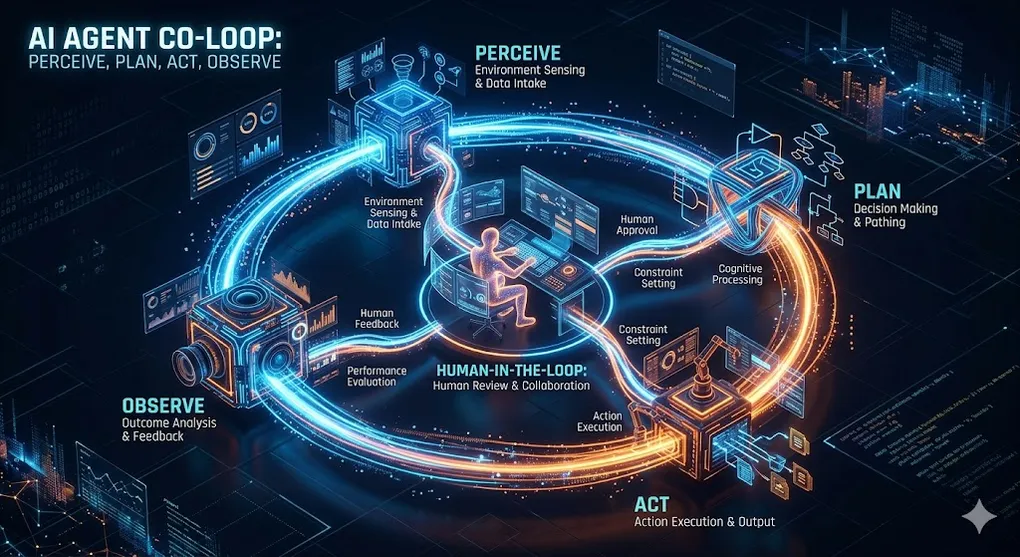
- The Cognitive Architecture — Perceive → Plan → Act → Observe
II — Architecture Layer (how agents are built) 3. The Agent Loop — ReAct, Reflexion, Plan-and-Execute 4. Memory Systems — Working, Short-term, Long-term 5. Tool Use — MCP, Function Calling, Code Execution 6. Planning Strategies — Task Decomposition & Self-Correction
III — Engineering Layer (building and operating agents) 7. Building an Agent with LangGraph — Step-by-step implementation 8. LLMOps & Observability — Monitoring, cost control, debugging 9. Human-in-the-Loop — The Approval/Interrupt pattern 10. Key Takeaways — Decision framework
1. What Is an Agent? Definition & Taxonomy
An AI Agent is a system where an LLM operates in an autonomous loop — perceiving its environment, making decisions, taking actions, and learning from the results to pursue a goal.
The critical distinction:
Chatbot vs. Agent:

  CHATBOT (Stateless, Reactive)
    User: "What was Q4 revenue?"
    Bot:  "Based on the report, Q4 revenue was $534M."
    User: "Compare it to Q3."
    Bot:  "Q3 revenue was $498M, so Q4 grew 7.2%."

    → Each turn: user asks, bot answers. No initiative.
    → The user drives every step.

  AGENT (Stateful, Proactive)
    User: "Analyze our quarterly financials and flag anomalies."
    Agent:
      Step 1: Read database schema (MCP Resource)
      Step 2: Query Q1-Q4 revenue data (MCP Tool)
      Step 3: Calculate growth rates, margins, variances
      Step 4: Detect: "Q3 COGS jumped 23% — unusual"
      Step 5: Cross-reference with procurement records
      Step 6: Generate report with flagged anomalies
      Step 7: ⏸ "Send report to CFO?" → Wait for approval
      Step 8: Send via Slack (MCP Tool)

    → The agent drives the process. The user provides the goal.
    → Multiple tools, multiple steps, self-directed.
1.1 The Agent Taxonomy
Not all agents are created equal. They exist on a spectrum of autonomy:
| Level | Type | Autonomy | Example |
|---|---|---|---|
| L0 | Chatbot | None — pure Q&A | ChatGPT basic conversation |
| L1 | Tool-Augmented LLM | Single tool call per turn | RAG pipeline (AI 03) |
| L2 | ReAct Agent | Multi-step reasoning + tool use | Claude with MCP tools |
| L3 | Plan-and-Execute Agent | Task decomposition + iteration | Devin, Claude Code agent mode |
| L4 | Multi-Agent System | Multiple agents collaborating | Research team (AI 06) |
Connection to AI 02 §5: Claude Code’s agentic loop (plan → act → observe → iterate) is an L3 agent. It decomposes coding tasks into steps, executes them using terminal and file tools, observes test results, and self-corrects. The same architecture powers non-coding agents.
1.2 The Five Components of an Agent
Agent = LLM + Memory + Tools + Loop + Guardrails

  ┌─────────────────────────────────────────────────────┐
  │                     AGENT                            │
  │                                                     │
  │  ┌─────────┐  The "brain" — reasoning, planning,   │
  │  │   LLM   │  deciding which tool to call next.    │
  │  └────┬────┘                                       │
  │       │                                            │
  │  ┌────▼────┐  Conversation history, intermediate   │
  │  │ MEMORY  │  results, learned facts. Persists     │
  │  └────┬────┘  across steps and sessions.           │
  │       │                                            │
  │  ┌────▼────┐  MCP servers, function calls, code    │
  │  │  TOOLS  │  execution, web search. The agent's   │
  │  └────┬────┘  "hands" in the real world.           │
  │       │                                            │
  │  ┌────▼────┐  The ReAct/Reflexion/P&E loop that   │
  │  │  LOOP   │  drives autonomous execution.         │
  │  └────┬────┘                                       │
  │       │                                            │
  │  ┌────▼────────┐  HITL approval, rate limits,     │
  │  │ GUARDRAILS  │  cost budgets, loop detection.    │
  │  └─────────────┘  Prevents runaway agents.         │
  │                                                     │
  └─────────────────────────────────────────────────────┘
🔧 Engineer’s Note: The LLM is necessary but not sufficient. A bare LLM without memory forgets previous steps. Without tools, it can only generate text. Without a loop, it answers once and stops. Without guardrails, it runs forever and burns your API budget. Production agents need all five components.
2. The Cognitive Architecture: Perceive → Plan → Act → Observe
Every agent, regardless of framework, follows the same cognitive cycle. This is the fundamental pattern that turns a passive LLM into an active problem solver:
The Cognitive Cycle:

  ┌──────────────────────────────────────────────────────────┐
  │                                                          │
  │  1. PERCEIVE                                             │
  │     Read the current state:                              │
  │     ─ User's original goal                               │
  │     ─ Results from previous actions                      │
  │     ─ Available tools and resources                      │
  │     ─ Memory of what has been tried                      │
  │                                                          │
  │  2. PLAN                                                 │
  │     Decide the next action:                              │
  │     ─ "What's the best next step toward the goal?"       │
  │     ─ "Which tool should I use?"                         │
  │     ─ "Do I have enough information, or do I need more?" │
  │                                                          │
  │  3. ACT                                                  │
  │     Execute the chosen action:                           │
  │     ─ Call an MCP tool (query database, send message)    │
  │     ─ Execute code (Python, terminal commands)           │
  │     ─ Generate text (draft report, compose email)        │
  │                                                          │
  │  4. OBSERVE                                              │
  │     Process the result:                                  │
  │     ─ Did the action succeed or fail?                    │
  │     ─ Does the result move toward the goal?              │
  │     ─ Should I continue, adjust, or stop?                │
  │                                                          │
  │  → Loop back to PERCEIVE with updated state              │
  │  → Until: goal achieved OR max iterations reached        │
  │                                                          │
  └──────────────────────────────────────────────────────────┘
2.1 The Key Insight: LLM as Controller, Not Executor
The LLM doesn’t do the work directly. It decides what work to do and interprets the results. The actual work — querying databases, running calculations, sending emails — is done by tools.
Traditional LLM:    User → LLM → Answer (one shot)

Agent LLM:          User → LLM → "I need data" → Tool Call → Result
                                → LLM → "Now I need to calculate" → Code → Result
                                → LLM → "Based on analysis..." → Answer

The LLM is the controller in a control loop.
It never touches the database directly.
It decides WHAT to query, reads the result, and decides WHAT to do next.
Connection to AI 01 §4.4: The ReAct prompting technique (Reasoning + Acting) from AI 01 is the prompt-level foundation of agent architecture. In AI 01, we discussed ReAct as a prompting pattern. Here, we build the engineering infrastructure to run ReAct in a persistent loop with real tools.
3. The Agent Loop: ReAct, Reflexion, Plan-and-Execute
Three major architectural patterns define how agents run their cognitive loops. Each pattern trades off simplicity for capability:
3.1 ReAct (Reasoning + Acting)
The simplest and most widely used agent pattern. The LLM alternates between thinking (reasoning about what to do) and acting (calling tools):
ReAct Pattern:

  Thought: "The user wants Q4 revenue. I should query the database."
  Action:  query_database({sql: "SELECT revenue FROM financials WHERE q='Q4'"})
  Observation: [{"revenue": 534000000}]

  Thought: "Got $534M. The user also asked for comparison. I need Q3."
  Action:  query_database({sql: "SELECT revenue FROM financials WHERE q='Q3'"})
  Observation: [{"revenue": 498000000}]

  Thought: "Q4=$534M, Q3=$498M. Growth = (534-498)/498 = 7.2%. I can answer now."
  Action:  FINISH
  Answer:  "Q4 revenue was $534M, up 7.2% from Q3's $498M."
ReAct Architecture:
┌───────────────────────────────────────────┐
│ Prompt = System + History + Instruction │
│ │
│ System: "You are a helpful agent. You │
│ have these tools: [tool descriptions]. │
│ Think step by step. Use tools when │
│ needed." │
│ │
│ History: [all previous Thought/Action/ │
│ Observation triples] │
│ │
│ → LLM generates next Thought + Action │
│ → Execute action → Get observation │
│ → Append to history → Repeat │
└───────────────────────────────────────────┘Strengths: Simple, effective for 3-5 step tasks, widely supported. Weaknesses: No self-correction — if it makes a mistake, it keeps building on it. Context window fills up with long histories.
3.2 Reflexion (Self-Critique Loop)
Reflexion adds a self-evaluation step after each attempt. The agent critiques its own performance and uses the critique to improve:
Reflexion Pattern:

  Trial 1:
    Thought: "I'll search for revenue figures."
    Action:  search("company revenue 2024")
    Observation: Generic industry article, not company-specific data

    REFLECT: "I searched too broadly. I should query our internal
              database instead of doing a web search. The data I
              need is in our PostgreSQL database, not the internet."

  Trial 2 (with reflection applied):
    Thought: "Use the internal database, not web search."
    Action:  query_database({sql: "SELECT * FROM revenue WHERE year=2024"})
    Observation: [{"q1": 498M, "q2": 512M, "q3": 498M, "q4": 534M}]

    REFLECT: "Good — got the exact data. Now I can calculate accurately."
Reflexion Architecture:
┌──────────────────────────────────────────────────┐
│ │
│ Attempt → Execute → Evaluate Success │
│ │ │
│ ┌─────┴─────┐ │
│ │ Success? │ │
│ └─────┬─────┘ │
│ Yes ↓ ↓ No │
│ Return Generate Reflection │
│ Result "What went wrong?" │
│ "How to improve?" │
│ │ │
│ Store in Memory │
│ │ │
│ Retry with Reflection Context │
│ │
└──────────────────────────────────────────────────┘Strengths: Self-correcting, improves over attempts, learns from mistakes. Weaknesses: More expensive (2× LLM calls per attempt), needs clear success criteria.
3.3 Plan-and-Execute (Hierarchical Planning)
For complex, multi-step tasks, the agent first creates a complete plan, then executes each step. The plan can be revised as new information emerges:
Plan-and-Execute Pattern:

  User Goal: "Generate a monthly financial reconciliation report."

  PLAN PHASE (Planner LLM):
    Step 1: Read database schema to understand available tables
    Step 2: Query transactions for the month (filter by date)
    Step 3: Query bank statement records for the same period
    Step 4: Compare transaction totals to bank totals
    Step 5: Identify and categorize any discrepancies
    Step 6: Generate formatted reconciliation report
    Step 7: ⏸ Request human approval before sending
    Step 8: Send report to CFO via email

  EXECUTE PHASE (Executor LLM):
    [Executes step 1] → Schema retrieved → ✅
    [Executes step 2] → 847 transactions retrieved → ✅
    [Executes step 3] → Bank records retrieved → ✅
    [Executes step 4] → Discrepancy found: $12,450 → ⚠️

  RE-PLAN: "Discrepancy found. Add investigation step."
    Step 4.5: Query transactions around the discrepancy date
    Step 4.6: Cross-reference with pending invoices
    [Continues with revised plan]
Plan-and-Execute Architecture:
┌─────────────────────────────────────────────────────┐
│ │
│ ┌──────────┐ │
│ │ PLANNER │ Creates high-level task plan │
│ │ (LLM) │ Revises plan when new info appears │
│ └─────┬────┘ │
│ │ [Step 1, Step 2, Step 3, ...] │
│ ▼ │
│ ┌──────────┐ │
│ │ EXECUTOR │ Executes one step at a time │
│ │ (LLM) │ Uses ReAct within each step │
│ └─────┬────┘ │
│ │ Result │
│ ▼ │
│ ┌──────────┐ │
│ │EVALUATOR │ "Is this step done? Next step?" │
│ │ │ "Do we need to re-plan?" │
│ └──────────┘ │
│ │
└─────────────────────────────────────────────────────┘Strengths: Handles complex multi-step tasks, can recover from failures, transparent plan. Weaknesses: Planning overhead for simple tasks, plan may become stale.
3.4 Choosing the Right Pattern
| Pattern | Best For | Steps | Self-Correction | Cost |
|---|---|---|---|---|
| ReAct | Simple tasks (3-5 steps) | Sequential | ❌ None | Low |
| Reflexion | Tasks with clear success metrics | Trial-based | ✅ Post-attempt | Medium |
| Plan-and-Execute | Complex multi-step workflows | Hierarchical | ✅ Re-planning | High |
🔧 Engineer’s Note: Start with ReAct. It handles 80% of agent use cases. Only move to Plan-and-Execute when tasks regularly exceed 5-7 steps or when you need explicit plan visibility for audit purposes (common in finance). Reflexion is powerful but doubles your LLM cost — use it when the task has clear pass/fail criteria (code tests, data validation).
4. Memory Systems: Working, Short-term, Long-term
An agent without memory is like a person with amnesia — it forgets what it just did and repeats the same steps. Memory is what makes multi-step reasoning possible.
4.1 The Three Memory Types
Agent Memory Architecture:

  ┌───────────────────────────────────────────────────────┐
  │                                                       │
  │  WORKING MEMORY (within a single LLM call)            │
  │  ─ The current prompt: system + history + instruction │
  │  ─ Limited by context window (128K-200K tokens)       │
  │  ─ Everything the LLM "sees" right now                │
  │                                                       │
  ├───────────────────────────────────────────────────────┤
  │                                                       │
  │  SHORT-TERM MEMORY (across steps within one task)     │
  │  ─ Conversation history: previous Thought/Action/Obs  │
  │  ─ Intermediate results: data retrieved, calculations │
  │  ─ The agent's "scratch pad" for the current task     │
  │  ─ Cleared when the task is complete                  │
  │                                                       │
  ├───────────────────────────────────────────────────────┤
  │                                                       │
  │  LONG-TERM MEMORY (persists across tasks/sessions)    │
  │  ─ Vector store: embeddings of past interactions      │
  │  ─ Reflections: "Last time I tried X, it failed       │
  │    because Y. Next time, I should do Z."              │
  │  ─ User preferences: "This user prefers bullet points"│
  │  ─ Stored in external DB (RAG pattern from AI 03)     │
  │                                                       │
  └───────────────────────────────────────────────────────┘
4.2 The Context Window Problem
The biggest engineering challenge in agent memory: the context window fills up.
Context Window Usage During an Agent Task:

  Step 1:  [System Prompt: 500 tokens] [User Goal: 100 tokens]
           [Tool list: 800 tokens]
           Total: ~1,400 tokens     ← 1% of 128K window

  Step 5:  + 5 Thought/Action/Observation triples
           Total: ~8,000 tokens     ← 6% of window

  Step 15: + 15 triples + intermediate data
           Total: ~35,000 tokens    ← 27% of window

  Step 30: + 30 triples + large query results
           Total: ~90,000 tokens    ← 70% of window ⚠️

  Step 40: Context window full → older context dropped
           Agent "forgets" early steps → makes mistakes
           → This is where agents fail in practice
4.3 Memory Management Strategies
| Strategy | How It Works | Trade-off |
|---|---|---|
| Sliding Window | Keep last N steps, drop older ones | Simple but loses early context |
| Summarization | LLM summarizes old steps into a paragraph | Preserves essence, costs extra tokens |
| RAG Memory | Store all steps in vector DB, retrieve relevant ones | Scalable, but retrieval may miss important context |
| Hierarchical | Summarize + store full history in external DB | Best of both, most complex to implement |
Summarization Strategy:

  Steps 1-10:  [Full detail — in context window]
  Steps 11-20: [Full detail — in context window]
  Steps 1-10:  → LLM Summary: "Retrieved Q1-Q4 revenue data
                 from PostgreSQL. Found $534M Q4 revenue.
                 Identified 23% COGS spike in Q3."
                 [Summary replaces full steps: 8,000 → 200 tokens]
🔧 Engineer’s Note: The summarization strategy is the production sweet spot. It keeps the most recent steps in full detail (needed for reasoning about the immediate next action) while compressing older history into concise summaries (preserving the narrative without consuming tokens). In LangGraph, implement this as a custom memory reducer that triggers summarization when the context exceeds a threshold (e.g., 50% of the model’s window).
Connection to AI 03: Long-term agent memory is essentially RAG (AI 03) applied to the agent’s own history. Past Thought/Action/Observation triples are embedded, stored in a vector database, and retrieved when relevant to the current step. The same chunking, embedding, and retrieval patterns from AI 03 apply here.
5. Tool Use: MCP, Function Calling, Code Execution
Tools are the agent’s hands — without them, the agent can only think and talk. With tools, it can query databases, browse the web, execute code, and interact with any external system.
5.1 Three Tool Mechanisms
How Agents Access Tools:

  ┌─────────────────────────────────────────────────────┐
  │                                                     │
  │  1. FUNCTION CALLING (Model API)                    │
  │     LLM → API → function call → result → LLM       │
  │     Provider-specific (OpenAI, Anthropic formats)   │
  │     Simple, single-model, stateless                 │
  │                                                     │
  │  2. MCP (Model Context Protocol)                    │
  │     LLM → MCP Client → MCP Server → result → LLM   │
  │     Universal, multi-host, session-based             │
  │     Write once, use in Claude/Cursor/your app       │
  │                                                     │
  │  3. CODE EXECUTION (Interpreter)                    │
  │     LLM generates Python code → sandbox executes    │
  │     → result → LLM                                  │
  │     Most flexible, highest risk (arbitrary code)    │
  │                                                     │
  └─────────────────────────────────────────────────────┘
5.2 When to Use Which
| Mechanism | Best For | Risk Level | Example |
|---|---|---|---|
| Function Calling | Simple, known functions | Low | get_weather(city), translate(text) |
| MCP Tools | Database, API, file system access | Medium | query_database(sql), send_slack(msg) |
| Code Execution | Complex calculations, data analysis | High | ”Calculate the Sharpe ratio of this portfolio” |
5.3 The Tool Description Problem
The LLM decides which tool to call based on the tool’s description. Poor descriptions lead to wrong tool selection:
Tool Selection by the LLM:

  User: "What's the average deal size this quarter?"

  Available tools:
    1. query_database:     "Execute SQL queries against the company DB"
    2. search_documents:   "Search through uploaded PDF documents"
    3. calculate:          "Perform mathematical calculations"
    4. send_notification:  "Send a message to a Slack channel"

  LLM reasoning:
    "The user wants deal size → this is in the database → tool #1"
    → query_database({sql: "SELECT AVG(deal_size) FROM deals WHERE quarter='Q1'"})

  If tool #1 had a BAD description:
    1. query_database: "Runs queries" (vague)

  LLM reasoning:
    "What does 'runs queries' mean? Maybe I should search documents."
    → search_documents("average deal size") → Wrong tool selected
🔧 Engineer’s Note: Tool descriptions are prompt engineering for agents (connecting back to AI 01). The three rules: (1) Be specific about what the tool does, (2) State the data source it accesses, (3) Give examples of when to use it. A tool description like
"Execute read-only SQL queries against the company PostgreSQL database to answer questions about revenue, customers, deals, and transactions"is far more effective than"Runs database queries".
Connection to AI 04 §4.2: MCP Tool descriptions serve the same purpose as function calling descriptions — the LLM reads them to decide which tool to invoke. The same description quality principles from AI 04 §6.4 (Pattern 2) apply to all agent tool mechanisms.
5.4 Data Truncation: When Tools Return Too Much
A common production pitfall: the agent calls query_database("SELECT * FROM transactions") and the tool returns 10,000 rows. The result floods the context window, pushing out the system prompt, earlier reasoning, and the user’s original goal.
The Data Volume Problem:

  Tool returns 10,000 rows → ~500,000 tokens → context window exploded

  Before tool call:                    After tool call:
  ┌──────────────────────┐             ┌──────────────────────┐
  │ System Prompt  (500) │             │ ██████████████████████│
  │ User Goal      (100) │             │ ██  Tool Result  █████│
  │ Tool List      (800) │             │ ██  (500K tokens) ████│
  │ History      (5,000) │             │ ██████████████████████│
  │                      │             │ ██████████████████████│
  │   [92% available]    │             │   [0% available] 💥  │
  └──────────────────────┘             └──────────────────────┘
The fix: always enforce output limits at the tool layer, not the agent layer.
@tool
def query_database(sql: str) -> str:
    """Execute a read-only SQL query. Results limited to 50 rows.
    Use LIMIT in your SQL, or add pagination with OFFSET."""

    # Guardrail 1: Force LIMIT if not present
    if "LIMIT" not in sql.upper():
        sql += " LIMIT 50"

    rows = execute_query(sql)
    result = json.dumps(rows, indent=2)

    # Guardrail 2: Truncate output if still too large
    MAX_CHARS = 8000  # ~2,000 tokens
    if len(result) > MAX_CHARS:
        result = result[:MAX_CHARS] + f"\n... (truncated, {len(rows)} total rows)"

    return result
⚠️ Critical Tip: Always implement pagination or output size limits at the tool level, not the agent level. The agent doesn’t know how large a result will be until it arrives — by then, the context is already consumed. Enforce
LIMIT 50as default in SQL tools, cap JSON responses at ~8,000 characters, and include a row count so the agent knows there’s more data available. This is the #1 production bug in agent systems that work perfectly in demos with small datasets.
6. Planning Strategies: Task Decomposition & Self-Correction
Planning is what separates L2 agents (reactive) from L3 agents (proactive). A planning agent doesn’t just respond to the current state — it creates and follows a strategy.
6.1 Task Decomposition
Task Decomposition:

  Complex Goal: "Prepare the board meeting financial package."

  Decomposed Plan:
  ┌────────────────────────────────────────────────────┐
  │  1. Gather Data                                    │
  │     ├── 1.1 Query revenue by segment (Q1-Q4)      │
  │     ├── 1.2 Query expense breakdown by department  │
  │     └── 1.3 Retrieve headcount data from HR system │
  │                                                    │
  │  2. Analyze                                        │
  │     ├── 2.1 Calculate YoY growth rates             │
  │     ├── 2.2 Compute margin analysis                │
  │     └── 2.3 Identify significant variances (>10%)  │
  │                                                    │
  │  3. Generate Artifacts                             │
  │     ├── 3.1 Executive summary (1 page)             │
  │     ├── 3.2 Financial tables with variance notes   │
  │     └── 3.3 Risk factors and outlook section       │
  │                                                    │
  │  4. Review & Deliver                               │
  │     ├── 4.1 ⏸ HITL: Human reviews draft            │
  │     └── 4.2 Send final package via email           │
  └────────────────────────────────────────────────────┘
6.2 Self-Correction Patterns
Self-Correction in Practice:

  Step 3: Calculate YoY growth
    Action:  calculate("revenue_2024 / revenue_2023 - 1")
    Result:  Error — revenue_2023 is NULL (data not loaded yet)

  Without self-correction:
    → Agent crashes or returns wrong answer

  With self-correction:
    Thought: "revenue_2023 is NULL. I need to query 2023 data first.
              I skipped it because the plan only mentioned Q1-Q4 of
              current year. Let me re-plan."

    Re-plan: Insert Step 1.4: "Query prior year revenue for comparison"
    Action:  query_database({sql: "SELECT ... WHERE year = 2023"})
    → Continue with corrected data
6.3 The Re-Planning Decision
When to Re-Plan:

  ┌── Tool call returned an error
  │     → Re-plan: try alternative tool or approach
  │
  ├── Data is missing or unexpected
  │     → Re-plan: add data gathering steps
  │
  ├── User provides new information mid-task
  │     → Re-plan: incorporate new requirements
  │
  ├── Cost/time budget exceeded 50%
  │     → Re-plan: simplify remaining steps
  │
  └── Result contradicts expectations
        → Re-plan: verify data source, check assumptions
🔧 Engineer’s Note: Good agents fail gracefully. The difference between a toy demo and a production agent is error handling. Every tool call should have: (1) a timeout, (2) a retry with backoff, (3) a fallback strategy (try a different tool or approach), and (4) a “give up gracefully” path that returns a partial result rather than crashing silently.
7. Building an Agent with LangGraph
LangGraph is the production-grade framework for building agents. It models agents as state machines — directed graphs where nodes are actions and edges are decisions.
7.1 Why LangGraph (Not Plain LangChain)
LangChain vs. LangGraph:

  LangChain (legacy AgentExecutor):
    → Linear chain: LLM → Tool → LLM → Tool → Done
    → No branching, no Human-in-the-Loop, no persistence
    → Fine for simple demos, breaks in production

  LangGraph:
    → State machine: nodes, edges, conditional routing
    → Built-in HITL (interrupt nodes), persistence (checkpoints)
    → Handles cycles, branches, parallel execution
    → Production-grade: used by LangChain team internally
7.2 Core Concepts
LangGraph Mental Model:

  ┌──────────────────────────────────────────────────────────┐
  │  STATE: A TypedDict that flows through the graph         │
  │  ─ Contains: messages, intermediate results, plan        │
  │  ─ Every node reads and writes to the state              │
  │                                                          │
  │  NODES: Functions that process the state                 │
  │  ─ "agent": LLM decides next action                     │
  │  ─ "tools": Executes the chosen tool                    │
  │  ─ "human_review": Pauses for human approval            │
  │                                                          │
  │  EDGES: Conditional routing between nodes                │
  │  ─ "If LLM chose a tool → go to tools node"            │
  │  ─ "If tool is high-risk → go to human_review node"    │
  │  ─ "If LLM said FINISH → end the graph"                │
  │                                                          │
  │  CHECKPOINTING: Saves state at every step               │
  │  ─ Enables HITL: pause, wait for human, resume          │
  │  ─ Enables retry: re-run from any checkpoint            │
  │  ─ Enables debugging: inspect state at any point        │
  └──────────────────────────────────────────────────────────┘
7.3 How State Flows Through the Graph
The hardest concept in LangGraph: understanding how AgentState transforms as it moves through nodes. Here’s a concrete walkthrough:
graph TD
    A["START"] --> B["agent node"]
    B -->|"has tool_calls"| C["tools node"]
    B -->|"no tool_calls"| D["END"]
    C --> B

    style A fill:#2d2d2d,stroke:#666,color:#fff
    style B fill:#4a9eff,stroke:#357abd,color:#fff
    style C fill:#ff9f43,stroke:#e67e22,color:#fff
    style D fill:#2d2d2d,stroke:#666,color:#fff
State Transformation — Step by Step:
┌─────────────────────────────────────────────────────────────────┐
│ INITIAL STATE (entering the graph) │
│ ───────────────────────────────────────────────────────────── │
│ messages: [HumanMessage("What was Q4 revenue?")] │
│ plan: "" │
│ iteration_count: 0 │
└──────────────────────────┬──────────────────────────────────────┘
│
▼
┌─────────────────────────────────────────────────────────────────┐
│ AFTER agent_node (LLM decides to call a tool) │
│ ───────────────────────────────────────────────────────────── │
│ messages: [HumanMessage("What was Q4 revenue?"), │
│ AIMessage(tool_calls=[{ │
│ name: "query_database", │
│ args: {sql: "SELECT revenue FROM financials..."} │
│ }])] │
│ ↑ add_messages APPENDED this new message │
│ iteration_count: 1 ← incremented by agent_node │
└──────────────────────────┬──────────────────────────────────────┘
│
▼
┌─────────────────────────────────────────────────────────────────┐
│ AFTER tools_node (tool executed, result appended) │
│ ───────────────────────────────────────────────────────────── │
│ messages: [HumanMessage("What was Q4 revenue?"), │
│ AIMessage(tool_calls=[...]), │
│ ToolMessage(content="[{revenue: 534000000}]")] │
│ ↑ add_messages APPENDED the tool result │
│ iteration_count: 1 ← unchanged by tools_node │
└──────────────────────────┬──────────────────────────────────────┘
│
▼ (loops back to agent_node)
┌─────────────────────────────────────────────────────────────────┐
│ AFTER agent_node (2nd pass — LLM generates final answer) │
│ ───────────────────────────────────────────────────────────── │
│ messages: [HumanMessage("What was Q4 revenue?"), │
│ AIMessage(tool_calls=[...]), │
│ ToolMessage(content="[{revenue: 534000000}]"), │
│ AIMessage("Q4 revenue was $534M.")] │
│ ↑ add_messages APPENDED the final answer │
│ iteration_count: 2 ← incremented again │
│ │
│ → should_continue() sees no tool_calls → routes to END │
└─────────────────────────────────────────────────────────────────┘
KEY INSIGHT: Each node returns ONLY its changes (a partial dict).
The add_messages reducer APPENDS new messages to the existing list.
The state is NEVER replaced — it accumulates.🔧 Engineer’s Note: The
Annotated[list, add_messages]type annotation is doing the heavy lifting. It tells LangGraph: “When a node returns{messages: [new_msg]}, don’t replace the list — appendnew_msgto the existing list.” This is the reducer pattern. Without it, each node would overwrite the entire message history, and the agent would forget everything from previous steps.
7.4 Implementation: A Financial Analysis Agent
# A complete LangGraph agent for financial analysis
from langgraph.graph import StateGraph, END
from langgraph.prebuilt import ToolNode
from langgraph.checkpoint.memory import MemorySaver
from langchain_anthropic import ChatAnthropic
from langchain_core.messages import HumanMessage, SystemMessage
from typing import TypedDict, Annotated
from langgraph.graph.message import add_messages

# ─── Step 1: Define the State ────────────────────────────
class AgentState(TypedDict):
    messages: Annotated[list, add_messages]  # conversation history
    plan: str                                # current plan (for P&E)
    iteration_count: int                     # loop detection

# ─── Step 2: Define Tools (via MCP or function calling) ──
from langchain_core.tools import tool

@tool
def query_database(sql: str) -> str:
    """Execute a read-only SQL query against the company financial database.
    Use this to answer questions about revenue, expenses, customers, and deals.
    Only SELECT queries are allowed."""
    # In production: connect via MCP client
    import sqlite3
    conn = sqlite3.connect("./data/company.db")
    cursor = conn.execute(sql)
    columns = [d[0] for d in cursor.description] if cursor.description else []
    rows = [dict(zip(columns, row)) for row in cursor.fetchall()]
    conn.close()
    return str(rows)

@tool
def calculate(expression: str) -> str:
    """Evaluate a mathematical expression. Use for financial calculations
    like growth rates, margins, ratios. Example: '(534 - 498) / 498 * 100'"""
    try:
        result = eval(expression)  # In production: use a safe math parser
        return str(result)
    except Exception as e:
        return f"Calculation error: {e}"

@tool
def generate_report(title: str, content: str) -> str:
    """Generate a formatted financial report. Returns the report as markdown.
    Use after gathering and analyzing all required data."""
    return f"# {title}\n\n{content}\n\n---\nGenerated by Financial Analysis Agent"

tools = [query_database, calculate, generate_report]

# ─── Step 3: Define the LLM ─────────────────────────────
llm = ChatAnthropic(model="claude-sonnet-4-20250514").bind_tools(tools)

SYSTEM_PROMPT = """You are a senior financial analyst agent. Your job is to:
1. Analyze company financial data by querying the database
2. Perform calculations (growth rates, margins, variances)
3. Generate clear, accurate reports

Rules:
- Always verify data before drawing conclusions
- Show your calculations
- Flag anomalies (variances > 10%)
- When done, use generate_report to create the final output"""

# ─── Step 4: Define Graph Nodes ──────────────────────────
def agent_node(state: AgentState) -> AgentState:
    """The LLM reasoning node — decides what to do next."""
    messages = [SystemMessage(content=SYSTEM_PROMPT)] + state["messages"]
    response = llm.invoke(messages)
    return {
        "messages": [response],
        "iteration_count": state.get("iteration_count", 0) + 1,
    }

tool_node = ToolNode(tools)

# ─── Step 5: Define Routing Logic ────────────────────────
def should_continue(state: AgentState) -> str:
    """Route: continue with tools, or finish?"""
    last_message = state["messages"][-1]

    # Guardrail: max iterations
    if state.get("iteration_count", 0) > 15:
        return "end"

    # If LLM wants to call a tool, route to tool node
    if hasattr(last_message, "tool_calls") and last_message.tool_calls:
        return "tools"

    # Otherwise, the agent is done
    return "end"

# ─── Step 6: Build the Graph ─────────────────────────────
workflow = StateGraph(AgentState)

workflow.add_node("agent", agent_node)
workflow.add_node("tools", tool_node)

workflow.set_entry_point("agent")

workflow.add_conditional_edges(
    "agent",
    should_continue,
    {"tools": "tools", "end": END},
)
workflow.add_edge("tools", "agent")  # After tools, go back to agent

# ─── Step 7: Add Checkpointing (enables HITL + persistence)
memory = MemorySaver()
app = workflow.compile(checkpointer=memory)

# ─── Step 8: Run the Agent ───────────────────────────────
async def run_agent(user_query: str):
    config = {"configurable": {"thread_id": "financial-analysis-001"}}

    initial_state = {
        "messages": [HumanMessage(content=user_query)],
        "plan": "",
        "iteration_count": 0,
    }

    async for event in app.astream(initial_state, config):
        for node_name, output in event.items():
            if node_name == "agent":
                print(f"🤖 Agent thinking...")
            elif node_name == "tools":
                print(f"🔧 Tool executed: {output}")

    # Get final state
    final_state = await app.aget_state(config)
    return final_state.values["messages"][-1].content

# Usage:
# result = await run_agent("What was our quarterly revenue trend this year?")
7.5 Expected Output
Running: run_agent("What was our quarterly revenue trend this year?")

🤖 Agent thinking...
   → "I need to query the database for quarterly revenue data."

🔧 Tool executed: query_database
   → sql: "SELECT quarter, revenue FROM financials WHERE year=2024 ORDER BY quarter"
   → Result: [{"quarter":"Q1","revenue":498000000}, {"quarter":"Q2","revenue":512000000},
              {"quarter":"Q3","revenue":498000000}, {"quarter":"Q4","revenue":534000000}]

🤖 Agent thinking...
   → "Got the data. Let me calculate QoQ growth rates."

🔧 Tool executed: calculate
   → expression: "(512-498)/498*100"
   → Result: "2.81"

🔧 Tool executed: calculate
   → expression: "(498-512)/512*100"
   → Result: "-2.73"

🔧 Tool executed: calculate
   → expression: "(534-498)/498*100"
   → Result: "7.23"

🤖 Agent thinking...
   → "I notice Q3 dipped back to Q1 levels. Let me generate the report."

🔧 Tool executed: generate_report
   → title: "Quarterly Revenue Trend Analysis — 2024"
   → content: "Q1: $498M → Q2: $512M (+2.8%) → Q3: $498M (-2.7%) → Q4: $534M (+7.2%)
               ⚠️ Anomaly: Q3 revenue declined to Q1 levels despite overall upward trend.
               Recommend investigating Q3 factors (seasonality? lost deals? delayed billing?)
               Full-year: $2.042B, Q4 exit rate suggests strong 2025 runway."

✅ Agent finished in 6 iterations, ~4,200 tokens used.
🔧 Engineer’s Note: Notice the
iteration_count > 15guardrail inshould_continue(). This is the minimum viable loop protection every agent must have. Without it, a confused agent can loop forever — burning tokens at $15/million. In production, add: (1) cost limit check, (2) duplicate action detection (same tool + same args 3 times → abort), (3) timeout per step.
8. LLMOps & Observability
Running agents in production without observability is like driving without a dashboard — you won’t know there’s a problem until you crash.
8.1 The Scariest Agent Failure Mode
The Infinite Loop:

  Think: "I need to search for the revenue data."
  Act:   search("Q4 revenue 2024")
  Observe: "No results found."

  Think: "Let me try searching again with different terms."
  Act:   search("quarterly revenue report 2024")
  Observe: "No results found."

  Think: "Maybe I should try a broader search."
  Act:   search("revenue 2024")
  Observe: "No results found."

  ... (the database is actually down, but the agent doesn't know)

  20 minutes later: $47 in tokens burned. Zero results.

  → Without observability, you only discover this
    when the API bill arrives.
8.2 The Minimum Viable Observability Stack
Agent Observability Architecture:

  Agent Code
    │
    ├── TRACES: Every LLM call logged with:
    │     • Input prompt (tokens, cost)
    │     • Output (tokens, cost)
    │     • Latency (ms)
    │     • Model used
    │
    ├── SPANS: Tool calls and state transitions:
    │     • Which tool was called
    │     • Arguments passed
    │     • Result returned
    │     • Execution time
    │
    ├── ALERTS (automated kill-switches):
    │     • If total_cost > $X → abort + notify
    │     • If iterations > N → abort + notify
    │     • If same_action_repeated ≥ 3 → abort + notify
    │     • If step_latency > 30s → log warning
    │
    └── DASHBOARD:
          • Cost per agent run (avg, p95, max)
          • Success rate (task completed / task started)
          • Average iterations per task
          • Tool usage frequency
          • Error rate by tool
8.3 Observability Tools
| Tool | Type | Best For |
|---|---|---|
| LangSmith | Commercial (LangChain) | LangGraph/LangChain native. Best trace visualization. |
| Langfuse | Open-source, self-hostable | Enterprise teams who need data sovereignty |
| Phoenix (Arize) | Open-source | Multi-framework support, strong evaluation features |
| OpenTelemetry | Standard | Custom pipelines, integrate with existing monitoring |
8.4 Implementing Cost Controls
# Cost control middleware for LangGraph agents
from langgraph.graph import StateGraph

MAX_COST_PER_RUN = 5.00       # $5 max per agent run
MAX_ITERATIONS = 20            # absolute cap
LOOP_DETECTION_THRESHOLD = 3   # same action 3x → abort

def cost_guard(state: AgentState) -> str:
    """Check cost and loop conditions before continuing."""

    # Cost check
    total_cost = sum(m.usage_metadata.get("cost", 0)
                     for m in state["messages"]
                     if hasattr(m, "usage_metadata"))
    if total_cost > MAX_COST_PER_RUN:
        return "budget_exceeded"

    # Iteration check
    if state.get("iteration_count", 0) > MAX_ITERATIONS:
        return "max_iterations"

    # Loop detection: check last 3 tool calls
    tool_calls = [m for m in state["messages"]
                  if hasattr(m, "tool_calls") and m.tool_calls]
    if len(tool_calls) >= LOOP_DETECTION_THRESHOLD:
        recent = tool_calls[-LOOP_DETECTION_THRESHOLD:]
        if all(tc.tool_calls[0]["name"] == recent[0].tool_calls[0]["name"]
               and tc.tool_calls[0]["args"] == recent[0].tool_calls[0]["args"]
               for tc in recent):
            return "loop_detected"

    return "continue"
🔧 Engineer’s Note: Running an agent in production without cost controls is like giving someone a credit card with no limit and no statements. At minimum, implement these three guardrails: (1) Max iteration limit — 15-20 for most tasks, (2) Max cost per run — 47-burnt-on-nothing scenario.
9. Human-in-the-Loop: The Approval/Interrupt Pattern
This is the pattern that separates demo agents from production agents. A well-designed agent pauses before any high-risk action and waits for human approval.
9.1 Why HITL Is Non-Negotiable
The Trust Equation:

  Agent without HITL:
    User: "Reconcile this month's transactions."
    Agent: [queries DB] [finds discrepancy] [auto-adjusts records]
           [sends report to CFO] [done]
    CFO:   "WHO AUTHORIZED THESE JOURNAL ENTRIES?!" → 💀

  Agent with HITL:
    User: "Reconcile this month's transactions."
    Agent: [queries DB] [finds discrepancy]
           ⏸ "I found a $12,450 discrepancy. I recommend
              adjusting entry #4521. Approve?"
           [User: ✅ Approve adjustment]
           [Agent adjusts record]
           ⏸ "Report ready. Send to CFO?"
           [User: ✅ Send]
           [Agent sends report]
    CFO:   "Great work. Everything checks out." → ✅
9.2 The Three Sensitivity Tiers
This extends the MCP sensitivity model from AI 04 §9.5 to the full agent loop:
Agent Action Sensitivity (expanded from AI 04 §9.5):

  🟢 GREEN — Auto-Execute
     Read data, search, calculate, retrieve documents
     → No side effects. Agent proceeds without asking.
     Examples: query_database (SELECT), read_file, search_web,
               calculate, list_resources

  🟡 YELLOW — Execute + Notify
     Generate reports, create drafts, export data
     → Creates artifacts but doesn't send/modify external state.
     → Agent executes, then shows result: "I created this report."
     Examples: generate_report, create_draft_email, export_csv,
               summarize_document

  🔴 RED — Pause + Approve
     Write to databases, send communications, modify systems
     → Irreversible side effects on external systems.
     → ⏸ Agent STOPS. Shows what it wants to do. Waits for human.
     Examples: insert_record, delete_record, send_email,
               create_invoice, update_config, post_to_slack
9.3 LangGraph Interrupt Implementation
# Adding HITL to the LangGraph agent
from langgraph.types import interrupt, Command

# Classify tools by sensitivity
TOOL_SENSITIVITY = {
    "query_database":   "green",
    "calculate":        "green",
    "generate_report":  "yellow",
    "send_email":       "red",
    "insert_record":    "red",
    "delete_record":    "red",
}

def tool_node_with_hitl(state: AgentState) -> AgentState:
    """Execute tools with sensitivity-based HITL."""
    last_message = state["messages"][-1]

    for tool_call in last_message.tool_calls:
        tool_name = tool_call["name"]
        tool_args = tool_call["args"]
        sensitivity = TOOL_SENSITIVITY.get(tool_name, "red")  # default: red

        if sensitivity == "red":
            # ⏸ PAUSE — wait for human approval
            human_response = interrupt({
                "action": "approve_tool_call",
                "tool": tool_name,
                "args": tool_args,
                "message": f"Agent wants to execute: {tool_name}({tool_args}). Approve?",
            })

            if human_response.get("approved") is not True:
                return {
                    "messages": [ToolMessage(
                        content=f"User DENIED execution of {tool_name}. "
                                f"Reason: {human_response.get('reason', 'No reason given')}",
                        tool_call_id=tool_call["id"],
                    )]
                }

        # Execute the tool (green, yellow, or approved red)
        result = execute_tool(tool_name, tool_args)

        if sensitivity == "yellow":
            # Notify user about the result (non-blocking)
            notify_user(f"Executed {tool_name}: {result[:200]}...")

        return {"messages": [ToolMessage(content=result, tool_call_id=tool_call["id"])]}
9.4 The Approval UI Pattern
The Approval Interaction:

  ┌─────────────────────────────────────────────────────┐
  │  📊 Financial Analysis Agent                         │
  │                                                     │
  │  Status: Running — Step 5 of 8                      │
  │                                                     │
  │  ┌─── Current Action ────────────────────────────┐  │
  │  │                                               │  │
  │  │  ⚠️ APPROVAL REQUIRED                          │  │
  │  │                                               │  │
  │  │  Tool: insert_record                          │  │
  │  │  Table: journal_entries                       │  │
  │  │  Data: {"date": "2024-12-31",                 │  │
  │  │         "account": "4521",                    │  │
  │  │         "debit": 12450,                       │  │
  │  │         "description": "Q4 reconciliation     │  │
  │  │          adjustment — revenue timing"}        │  │
  │  │                                               │  │
  │  │  Agent's reasoning:                           │  │
  │  │  "Found $12,450 discrepancy between bank      │  │
  │  │   statement and GL. This appears to be a      │  │
  │  │   timing difference on invoice #8821."        │  │
  │  │                                               │  │
  │  │  [✅ Approve]  [❌ Deny]  [✏️ Modify]           │  │
  │  │                                               │  │
  │  └───────────────────────────────────────────────┘  │
  │                                                     │
  │  Previous steps:                                    │
  │  ✅ 1. Read database schema                         │
  │  ✅ 2. Query Q4 transactions (847 records)          │
  │  ✅ 3. Query bank statement data                    │
  │  ✅ 4. Calculated discrepancy: $12,450              │
  │  ⏸ 5. Awaiting approval for journal entry          │
  │  ⬜ 6. Generate reconciliation report               │
  │  ⬜ 7. Send report to CFO                           │
  └─────────────────────────────────────────────────────┘
🔧 Engineer’s Note: Read = Auto, Write = Approve. This is the simplest possible HITL rule and it covers 95% of agent safety needs. If an agent action reads data, let it run. If it writes to any external system — database, email, Slack, file system — pause and ask. Your CFO will not trust an AI that independently creates journal entries. Neither should you.
Connection to AI 04 §9.5: The three-tier sensitivity model (🟢/🟡/🔴) was introduced in AI 04 for MCP tool calls. Here in AI 05, we extend the same model to the full agent loop. MCP provides the tool-level confirmation; the agent loop provides the workflow-level confirmation. They work together as defense-in-depth.
Connection to AI 08: The financial reconciliation example above is a preview of AI 08’s month-end close automation. The “AI flags anomaly → human approves journal entry” pattern is exactly how production finance agents work. The HITL node is what makes audit-compliant AI possible.
10. Key Takeaways
10.1 The Agent Readiness Checklist
Before deploying an agent to production:

  ✅ Loop protection: Max iterations set (15-20)
  ✅ Cost control: Max $ per run set ($5-10)
  ✅ Loop detection: Same action ×3 → abort
  ✅ HITL: All write operations require approval
  ✅ Observability: Traces + spans + alerts configured
  ✅ Error handling: Timeouts + retries + fallbacks
  ✅ Memory management: Context summarization strategy
  ✅ Tool descriptions: Specific, actionable, with examples
  ✅ Audit logging: Every tool call logged with who/what/when
  ✅ Testing: End-to-end tests with mock tools
10.2 Summary Table
| Concept | What to Remember |
|---|---|
| Agent = LLM + Memory + Tools + Loop + Guardrails | All five are required for production |
| ReAct for 80% of tasks | Start simple, upgrade to Plan-and-Execute if needed |
| Reflexion for self-correction | Doubles cost but dramatically improves accuracy |
| Memory = context management | Summarize old steps, keep recent steps in full detail |
| Tool descriptions = prompt engineering | Better descriptions → better tool selection |
| Observability is non-negotiable | Cost limits + loop detection + tracing |
| Read = Auto, Write = Approve | The simplest HITL rule that covers 95% of safety |
| Agents fail gracefully | Partial results > silent failures |
10.3 The Architecture Evolution
AI 01  → Prompt Engineering (how to talk to LLMs)
AI 02  → Dev Tools (LLMs that write code)
AI 03  → RAG (LLMs that read private data)
AI 04  → MCP (universal tool connections)
AI 05  → Agents (LLMs that act autonomously) ← YOU ARE HERE
AI 06  → Multi-Agent (multiple agents collaborating)
         → What happens when one agent isn't enough?
AI 07  → Security (making all of the above safe)
AI 08  → Financial Application (putting it all together)
10.4 What’s Next
AI 05 (this article):   Single agent: one LLM, one loop, one goal
AI 06 (next):           Multi-agent: specialized agents collaborating
                         → Supervisor pattern, handoff protocol, A2A
                         → When one agent can't do everything alone
Bridge to AI 06: You now know how to build a single agent that reasons, plans, acts, and self-corrects. But what happens when a task is too complex for one agent? What if you need a researcher, a writer, and a reviewer — each with different expertise and tools? That’s the domain of Multi-Agent Systems — where multiple specialized agents collaborate, delegate, and coordinate to solve problems no single agent can. In AI 06, we’ll build these teams using the Supervisor pattern and the A2A protocol we introduced in AI 04.
This is AI 05 of a 12-part series on production AI engineering. Continue to AI 06: Multi-Agent Systems — When One Brain Isn’t Enough.