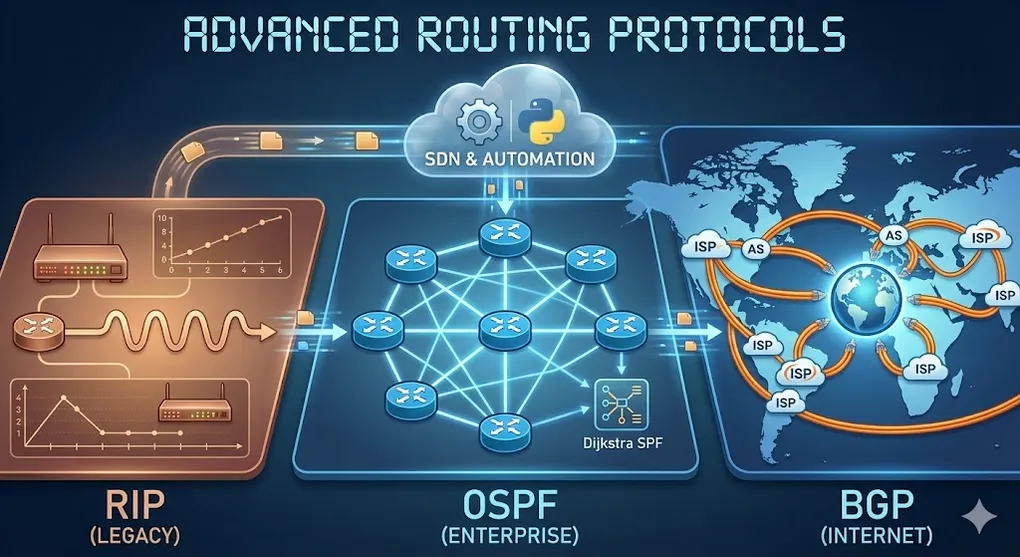
Advanced Routing Protocols: OSPF, BGP & RIP
Prerequisites: This article assumes familiarity with basic networking concepts (IP, LAN, WAN, Router). If you’re new to networking, start with SQL Server & Networking Fundamentals first.
Introduction: Why Do We Need Routing Protocols?
In the fundamentals article, we learned that a router is like a reception desk that forwards packets. But how does the router decide which path to take?
┌─────────────────────────────────────────────────────────────────┐
│                    The Routing Decision Problem                  │
├─────────────────────────────────────────────────────────────────┤
│                                                                  │
│  Packet arrives: "I need to go to 203.0.113.50"                  │
│                                                                  │
│                    ┌─────────┐                                   │
│                    │ Router  │                                   │
│                    └────┬────┘                                   │
│                         │                                        │
│         ┌───────────────┼───────────────┐                        │
│         │               │               │                        │
│         ▼               ▼               ▼                        │
│    Path A           Path B          Path C                       │
│    (3 hops)         (5 hops)        (2 hops, but slow)           │
│                                                                  │
│    Which one should the router choose?                           │
│                                                                  │
└─────────────────────────────────────────────────────────────────┘Answer: Routing protocols help routers automatically discover networks and calculate the best path.
Static vs Dynamic Routing
Before diving into protocols, understand the two approaches:
| Type | How It Works | Pros | Cons |
|---|---|---|---|
| Static Routing | Admin manually configures each route | Simple, predictable | Doesn’t adapt to failures |
| Dynamic Routing | Routers automatically share info | Self-healing, scalable | More complex, uses bandwidth |
When to use which?
- Static: Small networks, stub networks, default routes
- Dynamic: Large enterprises, ISPs, networks that change frequently
Part A: Interior Gateway Protocols (IGP)
IGPs operate within a single organization (Autonomous System).
1. RIP: Routing Information Protocol
The “Senior Citizen” of Routing Protocols (1988)
1.1 How RIP Works: Distance Vector
RIP uses the simplest metric: hop count (how many routers between here and destination).
┌─────────────────────────────────────────────────────────────────┐
│                    RIP: Hop Count Metric                         │
├─────────────────────────────────────────────────────────────────┤
│                                                                  │
│   Network A              Network B              Network C        │
│      │                      │                      │             │
│   ┌──▼──┐    1 hop     ┌────▼────┐    1 hop    ┌──▼──┐           │
│   │ R1  │◄────────────►│   R2    │◄───────────►│ R3  │           │
│   └─────┘              └─────────┘              └─────┘          │
│                                                                  │
│   From R1's perspective:                                         │
│   - Network B = 1 hop                                            │
│   - Network C = 2 hops                                           │
│                                                                  │
│   RIP always chooses the path with FEWEST hops                   │
│   (ignoring bandwidth!)                                          │
│                                                                  │
└─────────────────────────────────────────────────────────────────┘
1.2 RIP Characteristics
| Property | Value |
|---|---|
| Metric | Hop count (1-15, 16 = unreachable) |
| Max Hops | 15 (not suitable for large networks) |
| Update Interval | Every 30 seconds (broadcasts entire routing table) |
| Convergence | Slow (minutes) |
| Algorithm | Bellman-Ford |
1.3 RIP Versions
| Version | Key Features |
|---|---|
| RIPv1 | Classful (no subnet mask), broadcast |
| RIPv2 | Classless (VLSM support), multicast, authentication |
| RIPng | IPv6 support |
1.4 RIP Limitations
❌ Max 15 hops — Can’t handle large networks ❌ Slow convergence — Takes minutes to adapt to changes ❌ Ignores bandwidth — A 10 Gbps link counts the same as a 56 Kbps dial-up ❌ Broadcasts entire table — Wastes bandwidth every 30 seconds
RIP Today: Mostly seen in legacy systems or teaching labs. Its limitations (max 15 hops, slow convergence, ignoring bandwidth) are precisely WHY we study it — to understand how OSPF solved these problems.
2. OSPF: Open Shortest Path First
The “Industry Standard” for Enterprise Networks (1991)
2.1 How OSPF Works: Link State
Unlike RIP (which shares distance), OSPF routers share complete network topology.
┌─────────────────────────────────────────────────────────────────┐
│              OSPF: Link State Database (LSDB)                    │
├─────────────────────────────────────────────────────────────────┤
│                                                                  │
│   Every OSPF router builds a complete MAP of the network:        │
│                                                                  │
│   ┌─────────────────────────────────────────────────────┐        │
│   │              OSPF Router's Brain                     │       │
│   ├─────────────────────────────────────────────────────┤        │
│   │                                                      │       │
│   │   "I know the ENTIRE network topology:"             │        │
│   │                                                      │       │
│   │   R1 ──(10Gbps)── R2 ──(1Gbps)── R3                │         │
│   │    │                              │                 │        │
│   │    └────────(100Mbps)─────────────┘                 │        │
│   │                                                      │       │
│   │   Now I can calculate the BEST path myself!         │        │
│   │                                                      │       │
│   └─────────────────────────────────────────────────────┘        │
│                                                                  │
└─────────────────────────────────────────────────────────────────┘
2.2 OSPF Metric: Cost
OSPF uses cost based on bandwidth (higher bandwidth = lower cost = preferred).
Cost = Reference Bandwidth / Interface Bandwidth
Default Reference = 100 Mbps

Examples:
- 10 Mbps link:  100/10 = 10 (high cost)
- 100 Mbps link: 100/100 = 1 (medium cost)
- 1 Gbps link:   100/1000 = 0.1 → rounds to 1
Modern Problem: Default reference is 100 Mbps, so all links ≥100 Mbps have cost = 1. Admins often increase reference to 10 Gbps or 100 Gbps.
2.3 OSPF Neighbor Relationships
OSPF routers go through a state machine before exchanging routes:
┌─────────────────────────────────────────────────────────────────┐
│              OSPF Neighbor State Machine                         │
├─────────────────────────────────────────────────────────────────┤
│                                                                  │
│   Down → Init → 2-Way → ExStart → Exchange → Loading → Full      │
│                                                                  │
│   Key states:                                                    │
│   - 2-Way: "I see you, you see me" (Hello exchange)              │
│   - Full: Complete database synchronized (adjacency formed)      │
│                                                                  │
└─────────────────────────────────────────────────────────────────┘
2.4 OSPF Areas: Hierarchical Design
Large networks divide into areas for scalability:
┌─────────────────────────────────────────────────────────────────┐
│                    OSPF Area Design                              │
├─────────────────────────────────────────────────────────────────┤
│                                                                  │
│                         Area 0                                   │
│                      (Backbone)                                  │
│                   ┌─────────────┐                                │
│                   │     ABR     │ ← Area Border Router           │
│            ┌──────┴──────┬──────┴──────┐                         │
│            │             │             │                         │
│         Area 1        Area 2        Area 3                       │
│        (Sales)      (Engineering)  (Finance)                     │
│                                                                  │
│   Rules:                                                         │
│   - All areas must connect to Area 0                             │
│   - ABRs summarize routes between areas                          │
│                                                                  │
└─────────────────────────────────────────────────────────────────┘
2.5 OSPF Packet Types
| Type | Name | Purpose |
|---|---|---|
| 1 | Hello | Discover neighbors, maintain adjacency |
| 2 | DBD (Database Description) | Summarize LSDB contents |
| 3 | LSR (Link State Request) | Request specific LSAs |
| 4 | LSU (Link State Update) | Send LSA data |
| 5 | LSAck | Acknowledge LSU receipt |
2.6 OSPF vs RIP Comparison
| Feature | RIP | OSPF |
|---|---|---|
| Algorithm | Distance Vector (Bellman-Ford) | Link State (Dijkstra SPF) |
| Metric | Hop count | Cost (bandwidth-based) |
| Max Network Size | 15 hops | Virtually unlimited |
| Convergence | Slow (minutes) | Fast (seconds) |
| Bandwidth Usage | High (full table every 30s) | Low (updates only on changes) |
| VLSM Support | RIPv2 only | Yes |
| Hierarchical | No | Yes (areas) |
🌟 Honorable Mention: IS-IS (Intermediate System to Intermediate System)
While OSPF dominates enterprise networks, IS-IS is making a strong comeback in:
- 🏢 Hyperscale Data Centers (Facebook, Microsoft) — better scalability
- 🌐 SDN/VXLAN Underlay (Cisco ACI, VMware NSX) — native multi-topology support
- 📡 ISP Backbones — vendor-neutral, IPv6-friendly
IS-IS and OSPF are functionally similar (both link-state), but IS-IS runs directly on Layer 2, making it protocol-agnostic.
3. EIGRP: Enhanced Interior Gateway Routing Protocol
Cisco’s Proprietary Hybrid Protocol (now open standard)
3.1 EIGRP: Best of Both Worlds
EIGRP combines distance vector simplicity with link state efficiency.
| Feature | EIGRP |
|---|---|
| Metric | Composite (bandwidth + delay by default) |
| Algorithm | DUAL (Diffusing Update Algorithm) |
| Convergence | Very fast (sub-second with feasible successors) |
| Loop Prevention | Feasibility condition |
| Updates | Partial, bounded (only changes to affected neighbors) |
3.2 EIGRP Metric Calculation
Metric = [K1×Bandwidth + K2×Bandwidth/(256-Load) + K3×Delay] × [K5/(Reliability+K4)]

Default K values: K1=1, K2=0, K3=1, K4=0, K5=0
Simplified:       Metric = Bandwidth + Delay
3.3 Successor and Feasible Successor
┌─────────────────────────────────────────────────────────────────┐
│              EIGRP: Backup Path Ready                            │
├─────────────────────────────────────────────────────────────────┤
│                                                                  │
│   Destination: 10.0.0.0/8                                        │
│                                                                  │
│   ┌─────────────────────────────────────────┐                    │
│   │ Successor (Primary Path)                │                    │
│   │ via R2, Metric: 1000                    │ ← Used now         │
│   └─────────────────────────────────────────┘                    │
│                                                                  │
│   ┌─────────────────────────────────────────┐                    │
│   │ Feasible Successor (Backup)             │                    │
│   │ via R3, Metric: 1500                    │ ← Ready to use     │
│   └─────────────────────────────────────────┘                    │
│                                                                  │
│   If R2 fails → Instantly switch to R3 (no recalculation!)       │
│                                                                  │
└─────────────────────────────────────────────────────────────────┘
Part B: Exterior Gateway Protocols (EGP)
EGPs operate between organizations (Autonomous Systems).
4. BGP: Border Gateway Protocol
The “Glue” That Holds the Internet Together
4.1 What Is an Autonomous System (AS)?
An AS is a network under a single administrative domain with a unique AS Number (ASN).
| Type | Example |
|---|---|
| ISP | Chunghwa Telecom (AS3462), Google (AS15169) |
| Enterprise | Large companies with their own IP blocks |
| Content Provider | Netflix, Facebook |
4.2 BGP’s Role
┌─────────────────────────────────────────────────────────────────┐
│              BGP: Internet Routing Between ISPs                  │
├─────────────────────────────────────────────────────────────────┤
│                                                                  │
│      AS 64501              AS 64502              AS 64503        │
│    ┌─────────┐           ┌─────────┐           ┌─────────┐       │
│    │  ISP A  │◄─────────►│  ISP B  │◄─────────►│  ISP C  │       │
│    │         │   eBGP    │         │   eBGP    │         │       │
│    └─────────┘           └─────────┘           └─────────┘       │
│                                                                  │
│    BGP exchanges:                                                │
│    - Reachability info: "I can reach 203.0.113.0/24"             │
│    - Path attributes: "Go through AS64501 → AS64502"             │
│                                                                  │
└─────────────────────────────────────────────────────────────────┘
4.3 iBGP vs eBGP
| Type | Meaning | Where |
|---|---|---|
| eBGP | External BGP | Between different AS (inter-AS) |
| iBGP | Internal BGP | Within same AS (distribute eBGP routes internally) |
4.4 BGP Path Selection (Simplified)
BGP doesn’t use “shortest path.” It uses a sequence of tiebreakers:
- Highest Weight (Cisco-specific, local preference)
- Highest Local Preference
- Locally Originated (routes from this router)
- Shortest AS Path ← Most important tiebreaker
- Lowest Origin Type (IGP < EGP < Incomplete)
- Lowest MED (Multi-Exit Discriminator)
- eBGP over iBGP
- Lowest IGP metric to next hop
- Oldest route
- Lowest Router ID
4.5 BGP Attributes
| Attribute | Description |
|---|---|
| AS_PATH | List of ASes the route has traversed |
| NEXT_HOP | IP address of next-hop router |
| LOCAL_PREF | Preference within AS (higher = better) |
| MED | Hint to external neighbors (lower = better) |
| ORIGIN | How the route was learned (IGP, EGP, or incomplete) |
4.6 Why BGP Is Special
| Feature | IGPs (OSPF, RIP) | BGP |
|---|---|---|
| Scope | Within one organization | Between organizations |
| Goal | Fastest path | Policy-based routing |
| Decides based on | Metrics (cost, hops) | Business relationships |
| Scale | Thousands of routes | 900,000+ routes (full Internet) |
4.7 Useful BGP Tools
| Tool | URL | Use Case |
|---|---|---|
| HE BGP Toolkit | bgp.he.net | Look up AS numbers, IP prefixes, peering info |
| CAIDA | caida.org | Internet topology research, AS relationship datasets |
Try it: Search for your ISP’s AS number at bgp.he.net. For example, AS3462 shows Chunghwa Telecom’s BGP routing table and peers.
Part C: Protocol Comparison Summary
Quick Reference Table
| Protocol | Type | Algorithm | Metric | Convergence | Best For |
|---|---|---|---|---|---|
| RIP | IGP, DV | Bellman-Ford | Hop count | Slow | Legacy, small networks |
| OSPF | IGP, LS | Dijkstra | Cost (bandwidth) | Fast | Enterprise networks |
| EIGRP | IGP, Hybrid | DUAL | Composite | Very fast | Cisco environments |
| BGP | EGP, PV | Best Path Selection | Policy-based | Slow (by design) | Internet, ISPs |
When to Use What?
┌─────────────────────────────────────────────────────────────────┐
│              Routing Protocol Decision Tree                      │
├─────────────────────────────────────────────────────────────────┤
│                                                                  │
│   Is it between different organizations (ASes)?                  │
│       │                                                          │
│     Yes ─── BGP                                                  │
│       │                                                          │
│      No                                                          │
│       │                                                          │
│   Is it a Cisco-only environment?                                │
│       │                                                          │
│     Yes ─── EIGRP                                                │
│       │                                                          │
│      No                                                          │
│       │                                                          │
│   Is it a small/legacy network?                                  │
│       │                                                          │
│     Yes ─── RIP (simple)                                         │
│       │                                                          │
│      No ─── OSPF (standard)                                      │
│                                                                  │
└─────────────────────────────────────────────────────────────────┘
Part D: Layer 2 Technologies
5. STP: Spanning Tree Protocol
The “Loop Killer” for Switched Networks
5.1 The Problem: Layer 2 Loops
Redundant switches are good for failover, but they create broadcast storms and MAC address table instability.
┌─────────────────────────────────────────────────────────────────┐
│              Layer 2 Loop Problem                                │
├─────────────────────────────────────────────────────────────────┤
│                                                                  │
│       Switch A ◄───────────────────────► Switch B                │
│          │                                    │                  │
│          └────────────► Switch C ◄────────────┘                  │
│                                                                  │
│   Without STP: Broadcast frames loop forever!                    │
│   Frame: A → B → C → A → B → C → A... (infinite loop)            │
│   Result: Network crashes in seconds                             │
│                                                                  │
└─────────────────────────────────────────────────────────────────┘
5.2 How STP Works
STP blocks redundant paths while keeping them ready for failover.
┌─────────────────────────────────────────────────────────────────┐
│              STP: Blocking Redundant Paths                       │
├─────────────────────────────────────────────────────────────────┤
│                                                                  │
│       Switch A (Root Bridge)                                     │
│          │                │                                      │
│     Forwarding        Forwarding                                 │
│          │                │                                      │
│       Switch B ──────── Switch C                                 │
│                ↑                                                 │
│             BLOCKED                                              │
│         (backup path)                                            │
│                                                                  │
│   If A-B link fails → B-C unblocks automatically                 │
│                                                                  │
└─────────────────────────────────────────────────────────────────┘
5.3 STP Port States
| State | Duration | Sends/Receives Data? |
|---|---|---|
| Blocking | 20 sec | No (listening for BPDUs) |
| Listening | 15 sec | No (participating in election) |
| Learning | 15 sec | No (building MAC table) |
| Forwarding | - | Yes (normal operation) |
| Disabled | - | No (admin shutdown) |
5.4 STP Versions
| Version | Standard | Convergence | Key Feature |
|---|---|---|---|
| STP (802.1D) | Original | 30-50 sec | Basic loop prevention |
| RSTP (802.1w) | Rapid | 1-5 sec | Fast port state changes |
| MSTP (802.1s) | Multiple | 1-5 sec | Multiple instances per VLAN |
| PVST+ | Cisco | 30-50 sec | Per-VLAN STP |
| Rapid PVST+ | Cisco | 1-5 sec | Per-VLAN RSTP |
6. HSRP/VRRP: Gateway Redundancy
“What if the default gateway dies?“
6.1 The Problem: Single Point of Failure
┌─────────────────────────────────────────────────────────────────┐
│              Single Gateway = Single Point of Failure            │
├─────────────────────────────────────────────────────────────────┤
│                                                                  │
│                    ┌─────────┐                                   │
│                    │ Router  │ ← If this dies...                 │
│                    └────┬────┘                                   │
│                         │                                        │
│            ┌────────────┼────────────┐                           │
│            │            │            │                           │
│         PC1          PC2          PC3                            │
│                                                                  │
│   All PCs configured: Default Gateway = 192.168.1.1              │
│   Router dies → All PCs lose Internet (even if backup exists)    │
│                                                                  │
└─────────────────────────────────────────────────────────────────┘
6.2 Solution: Virtual IP (VIP)
HSRP/VRRP creates a virtual gateway shared by multiple routers.
┌─────────────────────────────────────────────────────────────────┐
│              HSRP: Virtual Gateway                               │
├─────────────────────────────────────────────────────────────────┤
│                                                                  │
│   Router A (Active)        Router B (Standby)                    │
│   Physical: 192.168.1.2    Physical: 192.168.1.3                 │
│        │                        │                                │
│        └────────┬───────────────┘                                │
│                 │                                                │
│     Virtual IP: 192.168.1.1 (shared)                             │
│                 │                                                │
│            ┌────┴────┐                                           │
│            │ Switch  │                                           │
│            └────┬────┘                                           │
│                 │                                                │
│    PC Default Gateway: 192.168.1.1 (never changes)               │
│                                                                  │
│    If Router A dies → Router B takes over 192.168.1.1            │
│    PCs don't notice any change!                                  │
│                                                                  │
└─────────────────────────────────────────────────────────────────┘
6.3 HSRP vs VRRP vs GLBP
| Protocol | Vendor | Load Balancing | Active/Standby |
|---|---|---|---|
| HSRP | Cisco | No (1 active, 1 standby) | Yes |
| VRRP | Standard (RFC 5798) | No | Yes |
| GLBP | Cisco | Yes (multiple active) | Multiple active |
Part E: Modern Networking
7. SDN: Software-Defined Networking
Separating the “Brain” from the “Muscle”
7.1 Traditional vs SDN
┌─────────────────────────────────────────────────────────────────┐
│              Traditional vs SDN Architecture                     │
├─────────────────────────────────────────────────────────────────┤
│                                                                  │
│   TRADITIONAL                         SDN                        │
│   ───────────                         ───                        │
│                                                                  │
│   Each device has                     Central controller         │
│   its own brain:                      has ALL brains:            │
│                                                                  │
│   ┌───────┐ ┌───────┐                    ┌─────────────┐         │
│   │Router1│ │Router2│                    │ Controller  │         │
│   │ Brain │ │ Brain │                    │ (OpenFlow)  │         │
│   │+Muscle│ │+Muscle│                    └──────┬──────┘         │
│   └───────┘ └───────┘                           │                │
│                                         ┌───────┼───────┐        │
│                                         │       │       │        │
│                                      ┌──▼──┐ ┌──▼──┐ ┌──▼──┐     │
│                                      │Dumb │ │Dumb │ │Dumb │     │
│                                      │Switch│ │Switch│ │Switch│  │
│                                      └─────┘ └─────┘ └─────┘     │
│                                                                  │
│   Config: Device by device            Config: One place          │
│   Slow to change                      Programmable, agile        │
│                                                                  │
└─────────────────────────────────────────────────────────────────┘
7.2 SDN Layers
| Layer | Name | Function |
|---|---|---|
| Application | Apps/Orchestration | Network applications, automation scripts |
| Control | SDN Controller | Central brain (e.g., OpenDaylight, Cisco ACI) |
| Infrastructure | Data Plane | Switches/routers that forward packets |
7.3 OpenFlow Protocol
OpenFlow is the most common protocol between controller and switches:
| Message Type | Direction | Purpose |
|---|---|---|
| Packet-In | Switch → Controller | ”I don’t know what to do with this packet” |
| Flow-Mod | Controller → Switch | ”Here’s a new rule for your flow table” |
| Packet-Out | Controller → Switch | ”Send this packet out port X” |
7.4 Overlay vs Underlay: The Modern Data Center Architecture
Modern SDN separates the network into two layers:
┌─────────────────────────────────────────────────────────────────┐
│              Overlay vs Underlay Architecture                    │
├─────────────────────────────────────────────────────────────────┤
│                                                                  │
│   OVERLAY (Virtual Network)                                      │
│   ────────────────────────                                       │
│   • VXLAN tunnels creating virtual Layer 2 across sites          │
│   • Software-defined, flexible, tenant-aware                     │
│   • "What the application sees"                                  │
│                                                                  │
│   ┌─────────────────────────────────────────────────────────────┐│
│   │  VM1 ◄───── VXLAN Tunnel (VNI 1001) ─────► VM2              ││
│   │  10.1.1.10                                 10.1.1.20        ││
│   └─────────────────────────────────────────────────────────────┘│
│                          │                                       │
│   UNDERLAY (Physical Network)                                    │
│   ────────────────────────                                       │
│   • Traditional OSPF/BGP/IS-IS routing                           │
│   • Pure IP connectivity between switches                        │
│   • "The plumbing underneath"                                    │
│                                                                  │
│   ┌─────────────────────────────────────────────────────────────┐│
│   │  Leaf1 ◄────── OSPF/BGP (192.168.x.x) ──────► Leaf2         ││
│   └─────────────────────────────────────────────────────────────┘│
│                                                                  │
│   Key Insight: OSPF/BGP builds the highway, VXLAN runs the cars  │
│                                                                  │
└─────────────────────────────────────────────────────────────────┘| Layer | Protocol | Purpose |
|---|---|---|
| Overlay | VXLAN, GRE, GENEVE | Virtual network fabric (software-defined) |
| Underlay | OSPF, BGP, IS-IS | Physical IP reachability (simple, stable) |
8. Network Automation with Python
“If you’re configuring 100 devices manually, you’re doing it wrong.”
8.1 Why Automate?
| Manual Configuration | Automation |
|---|---|
| 100 devices × 5 min = 500 min | 100 devices × 5 sec = 8 min |
| Human errors | Consistent results |
| No audit trail | Version-controlled changes |
| Can’t scale | Scales infinitely |
8.2 Python Libraries for Networking
| Library | Purpose | Example Use |
|---|---|---|
| Netmiko | SSH to network devices | Configure routers via CLI |
| Paramiko | Low-level SSH | Raw SSH connections |
| NAPALM | Multi-vendor abstraction | Get/set config across vendors |
| Nornir | Automation framework | Large-scale orchestration |
| Ansible | Declarative automation | Playbooks for network config |
8.3 Example: Netmiko Script
from netmiko import ConnectHandler

# Connect to Cisco router
device = {
    'device_type': 'cisco_ios',
    'host': '192.168.1.1',
    'username': 'admin',
    'password': 'secret123',
}

connection = ConnectHandler(**device)

# Send commands
output = connection.send_command('show ip interface brief')
print(output)

# Configure interface
config_commands = [
    'interface GigabitEthernet0/1',
    'description Connected to Core Switch',
    'ip address 10.0.0.1 255.255.255.0',
    'no shutdown'
]
connection.send_config_set(config_commands)

connection.disconnect()
8.4 APIs and REST
Modern devices support REST APIs instead of CLI:
GET /restconf/data/interfaces  → Returns JSON of all interfaces
PUT /restconf/data/interfaces/interface=Gi0/1  → Updates interface config
9. Cloud Networking
Networks in AWS, Azure, GCP
9.1 Key Cloud Networking Concepts
| Concept | Cloud Term | Traditional Equivalent |
|---|---|---|
| Virtual Network | VPC (AWS), VNet (Azure) | Physical LAN |
| Subnet | Subnet | Same |
| Internet Gateway | IGW | Edge router |
| NAT Gateway | NAT GW | NAT router |
| Security Group | SG | Per-instance firewall |
| Network ACL | NACL | Stateless subnet firewall |
| Load Balancer | ELB, ALB | F5, Citrix |
| VPN Gateway | VPN GW | VPN concentrator |
| Direct Connect | Direct Connect (AWS), ExpressRoute (Azure) | MPLS leased line |
9.2 Hub-and-Spoke: Transit Gateway Architecture
As organizations grow, connecting multiple VPCs becomes complex. Transit Gateway is the modern solution:
┌─────────────────────────────────────────────────────────────────┐
│              Transit Gateway: Hub-and-Spoke                      │
├─────────────────────────────────────────────────────────────────┤
│                         BEFORE                                   │
│   ┌─────┐    ┌─────┐    ┌─────┐    Full mesh = N×(N-1)/2 links! │
│   │VPC A│◄──►│VPC B│◄──►│VPC C│    3 VPCs = 3 links             │
│   └──┬──┘    └──┬──┘    └──┬──┘    10 VPCs = 45 links (chaos!)  │
│      └──────────┴──────────┘                                     │
│                                                                  │
│                          AFTER                                   │
│   ┌─────┐     ┌─────┐     ┌─────┐                                │
│   │VPC A│     │VPC B│     │VPC C│                                │
│   └──┬──┘     └──┬──┘     └──┬──┘                                │
│      │           │           │                                   │
│      └───────────┼───────────┘                                   │
│                  │                                               │
│           ┌──────▼──────┐                                        │
│           │Transit Gate │     One hub, all VPCs connect here     │
│           │   (Hub)     │     Also connects to on-prem VPN!      │
│           └─────────────┘                                        │
│                                                                  │
└─────────────────────────────────────────────────────────────────┘| Service | AWS | Azure | GCP |
|---|---|---|---|
| Transit Hub | Transit Gateway | Virtual WAN | Cloud Router |
| On-Prem VPN | Site-to-Site VPN | VPN Gateway | Cloud VPN |
| Dedicated Line | Direct Connect | ExpressRoute | Cloud Interconnect |
Modern Pattern: Use Transit Gateway as the central hub, attach all VPCs, site-to-site VPN, and Direct Connect to it. Simplifies routing and security policies.
9.3 VPC Architecture
┌─────────────────────────────────────────────────────────────────┐
│                    AWS VPC Example                               │
├─────────────────────────────────────────────────────────────────┤
│                                                                  │
│   VPC: 10.0.0.0/16                                               │
│   ┌───────────────────────────────────────────────────────────┐  │
│   │                                                            │ │
│   │   Public Subnet (10.0.1.0/24)                             │  │
│   │   ┌──────────┐  ┌──────────┐                              │  │
│   │   │ Web EC2  │  │ Web EC2  │ ← Internet-facing           │   │
│   │   └──────────┘  └──────────┘                              │  │
│   │         │                                                  │ │
│   │   Internet Gateway ←───────────────────► Internet         │  │
│   │                                                            │ │
│   ├────────────────────────────────────────────────────────────┤ │
│   │                                                            │ │
│   │   Private Subnet (10.0.2.0/24)                            │  │
│   │   ┌──────────┐  ┌──────────┐                              │  │
│   │   │ App EC2  │  │   RDS    │ ← No direct Internet access │   │
│   │   └──────────┘  └──────────┘                              │  │
│   │         │                                                  │ │
│   │   NAT Gateway ───────────────────────► Internet (outbound)│  │
│   │                                                            │ │
│   └───────────────────────────────────────────────────────────┘  │
│                                                                  │
└─────────────────────────────────────────────────────────────────┘
9.4 Hybrid Cloud Connectivity
| Method | Latency | Bandwidth | Cost | Security |
|---|---|---|---|---|
| Site-to-Site VPN | Variable | Limited by internet | Low | Encrypted |
| Direct Connect/ExpressRoute | Low, consistent | Up to 100 Gbps | High | Private (not encrypted by default) |
Part F: Troubleshooting & QoS
10. Network Troubleshooting Methodology
10.1 OSI-Based Troubleshooting
| Layer | Check | Commands |
|---|---|---|
| 1 (Physical) | Cable, port lights | Visual inspection |
| 2 (Data Link) | MAC address, VLAN | show mac address-table, show vlan |
| 3 (Network) | IP, routing | ping, traceroute, show ip route |
| 4 (Transport) | Port, firewall | telnet host port, netstat |
| 7 (Application) | Service, DNS | nslookup, curl, logs |
10.2 Common Issues Checklist
| Symptom | Likely Cause | Quick Check |
|---|---|---|
| No connectivity | Cable, port down | Check lights, show interface status |
| Intermittent drops | Duplex mismatch, CRC errors | show interface → check errors |
| Can ping IP, not name | DNS issue | nslookup |
| Slow speeds | Congestion, QoS | show interface → high utilization |
| Routing loop | Misconfigured route | traceroute shows repeating hops |
11. QoS: Quality of Service (Advanced)
Note: Basic QoS was covered in the Networking Fundamentals article.
11.1 QoS Mechanisms
| Mechanism | Purpose |
|---|---|
| Classification | Identify traffic types (DSCP, CoS) |
| Marking | Tag packets with priority |
| Queuing | Decide which packets go first (WFQ, LLQ, CBWFQ) |
| Policing | Drop excess traffic (hard limit) |
| Shaping | Buffer excess traffic (smooth output) |
11.2 DSCP Values
| DSCP | PHB | Typical Use |
|---|---|---|
| EF (46) | Expedited Forwarding | Voice (highest priority) |
| AF41 (34) | Assured Forwarding | Video conferencing |
| AF21 (18) | Assured Forwarding | Transactional data |
| CS0 (0) | Best Effort | Default (no priority) |
11.3 QoS Trust Boundaries
┌─────────────────────────────────────────────────────────────────┐
│              QoS Trust Boundary                                  │
├─────────────────────────────────────────────────────────────────┤
│                                                                  │
│   PC (Untrusted)           Access Switch          Distribution   │
│   ┌─────────┐              ┌──────────┐          ┌──────────┐    │
│   │ Marks   │──────────────│ Remarking│──────────│  Trusted │    │
│   │ EF      │              │ to BE    │          │          │    │
│   └─────────┘              └──────────┘          └──────────┘    │
│                                                                  │
│   IP Phone (Trusted)       Access Switch                         │
│   ┌─────────┐              ┌──────────┐                          │
│   │ Marks   │──────────────│  Trust   │                          │
│   │ EF      │              │  DSCP    │                          │
│   └─────────┘              └──────────┘                          │
│                                                                  │
│   Don't trust random PCs marking their own traffic as EF!        │
│                                                                  │
└─────────────────────────────────────────────────────────────────┘
Appendix: Key Terms
| Term | Definition |
|---|---|
| Autonomous System (AS) | Network under single administrative control |
| IGP | Interior Gateway Protocol (within one AS) |
| EGP | Exterior Gateway Protocol (between ASes) |
| Distance Vector | Share distance and direction to destinations |
| Link State | Share complete network topology |
| Convergence | Time for all routers to agree on network state |
| Administrative Distance | Trustworthiness of routing source (lower = more trusted) |
| STP | Spanning Tree Protocol (loop prevention) |
| HSRP | Hot Standby Router Protocol (gateway redundancy) |
| SDN | Software-Defined Networking |
| VPC | Virtual Private Cloud |
Administrative Distance Values
| Source | AD |
|---|---|
| Directly connected | 0 |
| Static route | 1 |
| EIGRP summary | 5 |
| eBGP | 20 |
| EIGRP | 90 |
| OSPF | 110 |
| RIP | 120 |
| iBGP | 200 |
| Unknown | 255 (never used) |
Series Navigation
This article is part of the Networking series:
- SQL Server & Networking Fundamentals — Basics
- Advanced Routing Protocols: OSPF, BGP & RIP ← You are here