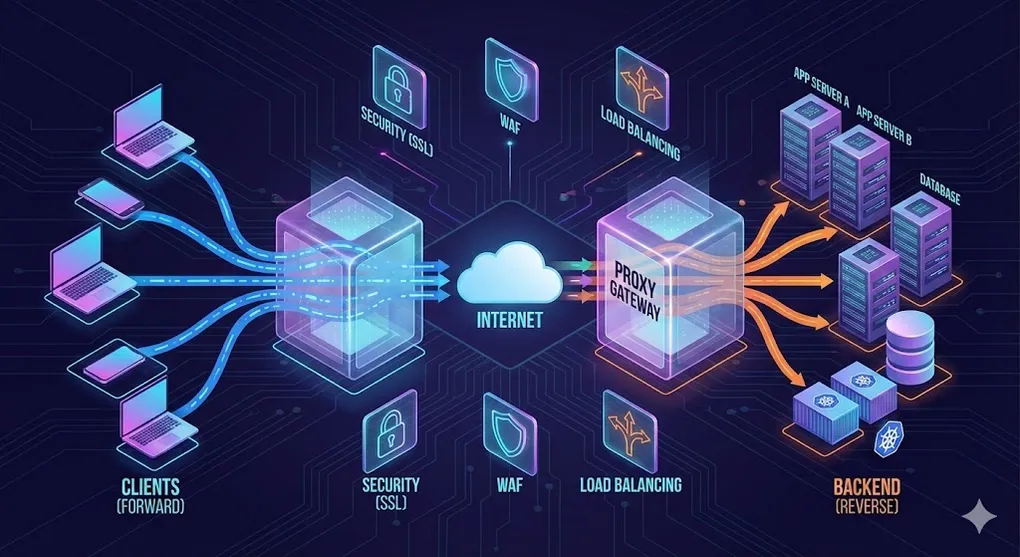
Proxy Servers Demystified: Forward, Reverse & Everything In Between
Every request you make on the internet passes through at least one intermediary. Understanding what those intermediaries do — and how to configure them — is one of the most practical networking skills you can build.
1. What Is a Proxy Server?
A proxy server is a middleman that sits between a client and a destination server. Instead of talking directly, both sides talk through the proxy.
┌──────────┐         ┌───────────┐         ┌──────────────┐
│  Client  │────────▶│   Proxy   │────────▶│  Destination │
│ (You)    │◀────────│  Server   │◀────────│    Server    │
└──────────┘         └───────────┘         └──────────────┘
     request ──▶          ──▶           ──▶
     response ◀──         ◀──           ◀──
Why do proxies exist?
| Goal | How a Proxy Helps |
|---|---|
| Privacy | Hides the client’s real IP address |
| Security | Filters malicious traffic, terminates SSL |
| Performance | Caches responses, compresses data |
| Access Control | Blocks or allows specific URLs/domains |
| Dev Workflow | Tunnels local servers to the public internet |
The key question that determines the type of proxy is: who does the proxy represent?
2. Forward Proxy vs Reverse Proxy
2.1 Forward Proxy — Represents the Client
The client knows it is using a proxy and explicitly configures it. The destination server only sees the proxy’s IP.
Analogy: A VPN — you route your traffic through a server so websites see the VPN’s IP, not yours.
2.2 Reverse Proxy — Represents the Server
The client has no idea a proxy exists. It thinks it is talking directly to the server. The proxy intercepts the request and forwards it to one or more backend servers.
Analogy: A hotel reception desk — guests (clients) talk to the receptionist, who routes requests to the right department behind the scenes.
2.3 Transparent Proxy — User-Unaware, Network-Level
Neither the client nor the server explicitly configures the proxy. It is injected at the network layer (router, ISP, firewall). The client does not know it exists.
Use cases: ISP caching, corporate monitoring, parental controls.
Forward Proxy                 Reverse Proxy                Transparent Proxy
──────────────                ─────────────                ─────────────────

 Client ──▶ [FWD PROXY] ──▶ Server    Client ──▶ [REV PROXY] ──▶ Backend A    Client ──▶ (network) ──▶ Server
   │                                      │            │──▶ Backend B              │
   │  Client configures                   │            │──▶ Backend C              │  Neither side
   │  the proxy                           │  Server deploys                        │  configures it
   │                                      │  the proxy                             │
   ▼                                      ▼                                        ▼
 Server sees PROXY IP              Client sees PROXY IP                   Proxy is invisible
 Client knows about proxy          Client does NOT know                   Injected by network
Quick Memory Trick
“Who configured the proxy?”
- Client configured it → Forward Proxy
- Server configured it → Reverse Proxy
- Network configured it → Transparent Proxy
3. Forward Proxy Use Cases
A. Privacy & Anonymity (VPN)
A VPN is essentially a forward proxy with encryption. Your traffic exits from the VPN server’s IP, hiding your real location.
Your PC ──encrypted──▶ VPN Server ──▶ Internet
                       (exit IP)
B. Geo-Blocking Bypass
Streaming services restrict content by region. A forward proxy in the target country makes you appear local.
You (Taiwan) ──▶ Proxy (US) ──▶ Netflix US libraryC. Content Filtering (Corporate / School Networks)
Organizations deploy forward proxies to block social media, gambling sites, or malware domains during work hours.
Employee ──▶ Corporate Proxy ──▶ Allowed? ──▶ Internet
                                    │
                                    └── Blocked → 403 Forbidden
D. Dev Debugging (Charles, Fiddler)
Tools like Charles Proxy and Fiddler act as local forward proxies. They intercept HTTP/HTTPS traffic so you can inspect headers, payloads, and timing.
Common workflow:
- Set your browser/device to use
localhost:8888as proxy - Install the tool’s root CA certificate (for HTTPS inspection)
- Inspect every request/response in real time
How HTTPS Inspection Actually Works (MITM)
Ever wonder how Charles or your company’s firewall can read HTTPS traffic? They perform a Man-In-The-Middle (MITM) attack — but a sanctioned one.
Normal HTTPS:
  Browser ──TLS──▶ google.com   (only Google's cert, nobody can read)

HTTPS Inspection (MITM):
  Browser ──TLS──▶ [Proxy] ──TLS──▶ google.com
              │         │
              │         └── Proxy decrypts, inspects, re-encrypts
              │
              └── Browser trusts proxy's Root CA (installed manually)
How it works step by step:
- The proxy intercepts the TLS handshake to
google.com - The proxy creates a fake certificate for
google.com, signed by its own Root CA - The browser accepts it because you installed the proxy’s Root CA as trusted
- The proxy opens a separate real TLS connection to
google.com - Traffic flows: Browser → (decrypted at proxy) → re-encrypted → Google
This is why your company can monitor your HTTPS traffic — their corporate proxy’s Root CA is pre-installed on your work laptop. Without that Root CA, the browser would show a certificate warning.
Security implication: Never install Root CAs from untrusted sources. Doing so gives that entity the ability to intercept all your HTTPS traffic.
E. Web Scraping with Proxy Pools
Scraping at scale requires rotating IPs to avoid rate limits and bans. Proxy pool services provide thousands of residential or datacenter IPs.
Scraper ──▶ Proxy Pool (round-robin) ──▶ Target Site
               │
               ├── IP 1 (US)
               ├── IP 2 (DE)
               ├── IP 3 (JP)
               └── IP 4 (BR)
4. Reverse Proxy Use Cases
A. Load Balancing
L4 vs L7 — Where Does the Proxy Operate?
Before diving into algorithms, it helps to understand at which layer the proxy makes routing decisions.
| Layer 4 (Transport) | Layer 7 (Application) | |
|---|---|---|
| Sees | TCP/UDP packets (IP + port) | HTTP headers, URL path, cookies |
| Routing logic | Forward packets based on IP:port | Route based on URL, Host header, content type |
| Speed | Faster (no payload parsing) | Slower (must parse HTTP) |
| Use case | Raw TCP load balancing, database proxying | Path-based routing, A/B testing, canary |
| Examples | AWS NLB, HAProxy (TCP mode) | Nginx, Envoy, AWS ALB, HAProxy (HTTP mode) |
L4 Proxy:  Sees "packet to port 443" → forwards to Backend A
           (doesn't know if it's HTTP, WebSocket, or gRPC)

L7 Proxy:  Sees "GET /api/users HTTP/2" → routes to User Service
           (can inspect headers, rewrite paths, check auth)
In practice, many architectures stack both: an L4 load balancer (e.g., AWS NLB) in front of an L7 reverse proxy (e.g., Nginx or Envoy) for maximum performance and flexibility.
A reverse proxy distributes incoming requests across multiple backend servers.
                         ┌──────────────┐
                    ┌───▶│  Backend #1  │
┌────────┐         │    └──────────────┘
│ Client │──▶ [LB] │    ┌──────────────┐
└────────┘         ├───▶│  Backend #2  │
                   │    └──────────────┘
                   │    ┌──────────────┐
                   └───▶│  Backend #3  │
                        └──────────────┘
Common algorithms:
| Algorithm | How It Works | Best For |
|---|---|---|
| Round Robin | Rotates sequentially: 1 → 2 → 3 → 1 | Equal-capacity servers |
| Least Connections | Sends to the server with fewest active connections | Variable request duration |
| IP Hash | Same client IP always hits the same backend | Session stickiness |
| Weighted | Assigns more traffic to stronger servers | Mixed-capacity fleet |
B. SSL/TLS Termination
The reverse proxy handles the expensive SSL handshake and decryption, then forwards plain HTTP to backends over the internal network.
Client ──HTTPS──▶ [Reverse Proxy] ──HTTP──▶ Backend
                  (SSL terminates here)
Benefits:
- Backends don’t need individual certificates
- Centralized certificate management (e.g., Let’s Encrypt auto-renewal)
- Reduced CPU load on application servers
C. Caching & CDN
A reverse proxy can cache static assets (images, CSS, JS) and even API responses. CDNs like Cloudflare and AWS CloudFront are globally distributed reverse proxies.
Client ──▶ CDN Edge (cache HIT) ──▶ Response (fast, no origin hit)
Client ──▶ CDN Edge (cache MISS) ──▶ Origin Server ──▶ Response (cached for next time)
D. Hide Origin Server / DDoS Protection
The public DNS points to the reverse proxy’s IP, not the origin server. Attackers cannot directly target your backend.
Attacker ──▶ Cloudflare IP (proxy) ──▶ filtered traffic ──▶ Origin (hidden IP)
             │
             └── malicious traffic dropped
E. Microservices Routing
A single reverse proxy routes requests to different services based on the URL path.
/api/users   ──▶  User Service    (port 3001)
/api/orders  ──▶  Order Service   (port 3002)
/api/payment ──▶  Payment Service (port 3003)
/            ──▶  Frontend SPA    (port 3000)
This is the foundation of an API Gateway — which we cover next.
5. API & Proxy — The Bodyguard Relationship
An API Gateway is a reverse proxy on steroids. It does everything a reverse proxy does, plus application-layer concerns like authentication, rate limiting, and request transformation.
graph LR
    C[Client] --> GW[API Gateway]
    GW --> US[User Service]
    GW --> OS[Order Service]
    GW --> PS[Payment Service]
    GW --> NS[Notification Service]

    style GW fill:#f9a825,stroke:#f57f17,color:#000
What the API Gateway adds on top of reverse proxy:
| Feature | Reverse Proxy | API Gateway |
|---|---|---|
| Load Balancing | ✅ | ✅ |
| SSL Termination | ✅ | ✅ |
| Caching | ✅ | ✅ |
| Path-based Routing | ✅ | ✅ |
| Authentication (JWT, OAuth) | ❌ | ✅ |
| Rate Limiting / Throttling | Basic | ✅ Advanced |
| Request/Response Transformation | ❌ | ✅ |
| API Versioning | ❌ | ✅ |
| Analytics & Logging | Basic | ✅ Detailed |
CORS Problem & How Proxy Solves It
During development, your frontend (localhost:3000) calls your API (localhost:8080). The browser blocks this as a cross-origin request.
Solution: Dev proxy — Webpack and Vite can proxy API calls through the dev server so the browser sees same-origin requests.
// vite.config.js
export default {
  server: {
    proxy: {
      '/api': {
        target: 'http://localhost:8080',
        changeOrigin: true,
      }
    }
  }
}
Now fetch('/api/users') from the browser hits localhost:3000/api/users, which the Vite dev server proxies to localhost:8080/api/users — no CORS error.
6. Proxy in Serverless & FaaS
What Is FaaS?
Function as a Service (FaaS) lets you deploy individual functions instead of entire servers. The cloud provider manages scaling, patching, and infrastructure.
| Provider | FaaS Product |
|---|---|
| AWS | Lambda |
| Google Cloud | Cloud Functions |
| Azure | Azure Functions |
| Cloudflare | Workers |
API Gateway as the FaaS Entry Point
Functions don’t listen on ports — they need a trigger. The API Gateway acts as the reverse proxy that receives HTTP requests and “wakes up” the right function.
graph LR
    C[Client] -->|HTTPS| GW[API Gateway]
    GW -->|invoke| F1[Lambda: getUser]
    GW -->|invoke| F2[Lambda: createOrder]
    GW -->|invoke| F3[Lambda: sendEmail]
    F1 -->|response| GW
    F2 -->|response| GW
    F3 -->|response| GW
    GW -->|HTTPS| C

    style GW fill:#42a5f5,stroke:#1565c0,color:#fff
Security & cost control at the gateway level:
- Rate limiting prevents a single client from triggering millions of invocations (cost explosion)
- Authentication ensures only authorized users can invoke functions
- Caching avoids redundant function invocations for identical requests
- Request validation rejects malformed payloads before they reach your function
7. Proxy in CI/CD — Zero Downtime Deployments
What Is CI/CD?
- CI (Continuous Integration): Automatically build and test code on every push
- CD (Continuous Deployment): Automatically deploy tested code to production
The reverse proxy plays a critical role in zero-downtime deployment strategies.
Blue-Green Deployment
Maintain two identical environments. The proxy switches traffic from the old (Blue) to the new (Green) after verification.
                    ┌─────────────────────────────────┐
                    │         Reverse Proxy            │
                    │     (traffic switch)             │
                    └──────────┬──────────────────────┘
                               │
              ┌────────────────┼────────────────┐
              ▼                                 ▼
     ┌─────────────────┐              ┌─────────────────┐
     │   BLUE (v1.0)   │              │  GREEN (v2.0)   │
     │   Current prod  │              │  New version    │
     │   ✅ Live       │   ──switch──▶│  ✅ Live        │
     └─────────────────┘              └─────────────────┘

Step 1: Deploy v2.0 to Green (Blue still serves traffic)
Step 2: Run smoke tests on Green
Step 3: Switch proxy to point to Green
Step 4: Blue becomes standby (instant rollback if needed)
Canary Release
Route a small percentage of traffic to the new version. Gradually increase if metrics look healthy.
Reverse Proxy
    │
    ├── 95% ──▶ Stable (v1.0)
    │
    └──  5% ──▶ Canary (v2.0)   ← monitor errors, latency
Nginx weighted upstream example:
upstream backend {
    server 10.0.0.1 weight=95;   # v1.0 — stable
    server 10.0.0.2 weight=5;    # v2.0 — canary
}
If the canary shows no issues, gradually shift: 5% → 25% → 50% → 100%.
8. Proxy Tools Overview
Forward Proxy Tools
| Tool | Type | Notes |
|---|---|---|
| Squid | Full-featured forward proxy | Caching, ACLs, enterprise-grade |
| Tinyproxy | Lightweight forward proxy | Minimal config, great for labs |
| Shadowsocks / Clash | Encrypted proxy (SOCKS5) | Censorship circumvention |
| Charles / Fiddler | HTTP debugging proxy | GUI, HTTPS inspection, dev tool |
Reverse Proxy Tools
| Tool | Type | Notes |
|---|---|---|
| Nginx | Web server + reverse proxy | Most popular, also supports forward proxy |
| Apache (httpd) | Web server + reverse proxy | mod_proxy, long history |
| HAProxy | TCP/HTTP load balancer | High performance, no static file serving |
| Caddy | Web server + reverse proxy | Automatic HTTPS (Let’s Encrypt built-in) |
| Traefik | Cloud-native reverse proxy | Auto-discovers Docker/K8s services |
Cloud-Native / Service Mesh
| Tool | Type | Notes |
|---|---|---|
| Envoy | L4/L7 proxy | Built for microservices, gRPC-native |
| Istio | Service mesh (uses Envoy) | Sidecar pattern, mTLS, observability |
| Kong | API Gateway | Plugin ecosystem, runs on Nginx/OpenResty |
| AWS ALB/NLB | Managed load balancer | Integrated with AWS ecosystem |
Database Proxies
Not all proxies handle HTTP. Database proxies sit between your application and the database to manage connection pooling, read/write splitting, and failover.
| Tool | Database | Key Feature |
|---|---|---|
| PgBouncer | PostgreSQL | Connection pooling (thousands of app connections → few DB connections) |
| ProxySQL | MySQL | Query routing, read/write split, query caching |
| Amazon RDS Proxy | MySQL / PostgreSQL | Managed, IAM auth, connection pooling for Lambda |
Why it matters: Databases use long-lived connections (unlike HTTP’s short-lived requests). A serverless function (Lambda) that opens a new DB connection per invocation can exhaust the connection pool in seconds. A database proxy solves this by multiplexing many app connections onto a small pool of real DB connections.
Without DB Proxy:
  1000 Lambda invocations → 1000 DB connections → DB crashes (max_connections exceeded)

With DB Proxy:
  1000 Lambda invocations → RDS Proxy → 50 DB connections → DB is happy
Proxy Monitoring & Observability
A proxy you can’t monitor is a proxy you can’t trust. Here are the essentials:
Nginx Monitoring
# Enable stub_status (built-in, basic metrics)
server {
    location /nginx_status {
        stub_status;
        allow 127.0.0.1;
        deny all;
    }
}
# Output:
# Active connections: 42
# server accepts handled requests
# 1234 1234 5678
# Reading: 2 Writing: 5 Waiting: 35For richer metrics, use the nginx-vts-module or nginx-prometheus-exporter.
Prometheus + Grafana (Industry Standard)
Most modern proxies export metrics in Prometheus format:
| Proxy | Prometheus Integration |
|---|---|
| Nginx | nginx-prometheus-exporter (scrapes stub_status) |
| Envoy | Built-in /stats/prometheus endpoint |
| HAProxy | Built-in Prometheus endpoint (v2.0+) |
| Traefik | Built-in --metrics.prometheus flag |
| Kong | prometheus plugin |
Key metrics to monitor:
| Metric | Why It Matters |
|---|---|
| Request rate (QPS) | Traffic volume, capacity planning |
| Error rate (5xx %) | Backend health, deployment issues |
| Latency (p50, p95, p99) | User experience, SLA compliance |
| Active connections | Connection pool saturation |
| Upstream response time | Backend performance vs proxy overhead |
9. Tunneling — ngrok & Alternatives
What Does ngrok Do?
ngrok creates a reverse proxy tunnel from the public internet to your local machine. It gives you a public URL (e.g., https://abc123.ngrok.io) that forwards traffic to localhost:3000.
Internet ──▶ ngrok Edge ──▶ ngrok Tunnel ──▶ Your Laptop (localhost:3000)Common use cases:
- Webhook development (Stripe, GitHub, Slack)
- Demoing local work to clients
- Testing mobile apps against a local API
- IoT device callbacks
Alternatives Comparison
| Tool | Free Tier | Self-Hosted | Custom Domain | Zero Install | Best For |
|---|---|---|---|---|---|
| ngrok | ✅ (limited) | ❌ | Paid | ❌ | Quick demos, webhook dev |
| Cloudflare Tunnel | ✅ (generous) | ❌ | ✅ Free | ❌ | Production tunnels, free custom domains |
| FRP | ✅ (OSS) | ✅ | ✅ | ❌ | Full control, own server |
| Serveo | ✅ | ❌ | ❌ | ✅ (SSH) | Zero-install quick test |
| Pinggy | ✅ | ❌ | Paid | ✅ (SSH) | Zero-install with more features |
| Localtunnel | ✅ | ❌ | ❌ | ❌ (npm) | JS developers, quick setup |
| Tailscale Funnel | ✅ | ❌ | ✅ | ❌ | Teams already using Tailscale VPN |
Decision Guide
Need a tunnel?
│
├── Just testing locally for 5 minutes?
│   └── Serveo or Pinggy (zero install: ssh -R)
│
├── Webhook development?
│   └── ngrok (best DX, inspect dashboard)
│
├── Production tunnel with custom domain?
│   └── Cloudflare Tunnel (free, reliable)
│
├── Need full control / self-hosted?
│   └── FRP (open source, your own server)
│
└── Team already on Tailscale?
    └── Tailscale Funnel
10. Hands-On Labs
Lab 1: Nginx Reverse Proxy with Load Balancing
Goal: Proxy requests to two backend servers with round-robin load balancing.
/etc/nginx/nginx.conf
http {
    upstream app_servers {
        server 127.0.0.1:3001;
        server 127.0.0.1:3002;
    }

    server {
        listen 80;
        server_name example.com;

        location / {
            proxy_pass http://app_servers;
            proxy_set_header Host $host;
            proxy_set_header X-Real-IP $remote_addr;
            proxy_set_header X-Forwarded-For $proxy_add_x_forwarded_for;
            proxy_set_header X-Forwarded-Proto $scheme;
        }
    }
}
Test it:
# Start two simple backends (in separate terminals)
python3 -m http.server 3001 --directory ./site-a
python3 -m http.server 3002 --directory ./site-b

# Reload Nginx
sudo nginx -t && sudo nginx -s reload

# Hit the proxy — requests alternate between 3001 and 3002
curl -i http://localhost
Lab 2: Cloudflare Tunnel Setup
Goal: Expose localhost:3000 to the internet with a custom domain — no port forwarding, no public IP needed.
# 1. Install cloudflared
# macOS
brew install cloudflared

# Linux (Debian/Ubuntu)
curl -L https://github.com/cloudflare/cloudflared/releases/latest/download/cloudflared-linux-amd64.deb -o cloudflared.deb
sudo dpkg -i cloudflared.deb

# 2. Authenticate with your Cloudflare account
cloudflared tunnel login

# 3. Create a tunnel
cloudflared tunnel create my-app

# 4. Configure the tunnel
cat > ~/.cloudflared/config.yml << 'EOF'
tunnel: my-app
credentials-file: /home/user/.cloudflared/<TUNNEL_ID>.json

ingress:
  - hostname: app.yourdomain.com
    service: http://localhost:3000
  - service: http_status:404
EOF

# 5. Add DNS record (CNAME to tunnel)
cloudflared tunnel route dns my-app app.yourdomain.com

# 6. Run the tunnel
cloudflared tunnel run my-app
Now https://app.yourdomain.com routes to your local localhost:3000 through Cloudflare’s network.
Lab 3: Tinyproxy Forward Proxy
Goal: Set up a forward proxy and verify your IP changes.
# Install
sudo apt install tinyproxy

# Configure — edit /etc/tinyproxy/tinyproxy.conf
# Key settings:
#   Port 8888
#   Allow 127.0.0.1        (allow localhost)
#   Allow 192.168.1.0/24   (allow your LAN)

# Start
sudo systemctl start tinyproxy

# Test — your request goes through the proxy
curl -x http://localhost:8888 https://httpbin.org/ip
# Response shows the proxy server's IP, not yours

# Compare with direct request
curl https://httpbin.org/ip
# Response shows your real IP
Lab 4: Docker Compose + Nginx API Gateway
Goal: Run three microservices behind Nginx as an API Gateway.
docker-compose.yml
version: "3.8"

services:
  nginx:
    image: nginx:alpine
    ports:
      - "80:80"
    volumes:
      - ./nginx.conf:/etc/nginx/nginx.conf:ro
    depends_on:
      - user-service
      - order-service
      - product-service

  user-service:
    image: node:20-alpine
    working_dir: /app
    volumes:
      - ./services/user:/app
    command: node index.js
    expose:
      - "3001"

  order-service:
    image: node:20-alpine
    working_dir: /app
    volumes:
      - ./services/order:/app
    command: node index.js
    expose:
      - "3002"

  product-service:
    image: node:20-alpine
    working_dir: /app
    volumes:
      - ./services/product:/app
    command: node index.js
    expose:
      - "3003"
nginx.conf
events { worker_connections 1024; }

http {
    server {
        listen 80;

        # User Service
        location /api/users {
            proxy_pass http://user-service:3001;
            proxy_set_header Host $host;
            proxy_set_header X-Real-IP $remote_addr;
        }

        # Order Service
        location /api/orders {
            proxy_pass http://order-service:3002;
            proxy_set_header Host $host;
            proxy_set_header X-Real-IP $remote_addr;
        }

        # Product Service
        location /api/products {
            proxy_pass http://product-service:3003;
            proxy_set_header Host $host;
            proxy_set_header X-Real-IP $remote_addr;
        }

        # Health check
        location /health {
            return 200 '{"status": "ok"}';
            add_header Content-Type application/json;
        }
    }
}
Run and test:
docker compose up -d

curl http://localhost/api/users
curl http://localhost/api/orders
curl http://localhost/api/products
curl http://localhost/health
All four URLs hit port 80 on Nginx, which routes each path to the correct microservice container.
Consider Traefik for Docker-heavy setups. While Nginx requires manual
proxy_passconfiguration for each service, Traefik auto-discovers Docker containers via labels — no config file updates needed when you add or remove services.# With Traefik, each service declares its own routing via labels: services: user-service: image: my-user-service labels: - "traefik.http.routers.users.rule=PathPrefix(`/api/users`)" - "traefik.http.services.users.loadbalancer.server.port=3001"Traefik watches the Docker socket and updates routing in real time — ideal for dynamic environments where containers scale up and down frequently.
11. HTTP Version Differences in Proxy Context
Proxies sit in the middle of every HTTP conversation, so the HTTP version matters a lot for performance.
HTTP/1.1 — The Head-of-Line Blocking Problem
HTTP/1.1 uses one request per TCP connection at a time. If a response is slow, everything behind it waits.
Connection 1:  [──── Request A (slow) ────][── Request B ──][── Request C ──]
                                            ↑
                                     B waits for A to finish
                                     = Head-of-Line Blocking
Browsers work around this by opening 6–8 parallel TCP connections, but each connection still suffers from HOL blocking.
HTTP/2 — Multiplexing Solves HOL Blocking
HTTP/2 sends multiple requests over a single TCP connection as interleaved binary frames.
Single Connection:  [A-frame][B-frame][A-frame][C-frame][B-frame][A-frame]
                     ↑
                     All three requests progress simultaneously
                     = No Head-of-Line Blocking (at HTTP layer)
Note: TCP-level HOL blocking still exists — if a packet is lost, all streams on that connection stall while TCP retransmits.
HTTP/3 — QUIC Eliminates TCP HOL Blocking
HTTP/3 replaces TCP with QUIC (UDP-based). Each stream is independent — a lost packet on Stream A does not block Stream B.
HTTP/3 over QUIC:
  Stream A: [frame][frame]...[lost]...[retransmit]
  Stream B: [frame][frame][frame]  ← unaffected by A's loss
  Stream C: [frame][frame]         ← unaffected by A's loss
Comparison Table
| Feature | HTTP/1.1 | HTTP/2 | HTTP/3 |
|---|---|---|---|
| Transport | TCP | TCP | QUIC (UDP) |
| Multiplexing | ❌ (1 req/conn) | ✅ (streams) | ✅ (streams) |
| HTTP HOL Blocking | ✅ Yes | ❌ Solved | ❌ Solved |
| TCP HOL Blocking | ✅ Yes | ✅ Still exists | ❌ Solved |
| Header Compression | ❌ | HPACK | QPACK |
| Connection Setup | TCP + TLS (2-3 RTT) | TCP + TLS (2-3 RTT) | 0-1 RTT |
| Server Push | ❌ | ✅ | ✅ |
| Encryption | Optional | Practically required | Always (built into QUIC) |
Proxy Implications
- Nginx supports HTTP/2 to clients since v1.9.5, and HTTP/3 (QUIC) experimentally since v1.25. However, Nginx still uses HTTP/1.1 to backends by default (
proxy_http_version 1.1;). - Envoy supports HTTP/2 and gRPC natively to both clients and backends — this is why modern service meshes prefer Envoy over Nginx for east-west traffic (see §14).
- HAProxy added HTTP/2 backend support in v2.0+.
gRPC — Why HTTP/2 Matters for Microservices
gRPC is Google’s high-performance RPC framework, and it requires HTTP/2. This has major proxy implications:
- gRPC uses HTTP/2 multiplexing to send multiple RPC calls over a single connection
- gRPC uses HTTP/2 trailers for status codes (not all proxies support trailers)
- gRPC supports bidirectional streaming — only possible with HTTP/2’s stream model
gRPC call flow through a proxy:

Client ──HTTP/2──▶ [Proxy] ──HTTP/2──▶ gRPC Service
                     │
                     └── Proxy MUST support HTTP/2 on both sides
                         (Nginx added this in v1.13.10, Envoy had it from day one)
This is a key reason Envoy became the default proxy in service meshes like Istio — it supported full HTTP/2 and gRPC proxying from the start, while Nginx required workarounds for years. Today Nginx handles gRPC well with grpc_pass, but Envoy remains the go-to for gRPC-heavy architectures.
# Enable HTTP/2 in Nginx (client-facing)
server {
    listen 443 ssl http2;
    # ...
}

# Force HTTP/1.1 to backend (Nginx default, but explicit is better)
location / {
    proxy_pass http://backend;
    proxy_http_version 1.1;
    proxy_set_header Connection "";
}
12. Security Considerations
Forward Proxy Risks
Open Proxy as Attack Relay
An open proxy is a forward proxy that accepts connections from anyone on the internet. Attackers use open proxies to:
- Hide their identity while attacking other servers
- Send spam email
- Scrape websites without being traced
Prevention: Always restrict access with authentication or IP allowlists.
# Squid ACL example — only allow your network
acl localnet src 192.168.1.0/24
http_access allow localnet
http_access deny all
Reverse Proxy Benefits
| Benefit | How |
|---|---|
| Hide origin IP | DNS points to proxy, not backend |
| DDoS shield | Proxy absorbs volumetric attacks |
| WAF integration | Inspect and block malicious payloads (SQLi, XSS) |
| Bot mitigation | Challenge suspicious traffic (CAPTCHA, JS challenge) |
WAF — The Reverse Proxy with a Rule Engine
A Web Application Firewall (WAF) is essentially a reverse proxy that inspects every request payload at Layer 7 and matches it against attack signatures.
Client ──▶ [WAF / Reverse Proxy] ──▶ Backend
                │
                ├── "SELECT * FROM users WHERE 1=1" → BLOCKED (SQLi)
                ├── "<script>alert('xss')</script>"  → BLOCKED (XSS)
                └── Normal request                   → ALLOWED
Common WAF solutions:
- Cloudflare WAF — managed, integrated with CDN
- AWS WAF — rule-based, works with ALB/CloudFront
- ModSecurity — open-source WAF module for Nginx/Apache (OWASP Core Rule Set)
# ModSecurity with Nginx example
load_module modules/ngx_http_modsecurity_module.so;

server {
    modsecurity on;
    modsecurity_rules_file /etc/nginx/modsec/main.conf;
    # ...
}
SSL/TLS Best Practices
server {
    listen 443 ssl http2;

    # Use modern TLS only
    ssl_protocols TLSv1.2 TLSv1.3;

    # Strong cipher suites
    ssl_ciphers ECDHE-ECDSA-AES128-GCM-SHA256:ECDHE-RSA-AES128-GCM-SHA256;
    ssl_prefer_server_ciphers on;

    # HSTS — tell browsers to always use HTTPS
    add_header Strict-Transport-Security "max-age=63072000; includeSubDomains" always;

    # OCSP Stapling — faster certificate validation
    ssl_stapling on;
    ssl_stapling_verify on;

    ssl_certificate     /etc/letsencrypt/live/example.com/fullchain.pem;
    ssl_certificate_key /etc/letsencrypt/live/example.com/privkey.pem;
}
SSRF & Header Injection Awareness
Server-Side Request Forgery (SSRF): If your proxy accepts user-supplied URLs (e.g., a URL preview feature), an attacker can make the proxy fetch internal resources.
Attacker sends: GET /fetch?url=http://169.254.169.254/latest/meta-data/
                                 ↑
                    AWS metadata endpoint — leaks IAM credentials
Mitigations:
- Validate and sanitize user-supplied URLs
- Block requests to private IP ranges (
10.x,172.16.x,192.168.x,169.254.x) - Use allowlists for permitted domains
- Run the proxy in a network namespace without access to internal services
13. Troubleshooting
Reading Nginx Error Logs
# Default log locations
tail -f /var/log/nginx/error.log
tail -f /var/log/nginx/access.log

# Custom log level (in nginx.conf)
error_log /var/log/nginx/error.log warn;   # levels: debug, info, notice, warn, error, crit
502 Bad Gateway
Meaning: The proxy connected to the backend, but the backend returned an invalid response (or crashed).
Common causes & fixes:
| Cause | Fix |
|---|---|
| Backend is down | systemctl status your-app — restart if needed |
| Wrong upstream port | Verify proxy_pass matches the backend’s actual port |
| Backend crashed mid-response | Check application logs for unhandled exceptions |
| PHP-FPM socket not found | Verify fastcgi_pass path matches FPM config |
# Quick diagnosis
curl -v http://localhost:3001/health    # Can you reach the backend directly?
sudo ss -tlnp | grep 3001              # Is the backend listening?
journalctl -u your-app --since "5 min ago"  # Recent app logs
504 Gateway Timeout
Meaning: The proxy waited too long for the backend to respond.
Common causes & fixes:
| Cause | Fix |
|---|---|
| Slow database query | Optimize the query, add indexes |
| Backend processing too long | Increase proxy_read_timeout (temporary fix) |
| Network issue between proxy and backend | Check connectivity, DNS resolution |
| Upstream keepalive exhausted | Tune keepalive in upstream block |
# Increase timeouts (use as temporary relief, not permanent fix)
location /api {
    proxy_pass http://backend;
    proxy_connect_timeout 10s;
    proxy_send_timeout    30s;
    proxy_read_timeout    60s;
}
Common Misconfigurations
| Mistake | Symptom | Fix |
|---|---|---|
Missing trailing slash in proxy_pass | Wrong path forwarded | proxy_pass http://backend/; (note the /) |
Not passing Host header | Backend sees wrong hostname | Add proxy_set_header Host $host; |
| Not passing real client IP | Logs show proxy IP only | Add X-Real-IP and X-Forwarded-For headers |
proxy_http_version not set | WebSocket fails | Set proxy_http_version 1.1; + Upgrade headers |
| SELinux blocking connections | 502 on CentOS/RHEL | setsebool -P httpd_can_network_connect 1 |
Debug Checklist
□ Can you curl the backend directly? (bypass proxy)
□ Is the backend process running? (ps, systemctl, docker ps)
□ Is the backend listening on the expected port? (ss -tlnp)
□ Does nginx -t pass? (config syntax check)
□ Are the logs showing errors? (error.log, app logs)
□ Is there a firewall blocking the connection? (iptables, ufw, security groups)
□ Is DNS resolving correctly? (dig, nslookup)
□ Are file permissions correct? (socket files, SSL certs)
14. Architecture Patterns (Advanced)
SSH Tunneling — DIY ngrok
SSH can create tunnels without any third-party tools.
Local Port Forwarding (ssh -L)
Access a remote service through a local port. Useful when a database is behind a firewall.
Your PC (localhost:5432) ──SSH──▶ Jump Server ──▶ DB Server (10.0.0.5:5432)ssh -L 5432:10.0.0.5:5432 user@jump-server.com
# Now: psql -h localhost -p 5432 connects to the remote DBRemote Port Forwarding (ssh -R)
Expose your local service on a remote server’s port. This is essentially what ngrok does.
Internet ──▶ Remote Server (port 8080) ──SSH──▶ Your PC (localhost:3000)ssh -R 8080:localhost:3000 user@your-vps.com
# Now: http://your-vps.com:8080 reaches your local port 3000Zero Trust Network Access (ZTNA)
Traditional VPNs grant access to the entire network once connected. Zero Trust verifies every request individually.
Traditional VPN:
  User ──VPN──▶ [Inside Network] ──▶ Access EVERYTHING

Zero Trust:
  User ──▶ Identity Check ──▶ Device Check ──▶ Access ONLY authorized app
Tools:
- Cloudflare Access — identity-aware proxy in front of internal apps
- Tailscale — WireGuard-based mesh VPN with ACLs per service
- Google BeyondCorp — Google’s internal zero-trust implementation
Service Mesh & Sidecar Pattern
As microservices grow, managing proxy rules centrally becomes a bottleneck. The sidecar pattern places a proxy next to every service.
Diagram A: Centralized Proxy (Traditional)
                    ┌──────────────────┐
                    │   Nginx / HAProxy │
                    │   (single point)  │
                    └────────┬─────────┘
                             │
              ┌──────────────┼──────────────┐
              ▼              ▼              ▼
         ┌─────────┐   ┌─────────┐   ┌─────────┐
         │ Service │   │ Service │   │ Service │
         │    A    │   │    B    │   │    C    │
         └─────────┘   └─────────┘   └─────────┘

All traffic funnels through ONE proxy.
Simple, but single point of failure.
Diagram B: Sidecar Proxy (Service Mesh)
         ┌──────────────────┐  ┌──────────────────┐  ┌──────────────────┐
         │  Pod A           │  │  Pod B           │  │  Pod C           │
         │ ┌──────┐ ┌─────┐│  │ ┌──────┐ ┌─────┐│  │ ┌──────┐ ┌─────┐│
         │ │Envoy │◀▶│ Svc ││  │ │Envoy │◀▶│ Svc ││  │ │Envoy │◀▶│ Svc ││
         │ │proxy │ │  A  ││  │ │proxy │ │  B  ││  │ │proxy │ │  C  ││
         │ └──┬───┘ └─────┘│  │ └──┬───┘ └─────┘│  │ └──┬───┘ └─────┘│
         └────┼────────────┘  └────┼────────────┘  └────┼────────────┘
              │                    │                    │
              └────────────────────┴────────────────────┘
                          mesh network (mTLS)

Every service gets its OWN proxy.
No single point of failure. Distributed observability.
Istio architecture:
- Data plane: Envoy sidecars handle all service-to-service traffic
- Control plane: Istiod manages configuration, certificates, and policies
- Benefits: mTLS everywhere, distributed tracing, traffic shaping, fault injection
Evolution Path
§4 Centralized Reverse Proxy (Nginx at the front gate)
        ↓
§5 API Gateway (reverse proxy + auth, rate limiting)
        ↓
§14 Service Mesh (sidecar proxy per service, full observability)
Docker Networking with Proxies
Docker containers communicate through virtual networks. A reverse proxy container connects to the same Docker network as the backend containers.
# Create a shared network
docker network create app-net

# Run backend
docker run -d --name api --network app-net my-api-image

# Run Nginx proxy on the same network
docker run -d --name proxy --network app-net -p 80:80 \
  -v ./nginx.conf:/etc/nginx/nginx.conf:ro nginx:alpine

# In nginx.conf, use the container name as hostname:
#   proxy_pass http://api:3000;
Docker’s built-in DNS resolves container names to their internal IPs within the same network.
15. Summary
Forward vs Reverse — Quick Reference
| Forward Proxy | Reverse Proxy | |
|---|---|---|
| Represents | Client | Server |
| Client aware? | Yes (configured by client) | No (transparent to client) |
| Hides | Client’s IP | Server’s IP |
| Deployed by | User / organization | Service provider |
| Examples | VPN, Squid, Charles | Nginx, Cloudflare, HAProxy |
| Use cases | Privacy, filtering, debugging | Load balancing, SSL, caching |
Tool Selection Decision Tree
What do you need?
│
├── Intercept & debug HTTP traffic?
│   └── Charles / Fiddler (forward proxy)
│
├── Hide your IP / bypass geo-blocks?
│   └── VPN or Shadowsocks (forward proxy)
│
├── Serve a website with load balancing?
│   ├── Simple setup → Caddy (auto HTTPS)
│   ├── Full control → Nginx
│   └── Maximum performance → HAProxy
│
├── API Gateway with auth & rate limiting?
│   ├── Self-hosted → Kong
│   ├── Cloud-native → AWS API Gateway
│   └── Kubernetes → Traefik or Envoy
│
├── Expose localhost to the internet?
│   ├── Quick test → ngrok or Serveo
│   ├── Production → Cloudflare Tunnel
│   └── Self-hosted → FRP
│
├── Microservices with service mesh?
│   └── Istio + Envoy (sidecar pattern)
│
└── Zero Trust access to internal apps?
    └── Cloudflare Access or Tailscale
Key Takeaways
- Forward proxy = client’s agent. It hides the client and controls outbound traffic.
- Reverse proxy = server’s agent. It hides the backend and controls inbound traffic.
- API Gateways are reverse proxies with superpowers (auth, rate limiting, transformation).
- Tunneling tools (ngrok, Cloudflare Tunnel) are reverse proxies that bridge local dev to the public internet.
- CI/CD deployments (Blue-Green, Canary) rely on the proxy as the traffic switch for zero-downtime releases.
- HTTP/2 and HTTP/3 solve head-of-line blocking — modern proxies like Envoy leverage this for better performance.
- Service meshes evolve the proxy from a centralized gateway to a distributed sidecar beside every service.
- Security is non-negotiable — never run an open proxy, always terminate TLS properly, and watch for SSRF.