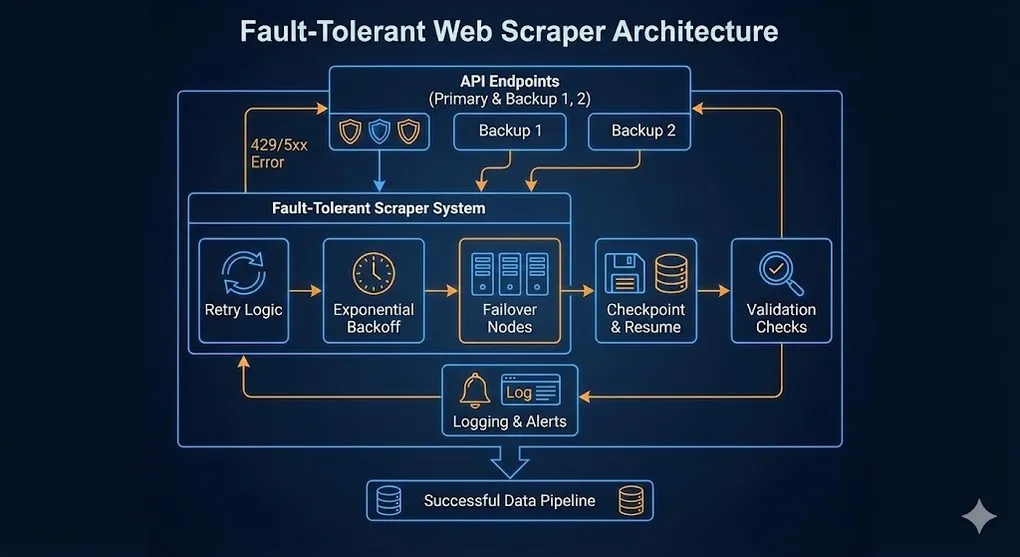
Building Fault-Tolerant Web Scrapers: Lessons from Scraping 80,000+ Data Points
Building Fault-Tolerant Web Scrapers
The Problem: Why Scrapers Fail
You write the perfect scraper. It works beautifully on your test run of 10 records. Then you scale it to 10,000 records and… chaos.
❌ ConnectionError: Connection timed out
❌ 429 Too Many Requests
❌ 504 Gateway Timeout
Sound familiar? This article shares the battle-tested patterns I developed while scraping 80,000+ library locations from OpenStreetMap for a global data analysis project.
The Architecture: Defense in Depth
┌─────────────────────────────────────────────────────────────────┐
│                   Fault-Tolerant Scraper                         │
├─────────────────────────────────────────────────────────────────┤
│                                                                  │
│  ┌─────────────┐   ┌─────────────┐   ┌─────────────┐            │
│  │   Retry     │──▶│   Backoff   │──▶│  Failover   │            │
│  │   Logic     │   │   Strategy  │   │   Nodes     │            │
│  └─────────────┘   └─────────────┘   └─────────────┘            │
│         │                │                 │                     │
│         ▼                ▼                 ▼                     │
│  ┌─────────────┐   ┌─────────────┐   ┌─────────────┐            │
│  │  Checkpoint │──▶│   Logging   │──▶│ Validation  │            │
│  │   Resume    │   │  & Alerts   │   │   Checks    │            │
│  └─────────────┘   └─────────────┘   └─────────────┘            │
│                                                                  │
└─────────────────────────────────────────────────────────────────┘
Pattern 1: Multiple API Endpoints (Redundancy)
Problem: If your only API endpoint goes down for maintenance, your entire scraper dies.
Solution: Define backup endpoints and rotate between them on failure.
import requests
import time

# Multiple endpoints for redundancy
ENDPOINTS = [
    "https://overpass-api.de/api/interpreter",      # Primary
    "https://overpass.kumi.systems/api/interpreter", # Backup 1
    "https://maps.mail.ru/osm/tools/overpass/api/interpreter"  # Backup 2
]

def query_with_failover(query: str, max_retries: int = 5) -> dict:
    """
    Query with automatic endpoint failover.
    Each retry uses the NEXT endpoint in rotation.
    """
    for attempt in range(max_retries):
        # Rotate through endpoints
        endpoint = ENDPOINTS[attempt % len(ENDPOINTS)]

        try:
            response = requests.post(
                endpoint,
                data={"data": query},
                timeout=120
            )
            response.raise_for_status()
            return response.json()

        except requests.exceptions.RequestException as e:
            print(f"⚠️ Attempt {attempt + 1} failed on {endpoint}: {e}")

            if attempt < max_retries - 1:
                sleep_time = 10 * (attempt + 1)  # Progressive delay
                print(f"💤 Sleeping {sleep_time}s before trying next endpoint...")
                time.sleep(sleep_time)

    raise Exception("All endpoints exhausted")
Key Insight: Use
attempt % len(ENDPOINTS)to automatically cycle through backup servers. No manual switching required.
Pattern 1.5: Production Best Practices
Before diving into more patterns, here are three essentials that separate hobby scripts from production-grade scrapers:
User-Agent Headers
Problem: Many APIs (including OpenStreetMap) will reject requests without a proper User-Agent, or give stricter rate limits.
# Always identify your scraper
HEADERS = {
    "User-Agent": "MyLibraryScraper/1.0 (contact@youremail.com)",
    "Accept": "application/json"
}

response = requests.post(endpoint, data=query, headers=HEADERS, timeout=120)
Pro Tip: Include a contact email in your User-Agent. Responsible API providers will reach out before blocking you.
Session Objects (Connection Reuse)
Problem: Each requests.get() opens a new TCP connection. For 80,000 requests, that’s 80,000 handshakes.
Solution: Use requests.Session() to reuse connections.
from requests.adapters import HTTPAdapter
from urllib3.util.retry import Retry

def create_session() -> requests.Session:
    """Create a session with retry logic built-in."""
    session = requests.Session()

    # Configure automatic retries
    retry_strategy = Retry(
        total=3,
        backoff_factor=1,
        status_forcelist=[500, 502, 503, 504]
    )

    adapter = HTTPAdapter(max_retries=retry_strategy)
    session.mount("https://", adapter)
    session.mount("http://", adapter)

    # Set default headers
    session.headers.update(HEADERS)

    return session

# Usage
session = create_session()
response = session.post(endpoint, data=query)  # Reuses connection!
Logging vs Print
Problem: print() statements disappear when your script runs on a server or overnight.
Solution: Use Python’s logging module for production.
import logging

# Configure logging
logging.basicConfig(
    level=logging.INFO,
    format='%(asctime)s - %(levelname)s - %(message)s',
    handlers=[
        logging.FileHandler('scraper.log'),  # Save to file
        logging.StreamHandler()                # Also print to console
    ]
)

logger = logging.getLogger(__name__)

# Replace print() with logger
logger.info(f"Processing {country}...")
logger.warning(f"Rate limited. Backing off...")
logger.error(f"Failed to fetch {country}: {e}")
Production Note: For truly mission-critical scrapers, consider structured logging (JSON format) that can be ingested by tools like ELK Stack or Datadog.
Pattern 2: Exponential Backoff
Problem: After a 429 Too Many Requests, immediately retrying makes things worse. You’ll get rate-limited even harder.
Solution: Wait exponentially longer between retries.
import random

def exponential_backoff(attempt: int, base_delay: float = 1.0, max_delay: float = 60.0) -> float:
    """
    Calculate delay with exponential backoff + jitter.

    Attempt 0: ~1s
    Attempt 1: ~2s
    Attempt 2: ~4s
    Attempt 3: ~8s
    ...capped at max_delay
    """
    delay = min(base_delay * (2 ** attempt), max_delay)

    # Add jitter (randomness) to prevent thundering herd
    jitter = random.uniform(0, delay * 0.3)

    return delay + jitter

def fetch_with_backoff(url: str, max_retries: int = 5) -> requests.Response:
    """Fetch with exponential backoff on failures."""

    for attempt in range(max_retries):
        try:
            response = requests.get(url, timeout=30)

            if response.status_code == 429:
                # Rate limited - back off
                delay = exponential_backoff(attempt, base_delay=15)
                print(f"⛔ Rate limited. Backing off for {delay:.1f}s...")
                time.sleep(delay)
                continue

            elif response.status_code == 504:
                # Server timeout - back off less aggressively
                delay = exponential_backoff(attempt, base_delay=5)
                print(f"⏱️ Server timeout. Retrying in {delay:.1f}s...")
                time.sleep(delay)
                continue

            response.raise_for_status()
            return response

        except requests.exceptions.ConnectionError:
            delay = exponential_backoff(attempt)
            print(f"🔌 Connection error. Retrying in {delay:.1f}s...")
            time.sleep(delay)

    raise Exception(f"Failed after {max_retries} retries")
Why Jitter Matters
Without jitter, if 100 scrapers all get rate-limited at the same time, they’ll all retry at the exact same moment, causing another wave of rate-limiting. Adding randomness spreads out the retries.
Bonus: Parse Retry-After Header
Some APIs (including Overpass) tell you exactly how long to wait via the Retry-After response header:
def get_backoff_delay(response: requests.Response, attempt: int) -> float:
    """
    Get delay from Retry-After header if available,
    otherwise fall back to exponential backoff.
    """
    retry_after = response.headers.get('Retry-After')

    if retry_after:
        try:
            # Retry-After can be seconds (integer) or HTTP-date
            return float(retry_after)
        except ValueError:
            pass  # Not a number, fall through

    # Fallback to exponential backoff
    return exponential_backoff(attempt)

# Usage
if response.status_code == 429:
    delay = get_backoff_delay(response, attempt)
    logger.warning(f"Rate limited. Waiting {delay:.1f}s (from Retry-After)...")
    time.sleep(delay)
Why this matters: Respecting
Retry-Afteris both polite and efficient. You won’t wait longer than necessary, and you won’t hammer the server before it’s ready.
Pattern 3: Checkpoint & Resume (Idempotency)
Problem: Your script crashes at country #41 out of 50. Do you really need to re-scrape the first 40?
Solution: Write progress to disk after each unit of work. On restart, skip completed items.
import pandas as pd
import os

RAW_DATA_PATH = "data/libraries_raw.csv"

def get_processed_items(filepath: str) -> set:
    """Get set of already-processed items from existing output."""
    if os.path.exists(filepath):
        df = pd.read_csv(filepath)
        return set(df['country'].unique())
    return set()

def scrape_all_countries(countries: list) -> None:
    """Scrape countries with checkpoint resume."""

    # 1. Load existing progress
    processed = get_processed_items(RAW_DATA_PATH)
    print(f"📂 Found {len(processed)} already processed countries")

    for country in countries:
        # 2. Skip if already done
        if country in processed:
            print(f"⏭️ Skipping {country} (already processed)")
            continue

        print(f"🔄 Processing {country}...")

        try:
            # 3. Fetch data
            data = fetch_country_libraries(country)

            # 4. Append immediately (mode='a')
            df = pd.DataFrame(data)
            df.to_csv(
                RAW_DATA_PATH,
                mode='a',
                header=not os.path.exists(RAW_DATA_PATH),
                index=False
            )

            print(f"✅ {country}: {len(data)} libraries saved")

        except Exception as e:
            print(f"❌ {country} failed: {e}")
            # Continue to next country, don't crash
            continue
The Power of mode='a'
| Save Strategy | Risk | Recovery |
|---|---|---|
df.to_csv() at the end | Crash = lose everything | Must restart from 0 |
df.to_csv(mode='a') each iteration | Crash = lose 1 item | Resume from checkpoint |
Pattern 4: Smart Rate Limiting
Problem: You don’t know the API’s rate limit. You either go too fast (get blocked) or too slow (waste time).
Solution: Adaptive rate limiting based on response headers.
import time

class AdaptiveRateLimiter:
    """
    Adjust request rate based on API feedback.
    - If hitting 429s: slow down
    - If succeeding: gradually speed up
    """

    def __init__(self, initial_delay: float = 1.0):
        self.delay = initial_delay
        self.min_delay = 0.5
        self.max_delay = 30.0
        self.consecutive_success = 0

    def wait(self):
        """Wait before next request."""
        time.sleep(self.delay)

    def on_success(self):
        """Gradually speed up after consecutive successes."""
        self.consecutive_success += 1

        if self.consecutive_success >= 10:
            self.delay = max(self.delay * 0.9, self.min_delay)
            self.consecutive_success = 0
            print(f"📈 Speeding up. New delay: {self.delay:.2f}s")

    def on_rate_limit(self):
        """Slow down after rate limit hit."""
        self.delay = min(self.delay * 2, self.max_delay)
        self.consecutive_success = 0
        print(f"📉 Slowing down. New delay: {self.delay:.2f}s")

    def on_error(self):
        """Slight slowdown on other errors."""
        self.delay = min(self.delay * 1.5, self.max_delay)
        self.consecutive_success = 0

# Usage
limiter = AdaptiveRateLimiter(initial_delay=2.0)

for url in urls:
    limiter.wait()

    response = requests.get(url)

    if response.status_code == 200:
        limiter.on_success()
    elif response.status_code == 429:
        limiter.on_rate_limit()
    else:
        limiter.on_error()
Pattern 5: Automated Validation
Problem: The scraper finishes without errors. But is the data correct? Did you accidentally scrape the wrong coordinates?
Solution: Built-in validation and visual QA.
import folium
import pandas as pd

def validate_scrape_results(df: pd.DataFrame) -> None:
    """Run automated validation checks."""

    print("\n📊 Validation Report")
    print("=" * 40)

    # Check 1: Expected row count
    total = len(df)
    print(f"Total records: {total:,}")

    if total < 1000:
        print("⚠️ WARNING: Unexpectedly low record count!")

    # Check 2: Null values
    null_pct = df.isnull().sum() / len(df) * 100
    for col, pct in null_pct.items():
        if pct > 5:
            print(f"⚠️ WARNING: {col} has {pct:.1f}% null values")

    # Check 3: Coordinate bounds
    if 'latitude' in df.columns:
        invalid_lat = ((df['latitude'] < -90) | (df['latitude'] > 90)).sum()
        if invalid_lat > 0:
            print(f"❌ ERROR: {invalid_lat} records with invalid latitude!")

    # Check 4: Sample per country
    country_counts = df.groupby('country').size()
    underpopulated = country_counts[country_counts < 10]
    if len(underpopulated) > 0:
        print(f"⚠️ WARNING: Countries with <10 records: {list(underpopulated.index)}")

def generate_qa_map(df: pd.DataFrame, output_path: str = "qa_map.html") -> None:
    """Generate interactive map for visual QA."""

    # Sample to prevent browser crash
    if len(df) > 5000:
        print(f"📍 Sampling 5000 points from {len(df):,} for map...")
        df = df.sample(n=5000, random_state=42)

    # Create map centered on mean coordinates
    m = folium.Map(
        location=[df['latitude'].mean(), df['longitude'].mean()],
        zoom_start=2
    )

    # Add points
    for _, row in df.iterrows():
        folium.CircleMarker(
            location=[row['latitude'], row['longitude']],
            radius=3,
            color='blue',
            fill=True
        ).add_to(m)

    m.save(output_path)
    print(f"🗺️ QA map saved to {output_path}")
Putting It All Together
def main():
    """Complete fault-tolerant scraping pipeline."""

    # Initialize
    limiter = AdaptiveRateLimiter(initial_delay=2.0)
    processed = get_processed_items(RAW_DATA_PATH)

    countries = ["USA", "UK", "Japan", "France", ...]  # 40+ countries

    for country in countries:
        # Skip completed
        if country in processed:
            continue

        # Rate limit
        limiter.wait()

        # Fetch with failover + backoff
        for attempt in range(MAX_RETRIES):
            endpoint = ENDPOINTS[attempt % len(ENDPOINTS)]

            try:
                data = fetch_country_data(country, endpoint)

                # Save immediately (checkpoint)
                save_results(data, RAW_DATA_PATH)

                limiter.on_success()
                break

            except RateLimitError:
                limiter.on_rate_limit()
                time.sleep(exponential_backoff(attempt))

            except TimeoutError:
                limiter.on_error()
                time.sleep(exponential_backoff(attempt))

    # Final validation
    df = pd.read_csv(RAW_DATA_PATH)
    validate_scrape_results(df)
    generate_qa_map(df)

    print("✅ Scrape complete!")

if __name__ == "__main__":
    main()
Key Takeaways
| Pattern | Problem Solved | Implementation |
|---|---|---|
| Multiple Endpoints | Single point of failure | attempt % len(endpoints) |
| Exponential Backoff | Rate limit spirals | delay * 2^attempt + jitter |
| Checkpoint Resume | Crash recovery | mode='a' + skip processed |
| Adaptive Rate Limit | Unknown API limits | Success → speed up, 429 → slow down |
| Automated Validation | Bad data quality | Null checks + visual QA map |
Results from Production
Using these patterns on my library density project:
- 80,000+ records scraped across 40+ countries
- 4-5 endpoint failures gracefully handled via failover
- Zero manual restarts required (checkpoint resume worked)
- 100% data validation passed
The scraper ran overnight, encountered multiple 429s and timeouts, and still completed successfully. That’s the power of fault-tolerant design.
Remember: A scraper is only as good as its error handling. Plan for failure, and your code will thrive.